About this animation
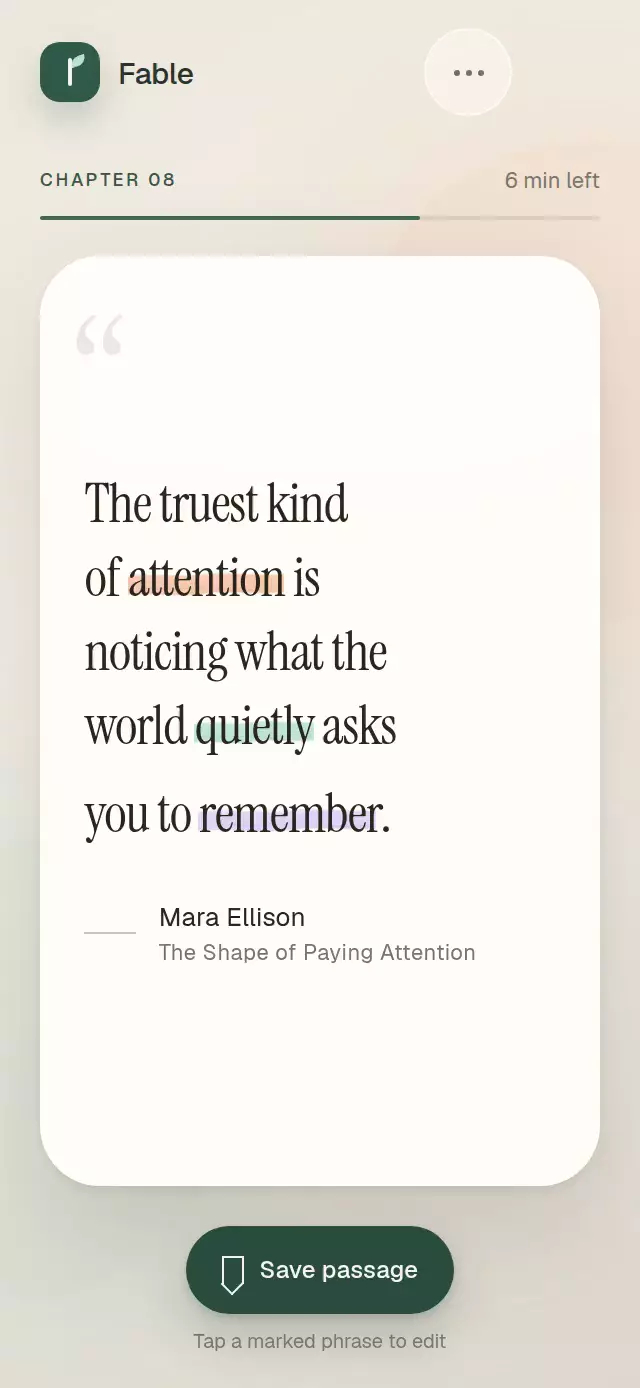
An interactive editorial quote whose irregular pastel marker strokes draw behind selected phrases.
How it works
- Quote copy is supplied as explicit lines of inline segments, so the layout remains intentional on compact and tall phones.
- Highlighted segments measure themselves and build a filled Skia path with an uneven upper edge, lower edge, dry-brush rim, and subtle paper grain.
- A single continuous Reanimated progress value stages the line entrance, reveals each initial stroke from left to right, and drives later selection transitions.
- Tapping a marked phrase captures its current visual amount before springing to the next state, which keeps rapid reversals interruptible.
- The component measures its own width and scales the typography without reading the device window.
Why this one
Most marker effects use a uniform rounded rectangle or a constant-width line. This version creates a materially richer band with changing thickness and rough layered edges, then places it inside a complete, accessible selection state machine. The explicit editorial line model also keeps art direction stable across 320 × 694 and 390 × 844 layouts.
Install
npx expo install @shopify/react-native-skia react-native-reanimated react-native-workletsFor web, follow Expo's Skia setup so CanvasKit is loaded before this component renders.
Usage
import MarkerHighlightQuote from './MarkerHighlightQuote';

export function ReadingScreen() {
  return (
    <MarkerHighlightQuote
      author="Avery Rowan"
      lines={[
        [{ id: 'line-1', text: 'Make room for the ' }],
        [
          { id: 'quiet', text: 'quiet', highlightColor: '#BCE7D1' },
          { id: 'line-2', text: ' idea.' },
        ],
      ]}
    />
  );
}
Customize the palette, fonts, initial state, and completion callback:
<MarkerHighlightQuote
  author="Avery Rowan"
  source="Notes from Tomorrow"
  lines={quoteLines}
  initialHighlightedIds={['quiet']}
  backgroundColor="#FFFCF4"
  textColor="#242019"
  mutedColor="#777168"
  quoteFontFamily="YourSerifFont"
  metadataFontFamily="YourSansFont"
  fontScale={0.088}
  onHighlightChange={(ids) => saveHighlights(ids)}
/>
The forwarded ref exposes replay(), clearHighlights(), highlightAll(), and reset().
Props
| Prop | Type | Default | Description |
|---|---|---|---|
lines | MarkerQuoteLine[] | Built-in three-line quote | Explicit quote lines containing text and optional marker segments. |
author | string | 'Unknown author' | Author credit. |
source | string | — | Optional work or publication. |
initialHighlightedIds | string[] | Every marker segment | Segment IDs initially shown with marker. |
textColor | string | '#29251F' | Quote and author color. |
mutedColor | string | '#7B746B' | Source, rule, and decorative quote color. |
backgroundColor | string | '#FFFDF7' | Paper surface color. |
quoteFontFamily | string | System serif | Quote font family. |
metadataFontFamily | string | System sans serif | Author and source font family. |
fontScale | number | 0.091 | Quote size as a fraction of the measured component width. |
onHighlightChange | (highlightedIds: string[]) => void | — | Called after a selection transition settles. |
onEnter | () => void | — | Called after the entrance settles. |
accessibilityLabel | string | 'Interactive highlighted quote' | Label for the quote region. |
style | StyleProp<ViewStyle> | — | Outer-container style. |
testID | string | — | Test identifier for the outer container. |
Compatibility
- Expo SDK 57
- React Native 0.86
- Reanimated 4.5 and Worklets 0.10
- React Native Skia 2.6
- iOS: supported, not yet verified on a device
- Android: supported, not yet verified on a device
- Web: supported, not yet visually verified
- Works in Expo Go because its native dependencies are included in Expo SDK 57
Accessibility
Every marked phrase is a labeled button with selected state and a minimum 44 pt touch target. Screen readers announce whether a tap adds or removes its highlight. With reduced motion enabled, lines and marker states update immediately without translation, drawing, or spring movement.