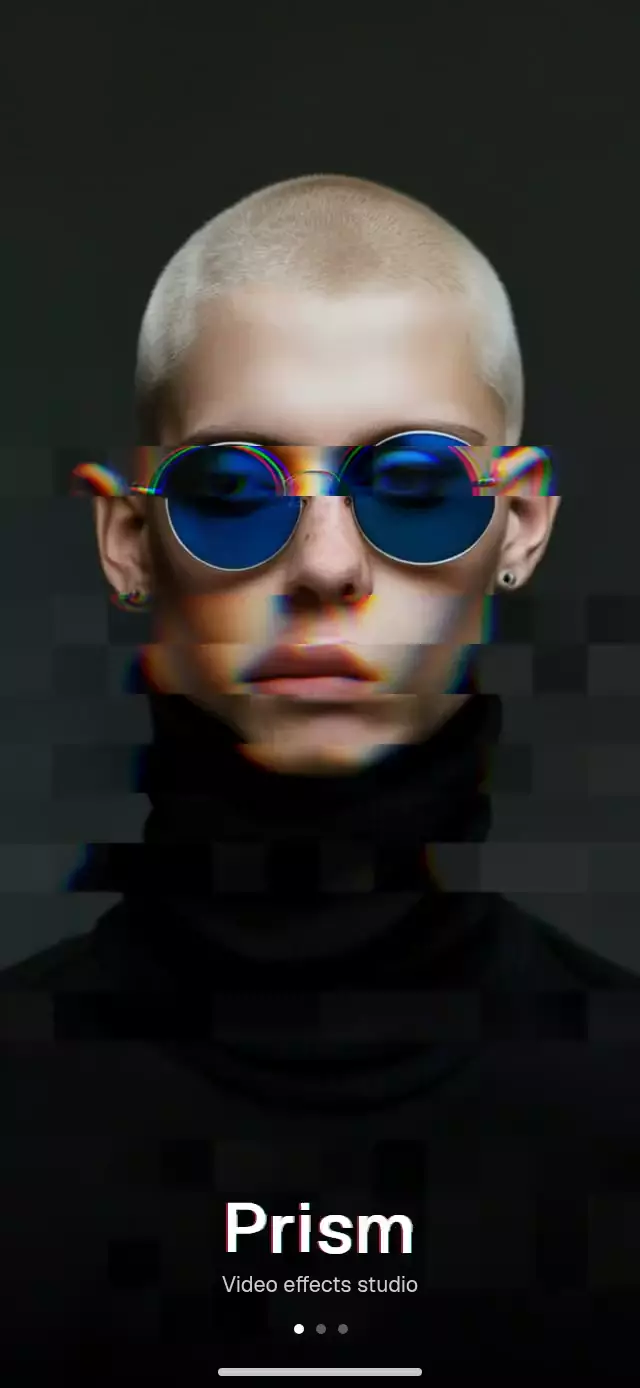
About this animation
A React Native psychedelic splash screen can transform one portrait into a sequence of liquid neon, moving mirrors, and RGB glitches. This component uses one Skia runtime effect with selectable modes, alternating each treatment with a clean-photo interval. A Reanimated frame clock runs the sequence on the UI thread, while layered wordmark text adds deterministic channel jumps without per-frame React renders. Native overlays keep the tagline and page dots above the image canvas. Use it for a video-effects introduction, a creative app entry, an expressive portrait showcase, or a visual onboarding page. Supply the image, choose effect order and timing, and configure intensity, neon colors, wordmark, tagline, fonts, and page indicators. Listen for effect changes or pause and resume through the ref.
When to use it
- Introduce a video-effects interface.
- Show a portrait with neon and mirrors.
- Create an expressive onboarding page.
- Alternate photo effects with clean frames.
A full-bleed portrait splash that cuts between liquid neon, moving mirrors, clean frames, and RGB glitches.
How it works
- The component measures its own container and asks an
ImageShaderto cover that exact rectangle, so the portrait remains centered without depending on the window size. - One Skia runtime effect contains all three looks. A mode uniform selects liquid warping with a luminance-driven neon map, six moving mirrored strips, or blocky RGB channel separation.
- A
useFrameCallbackclock runs on the UI thread. Each effect ramps in and out over 120 ms, then yields to a short clean-photo interval before the next mode. - The wordmark is drawn in white, red, and cyan layers. Deterministic 60 ms jumps, plus a clipped text band, create the entrance glitch without React renders per frame.
- The lower gradient, tagline, page dots, and home indicator remain native view layers above the image canvas for crisp layout and readable contrast.
Install
npx expo install @shopify/react-native-skia expo-linear-gradient react-native-reanimated react-native-workletsOn web, copy CanvasKit into the public directory and load it before mounting the component:
npx setup-skia-web publicimport { LoadSkiaWeb } from '@shopify/react-native-skia/lib/module/web';
await LoadSkiaWeb({ locateFile: () => '/canvaskit.wasm' });Usage
import PsychedelicSplash from './PsychedelicSplash';

export function SplashScreen() {
  return <PsychedelicSplash image={require('./portrait.jpg')} />;
}
Customize the sequence and pause it from a parent:
import { useRef } from 'react';
import PsychedelicSplash, {
  type PsychedelicSplashRef,
} from './PsychedelicSplash';

export function SplashScreen() {
  const splashRef = useRef<PsychedelicSplashRef>(null);

  return (
    <PsychedelicSplash
      ref={splashRef}
      image={require('./portrait.jpg')}
      effects={['liquid', 'mirror', 'rgbSplit']}
      effectSeconds={1.1}
      cleanSeconds={0.2}
      intensity={0.85}
      neon={['#FF375F', '#FFD60A', '#32D74B', '#64D2FF']}
      wordmark="Studio"
      tagline="Make every frame yours"
      pageCount={4}
      activePage={1}
      onEffectChange={(effect) => trackEffect(effect)}
    />
  );
}
The forwarded ref exposes pause() and resume().
Props
| Prop | Type | Default | Description |
|---|---|---|---|
image | DataSourceParam | Required | Full-bleed photo processed by the shader. |
effects | SplashEffect[] | ['rgbSplit', 'liquid', 'mirror', 'liquid'] | Ordered effect sequence; loops continuously. |
effectSeconds | number | 1.2 | Seconds allotted to each effect. |
cleanSeconds | number | 0.25 | Clean-photo pause between effects. |
neon | [string, string, string, string] | Pink, yellow, green, blue | Four-color liquid-effect palette. |
wordmark | string | 'Prism' | Large wordmark near the bottom. |
tagline | string | 'Video effects studio' | Supporting line under the wordmark. |
wordmarkFont | DataSourceParam | System font | Optional font source for the Skia wordmark. |
fontFamily | string | System font | Font family for the native tagline. |
pageCount | number | 3 | Number of page dots; zero hides them. |
activePage | number | 0 | Zero-based active page dot. |
intensity | number | 1 | Shader strength, clamped from 0 to 1. |
onEffectChange | (effect: SplashEffect | 'clean') => void | — | Called when an effect or clean interval becomes visible. |
style | StyleProp<ViewStyle> | — | Outer-container style. |
testID | string | — | Outer-container test identifier. |
Compatibility
- Expo SDK 57
- React Native 0.86
- Reanimated 4.5
- React Native Skia 2.6
- iOS: supported, not yet verified on a device
- Android: supported, not yet verified on a device
- Web: verified
- Works in Expo Go because Skia, Reanimated, Worklets, and Linear Gradient are included in the SDK
Accessibility
The complete splash is exposed as one image with a label made from the wordmark and tagline. When reduced motion is enabled, the shader stays on the clean portrait and the wordmark renders once in white without channel jumps.
FAQ
- Which image effects does the splash screen support?
- effects accepts liquid, mirror, and rgbSplit in your chosen order. effectSeconds controls each effect, cleanSeconds sets the clean-photo interval, and intensity sets shader strength.
- Can I replace the portrait, wordmark, and page indicators?
- Yes. Supply image, wordmark, tagline, wordmarkFont, and fontFamily. Set pageCount and activePage for the dots, or use pageCount of 0 to hide them.
- Does the psychedelic splash support Reduce Motion?
- Yes. The shader stays on the clean portrait and the wordmark renders once in white without channel jumps. The complete screen is exposed as one labeled image.