About this animation
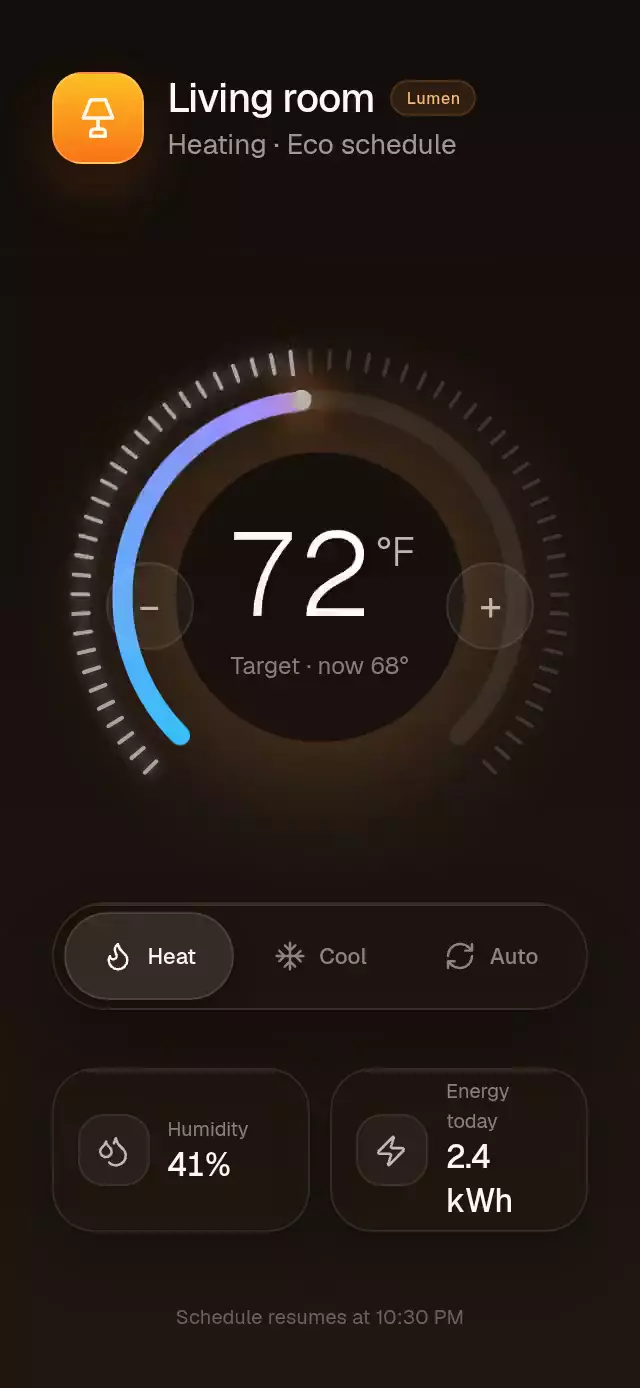
A luminous, gesture-driven thermostat wheel with responsive tick feedback and a synchronized rolling temperature.
Why this one
Typical thermostat controls treat the arc, value, and tick marks as separate animations. This dial derives every moving layer from one continuous temperature progress, so a gesture can interrupt the intro or a spring without a visual jump. Sixty responsive ticks, a blue-to-orange continuous arc, an illuminated endpoint, and a real rolling figure make every degree feel tangible. The mode selector and compact home metrics turn the control into a credible product surface instead of an isolated demo.
How it works
onLayoutconverts the host container into responsive dial, control, and metric geometry.- One Reanimated shared progress maps 60–85°F to gesture angle, arc trim, tick activation, tick pulse, endpoint position, and rolling figures.
- The pan gesture reads the pointer angle around the center and springs to the nearest whole degree on release.
- A Skia path draws one continuous 270-degree progress arc with a sweep gradient rather than approximating it with segments.
- The intro sweeps from 60°F to the target, rises three degrees, drops three degrees, and settles without blocking input.
- Mode changes crossfade the ambient halo over 500 ms while temperature progress remains uninterrupted.
Install
npx expo install expo-blur @shopify/react-native-skia react-native-gesture-handler react-native-reanimated react-native-workletsWrap the application with GestureHandlerRootView as described by React Native Gesture Handler. Skia web projects must initialize CanvasKit before loading this component.
Usage
import { ThermostatDial } from './ThermostatDial';

export function ClimateScreen() {
  return <ThermostatDial />;
}
const dialRef = useRef<ThermostatDialRef>(null);
<ThermostatDial
ref={dialRef}
initialTemperature={72}
initialMode="auto"
currentTemperature={68}
humidity="41%"
energyUsage="2.4 kWh"
onTemperatureChange={(temperature) => saveTarget(temperature)}
onModeChange={(mode) => saveMode(mode)}
/>The forwarded ref exposes setTemperature(temperature), nudge(degrees), setMode(mode), and playIntro().
Props
| Prop | Type | Default | Description |
|---|---|---|---|
initialTemperature | number | 72 | Initial target in Fahrenheit, clamped to 60–85. |
initialMode | 'heat' | 'cool' | 'auto' | 'heat' | Initial operating mode. |
currentTemperature | number | 68 | Current room temperature under the target. |
humidity | string | '41%' | Humidity metric. |
energyUsage | string | '2.4 kWh' | Daily energy metric. |
fontFamily | string | System | Body and metadata typeface. |
mediumFontFamily | string | System | Labels and active-control typeface. |
temperatureFontFamily | string | System | Light typeface for the rolling value. |
onTemperatureChange | (temperature: number) => void | — | Called for each rounded degree. |
onModeChange | (mode: ThermostatMode) => void | — | Called after a mode selection. |
accessibilityLabel | string | 'Target temperature' | Screen-reader label for the adjustable dial. |
style | StyleProp<ViewStyle> | — | Outer-container style. |
testID | string | — | Test identifier for the outer container. |
Compatibility
- Expo SDK 57
- React Native 0.86.3
- Reanimated 4.5.1 and Worklets 0.10.1
- React Native Skia 2.6.2
- iOS and Android: supported, device-unverified
- Web: supported, verified by the project gate
- Expo Go: supported by the SDK 57 bundled modules; use a development build after adding native dependencies to another Expo project
Accessibility
The wheel is an adjustable control with increment and decrement actions, and two labeled 44-point buttons provide a one-degree alternative to rotation. Every mode has a 44-point labeled button and selected state. Reduced Motion renders the final temperature immediately, removes tick jumps and spring travel, and keeps the 500 ms mode change instantaneous.