About this animation
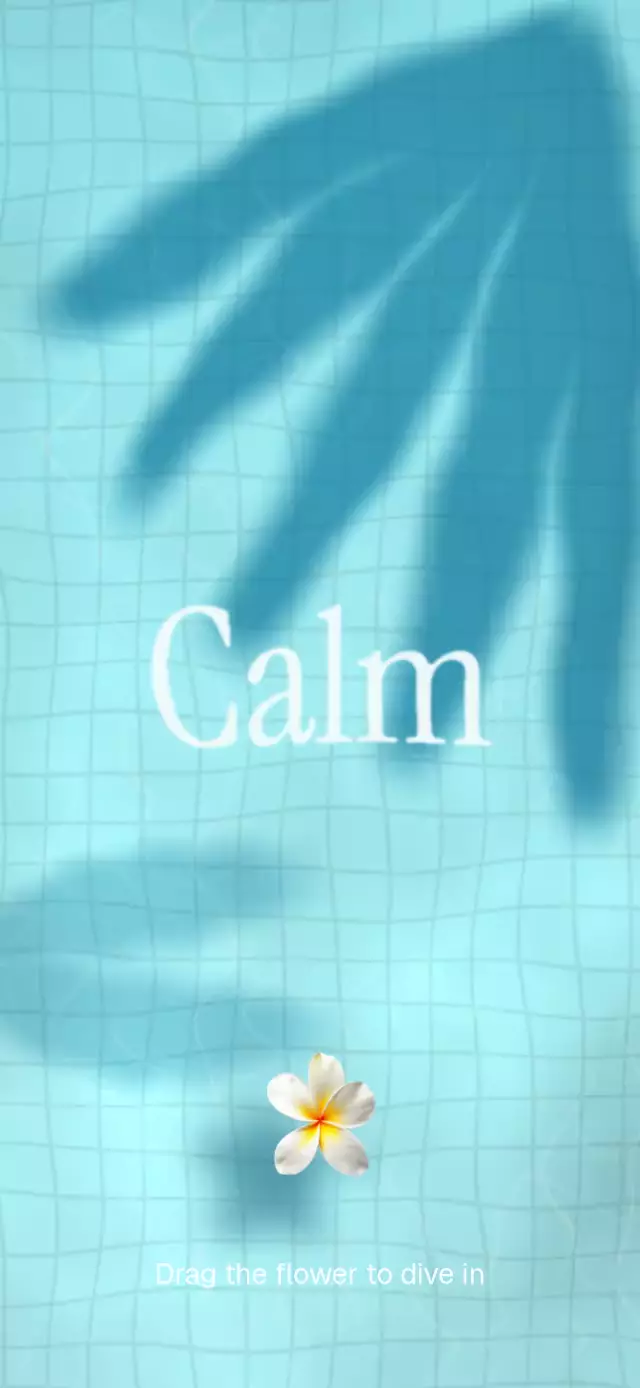
A React Native water splash animation can turn a welcome screen into a tactile pool with a floating image. This component draws tiled water, moving caustics, foliage shadows, wake, and touch ripples with a Skia runtime shader. A displacement map refracts the title and image shadow using the same wave field, while one Reanimated progress value coordinates the title fade, image scale, welcome reveal, and return. Gesture Handler adds wake and tilt from drag velocity, and a high release or tap starts entry. Use it for a water-themed welcome, an interactive creative introduction, a playful entry screen, or a refraction demo. Customize copy, floating artwork and proportions, fonts, water preset, wave amplitude, caustics, and shadows. Connect onEnter or use enter, reset, and simulateDrag through the ref.
When to use it
- Create a water-themed welcome screen.
- Let a floating image trigger entry.
- Demonstrate synchronized water refraction.
- Add a tactile creative introduction.
A tactile welcome screen where a floating image disturbs a living pool before diving beneath the surface.
How it works
- The component measures its own container with
onLayout, then derives every position and size from that local width and height. - A Skia runtime shader draws the tiled pool, animated caustics, soft foliage shadows, wake, and expanding touch ripple.
- A displacement-map shader refracts the title and image shadow with the same wave field, keeping all water layers synchronized.
- One Reanimated progress value drives the title fade, welcome reveal, image scale, and return choreography on the UI thread.
- The pan gesture adds wake and tilt from pointer velocity; releasing high enough triggers the entry spring and calls
onEnter.
Install
npx expo install expo-image react-native-gesture-handler react-native-reanimated react-native-worklets @shopify/react-native-skiaOn web, CanvasKit must finish loading before this component mounts. Copy canvaskit.wasm to your public assets and call LoadSkiaWeb from the web entry point:
import { LoadSkiaWeb } from '@shopify/react-native-skia/lib/module/web';

await LoadSkiaWeb({ locateFile: () => '/canvaskit.wasm' });
Usage
import WaterRefractionSplash from './WaterRefractionSplash';

export function WelcomeScreen() {
  return (
    <WaterRefractionSplash
      floatingImage={require('./assets/leaf.png')}
      onEnter={() => navigateNext()}
    />
  );
}
Use the visual knobs and imperative controls to adapt the pattern:
import { useRef } from 'react';
import WaterRefractionSplash, {
  type WaterRefractionSplashRef,
} from './WaterRefractionSplash';

export function BrandedWelcome() {
  const splashRef = useRef<WaterRefractionSplashRef>(null);

  return (
    <WaterRefractionSplash
      ref={splashRef}
      title="Breathe"
      instruction="Drag the leaf to enter"
      welcomeText="You're here"
      floatingImage={require('./assets/leaf.png')}
      floatingImageAspectRatio={1.1}
      titleFont={require('./assets/YourSerif.ttf')}
      instructionFontFamily="YourSans"
      welcomeFontFamily="YourSerif"
      look="rippled"
      waveAmplitude={0.015}
      causticsIntensity={0.3}
      shadowDarkness={0.7}
    />
  );
}
The forwarded ref exposes enter(), reset(), and simulateDrag().
Props
| Prop | Type | Default | Description |
|---|---|---|---|
title | string | 'Welcome' | Large word rendered beneath the refracted water. |
instruction | string | 'Drag the image to enter' | Instruction near the bottom edge. |
welcomeText | string | 'Welcome in' | Message revealed after entry. |
floatingImage | ImageSourcePropType | — | Local or remote image floating above the water. |
floatingImageAspectRatio | number | 0.890625 | Floating image width divided by height. |
titleFont | DataSourceParam | System serif | Skia font source for the title. Pass a font on web. |
instructionFontFamily | string | System | Font family for the instruction. |
welcomeFontFamily | string | System | Font family for the welcome message. |
look | 'calm' | 'default' | 'rippled' | 'default' | Water personality preset. |
waveAmplitude | number | Preset value | Wave displacement as a fraction of width. |
causticsIntensity | number | Preset value | Brightness of moving caustics. |
shadowDarkness | number | Preset value | Opacity of foliage shadows. |
floatingImageAccessibilityLabel | string | 'Floating image' | Screen-reader label for the draggable control. |
onEnter | () => void | — | Called when the entry reaches its revealed state. |
style | StyleProp<ViewStyle> | — | Outer-container style. |
testID | string | — | Test identifier for the outer container. |
Compatibility
- Expo SDK 57
- React Native 0.86
- Reanimated 4.5
- React Native Skia 2.6
- iOS: supported, not yet verified on a device
- Android: supported, not yet verified on a device
- Web: verified
- Works in Expo Go because all native dependencies are included in Expo SDK 57
Accessibility
The floating image is exposed as a labeled button, and tapping it provides the same entry path as dragging. With reduced motion enabled, continuous water, floating, rotation, and ripple motion stop; entry and reveal use short fades and direct movement.
FAQ
- Can I enter the water welcome without dragging?
- Yes. The floating image is a labeled button and tapping starts the same entry sequence. The ref also exposes enter, reset, and simulateDrag.
- Can I customize the water motion and floating image?
- Yes. Supply floatingImage and floatingImageAspectRatio, choose calm, default, or rippled with look, and override waveAmplitude, causticsIntensity, and shadowDarkness. Copy and fonts are configurable.
- Does the water splash run in Expo Go and on web?
- Yes. Its native dependencies are included in Expo SDK 57. Web needs CanvasKit loaded before mounting and a supplied titleFont. Reduce Motion stops continuous water, floating, rotation, and ripples.