About this animation
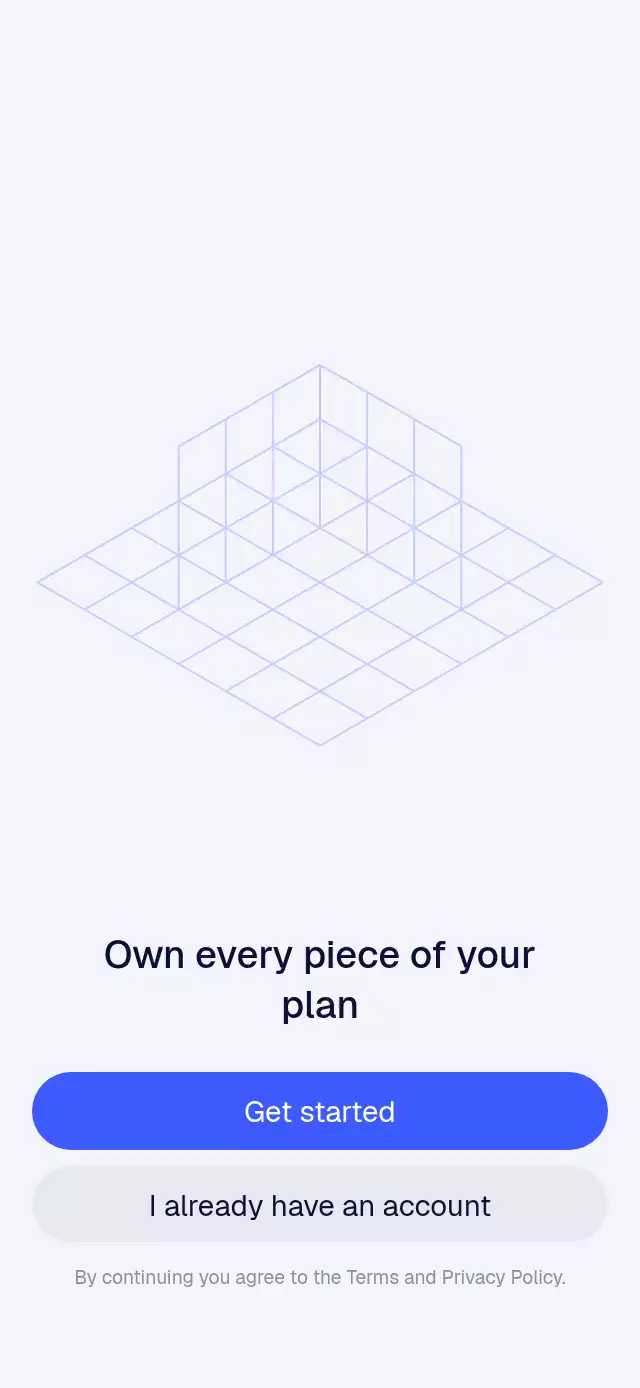
A React Native isometric animation can illustrate building and organization without a prerecorded video. This onboarding component projects integer three-dimensional cells into a measured screen layout and draws their ordered cube faces with Skia. One Reanimated timeline stages the falling blocks, bounce, opacity, and reverse exit, while another handles quarter-turn rotation and changes draw order to preserve overlap. A frame clock adds subtle breathing after assembly. Use it for workflow onboarding, a construction metaphor, a planning welcome, or a procedural product illustration. Supply custom cell-based shapes and optional face glyphs, then configure cube and grid colors, heading, action labels, legal copy, and fonts. The primary action advances the form, callbacks expose actions and shape changes, and the ref provides next and replay.
When to use it
- Illustrate a workflow coming together.
- Introduce a planning or building tool.
- Create procedural onboarding artwork.
- Cycle through custom block structures.
A procedural onboarding illustration where isometric blocks fall into architectural forms, rotate, breathe, and rebuild.
How it works
- The component measures its container and projects integer 3D cells into an isometric screen coordinate system.
- Skia draws an open floor-and-wall grid, then renders each cube as three ordered polygon faces.
- One shared assembly timeline staggers every block, including its fall, bounce, opacity, and reverse exit.
- A second timeline interpolates logical quarter-turns, while the draw order switches at the midpoint to preserve occlusion.
- A frame clock adds a subtle post-assembly breathing offset without causing React renders.
Install
npx expo install @shopify/react-native-skia react-native-reanimated react-native-workletsFor web, initialize Skia before rendering the app:
import { LoadSkiaWeb } from '@shopify/react-native-skia/lib/module/web';

await LoadSkiaWeb({ locateFile: (file) => `/${file}` });
Copy canvaskit.wasm from node_modules/canvaskit-wasm/bin/full/ into the web public directory. No extra step is needed if the Expo web entry already loads Skia.
Usage
import IsometricAssemble from './IsometricAssemble';

export function WelcomeScreen() {
  return <IsometricAssemble />;
}
Customize the forms and appearance:
<IsometricAssemble
  title="Build a clearer workflow"
  colors={{
    top: '#5B6CFF',
    left: '#29328F',
    right: '#111743',
    grid: '#C9D0FF',
    accent: '#8AF5CE',
  }}
  shapes={[{ cells: [[0, 0, 0], [1, 0, 0], [1, 0, 1]] }]}
  onShapeChange={(index) => track('shape', index)}
/>
The forwarded ref exposes next() and replay().
Props
| Prop | Type | Default | Description |
|---|---|---|---|
shapes | IsoShape[] | Three built-in forms | Cell lists and optional left-face glyphs. |
title | string | 'Own every piece of your plan' | Main onboarding title. |
primaryLabel | string | 'Get started' | Main action label; pressing it advances the form. |
secondaryLabel | string | 'I already have an account' | Secondary action label. |
legalText | string | Terms and privacy sentence | Legal copy beneath the actions. |
colors | object | Indigo palette | Cube, grid, and glyph colors. |
fontFamily | string | System font | Font family for supporting text and buttons. |
titleFontFamily | string | System font | Font family for the title. |
onPrimaryPress | () => void | — | Called when the main action is pressed. |
onSecondaryPress | () => void | — | Called when the secondary action is pressed. |
onShapeChange | (index: number) => void | — | Called when the next form becomes active. |
style | StyleProp<ViewStyle> | — | Outer-container style. |
testID | string | — | Test identifier for the outer container. |
Compatibility
- Expo SDK 57
- React Native 0.86
- Reanimated 4.5
- React Native Skia 2.6
- iOS, Android, and web: supported, not yet verified on a device
- Web requires the CanvasKit setup above
- Works in Expo Go because Skia, Reanimated, and Worklets are included in Expo SDK 57
Accessibility
Both actions expose button roles and readable labels, while the title is announced as a header. With reduced motion enabled, the current form appears with a short fade and remains still: falling, breathing, and rotation are disabled.
FAQ
- Can I create my own isometric shapes?
- Yes. Supply shapes as IsoShape cell lists, with optional left-face glyphs. The component projects the cells and draws each cube as three polygon faces.
- How do I advance or replay the block assembly?
- The primary action advances the active form and calls onPrimaryPress. The ref exposes next and replay, and onShapeChange reports the new form index.
- Does isometric assembly run in Expo Go and on web?
- Skia, Reanimated, and Worklets are included in Expo SDK 57. Web requires CanvasKit initialization. Reduce Motion uses a short fade and disables falling, breathing, and rotation.