About this animation
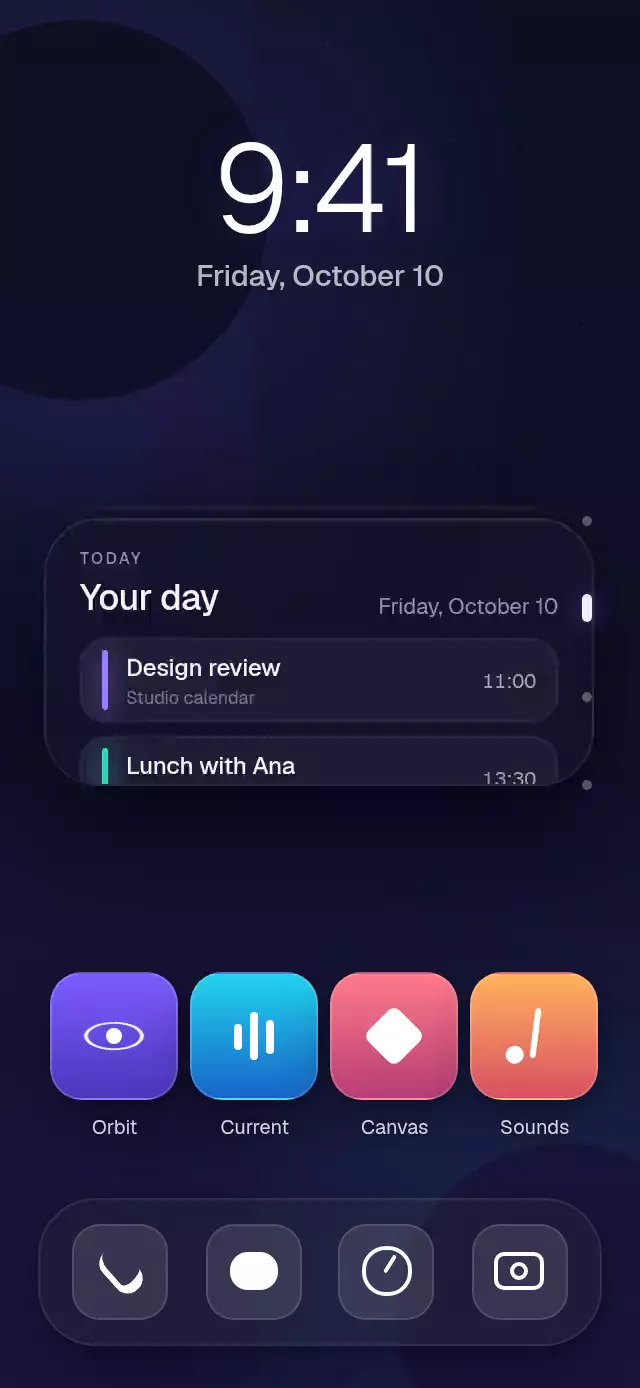
A polished vertical stack of glass widgets driven by one continuous, interruptible position.
How it works
onLayoutconverts the container into responsive card geometry, so the stack also works inside sheets and tablet layouts.- A single Reanimated shared position drives the swipe, depth order, card transforms, opacity, and every content reveal.
- Gesture velocity is projected before the nearest widget is selected, then a spring settles the stack without blocking another gesture.
- Weather, calendar, activity, and music are real layouts instead of static mockups. Calendar rails, activity rings, rolling metrics, and music progress derive from the same position.
- The front card uses
expo-blur, a translucent tint, a highlight edge, and two shadow scales to create depth.
Why this one
Most widget stacks stop at a card transition. This one turns the pattern into a credible home-screen product moment: useful data, continuous 3D depth, accessible point controls, velocity-aware snapping, and an Activity reveal with synchronized ring glows.
Install
npx expo install expo-blur expo-image @shopify/react-native-skia react-native-gesture-handler react-native-reanimated react-native-workletsWrap your application with GestureHandlerRootView as described by React Native Gesture Handler. Skia web apps also need CanvasKit initialization before this component is loaded.
Usage
import { SmartWidgetStack } from './SmartWidgetStack';

export function HomeWidgets() {
  return <SmartWidgetStack artwork={require('./cover.jpg')} />;
}
const stackRef = useRef<SmartWidgetStackRef>(null);
<SmartWidgetStack
ref={stackRef}
initialIndex={1}
activityRings={[
{ value: '420/600 cal', progress: 0.7, color: '#FF5C7A' },
{ value: '28/30 min', progress: 0.93, color: '#8BE26A' },
{ value: '9/12 h', progress: 0.75, color: '#48D9F4' },
]}
onIndexChange={(index) => setActiveWidget(index)}
/>Props
| Prop | Type | Default | Description |
|---|---|---|---|
initialIndex | number | 0 | Initially active widget. |
weatherLocation | string | San Francisco | Weather location. |
weatherTemperature | string | 64°F | Current temperature. |
weatherRange | string | H:68° L:56° | Daily high and low. |
weatherHours | WeatherHour[] | Five-hour forecast | Compact forecast data. |
calendarDate | string | Friday, October 10 | Calendar date. |
calendarEvents | CalendarEvent[] | Two sample events | Schedule entries. |
activityRings | ActivityRing[] | Three goals | Outer-to-inner ring values. |
artwork | ImageSourcePropType | — | Music artwork. |
trackTitle | string | Afterglow | Track title. |
artist | string | Lumen Fields | Artist name. |
trackProgress | number | 0.58 | Music progress from zero to one. |
fontFamily | string | System | Body typeface. |
mediumFontFamily | string | System | Heading typeface. |
monoFontFamily | string | System | Figure typeface. |
onIndexChange | (index: number) => void | — | Called when snapping changes the active widget. |
onWidgetPress | (index: number) => void | — | Called when the front widget is tapped. |
accessibilityLabel | string | Smart widget stack | Screen-reader label. |
style | StyleProp<ViewStyle> | — | Outer container style. |
testID | string | — | Test identifier. |
The ref exposes next(), previous(), and goTo(index).
Compatibility
- Expo SDK 57
- React Native 0.86.3
- Reanimated 4.5.1 and Worklets 0.10.1
- Skia 2.6.2
- iOS, Android, and web: unverified
- Expo Go: supported by the SDK 57 bundled modules; use a development build after adding native dependencies to another Expo project
Accessibility
The stack is exposed as an adjustable control with increment and decrement actions. Every indicator has a 44-point hit area, and tapping the front widget is a button alternative to the swipe gesture. Reduced Motion switches to immediate state changes, disables 3D travel and spring movement, and leaves widget content in its final state.