About this animation
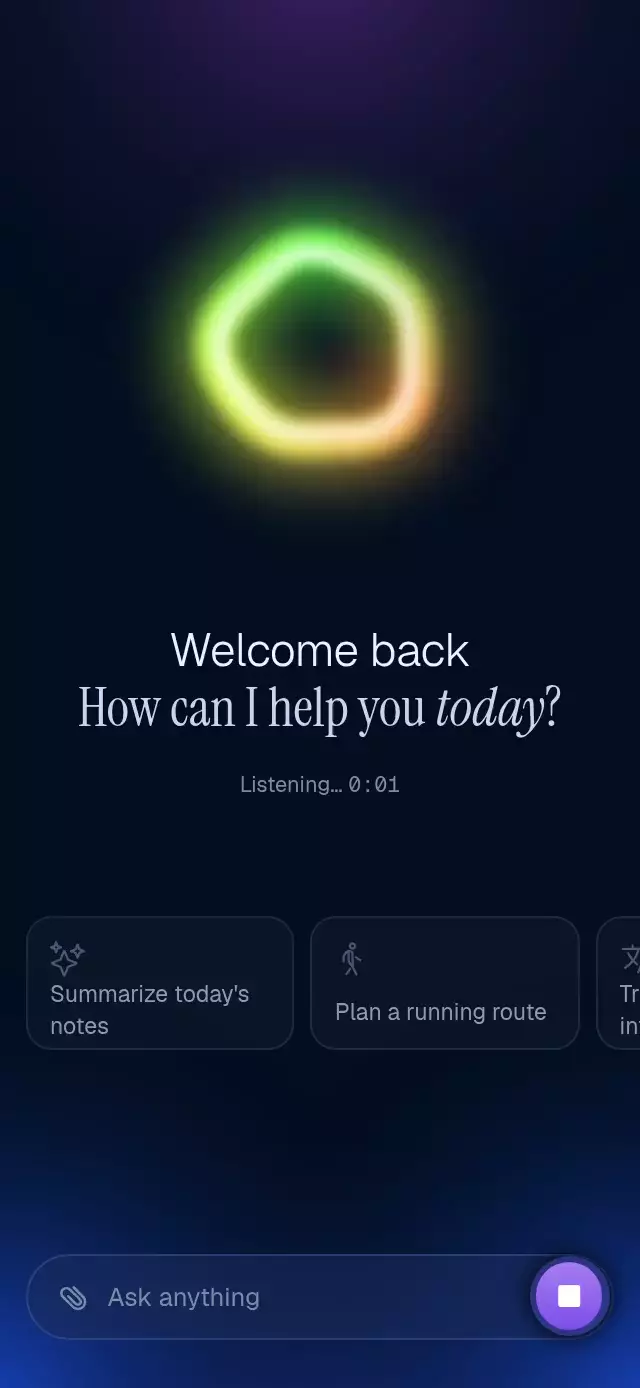
A React Native voice orb animation can make listening visible through a fluid shape that responds to audio level. This component builds four layered Skia paths from one closed curve, combining a broad glow, colored ring, white highlight, and bright core. A Reanimated frame callback smooths input with separate attack and release behavior, then maps it to deformation and palette speed while retaining gentle idle breathing. Use it for a voice assistant, microphone feedback, an audio-input screen, or a simulated conversation demo. Choose microphone, simulated, or external level sources, configure size and a two- or three-color palette, and replace idle and active accessibility labels. Expo Audio supplies microphone metering, callbacks report recording and denied permission, and async ref methods start, stop, toggle, or reset the source.
When to use it
- Show voice-assistant listening feedback.
- Visualize microphone input levels.
- Connect an existing audio-level pipeline.
- Create a deterministic simulated voice demo.
A fluid, breathing voice indicator that reacts to microphone, simulated, or app-provided audio levels.
How it works
- The component draws four layered Skia paths from the same 120-point closed curve, combining a broad color glow, a crisp color ring, a white highlight, and a bright core.
- A frame callback advances one ambient clock and smooths incoming levels with separate attack and release constants, keeping speech responsive without jitter.
- The current level increases the curve deformation and palette speed. At rest, a low-amplitude sine wave keeps the shape breathing.
- Microphone metering is normalized from decibels to
0–1; external mode reads an existing Reanimated shared value without crossing the JavaScript bridge per frame. - Simulated mode uses a seeded phrase rhythm, making catalog recordings deterministic while retaining natural pauses and syllable attacks.
Install
npx expo install @shopify/react-native-skia expo-audio react-native-reanimatedOn web, CanvasKit must finish loading before this component mounts. Call LoadSkiaWeb in your web entry point, then render the application:
import { LoadSkiaWeb } from '@shopify/react-native-skia/lib/module/web';

LoadSkiaWeb().then(() => root.render(<App />));
Microphone access on web requires HTTPS or localhost. Add the expo-audio config plugin with a microphone permission message when shipping a native app.
Usage
import VoiceOrb from './VoiceOrb';

export function VoiceControl() {
  return <VoiceOrb size={120} source="microphone" />;
}
Use an existing audio pipeline and imperative controls:
import { useRef } from 'react';
import { useSharedValue } from 'react-native-reanimated';
import VoiceOrb, { type VoiceOrbRef } from './VoiceOrb';

export function ExternalVoiceControl() {
  const level = useSharedValue(0);
  const orbRef = useRef<VoiceOrbRef>(null);

  return (
    <VoiceOrb
      ref={orbRef}
      size={160}
      source="external"
      level={level}
      colors={['#5FA8FF', '#8F7CFF', '#E46DFF']}
      onRecordingChange={(recording) => trackRecording(recording)}
    />
  );
}
The forwarded ref exposes start(), stop(), toggle(), and reset(); each method returns a promise.
Props
| Prop | Type | Default | Description |
|---|---|---|---|
size | number | 120 | Base path diameter in points; the hit target occupies a 1.5× square. |
colors | readonly [string, string] | readonly [string, string, string] | Measured rotating spectrum | Optional neighboring tones for a custom rotating palette. |
level | SharedValue<number> | — | External normalized level used by source="external". |
source | 'microphone' | 'simulated' | 'external' | 'microphone' | Selects the level source. |
onRecordingChange | (recording: boolean) => void | — | Runs after the orb starts or stops its source. |
onPermissionDenied | () => void | — | Runs when microphone permission is denied; simulation starts as a fallback. |
startAccessibilityLabel | string | 'Start listening' | Accessible name while idle. |
stopAccessibilityLabel | string | 'Stop listening' | Accessible name while active. |
style | StyleProp<ViewStyle> | — | Style for the 1.5× outer container. |
testID | string | — | Test identifier for the outer container. |
Compatibility
- Expo SDK 57
- React Native 0.86
- Reanimated 4.5
- React Native Skia 2.6
- iOS: supported, not yet verified on a device
- Android: supported, not yet verified on a device
- Web: verified; microphone access needs a secure context
- Works in Expo Go because Expo Audio, Skia, and Reanimated are included in the SDK
Accessibility
The complete glow area is a labeled button and exposes its active state to assistive technology. Consumers can replace both active and idle labels. With reduced motion enabled, level-driven edge deformation is removed while the quiet breathing shape and color feedback remain available.
FAQ
- Can the voice orb use my existing audio levels?
- Yes. Set source to external and pass a normalized 0–1 Reanimated shared value through level. Simulated mode supplies a seeded phrase rhythm without microphone input.
- Why does the voice orb microphone need HTTPS on web?
- Web microphone access requires HTTPS or localhost. Skia also needs CanvasKit loaded before mounting. When permission is denied, onPermissionDenied runs and simulation starts as a fallback.
- Does the audio-reactive orb work in Expo Go?
- Yes. Expo Audio, Skia, and Reanimated are included in Expo SDK 57. When shipping a native app, add the Expo Audio config plugin with a microphone permission message as described in the README.