About this animation
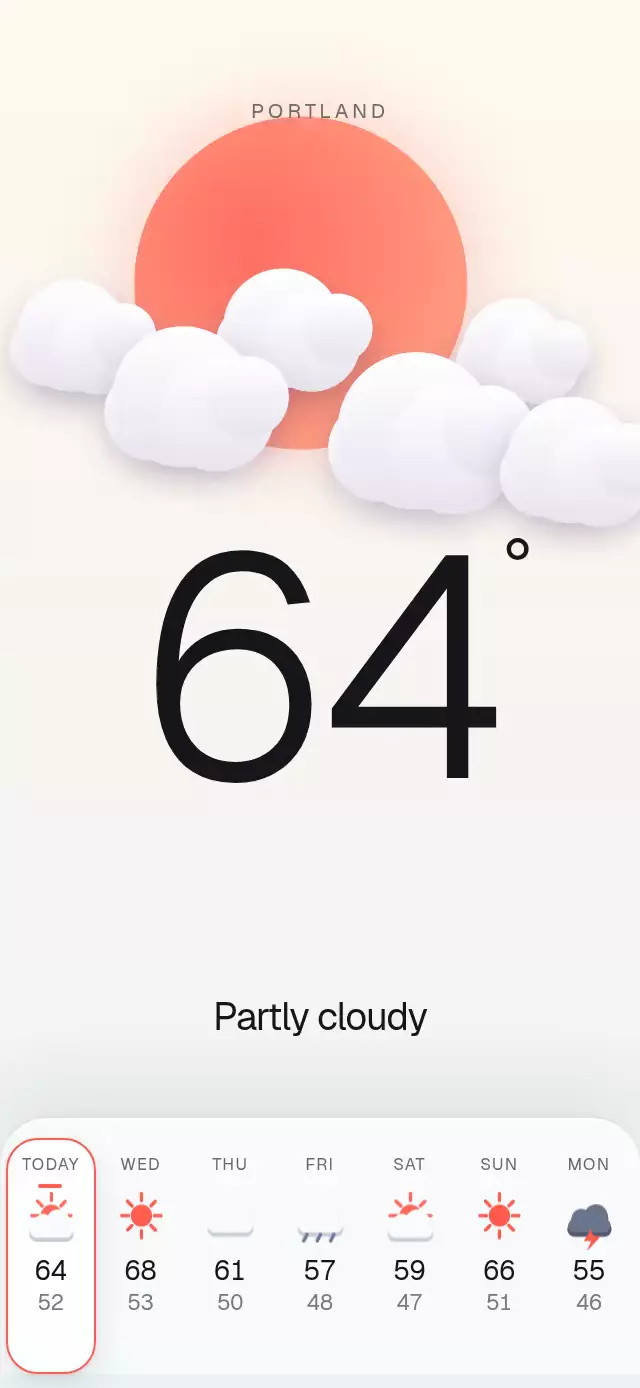
An editorial weather screen with crisp rolling temperature digits, a hand-drawn forecast set, and a living Skia sky.
Why this one
Most oversized weather heroes treat the forecast and the scene as separate layers. This one keeps the selected day, rolling temperature, condition label, forecast highlight, and atmospheric palette on one transition path. The result stays synchronized even through fast repeated taps, while the custom sun, cloud, rain, and storm drawings remain readable at compact mobile sizes.
How it works
- The component measures its container and derives every position, size, and type scale from its width and height.
- Skia draws the gradient sun, layered cotton clouds, occasional wind trails, and rain. One UI-thread clock drives every ambient loop without React renders per frame.
- A shared transition blends the backdrop, cloud coverage, sun visibility, cloud tone, rain, and lightning when the selected forecast changes.
- React Native text keeps the giant temperature crisp and accessible. Incoming and outgoing values each use their natural typographic width, stay centered independently of the degree symbol, and are committed together before a layout effect starts their roll.
- Forecast buttons and the imperative
selectDay()method use the same transition path, so direct interaction and autoplay behave identically.
Install
npx expo install @shopify/react-native-skia react-native-reanimated react-native-workletsOn web, wait for CanvasKit before mounting the application:
import { LoadSkiaWeb } from '@shopify/react-native-skia/lib/module/web';

LoadSkiaWeb().then(() => {
  root.render(<App />);
});
Usage
import WeatherHero, { type ForecastDay } from './WeatherHero';

const days: ForecastDay[] = [
  { label: 'TODAY', high: 64, low: 52, sky: 'partly' },
  { label: 'WED', high: 68, low: 53, sky: 'sunny' },
  { label: 'THU', high: 61, low: 50, sky: 'cloudy' },
  { label: 'FRI', high: 57, low: 48, sky: 'rain' },
  { label: 'SAT', high: 59, low: 47, sky: 'partly' },
  { label: 'SUN', high: 66, low: 51, sky: 'sunny' },
  { label: 'MON', high: 55, low: 46, sky: 'storm' },
];

export function WeatherScreen() {
  return <WeatherHero days={days} />;
}
Customize the typography, highlight color, labels, callback, and external control:
import { useRef } from 'react';
import WeatherHero, { type WeatherHeroRef } from './WeatherHero';

export function WeatherScreen() {
  const weatherRef = useRef<WeatherHeroRef>(null);

  return (
    <WeatherHero
      ref={weatherRef}
      accent="#F06449"
      city="Portland"
      days={days}
      fontFamily="Geist_400Regular"
      numberFontFamily="Geist_300Light"
      skyLabels={{
        sunny: 'Clear',
        partly: 'Some clouds',
        cloudy: 'Overcast',
        rain: 'Light showers',
        storm: 'Thunderstorms',
      }}
      onDayChange={(index) => trackForecastDay(index)}
    />
  );
}
The forwarded ref exposes selectDay(index).
Props
| Prop | Type | Default | Description |
|---|---|---|---|
city | string | 'Portland' | City shown above the sky. |
days | ForecastDay[] | Required | Seven selectable forecast days; the first is selected initially. |
unit | string | '°' | Temperature suffix. |
skyLabels | Partial<Record<SkyState, string>> | Built-in labels | Visible labels for any sky states you want to override. |
accent | string | '#FF5A4E' | Sun, selection, and highlight color. |
numberFontFamily | string | System font | Font family for the giant temperature. |
fontFamily | string | System font | Font family for labels and forecast values. |
onDayChange | (index: number) => void | — | Called after a day transition completes. |
style | StyleProp<ViewStyle> | — | Outer-container style. |
testID | string | — | Test identifier for the outer container. |
ForecastDay contains label, high, low, and sky. SkyState is 'sunny' | 'partly' | 'cloudy' | 'rain' | 'storm'.
Compatibility
- Expo SDK 57
- React Native 0.86
- Reanimated 4.5
- React Native Worklets 0.10
- React Native Skia 2.6
- iOS: supported, not yet verified on a device
- Android: supported, not yet verified on a device
- Web: verified
- Works in Expo Go because Skia, Reanimated, and Worklets are included in the SDK
Accessibility
Each forecast day is a labeled button with its selected state, condition, high, and low exposed to assistive technology. The current city, temperature, and condition form a polite live region. With reduced motion enabled, clouds, wind, and rain remain still, while day changes use a 250 ms crossfade instead of rolling or traveling motion.