About this animation
A hold-to-charge cauldron reward reveal with configurable reward content, colors, labels, and fonts.
Why this one
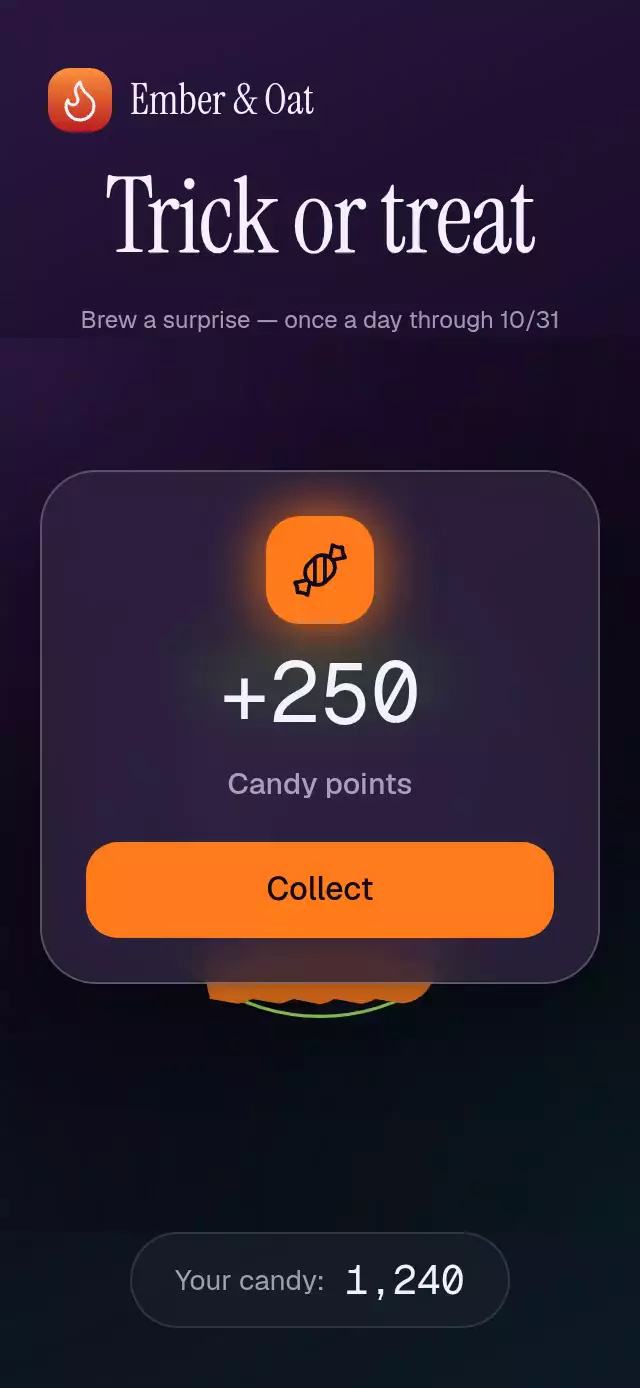
The user earns the reveal by controlling its anticipation. Fire, potion, bubbles, tremor, and a continuous progress ring respond to one charge value. The final burst releases four candy shapes and four scalloped bats before the reward rises from the pot.
How it works
- A zero-distance Gesture Handler pan charges linearly over 1,800 ms. Releasing early returns charge with an interruptible spring.
- Charge controls flame growth, potion height, bubble density, progress, and a deterministic stepped tremor above 60%.
- Completion triggers the squash spring and a 500 ms green flash. Seeded initial velocities and angular velocities drive ballistic candies with gravity for 1.6 seconds.
- At 380 ms, a glass reward card starts rising. Digit reels count to the reward, with higher digits moving only at their carry threshold.
- Collection calls
onCollectonce and sends the card toward the upper-left corner.reset()fades out, cancels pending transitions, and returns to idle.
Install
npx expo install @shopify/react-native-skia react-native-reanimated react-native-worklets react-native-gesture-handler expo-blurUse a GestureHandlerRootView at the app root. Expo SDK 58 includes these native modules in Expo Go. For web, configure CanvasKit following Skia's web setup and load this module after CanvasKit is ready. No image assets or external application files are required. Fonts are optional and must be loaded by the host.
Usage
import { useRef } from 'react';
import { View } from 'react-native';
import { CauldronRewardBurst, type CauldronRewardBurstRef } from './cauldron-reward-burst';

function DailyReward() {
  const rewardRef = useRef<CauldronRewardBurstRef>(null);
  return (
    <View style={{ width: 300, height: 400 }}>
      <CauldronRewardBurst
        ref={rewardRef}
        reward={{ amount: 250, label: 'Candy points', prefix: '+' }}
        onCollect={(reward) => saveReward(reward.amount)}
      />
    </View>
  );
}
saveReward is your application's persistence function. The component handles presentation only; the host decides daily eligibility and applies the reward.
<CauldronRewardBurst
  reward={{ amount: 100, label: 'Bonus points', prefix: '+' }}
  holdDuration={1400}
  confettiCount={18}
  cauldronRatio={0.5}
  fontSize={16}
  amountFontSize={38}
  colors={{
    potion: '#73D8E8', potionShadow: '#268DAD',
    fire: '#B89BFF', fireHighlight: '#E9DEFF',
    background: '#101827', meshTop: '#20334D', meshBottom: '#162D36',
    cauldron: '#162131', lip: '#293D52',
    text: '#F8FCFF', muted: '#B6C9D4', highlight: '#DAEFFA',
    candies: ['#73D8E8', '#B89BFF'], bats: '#BED2E5',
    surface: 'rgba(25,42,60,0.82)', border: '#577181', buttonText: '#101827',
  }}
  labels={{ hold: 'Hold for your bonus', almost: 'Almost ready…', collect: 'Add points' }}
/>
Props
| Prop | Type | Default | Purpose |
|---|---|---|---|
reward | { amount, label, prefix? } | 250 / Candy points / + | Whole-number reward and copy. Negative/nonfinite amounts become zero. |
holdDuration | number | 1800 | Charge time in ms, minimum 200. |
onCharged | () => void | — | Once per completed charge. |
onCollect | (reward) => void | — | Once per collection; use to update balance. |
onReveal | () => void | — | When the card becomes visible. |
onInteraction | () => void | — | Real touch/accessibility interaction, for stopping autoplay. |
colors | Partial<CauldronColors> | Collection night palette | Complete surface, ink, mesh, potion, fire, candy, bat, border, and button palette. |
labels | { hold?, almost?, collect? } | Hold to brew / Almost… / Collect | All interaction text. |
confettiCount | number | 26 | Seeded candies; clamped to 0–80. |
renderReward | ({ reward, collect }) => ReactNode | Built-in card | Replace card contents while retaining its material and reveal/exit. |
cauldronRatio | number | 0.46 | Pot width / shorter container dimension, clamped to 0.2–0.7. |
fontSize | number | 15 | UI copy size. |
amountFontSize | number | 42 | Reward digit size; compact layout caps it at 32. |
cardMaxWidth | number | 280 | Card width limit in points. |
fontFamily, monoFontFamily | string | System | Host-loaded UI and digit fonts. |
accessibilityLabel | string | Hold to brew a reward | Accessible brew action. |
formatAnnouncement | (reward) => string | Prefix, amount, label | Screen-reader reveal announcement. |
style | StyleProp<ViewStyle> | — | Root style; defaults to flex 1. |
testID | string | cauldron-reward-burst | Root ID; controls append -brew / -collect. |
The ref exposes brew(), collect(), and reset(). Calls during an inapplicable phase do nothing. Reset is available during every phase.
Layout and demo
The host owns safe areas. The component measures its own box; the pot is 46% of the shorter side. Reward contents switch to a compact layout below 300 pt of available component height. The standard target embed is 300×400. Large custom copy or content may require a larger host box.
The separate Ember & Oat demo uses Geist, Instrument Serif, and Geist Mono from the host theme. Autoplay brews, leaves the reward visible for two seconds, collects, pauses, fades back, and repeats. Any touch stops the loop. The balance begins at 1,240 and increases on collection. A landscape composition keeps campaign copy beside the scene.
Accessibility
The cauldron is a button with an activate accessibility action that runs brew() without a sustained hold. The collect control has a 48 pt minimum height and its own activate action. The reveal is announced via AccessibilityInfo. Hidden card controls are excluded from the accessibility tree. Reduced motion removes particles, flights, tremor, flame motion, and blur; the card and numeric changes fade over 200 ms.
Compatibility
Targets Expo SDK 58, React Native 0.88.0, Reanimated 4.7.1, Worklets 0.13.0, Skia 2.14.0, and Gesture Handler 3.3.0. Android glass uses a local BlurTargetView and dimezisBlurViewSdk31Plus; older Android versions retain the tinted surface fallback. Supports iOS, Android, and web. The entry remains unregistered for the catalog reviewer.
The candy and flame interface glyphs use Lucide paths (ISC license, copyright Lucide Contributors). All cauldron, candy-particle, and bat illustrations are original geometry.