About this animation
A guided focus onboarding flow with a moving glass character and configurable copy, colors, fonts, and subscription plans.
How it works
- A reducer owns stable step IDs and the answers. Back navigation preserves selections; reset restores
initialAnswers. One shared transition value drives the outgoing and incoming scenes. FocusDropcombines radial light, curved refraction bands, glass fragments, and a short convergence bloom. The same object moves from the story to the conversation.- Questions reveal word by word; choosing screen time records the touched pill's position, animates the answer into the conversation, and fills the review bar before advancing.
- Permission is delegated to the host. Calendar-time projections use the chosen daily average, with a disclosed 60-year horizon and an illustrative 30% reduction goal. No outcome is guaranteed.
- The app picker expands categories, filters actual app names, keeps up to three stable app IDs, and enables Continue at exactly three selections.
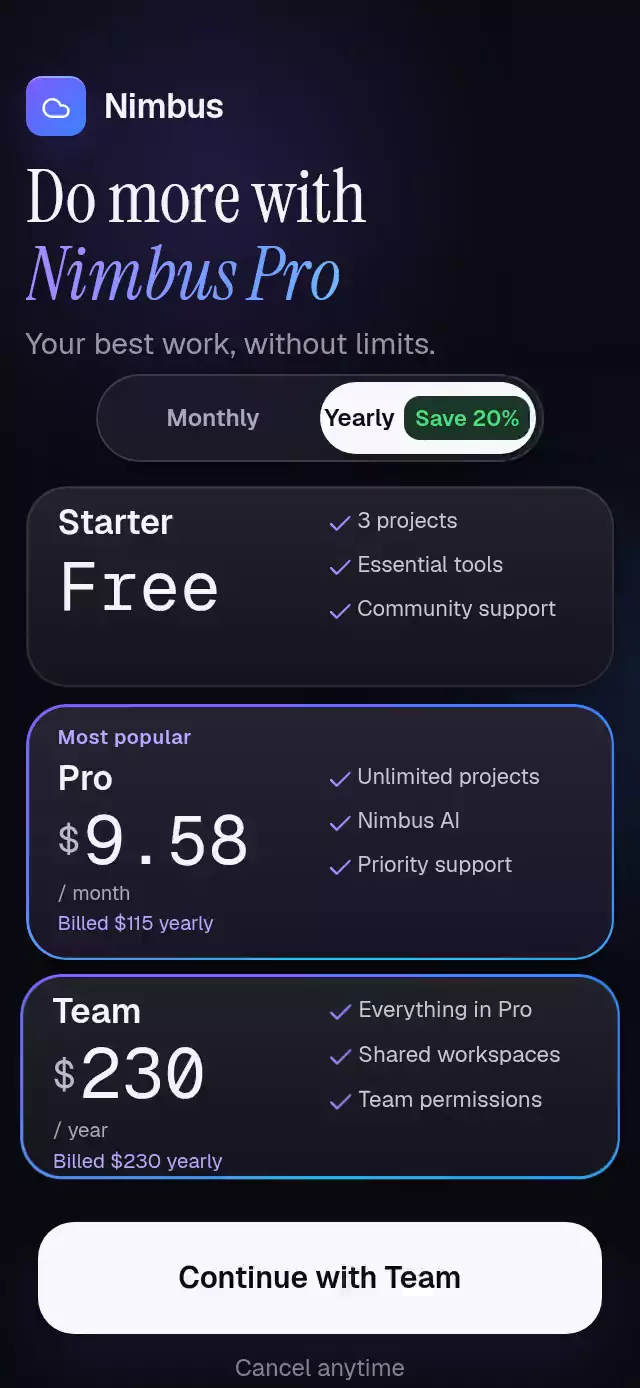
- The optional paywall displays host-supplied plans and billing terms. Purchase and restore promises show loading and retryable errors; successful resolution completes the flow once per run.
Steps
| Screen | Stable step ID | Behavior |
|---|---|---|
| 1 | splash | Wordmark and glass drop |
| 2–4 | story | Three beats: fragments, convergence, drop |
| 5–6 | name | Real text input, empty and filled |
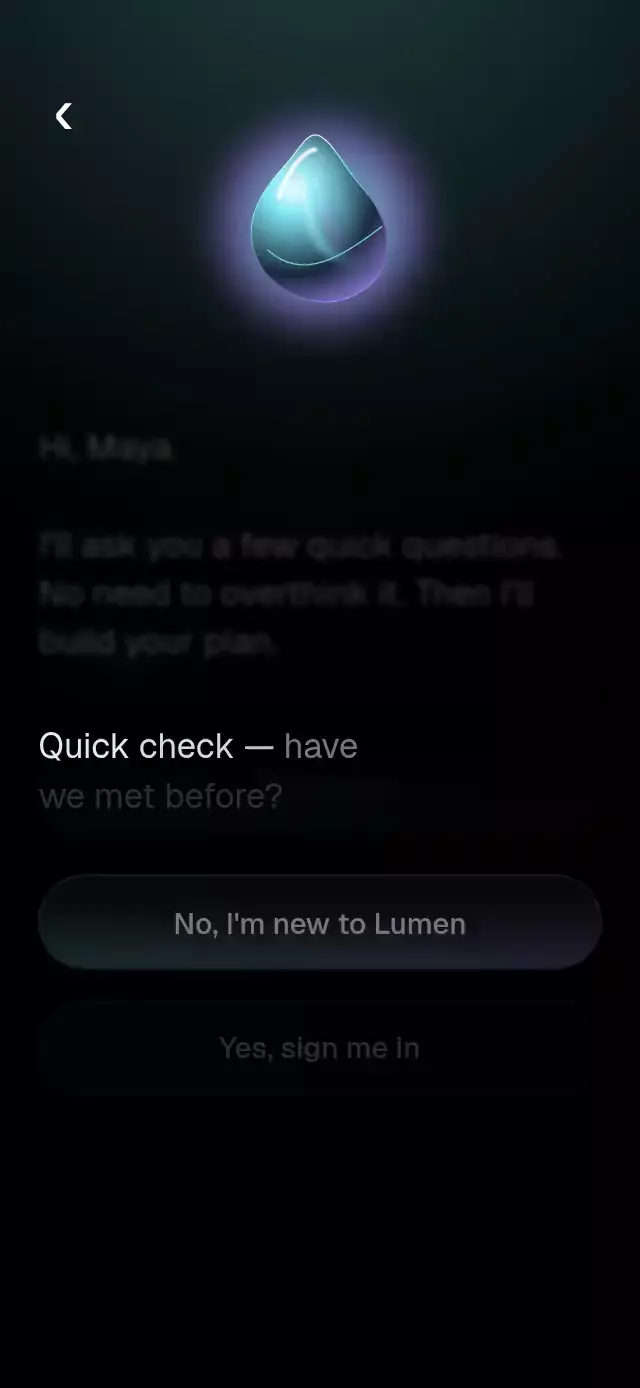
| 7 | returning | New user or host sign-in callback |
| 8 | screen-time | Seven configurable answers |
| 9 | plan | Answer flight and automatic review |
| 10 | persona | Scrollable profile options |
| 11 | permission | Personalized explanation and host permission |
| 12 | projection | Estimated days and rolling year wheel |
| 13 | gains | Name, estimated time back, benefits |
| 14 | apps | Searchable categories and three app choices |
| 15 | paywall | Optional purchase/restore or Continue |
Install
Copy this folder, excluding demo/, into your project. Install SDK-compatible dependencies:
npx expo install @shopify/react-native-skia react-native-reanimated react-native-worklets expo-blur expo-linear-gradientTested dependency baseline: Expo SDK 58, React Native 0.88.0, Reanimated 4.7.1, Worklets 0.13.0, Skia 2.14.0, expo-blur ~58.0.5, expo-linear-gradient ~58.0.3. Exact imports are recorded in piece.json.
The host loads font families before mounting. Defaults are Geist_400Regular, Geist_500Medium, and Geist_700Bold. Pass your own loaded family names with fonts. For a gradient year wheel, also pass a local bold TTF through numberFont; without it the wheel uses accessible React Native text in the accent color. No font binary ships in the Flow.
For web, initialize Skia with LoadSkiaWeb before importing the Flow and serve canvaskit.wasm from your public assets; follow the Skia web setup. In an Expo Router web app, load the component dynamically after Skia initialization. The native import below assumes the host's Skia setup is ready.
Usage
The host owns safe area insets. Render inside a safe area container and hide the route's header. Use src/app/onboarding.tsx if your project uses src/app, or app/onboarding.tsx otherwise; keep the Flow itself outside the route directory.
// app/onboarding.tsx
import { Stack, router } from 'expo-router';
import { SafeAreaView } from 'react-native-safe-area-context';
import { GlassGuideOnboarding } from '../components/glass-guide-onboarding';

export default function OnboardingRoute() {
  return (
    <SafeAreaView style={{ flex: 1, backgroundColor: '#000000' }}>
      <Stack.Screen options={{ headerShown: false }} />
      <GlassGuideOnboarding
        brandName="Lumen"
        onSignIn={() => router.push('/sign-in')}
        onComplete={(answers) => {
          // Persist answers here if your application needs them.
          router.replace('/');
        }}
      />
    </SafeAreaView>
  );
}
Customize and control
import { useRef } from 'react';
import {
  GlassGuideOnboarding,
  DEFAULT_COPY,
  type GlassGuideOnboardingHandle,
} from './glass-guide-onboarding';

function Setup() {
  const flow = useRef<GlassGuideOnboardingHandle>(null);
  return (
    <GlassGuideOnboarding
      ref={flow}
      brandName="Lumen"
      initialAnswers={{ name: 'Maya' }}
      colors={{ accent: '#7FE7F2', accent2: '#A98BFF', paywall: '#6E56FF' }}
      fonts={{
        regular: 'Geist_400Regular',
        medium: 'Geist_500Medium',
        bold: 'Geist_700Bold',
      }}
      numberFont={require('./assets/Geist_700Bold.ttf')}
      copy={{
        gainsButton: "👊 Let's do it",
        screenTimes: DEFAULT_COPY.screenTimes,
        titles: { paywall: 'Make room for your best work.' },
      }}
      socialProof="Built for deep work"
      onEvent={(event) => {
        // Forward to your own analytics or persistence layer.
      }}
    />
  );
}
// From a host action: flow.current?.goTo('apps'); flow.current?.reset();
copy merges top-level fields and titles; arrays are replaced in full. Keep option IDs stable across translations. App categories contain selectable app objects (id, label, icon); category headings expand/collapse rather than selecting every child. Demo app names are fictional. Icons are original geometric marks; accepted variants are exported as FlowIcon.
All structural copy, labels, errors, benefits, units, and choice content live in the typed FlowCopy. Supported placeholders include {name}, {brand}, {n}, {days}, {years}, and {savedDays} in their respective fields. Prices, renewal details, trial terms, and legal URLs come from each plan. socialProof is optional and must contain truthful host content.
Permission adapter
<GlassGuideOnboarding
  requestPermission={async () => {
    // Invoke your own permission provider here.
    return 'granted'; // Or 'denied'.
  }}
/>
Both granted and denied continue to the projection; a rejected promise stays on the permission screen with a retry action. Without an adapter, the action simulates permission and logs that fact in development. Selecting apps records preferences only: it does not enumerate installed apps or enforce OS restrictions. The host supplies those capabilities.
RevenueCat adapter example
No RevenueCat dependency is included. Install and configure it in the host using its Expo guide. Real App Store / Google Play purchases require a development build; Expo Go can preview this UI and use mock adapters. Configure the RevenueCat public SDK key once at app startup. Never place a secret API key in the app.
import Purchases, { type PurchasesPackage } from 'react-native-purchases';
import { GlassGuideOnboarding } from './glass-guide-onboarding';

// Load these from (await Purchases.getOfferings()).current?.availablePackages.
function PurchaseFlow({ packages }: { packages: PurchasesPackage[] }) {
  const entitlement = 'focus'; // Use your configured entitlement identifier.
  return (
    <GlassGuideOnboarding
      plans={packages.map((item) => ({
        id: item.identifier,
        title: item.product.title,
        price: item.product.priceString,
        // Supply accurate localized renewal/trial disclosures for each product.
        terms: billingTermsForProduct(item.product.identifier),
        termsUrl: 'https://your-domain.com/terms',
        privacyUrl: 'https://your-domain.com/privacy',
      }))}
      onPurchase={async (planId) => {
        const item = packages.find(
          (candidate) => candidate.identifier === planId,
        );
        if (!item) throw new Error('This plan is unavailable.');
        const { customerInfo } = await Purchases.purchasePackage(item);
        if (!customerInfo.entitlements.active[entitlement]) {
          throw new Error('No active entitlement.');
        }
      }}
      onRestore={async () => {
        const customerInfo = await Purchases.restorePurchases();
        if (!customerInfo.entitlements.active[entitlement]) {
          throw new Error('No active purchase to restore.');
        }
      }}
      onComplete={(answers) => {
        /* Save answers and navigate to your app. */
      }}
    />
  );
}
// billingTermsForProduct is your host's localized billing disclosure function.
Resolving either adapter means entitlement verification succeeded and completes the Flow. Reject on cancellation, pending purchases, errors, or an empty restore; the Flow stays on the paywall and displays the configurable error. Restore is only shown when supplied. Plans without a purchase handler show an unavailable error, never a simulated successful purchase. Without plans (including an empty array), Continue calls onComplete without purchase. Autoplay never calls permission or payment adapters.
Props
| Prop | Type | Default | Purpose |
|---|---|---|---|
variant | "aurora" | "ember" | "mono" | "aurora" | Iridescent palette preset; colors overrides individual tokens. |
brandName | string | Lumen | Wordmark and personalized copy |
copy | partial FlowCopy, partial titles | DEFAULT_COPY | All text and option lists |
colors | Partial<FlowColors> | DEFAULT_COLORS | Background, text, muted, accent, accent2, paywall, paywallIndigo, surface, border, fog |
fonts | Partial<FlowFonts> | Geist regular/medium/bold | Host-loaded font families |
numberFont | Skia DataSourceParam | absent | Local TTF for gradient year text |
initialAnswers | Partial<Answers> | empty answers | Prefill and reset values |
onEvent | (event: FlowEvent) => void | absent | Local lifecycle and answer events |
onComplete | (answers: Answers) => void | absent | Called once per completed run |
onSignIn | () => void | absent | Existing-account branch |
requestPermission | () => Promise<'granted' | 'denied'> | simulation | Host permission adapter |
plans | readonly FlowPlan[] | absent | id, title, price, terms, optional description, termsUrl, privacyUrl |
onPurchase | (planId: string) => void | Promise<void> | absent | Host purchase/entitlement adapter |
onRestore | () => void | Promise<void> | absent | Host restore/entitlement adapter |
socialProof | string | absent | Truthful host-supplied statement |
autoplay | boolean | false | Repeating simulated walkthrough (~2.5 s per step; permission waits for its text) |
reducedMotion | boolean | system preference | Remove ambient drift, particles, rolling, and spatial transitions |
style | StyleProp<ViewStyle> | fills parent | Container override |
testID | string | glass-guide-onboarding | Stable root and control ID prefix |
Answers: { name: string; returning: boolean | null; screenTime: string | null; persona: string | null; apps: string[] }. Choice values are IDs rather than translated labels. The name and answers stay local unless your callbacks send or save them.
Events: flow_started, step_viewed, answer_changed, flow_completed. Every event contains stepId; story views also include storyBeat (0–2), answer changes include field and value, completion includes an answer snapshot. The name field emits changes while typing, so avoid forwarding personal content to analytics without a deliberate policy. React Strict Mode may replay mount effects in development.
Imperative ref: goTo(stepId) for host navigation and reset() for a new run. goTo deliberately permits skipping directly to a step. The UI and Android hardware Back navigate backward while retaining answers. Back from the profile question skips the automatic review and returns directly to screen time. The three story beats share one stable step ID; the empty/filled name screen is one input step.
Compatibility
Designed for iOS, Android, and web on the SDK 58 baseline above. Expo Go supports the visual Flow's bundled modules; host permission providers and real purchases may require a development build.
Layout uses the measured parent container, caps text-column width, and scrolls when content does not fit. The host applies safe area insets. No network requests are made by the Flow, except when the user explicitly opens a supplied legal URL or invokes a host adapter.
Accessibility
System reduced motion disables drift and spatial reveals, uses short fades, and shows the final projection without rolling. Controls have labels, roles, selected/checked/disabled states, and at least 48 pt touch targets. Questions retain prior selections; errors announce as alerts; app counts update politely. Animated word groups expose a complete sentence label, and the year wheel exposes its final value rather than announcing every intermediate frame. All interaction has a button or real-input path; no gesture-only actions. Back is available on screen and through Android's Back handler.
Appearance variants
variant="aurora" combines aquamarine and violet. variant="ember" uses amber and coral, and variant="mono" uses cool silver. The demo exposes a palette selector during the story; autoplay always uses Aurora. Explicit colors take precedence over the preset.
The content uses a centered reading column of up to 440 points. Short containers use a smaller story object; landscape moves the story text to the left and the drop to the right. Questions and longer content remain scrollable. The host owns safe-area insets.
Accessibility details
Headings allow font scaling up to 1.4, use balanced wrapping, and keep the final two words together. Animated words expose one complete accessible label. Native heading focus moves once per active step; outgoing layers are hidden from assistive technology. Radios and checkboxes expose selection, and navigation preserves answers.
Reduced motion follows the system, including changes while the flow is open, unless reducedMotion is explicitly provided. Step changes become 200 ms crossfades, and decorative drift, grain, bloom, breathing, sweeps, and press transforms are suppressed. The name field uses the platform's real blinking caret and a fading placeholder. No haptics dependency is included.