About this animation
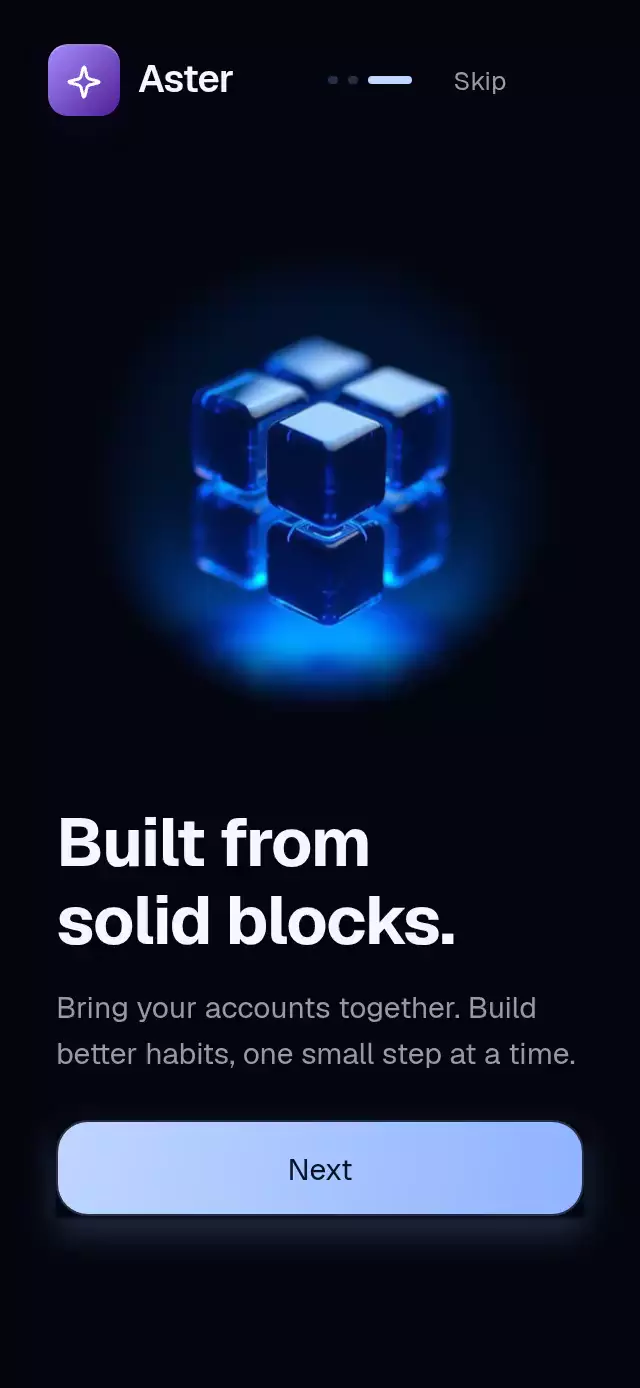
A page-turn onboarding flow with floating metallic objects and configurable pages, colors, fonts, and navigation labels.
Why this one
Most onboarding screens dissolve between illustrations. Here the outgoing object recedes and rotates while the incoming object arrives from the opposite side. Both remain visible at the midpoint. A luminance-masked screen blend catches the object's bright surfaces as it settles, giving each page a sense of weight.
How it works
onLayoutmeasures the component, caps artwork at 340 points (1024-pixel demo assets), and switches to a side-by-side composition in landscape. Small containers scroll vertically; copy stays in normal document flow.- One continuous, circular
positionshared value drives the objects' offsets, rotation, scale, motion blur, opacity, and the shared headline/paragraph fade. Headline words keep a short, capped movement stagger without fading independently. The last-to-first transition travels one page forward. - A horizontal Gesture Handler pan interrupts the current spring and projects its velocity into the next snap. A tap on the artwork or the Next button provides an alternative.
- The image shader feathers the image edges radially. It computes a luminance mask and applies the Screen blend equation to a diagonal light band, so the shimmer cannot become an opaque rectangle. A separate four-second ambient clock supplies the six-point float; settling triggers a 600 ms light sweep.
- All page copy stays mounted and measured in a shared slot. Each headline and paragraph fades together directly from
position, so visual updates do not wait for a React page swap. React tracks the active page for controls and accessibility. Settled pages trigger screen-reader announcements andonIndexChange; the final primary action receives a single 600 ms glow pulse. - All artwork is decoded concurrently before object layers mount and navigation is enabled.
onReadylets the host start its timer only after every image is available. Autoplay belongs to the demo: it advances every 2.2 seconds after readiness and stops on the first touch. Action callbacks in the demo show local feedback; they do not create or import a financial account.
Install
npx expo install @shopify/react-native-skia@2.14.0 expo-linear-gradient@~58.0.3 react-native-gesture-handler@~3.3.0 react-native-reanimated@4.7.1 react-native-worklets@0.13.0Copy the files listed in piece.json. Wrap your application in GestureHandlerRootView and configure Reanimated as required by your Expo project. On web, initialize Skia with the host's CanvasKit loader before rendering the component. The demo additionally uses the installed Expo font packages to load Geist Bold and Semibold. Icons: Lucide (ISC); the optional Aster demo tile uses the kit's sparkle glyph.
Usage
import ChromeObjectOnboarding from './chrome-object-onboarding';

<ChromeObjectOnboarding
  pages={[
    { image: require('./vault.jpg'), title: 'Your money.\nYour rules.', text: 'Make space for what matters.' },
    { image: require('./card.jpg'), title: 'Ready for\nwhat is next.', text: 'Keep your essentials close.' },
  ]}
  onFinish={() => completeOnboarding()}
  onSkip={() => completeOnboarding()}
/>
Customize the material and control the current page:
const onboarding = useRef<ChromeObjectOnboardingRef>(null);

<ChromeObjectOnboarding
  ref={onboarding}
  pages={pages}
  fontFamily="YourBodyFont"
  titleFontFamily="YourBoldFont"
  colors={{ background: '#F5F7FC', text: '#101629', muted: '#535F76', accent: '#BFD6FF', accentEnd: '#8FB3FF', buttonText: '#071226', secondary: '#E9EEF8', border: '#CCD6EA', glow: '#8FB3FF40' }}
  floatAmplitude={4}
  shineIntensity={0.65}
  onImport={() => openImportFlow()}
  onInteraction={() => pauseYourAutoplay()}
/>
// Call from an event or timer, not during render.
onboarding.current?.goTo(2);
The host supplies safe-area padding. The component is embeddable and fills its parent; the demo adds breathing room. All image sources are caller supplied. The artwork uses 2D images with perspective transforms, rather than a realtime 3D mesh. Use images with dark studio backgrounds and a bright central object for the strongest luminance mask.
Props
| Prop | Type | Default | Purpose |
|---|---|---|---|
pages | ChromeObjectPage[] | Required | Each page contains image, title, and text. Empty arrays render an empty container. |
onFinish, onSkip, onImport | () => void | — | Final, skip, and secondary action callbacks. |
onReady | () => void | — | All page artwork has decoded; navigation is enabled. |
onIndexChange | (index: number) => void | — | Settled zero-based index. |
onInteraction | () => void | — | Touch/accessibility action notification for autoplay cancellation. |
colors | Partial<ChromeObjectColors> | Midnight/ice | Override background, text, muted, accent, accentEnd, buttonText, secondary, border, and glow. glow accepts a CSS/RN shadow color with alpha. |
brand | ReactNode | — | Optional branding in the upper-left slot. |
fontFamily, titleFontFamily | string | System | Body/action and headline fonts; load them in the host. |
nextLabel | string | Next | Primary copy before the final page. |
finishLabel | string | Get started | Final primary copy. |
importLabel | string | Import an account | Final secondary copy. |
skipLabel | string | Skip | Header action copy. |
accessibilityLabel | string | Onboarding pages | Adjustable artwork label. |
pageAnnouncement | (page, index, count) => string | Page number and title | Custom screen-reader announcement. |
floatAmplitude | number | 6 | Ambient vertical movement in points. |
shineIntensity | number | 0.8 | Screen-blend strength, intended range 0–1. |
style | StyleProp<ViewStyle> | — | Root overrides. |
testID | string | chrome-object-onboarding | Root; action suffixes -skip, -next, -import. |
ref.goTo(i) waits for artwork readiness, then clamps a finite zero-based index and takes the shortest circular route. Horizontal swipes wrap. The three-dot chapter indicator deliberately groups the final two chapters under its third dot; content and screen-reader values identify all four pages.
Compatibility
Expo SDK 58, React Native 0.88.0, Reanimated 4.7.1, Worklets 0.13.0, Gesture Handler 3.3, Skia 2.14.0. Expo Go includes these native modules. Supports iOS, Android, and web. The correction is checked with a 40-second web autoplay recording at 320×694.
Accessibility
Every action has a button role and a label. Artwork offers adjustable increment/decrement actions plus a gesture tap alternative. Headline words share one semantic heading. The headline and supporting paragraph fade as one group, so no paragraph remains without its heading. A settled page announces its number and headline; announcements can be localized. Reduced motion disables float, tilt, rotation, blur, shimmer, and the final glow pulse, and changes pages with a 200 ms crossfade. Controls have at least 48-point hit areas and independent press feedback. Text can scale and the layout can scroll instead of clipping enlarged copy. The upper-right 56-point header slot is reserved for the host viewer's close control.