About this animation
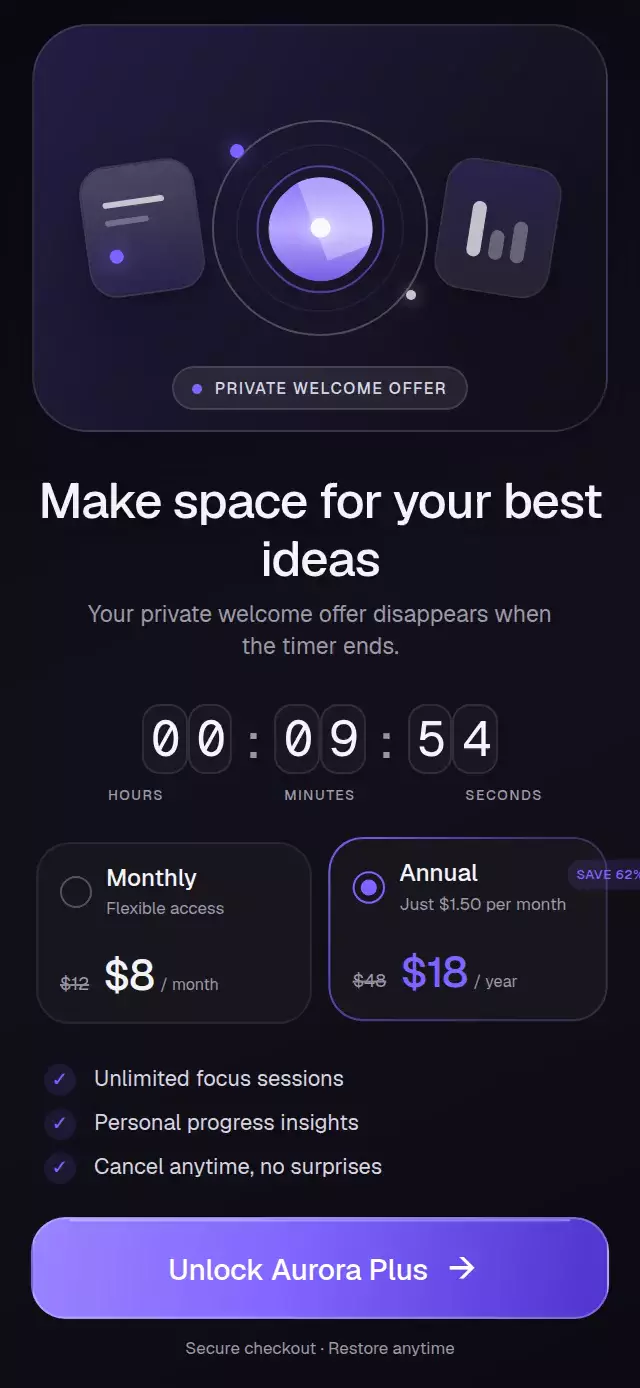
A countdown timer in React Native can make a genuinely time-limited offer clear without mixing business logic into every screen. This paywall takes an absolute expiresAt value, derives the remaining time from it, and calls onExpire when the clock reaches zero. Use it for a one-time upgrade offer, reservation window, trial extension, or another promotion with a real deadline. Reanimated and Expo Linear Gradient provide the polished urgency treatment while the displayed time updates independently from UI-thread motion. The component highlights the final ten seconds, exposes a direct onClaim action, and keeps the remaining time available as a concise accessibility summary. Its small public API makes the offer logic easy to connect to an existing purchase flow.
When to use it
- Present a genuine limited-time upgrade offer.
- Show a reservation or checkout hold.
- Count down a trial extension.
- Trigger expiration logic at zero.
Related guides
A subscription paywall with rolling offer digits and configurable plans, copy, fonts, and accent color.
Why this one
Most countdown paywalls lean on visual pressure: flashing red timers, flat pricing rows, and opaque shimmer blocks. This version creates urgency without noise. Only digits whose values change roll inside fixed-width windows, the previous price gets a precise full-width strike, and the selected plan gains a true gradient edge. A layered creative scene and a restrained CTA halo make the offer feel considered while the measured vertical rhythm expands from compact phones to taller screens.
How it works
- The component measures its own width and scales the monospaced countdown for its container.
- A 250 ms clock samples
expiresAt, but React only updates when the displayed second changes. - The previous and current clock strings enter React state together; a layout effect then rolls changed digit layers in the same frame while unchanged digits render as static text.
- Every digit uses the same explicit monospaced window width, so hours and minutes never shift when seconds advance.
- Plan selection uses a spring while a one-point
LinearGradientwrapper draws the selected border. - Coordinated entrance values stage the layered hero scene and the CTA edge pulse, and the forwarded ref can replay the flourish for demos or onboarding flows.
Install
npx expo install expo-linear-gradient react-native-reanimated react-native-workletsUsage
import CountdownOfferPaywall from './CountdownOfferPaywall';

export function OfferScreen() {
  return (
    <CountdownOfferPaywall
      expiresAt={new Date(Date.now() + 10 * 60 * 1000)}
      onClaim={() => openCheckout()}
    />
  );
}
Customize the plans, copy, fonts, and accent:
import { useRef } from 'react';
import CountdownOfferPaywall, {
  type CountdownOfferPaywallRef,
} from './CountdownOfferPaywall';

export function CustomOffer({ expiresAt }: { expiresAt: Date }) {
  const paywallRef = useRef<CountdownOfferPaywallRef>(null);

  return (
    <CountdownOfferPaywall
      ref={paywallRef}
      expiresAt={expiresAt}
      accentColor="#6E56FF"
      title="Build a calmer creative practice"
      claimLabel="Start my membership"
      fontFamily="YourSansFont"
      mediumFontFamily="YourMediumFont"
      monoFontFamily="YourMonoFont"
      plans={[
        {
          id: 'monthly',
          label: 'Monthly',
          period: '/ month',
          oldPrice: '$14',
          price: '$9',
        },
        {
          id: 'annual',
          label: 'Annual',
          period: '/ year',
          oldPrice: '$96',
          price: '$36',
          badge: 'BEST VALUE',
        },
      ]}
    />
  );
}
The forwarded ref exposes replay().
Props
| Prop | Type | Default | Description |
|---|---|---|---|
expiresAt | Date | Required | Exact offer expiry time. |
oldPrice | string | '$48' | Regular price for the default annual plan. |
price | string | '$18' | Offer price for the default annual plan. |
benefits | string[] | Three generic benefits | Benefit list below the plans. |
plans | CountdownOfferPlan[] | Monthly and annual plans | Custom selectable plans. |
initialPlanId | string | 'annual' | Initially selected plan identifier. |
title | string | 'Make space for your best ideas' | Main heading. |
subtitle | string | Private-offer copy | Supporting heading copy. |
claimLabel | string | 'Unlock Aurora Plus' | Primary action label. |
accentColor | string | '#7C5CFF' | Accent used for selection and glow. |
colorScheme | 'light' | 'dark' | 'auto' | 'auto' | Surface color scheme. |
fontFamily | string | System font | Interface font family. |
mediumFontFamily | string | System font | Heading and emphasized-label font. |
monoFontFamily | string | System font | Countdown digit font. |
claimAccessibilityLabel | string | claimLabel | Screen-reader label for the CTA. |
onClaim | () => void | — | Called when the CTA is pressed. |
onExpire | () => void | — | Called once when the timer reaches zero. |
onPlanChange | (plan) => void | — | Called when a plan is selected. |
style | StyleProp<ViewStyle> | — | Outer-container style. |
testID | string | — | Test identifier. |
Compatibility
- Expo SDK 58
- React Native 0.88
- Reanimated 4.7
- iOS: supported
- Android: supported
- Web: supported
- Works in Expo Go because both native dependencies are included in the SDK
Accessibility
Each plan is exposed as a labeled radio option with selected state, and the CTA reports its disabled state when the offer ends. The countdown is announced as one timer instead of six unrelated digits. With reduced motion enabled, the entrance becomes immediate, ambient rotation stops, and digit changes use a short fade instead of spatial motion.
Customization notes
The offer countdown follows its time input, rather than a cosmetic animation duration.
FAQ
- Does this countdown timer need a custom development build?
- It uses Expo Linear Gradient and Reanimated 4.7 with Expo SDK 58. Each published piece is reviewed on physical iPhone and Android devices with Expo Go before release.
- How do I connect the timer to my offer?
- Pass an absolute expiresAt value, handle the purchase through onClaim, and use onExpire to remove or replace the offer when time reaches zero.
- Is the remaining time accessible?
- Yes. The offer exposes a concise remaining-time summary for assistive technology. The deadline and claim behavior remain application-controlled.