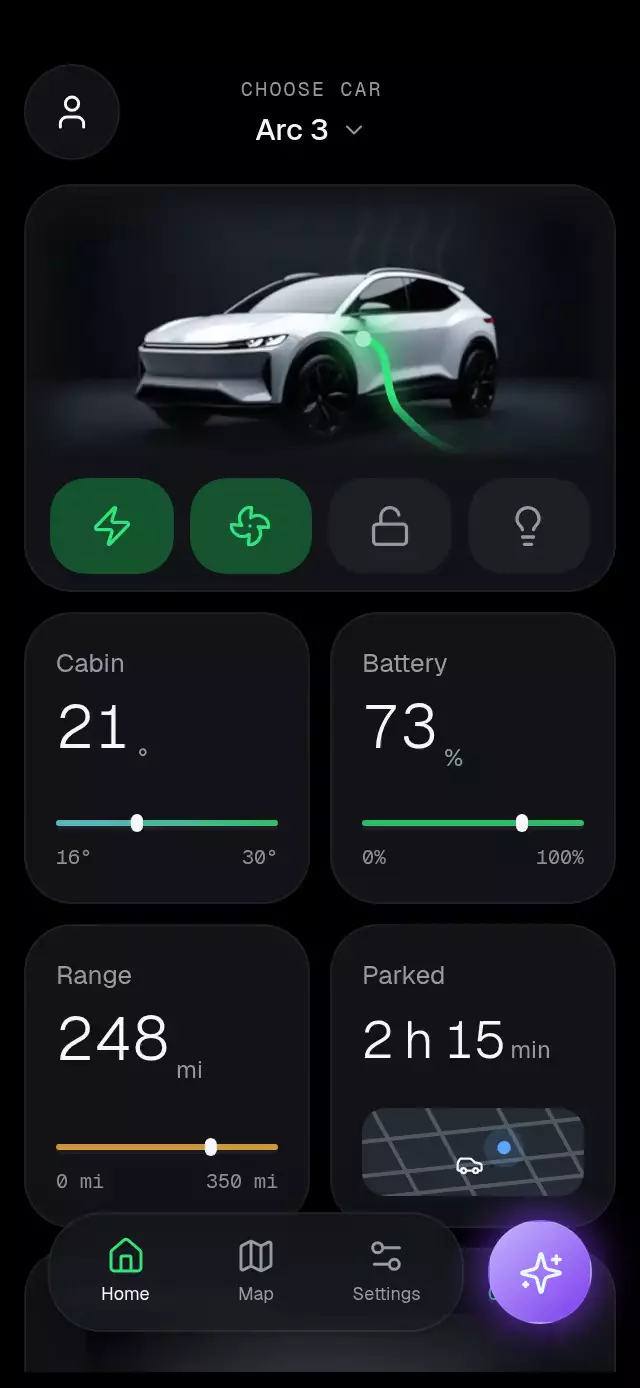
About this animation
A vehicle dashboard with a collapsing photo hero and animated controls, with configurable images, metrics, colors, and fonts.
Why this one
The car is part of the interaction. A luminous cable connects to a measured point on the body, energy travels toward the connector, climate drifts out of the windows, and the actual LED coordinates flash when locked. The hero collapses while all four controls stay available. This adds feedback and continuity to the usual static vehicle photo and switches.
How it works
- Measure the host with
onLayout; center a dashboard no wider than 430 pt. Compact hosts scroll the metrics and overview. - Compute the source image's centered
coverrectangle. Map normalized connector and LED coordinates into that rectangle. Image and Skia effects share the same entrance/collapse transform. - Give each mode one interruptible progress value. Cable trimming, connector glow, climate temperature, fan rotation, lock flashes, and lights derive from those values on the UI thread.
- Trim a bright 18% segment along the cable every 900 ms. A charging clock advances the illustrative battery counter, independently of React rendering.
- Animate numeric columns only during their carry, then settle exactly on an integer; units have their own layout width.
- Keep the hero outside the metric scroll view and reduce its height with scroll offset. The demo calls imperative methods on a cleaned-up timeline.
The small map is an illustrative local Skia drawing, not a mapping service. The battery counter is simulated UI feedback, not telemetry. Integrate actual readings through metrics, remount to reset simulation, or disable counting with a very large batteryStepMs.
Install
Copy this folder without demo/ into your app, then install compatible versions:
npx expo install @shopify/react-native-skia expo-blur expo-image expo-linear-gradient react-native-gesture-handler react-native-reanimated react-native-workletsUse a GestureHandlerRootView at the app root and the Worklets Babel configuration required by your Expo SDK. For web, initialize CanvasKit before loading this component, using Skia's web loading integration. The catalog host handles that loading; the copied component does not configure your app.
Icons: Lucide (ISC). Icon paths are included locally in icons.ts and rendered as inline SVG images with expo-image, preserving their geometry without allocating WebGL contexts. Only the car effects and the currently visible map use Skia canvases: at most two per dashboard, including the Settings view.
Usage
import { EvChargeDashboard } from './ev-charge-dashboard';

<EvChargeDashboard
  heroImage={require('./assets/front.jpg')}
  detailImage={require('./assets/side.jpg')}
  modelName="My vehicle"
/>
A customized, externally controlled dashboard:
const dashboard = useRef<EvChargeDashboardRef>(null);

<EvChargeDashboard
  ref={dashboard}
  heroImage={require('./assets/front.jpg')}
  detailImage={require('./assets/side.jpg')}
  imageAspectRatio={1.75}
  chargePort={{ x: 0.57, y: 0.55 }}
  lightBar={[{ x: 0.20, y: 0.565 }, { x: 0.43, y: 0.56 }]}
  headlight={[{ x: 0.37, y: 0.55 }, { x: 0.44, y: 0.57 }]}
  actions={{ charge: true }}
  metrics={{
    cabin: {
      title: 'Cabin', value: 75, targetValue: 70, unit: '°F',
      range: [60, 86], rangeLabels: ['60°F', '86°F'],
    },
  }}
  colors={{ green: '#5EE7A2', activeControl: '#174533' }}
  onActionChange={(action, enabled) => updateVehicle(action, enabled)}
/>

// Called from an event, never during render:
dashboard.current?.setAction('lights', true);
Import useRef from React and EvChargeDashboardRef from this folder for the second example. updateVehicle is your application's command handler. All image coordinates are fractions of the original image, before cropping.
Props
| Prop | Type | Default | Purpose |
|---|---|---|---|
heroImage, detailImage | number | { uri: string } | Required | Vehicle images, supplied by the host. |
imageAspectRatio | number | 1.75 | Source width / height; required for accurate effects with different images. |
modelName | string | Vehicle | Centered model label. |
metrics | Partial<Record<MetricName, EvMetric>> | Cabin 24→21°, battery 72%, range 248 mi, parked 2 h 15 min | Headings, values, units, numeric limits, and range labels. |
actions | Partial<Record<EvAction, boolean>> | All off | Initial modes; call the ref to change them later. |
onActionChange | (name, on) => void | — | Discrete JS callback, including imperative changes. |
chargePort | { x, y } | { .57, .55 } | Connector in source-image fractions. |
lightBar | [Point, Point] | (.20,.565) → (.43,.56) | Front LED coordinates. |
headlight | [Point, Point] | (.37,.55) → (.44,.57) | Headlight coordinates. |
colors | Partial<EvDashboardColors> | Black/graphite, green, cyan, amber, violet | Complete palette: background, surfaces, text, controls, glass, map, and effects. Supply every field for a coherent alternate theme. |
texts | Partial<EvDashboardTexts> | Generic English copy | Every structural label, message, status, and control label. |
announcement | (name, on) => string | Action label + enabled/disabled | Localized screen-reader announcements. |
fontFamily | string | System | Body font. |
mediumFontFamily | string | Body font | Model and selected labels. |
numberFontFamily | string | System | Numeric readouts; demo uses Geist Light. |
monoFontFamily | string | System | Eyebrows and scale labels. |
heroHeightRatio | number | .30 | Expanded hero height; bounded for compact containers. |
chargeDuration | number | 600 | Connection duration in milliseconds. |
batteryStepMs | number | 3500 | Illustrative time per battery point. |
style | StyleProp<ViewStyle> | — | Root overrides; root defaults to flex: 1. |
testID | string | ev-charge-dashboard | Stable root, action, tab, assistant, and scroll identifiers. |
EvMetric has title, value, unit, optional targetValue, range, and rangeLabels. Numeric rolling values are nonnegative whole numbers; parked.value can be a formatted string. Use units and range labels for your preferred locale. The demo follows the supplied degree values; pass Fahrenheit metrics for a US temperature display.
Ref methods: setAction(name, on), scrollTo(offset), enter(), and reset(). reset() animates actions back to their initial values, clears simulated counters, and scrolls to the top while keeping the car and metric grid visible. Only mounting or explicitly calling enter() replays the entrance. Actions can overlap; charging continues during climate, locking, and lights. Home restores scroll position. Map shows the parked location illustration; Settings provides labeled switches. The profile/model header buttons and assistant open dismissible inline panels.
Compatibility
Target versions: Expo SDK 58, React Native 0.88.0, Reanimated 4.7.1, Worklets 0.13.0, Skia 2.14.0. Uses installed Expo Go modules. Android blur uses an internal BlurTargetView with dimezisBlurViewSdk31Plus; older Android versions keep the glass tint fallback.
The host owns safe-area insets. The demo adds modest framing only; production full-screen hosts should apply their own insets. Tablets cap the content width; landscape and embedded 300×400 layouts retain the actions and scroll the metric content. The unchanged demo images are 1344×768; keep the rendered scene within their 3× density budget when increasing heroHeightRatio.
Accessibility
Action controls expose switch roles and checked state; navigation exposes selected tab state. Every touch target is at least 48 pt. Each action change announces a customizable string. Native ScrollView supports touch scrolling; tapping Home restores the expanded hero, and the ref offers programmatic scroll.
Reduced motion removes cable pulses, drifting air, fan rotation, entrance sweep, lock flashes, numeric translation, and car transforms. Mode changes use a 200 ms fade and the cable connects as a complete stroke. Font scaling remains enabled. Stable controls expose native accessibility activation alongside Gesture Handler taps.
Demo timeline
Entrance → charge at 0.5 s (connected by 1.1 s) → climate at 3.5 s → lock at 5.5 s → collapse at 7 s → return at 8.2 s → lights at 9.1 s → cable retracts at 10.2 s → repeat at 11.6 s. The entrance plays once; later cycles restore actions with their normal transitions and return scroll to the top without hiding the car or cards. Timers are cleared on unmount.
Implementation notes
At 390×844 and 320×694, the two-column grid uses container measurements, whole-digit resting positions, separate unit widths, and scrolling rather than fixed bottom offsets. The measured photo rectangle is shared by all effects. The header reserves its rightmost area for the catalog close button; the assistant dock is inset from the lower right. No effect uses an opaque block over the car: the entrance sweep is image-luminance masked; LEDs, cable, air, and light beam are Skia paths. Autoplay connects the cable by about 1.2 s.