About this animation
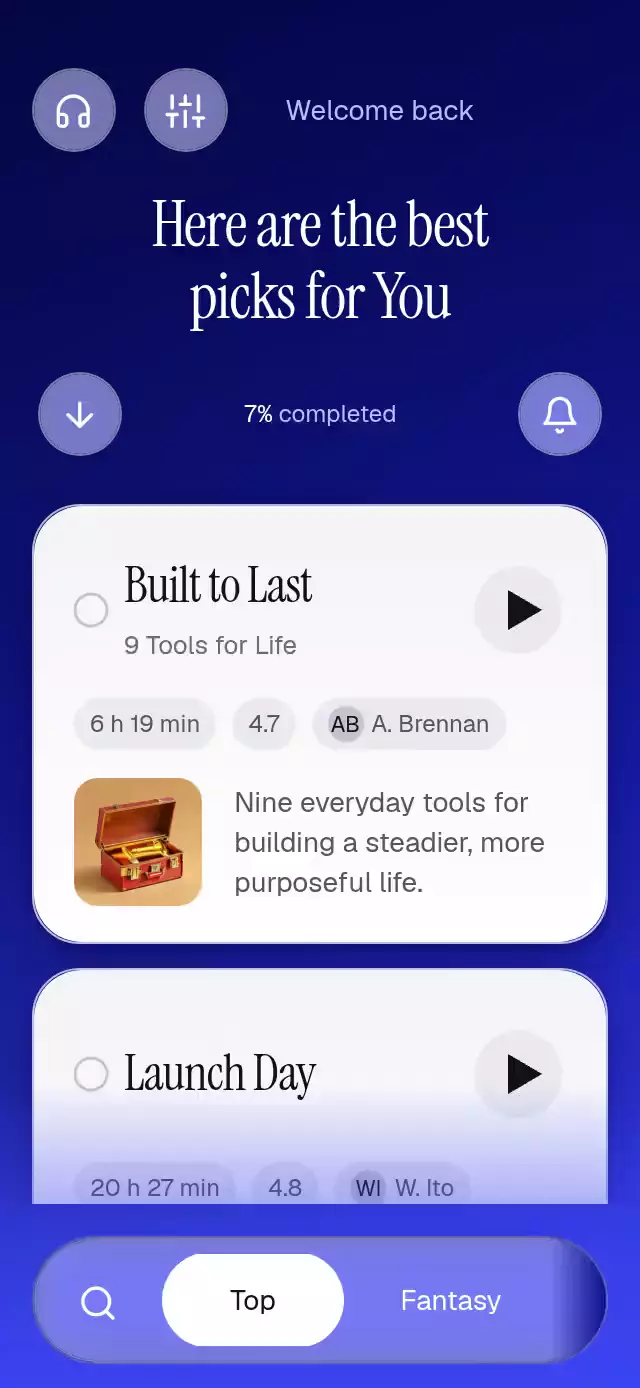
An audiobook stack that folds into a chapter reader, with configurable books, labels, colors, and fonts.
How it works
- A UI-thread scroll offset pins each card at the top of the deck, narrows it to 92%, and adds a soft dark veil as the next card covers it. The cards stay mounted; there is no recycled-card reset.
- One interruptible
openvalue expands the selected card's existing container. A single title and thumbnail layer travel from the current scroll-dependent source rectangle to the reader header and chapter avatar. - Chapter position drives word colors through a three-word blend, the progress rail, and automatic chapter scrolling. Only integer page changes cross to React.
- Scrubbing writes that same position on the UI thread. Play morphs a six-point polygon into pause bars and rotates the selected list card's status ring.
- One sliding selection surface follows genre changes. Filtered books enter with a short fade and 12-point lift. Direct input interrupts the demo's external autoplay schedule.
This component renders a listening interface and a chapter clock. Connect the callbacks and imperative seek method to your own audio player for actual sound or synchronization.
Install
Copy this folder without demo/ into your project. Install the SDK-compatible dependencies:
npx expo install @expo/vector-icons @shopify/react-native-skia expo-blur expo-image expo-linear-gradient react-native-gesture-handler react-native-reanimated react-native-workletsUse a GestureHandlerRootView at your application root. Follow the Reanimated setup for your Expo SDK. On web, initialize Skia with LoadSkiaWeb before importing this component, and serve its matching canvaskit.wasm. Native builds do not require that web initialization. Icons: Feather from the Lucide kit (ISC).
Usage
import { useRef } from 'react';
import { AudiobookStackList, type AudiobookStackListHandle } from './audiobook-stack-list';

const library = useRef<AudiobookStackListHandle>(null);

<AudiobookStackList
  ref={library}
  greeting="Welcome back"
  title={'Here are the best\npicks for You'}
  books={books}
  genres={['Top', 'Fantasy', 'Thriller']}
  onOpenBook={(id) => loadAudio(id)}
  onPlayToggle={(id, playing) => setAudioPlaying(id, playing)}
  onSeek={(fraction) => seekAudio(fraction)}
/>;

// Use the same paths as touch input:
library.current?.openBook('toolbox');
library.current?.seek(0.3);
Provide your own books and local artwork:
const books = [{
  id: 'toolbox',
  title: 'Built to Last',
  subtitle: '9 Tools for Life',
  duration: '6 h 19 min',
  rating: '4.7',
  narrator: { initials: 'AB', name: 'A. Brennan' },
  synopsis: 'Small tools for steadier days.',
  thumb: require('./assets/toolbox.jpg'),
  genres: ['Business'],
  chapter: {
    number: 8,
    title: 'A Toolkit for Steady Days',
    text: 'Provide the complete chapter text here.',
    position: 245,
    total: 491,
  },
}];

<AudiobookStackList
  books={books}
  colors={{ top: '#15113F', middle: '#393386', bottom: '#6660D1', accent: '#5144CE' }}
  fontFamily="YourInterfaceFont"
  titleFontFamily="YourEditorialSerif"
  monoFontFamily="YourTabularFont"
  bottomInset={insets.bottom}
  playbackRate={0}
  onAction={(action, bookId) => handleLibraryAction(action, bookId)}
/>;
Setting playbackRate={0} lets an external audio clock own progress through ref.seek(). Avoid feeding onSeek straight back into seek without a guard.
Props
| Prop | Type | Default | Purpose |
|---|---|---|---|
books | Audiobook[] | Required | Content, narrator initials, artwork, genre identifiers, and chapter data. |
greeting | string | Welcome back | List greeting. |
title | string | Your next\ngreat listen | Editorial headline. |
progress | number | 0.07 | Normalized library completion. |
readerProgress | number | 0.56 | Whole-book completion, independent of chapter pages. |
genres | string[] | ['All'] | Genre names; the first includes all books. Books without genres appear everywhere. |
initialGenre | number | 0 | Initial selected index. |
labels | Partial<AudiobookStackLabels> | English labels | All interface and accessibility strings. |
colors | Partial<AudiobookStackColors> | Electric blue / white paper | Semantic colors for every material and text role. |
colorScheme | 'light' | 'dark' | 'auto' | 'dark' | Blue background variant; auto follows the device. |
fontFamily | string | System | Interface, synopsis, metadata, and chapter body text. |
titleFontFamily | string | System | Editorial headlines and drop cap. The demo supplies Instrument Serif. |
monoFontFamily | string | System | Tabular page counter. |
bottomInset | number | 0 | Bottom safe area supplied by the host. |
motion | 'auto' | 'reduced' | 'auto' | Device preference or reduced transitions. |
playbackRate | number | 0.022 | Normalized chapter fraction advanced per second. |
autoplay | boolean | false | Host demonstration marker; it schedules no timers internally. |
style | StyleProp<ViewStyle> | — | Root styling. |
testID | string | audiobook-stack-list | Automation prefix. |
accessibilityLabel | string | Audiobook library | Root description. |
onOpenBook | (id) => void | — | Reader opens. |
onPlayToggle | (id, playing) => void | — | Playback request. |
onSeek | (position) => void | — | Seek request; position is normalized. |
onGenreChange | (index) => void | — | Selected genre changes. |
onClose | () => void | — | Reader closes. |
onInteraction | () => void | — | Direct input; stop host autoplay here. |
onAction | (action, bookId?) => void | — | Search, filter, notification, bookmark, contents, share, expand, and more requests. |
The handle exposes openBook(id), close(), play(), pause(), seek(p), scrollTo(y), and setGenre(index). chapter.position and chapter.total are page counts; seek uses a fraction. Secondary controls emit requests; search, bookmark persistence, sharing, and audio belong to the host application.
Stable targets include the root, -card-<i>, -play-<i>, -reader, -reader-play, -scrubber, -back, and -genre-<i>. Card indices refer to the filtered list.
Compatibility
Expo SDK 58, React Native 0.88, Reanimated 4.7, Worklets 0.13, Gesture Handler 3.3, and Skia 2.14. Designed for iOS, Android, and web with Expo Go's bundled modules. Custom native dependency versions require a compatible development build.
The component fills its parent, centers a maximum 430-point column on wide layouts, and uses compact header spacing below 650 points. Lists, chapters, and genre rows scroll intentionally. Cards use 20-point padding, 12-point row spacing, and a 16-point artwork-to-copy gap. Subtitles sit below their titles. The chapter body is left-aligned at 17 points with 1.5 line spacing. The genre dock has a continuous glass background and a trailing fade; the list reserves its height plus 16 points. The host supplies the top safe-area container and the actual bottomInset; the demo reads it from useSafeAreaInsets. Remote artwork may load after the transition; local images are recommended.
Accessibility
Buttons have configurable labels, button roles, and 48-point touch areas in the library; secondary reader controls use 44 points and play uses 56 points. Genres expose selected state. The scrubber exposes an adjustable role, a page value, and increment/decrement actions as a drag alternative. Native accessibility activation uses the same callbacks as touch.
Reduced motion removes stack recession, ring rotation, large element flights, and the word-color gradient. The card changes through a short fade. Pending words deliberately use lighter ink to represent listening progress; replace colors.pending for stronger reading contrast. Manual chapter scrolling pauses automatic following until the next seek.
Why this one
The deck, chapter, and playback controls form one continuous interaction. Opening a book preserves the selected card's geometry, and dragging progress immediately changes the text, page count, and scroll position. It is useful for audiobook libraries, narrated articles, and educational reading experiences where a static player loses context.