About this animation
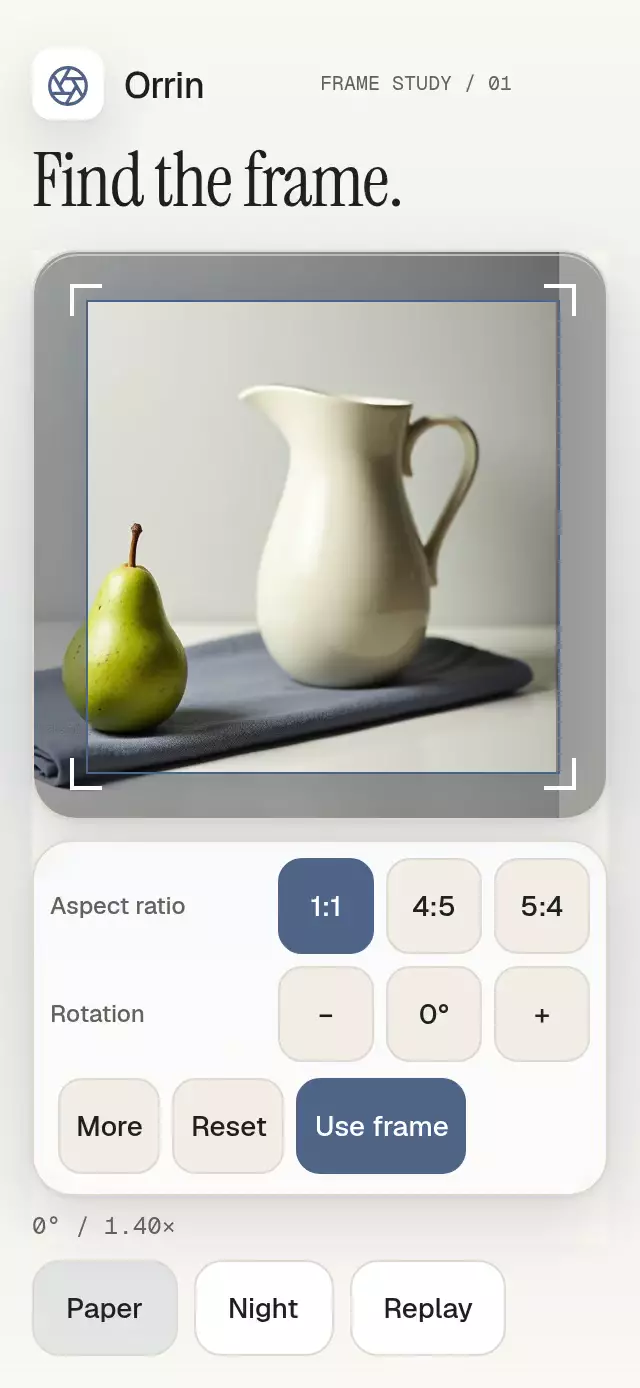
A photo crop editor with animated ratio changes, pan, pinch, and rotation, with configurable image, ratio options, palette, and fonts. It defines a source-space output region for your app to export.
How it works
onLayoutmeasures the image stage, reserving 24 points around the frame for full 48-point corner targets.- One UI-thread crop record contains the normalized source center, relative zoom, rotation, and frame dimensions. All image, frame, grid, and scrim geometry comes from that record.
- Minimum coverage is
max((|cos θ| × frameWidth + |sin θ| × frameHeight) / imageWidth, (|sin θ| × frameWidth + |cos θ| × frameHeight) / imageHeight). Every intermediate animated state is normalized, keeping all selected pixels covered. - Pan applies inverse-rotated deltas; pinch holds the source point under the fingers. Ratio changes keep the source center, except when the source edge requires clamping. Corner drags resize about that center while preserving the selected ratio.
onConfirminverse-maps TL, TR, BR, BL into source pixels. These are four actual corners, not an axis-aligned bounding box. No image manipulation dependency or file export is included.
Install
npx expo install expo-image expo-blur expo-linear-gradient react-native-gesture-handler react-native-reanimated react-native-workletsCopy the component folder without demo/. Wrap the host in GestureHandlerRootView and configure Reanimated/Worklets for your Expo SDK. The host provides safe areas once. No theme or catalog imports are required by the component.
Usage
import { FocalCropFrame } from './focal-crop-frame';

<FocalCropFrame
  source={require('./photo.jpg')}
  imageSize={{ width: 3072, height: 3840 }}
  onConfirm={({ transform, sourceCorners }) => {
    // Pass this transform and clockwise corner tuple to your export pipeline.
  }}
/>
const editor = useRef<FocalCropFrameHandle>(null);
<FocalCropFrame
ref={editor}
source={require('./photo.jpg')}
imageSize={{ width: 3072, height: 3840 }}
defaultCrop={{ centerX: 0.6, centerY: 0.55, scale: 1.3, rotation: 0 }}
maxZoom={2}
colorScheme="dark"
palette={{ accent: '#ACC9EE', onAccent: '#151720' }}
labels={{ confirm: 'Use frame', help: 'Zoom is limited by source resolution.' }}
motion={{ durationScale: 1, glowOpacity: 0.25 }}
/>
// Requests are ignored while disabled or loading, except reset while disabled.
editor.current?.setAspectRatio(1);
editor.current?.setCrop({ centerX: 0.6, centerY: 0.55, scale: 1.2, rotation: 6 });
editor.current?.confirm();Import useRef from React and FocalCropFrameHandle from this folder for the second example.
Props
| Prop | Type / default | Purpose |
|---|---|---|
source | ImageSourcePropType, required | Host photo, local or remote. |
imageSize | { width; height }, required | Actual source dimensions in pixels. |
crop / defaultCrop | CropTransform / centered, zoom 1 | Controlled value or initial internal value. |
aspectRatio | number, omitted | Controlled ratio. Internal selection initially 4:5 when omitted. |
onAspectRatioChange | (ratio) => void | Controlled ratio request. |
maxZoom | number, 2 | Relative to rotated minimum coverage. |
sourceDensity | number, max(3, PixelRatio.get()) | Required source pixels per rendered point. |
onCropChange | (transform) => void | At most 20 Hz; final value also arrives in commit. |
onCropCommit | (transform) => void | One successful action completion; no commit for cancellation. |
onConfirm | ({ transform, sourceCorners }) => void | Source pixels in clockwise TL, TR, BR, BL order. |
ratios | RatioOption[], square/portrait/landscape | IDs, ratios, and visible labels. |
labels | Partial<FocalCropFrameLabels> | All tool, fallback, helper, and accessible copy. |
formatValue | (transform) => string | Rotation/zoom display and accessible value. |
formatAnnouncement | (transform) => string, omitted | Optional single announcement per commit. |
onReady / onInteraction | () => void | Image loaded / real touch, keyboard, or accessibility action. |
disabled | boolean, false | Blocks actions, refs, and gestures except reset. |
colorScheme | light / dark / auto, auto | Complete Paper/Night themes. |
palette | Partial<Palette> | All material colors, scrim, grid, highlight, and focus. |
fontFamily / monoFontFamily | string, system | Controls and numerical values. |
titleFontFamily | string, system | Reserved heading integration prop; this editor has no heading. |
motion | { durationScale; glowOpacity } | Clamped to 0.5–2 and 0–0.3. |
style | StyleProp<ViewStyle> | Root override, applied last. |
testID / accessibilityLabel | strings | Root identity and image adjustment label. |
CropTransform = { centerX, centerY, scale, rotation }: centers are normalized source coordinates, scale is relative to minimum rotated coverage, and rotation is in degrees (−15 to +15). Handle: setAspectRatio(ratio), setCrop(transform), reset(), confirm(). Reset restores defaultCrop (or a centered crop) and leaves the current ratio selected.
Controlled props win: imperative actions issue change/commit requests without replacing crop; ratio requests call onAspectRatioChange. Gestures show transient manipulation, then restore the controlled transform until the host accepts it. Frame size is local and is represented by the returned corners rather than added to CropTransform; retain the corners when persisting arbitrary handle resizes.
Nonfinite centers/rotation/scale fall back to 0.5/0/1. Nonpositive dimensions fall back to 1; invalid ratios fall back to 4:5 and ratios are bounded to 1:4–4:1. Duplicate/empty ratio IDs and invalid entries are skipped; an empty list simply omits ratio choices. Zoom is clamped to at least coverage. Unknown ratio IDs are never used for actions. Source errors reserve stage geometry and expose Retry.
Resolution and demo art
Zoom cap is max(1, min(maxZoom, 1 / (minimumCoverage × sourceDensity))). Minimum coverage includes both source dimensions and rotation. When the original is too small even at zoom 1, coverage takes precedence over density; no synthetic upscale asset is created. Provide a helper label explaining the source limit to users.
The demo deliberately uses density 2, rather than the component's default 3, for its original 1024×1280 FLUX photograph (81 KB JPEG). It is copied unchanged from the supplied art, with no enlargement. The cap varies with stage geometry and rotation; it approaches 1× on a large tablet. Supply larger originals to obtain the full requested zoom. Demo artwork belongs only in demo/assets/; reference art is excluded. Orrin uses the kit aperture glyph. Icons: Lucide (ISC).
Compatibility
Targets Expo SDK 58, React Native 0.88.0, Reanimated 4.7.1, Worklets 0.13.0, and Gesture Handler 3.3, with the New Architecture. Expo Go includes these installed modules.
The toolbar is translucent over a real gradient on iOS/web. Android deliberately uses a solid palette surface: no unsupported legacy blur target assumptions. Every blur wrapper has its own radius and clipping. There is no Skia canvas or GPU animation loop.
Accessibility
All buttons have 48-point minimum targets and stable IDs. Ratio selection, rotation, zoom, moving the focal center, and frame size have button alternatives. Aspect ratio and rotation occupy separate compact rows; More opens zoom, focal movement, and frame sizing in the same toolbar. Back returns to the primary controls. Localize these buttons with labels.moreTools and labels.mainTools. The image has adjustable screen-reader actions. On web, focus the image and use arrows to move the focal center, +/− for zoom, Enter to confirm, Escape to reset; buttons support Tab/Enter. Pass localized ratio labels and announcements; layout follows the host's RTL direction while source coordinates retain their physical image axes.
Reduced motion changes immediately to a valid covered transform and removes grid/spring travel. It also responds when the system preference changes while mounted. The toolbar has no internal scrolling. The image stage fills the remaining editor height using a zero flex basis, while both tool panels retain 48-point touch targets. Compact button padding keeps the ratio and rotation rows complete in a 300-point host. The primary stage occupies more than 45% of a 390×844 demo viewport. Provide a usable editor height (300×400 is the compact target); the host handles overflow for larger text or shorter layouts. The demo uses the available screen height instead of a fixed editor height and has no scrolling at 320×694 or 390×844. Below 600 points tall, one outer page scroll preserves a 694-point page with the full editor and footer, with its indicator hidden. The brand header reserves space for the viewer close button. No font scaling is disabled. The host handles focus restoration when closing its own modal.
Why this one
This defines a transformed output region instead of inspecting a gallery or presenting editing steps. Rotation-aware coverage, focal continuity, and inverse-mapped source corners keep the result consistent enough for a host export pipeline without tying the UI to a file format.