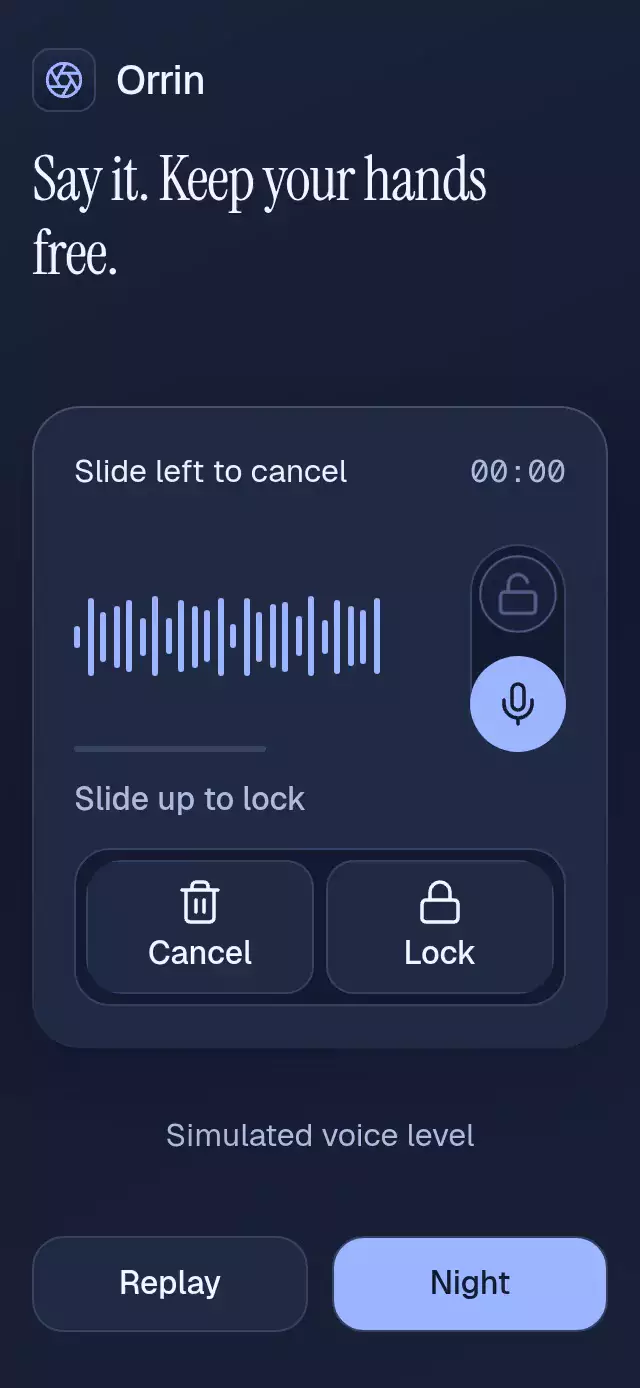
About this animation
A hold-to-record interface with slide-to-lock and review states, with configurable labels, palette, fonts, and duration limit. Your app supplies the recording adapter, audio levels, and playback state.
Why this one
An axis locks after 18 points of movement, so a diagonal cannot both cancel and lock. Visible threshold meters and explicit Record, Lock, Cancel, Stop, preview, and Send actions make the same flow available without holding a gesture. Releasing a hold always requests review. Reaching the duration limit requests Stop, never Send. Controlled hosts retain ownership of every rendered state.
How it works
- A tap on Record starts directly in hands-free mode; a 180 ms hold on the waveform’s trailing microphone starts holding.
- A pan commits to its dominant axis after 18 points. Sliding left crosses
min(96, width * 0.34); sliding up crossesmin(80, height * 0.24). Component measurements come fromonLayout. - A single signed gesture progress drives microphone travel and the threshold meters. A separate lock transition drives the ascent, waveform expansion, and blue halo. Lucide's closed shackle draws in 180 ms.
- The host supplies sanitized level, elapsed time, preview position, and playback status. Voice level smoothing takes 80 ms on the UI thread; React never receives frame callbacks.
- A session request ledger rejects duplicate actions, including duplicate releases while controlled props are waiting for acknowledgment. Business callbacks run in JS and never wait for an animation to finish.
- Stop/release opens review. Only an explicit Send action can call
onSend. Background interruption and unmount discard an active session once.
Install
Copy this folder without demo/. Install compatible packages through Expo:
npx expo install react-native-reanimated react-native-worklets react-native-gesture-handler @shopify/react-native-skia expo-linear-gradient expo-blurUse a GestureHandlerRootView at the host app root. Configure Reanimated/worklets and Skia for your Expo project. On web, load CanvasKit before rendering the component, as required by Skia. Icons: Lucide (ISC), copied from the local kit with original paths.
Usage
import { VoiceRecordLock, type VoiceRecordLabels } from './voice-record-lock';

const labels: VoiceRecordLabels = {
  hold: 'Hold to record',
  cancelHint: 'Slide left to cancel',
  lockHint: 'Slide up to lock',
  locked: 'Recording locked',
  review: 'Review your message',
  submitted: 'Voice message ready',
  record: 'Record', lock: 'Lock', cancel: 'Cancel', stop: 'Stop',
  play: 'Play', pause: 'Pause', send: 'Send',
};

<VoiceRecordLock
  sessionId="draft-42"
  labels={labels}
  level={0.45}
  elapsedMs={2400}
  accessibilityLabel="Voice recorder"
  onStart={adapter.start}
  onLock={adapter.lock}
  onCancel={adapter.discard}
  onStop={adapter.stop}
  onSend={adapter.requestSend}
/>
The adapter above is supplied by your application. A UI-only host can provide no-op callbacks. The component never imports an audio adapter.
const recorder = useRef<VoiceRecordLockRef>(null);
const [state, setState] = useState<VoiceRecordState>('idle');

<VoiceRecordLock
  ref={recorder}
  sessionId={sessionId}
  state={state}
  onStateChange={setState}
  level={level}
  elapsedMs={elapsedMs}
  previewProgress={previewProgress}
  previewPlaying={previewPlaying}
  onPreviewToggle={setPreviewPlaying}
  labels={labels}
  colorScheme="dark"
  palette={NIGHT}
  motionScale={0.8}
  fontFamily={interfaceFont}
  titleFontFamily={statusFont}
  monoFontFamily={numberFont}
  accessibilityLabel="Voice recorder"
  onStart={adapter.start}
  onLock={adapter.lock}
  onCancel={adapter.discard}
  onStop={adapter.stop}
  onSend={adapter.requestSend}
/>
Import the ref/state types and palette from index.ts. The host must filter asynchronous responses by session ID before updating props. Use a new unique ID for each recording; changing IDs invalidates the previous request ledger and cancels an unfinished old session. Call reset() when opening a new UI session. Do not switch between controlled and uncontrolled modes during one mount.
Props
| Prop | Type | Default | Purpose |
|---|---|---|---|
sessionId | string | Required | Unique stable host session identity; forwarded unchanged to callbacks. |
state | VoiceRecordState | Uncontrolled | Rendered host state. Refs request callbacks without changing this prop. |
defaultState | VoiceRecordState | idle | Initial uncontrolled state only. |
level | number | Required | Host level, clamped to 0–1; invalid input becomes 0. |
elapsedMs | number | Required | Host clock, clamped to recording limit; invalid input becomes 0. |
previewProgress | number | 0 | Simulated waveform playback position, clamped to 0–1. |
previewPlaying | boolean | false | Host preview state; no sound is played. |
maxDurationMs | number | 60000 | Stop limit, clamped to 1–86,400,000 ms; nonfinite input uses 60,000. |
onStateChange | (state) => void | — | Requests a transition or reset; controlled host must acknowledge it. |
onStart/onLock/onCancel/onStop/onSend | (sessionId: string) => void | Required | Business requests, deduplicated within a session. |
onPreviewToggle | (playing: boolean) => void | — | Requests host preview playback. |
formatDuration | (ms: number) => string | MM:SS | Custom output flows as plain text; default uses one fixed-width, single-line timer. |
labels | VoiceRecordLabels | Required | Every instruction, state, and action string; see table below. |
colorScheme | light | dark | auto | auto | Full theme selection. |
palette | VoiceRecordPalette | Theme palette | Full override: background, surface, text, muted, border, accent, onAccent, success, error. |
fontFamily | string | System | Controls and instructions. |
titleFontFamily | string | fontFamily | Status text. |
monoFontFamily | string | System | Timer text; use a monospaced font. |
style | StyleProp<ViewStyle> | — | Root style; default flex: 1. Host owns safe areas. |
testID | string | voice-record-lock | Root and stable control prefix. |
accessibilityLabel | string | Required | Contextual timer/recorder description. |
motionScale | number | 1 | Clamped to 0–1.5. Zero removes movement while preserving actions. |
| Label key | Demo value | Usage |
|---|---|---|
hold | Hold to record | Idle state instruction. |
cancelHint | Slide left to cancel | Holding state instruction. |
lockHint | Slide up to lock | Vertical gesture instruction. |
locked | Recording locked | Hands-free status and announcement. |
review | Review your message | Preview status and announcement. |
submitted | Voice message ready | Send-request confirmation, not delivery confirmation. |
record | Record | Accessible tap alternative. |
lock | Lock | Accessible lock action. |
cancel | Cancel | Discard action. |
stop | Stop | Review action. |
play | Play | Simulated preview action. |
pause | Pause | Simulated preview action. |
send | Send | Explicit send request. |
Empty label strings render no text and reserve no text gap. Supply meaningful action labels for screen readers even when your host uses icon-only visual controls.
Ref
| Method | Effect |
|---|---|
start() | Requests holding from idle. |
lock() | Requests locked from holding. |
cancel() | Discards holding, locked, or preview once. |
stop() | Requests preview from holding or locked. |
requestSend() | Requests submitted only from preview. |
reset() | Requests idle, clears the ledger and gesture position; no business callbacks. |
In controlled mode, none of these methods changes rendered remote state. Invalid or repeated requests are ignored. A canceled or submitted session must be reset or given a new ID before reuse. Tap Record calls Start and Lock once and requests locked directly. Releasing holding calls Stop once and requests preview.
State transitions
| From | Trigger | To | Business callback |
|---|---|---|---|
| idle | Hold / start() | holding | Start |
| idle | Tap Record | locked | Start, Lock |
| holding | Up threshold / Lock | locked | Lock |
| holding | Release | preview | Stop |
| holding / locked | Stop / duration limit | preview | Stop |
| holding / locked / preview | Cancel / interruption | idle | Cancel |
| preview | Send | submitted | Send |
| any | Reset | idle | None |
A gesture cancellation before confirmation discards the hold. Cancellation after locking preserves locked state. A diagonal fixes one axis, and threshold confirmation happens once. No callback is attached to spring completion. onSend means the host was asked to send; network success and failure remain host responsibilities.
Compatibility
Target stack: Expo 58, React Native 0.88.0, Reanimated 4.7.1, worklets 0.13.0, Gesture Handler 3.3, Skia 2.14.0. Expo Go uses the modules bundled with this SDK. Web mouse/keyboard use the same explicit buttons; hold/drag uses Gesture Handler.
Accessibility
The root measures its embedding slot and adds no safe-area padding. The demo contains no ScrollView, caps its width at 480 points, removes its exterior title/brand on compact or large-text layouts, and places Replay and theme selection at the bottom. The upper-right 56-point region is reserved for the catalog viewer. All action targets are at least 48 points. Action buttons share the same height, with an icon above a single-line label; use short labels such as Play and Pause for compact layouts.
Screen readers use labeled action buttons instead of the visual microphone target. Status announcements occur only on discrete changes, never each timer tick. The default duration is a single monospaced line with a fixed width sized for the recording limit and font scale. The draggable microphone stays inside the waveform stage, away from every action label, and disappears immediately when recording locks. Status changes use a 90 ms exit, 20 ms gap, then 90 ms entry, with one mounted label. Native announcements are guarded on web. Reduced motion removes microphone travel, waveform movement, halo, and lock drawing; all states and actions remain available.
At 200% text, actions stack vertically and decorative context disappears. The host must offer an expanded presentation when its embedding slot cannot contain the complete scaled action text; do not clip the component or disable font scaling.
The rounded control band uses BlurView intensity 45 on iOS/web, with its own radius and overflow clipping. Android uses the opaque themed fallback. No blur target or additional native module is required. The material behind the band is deliberately subdued for contrast.