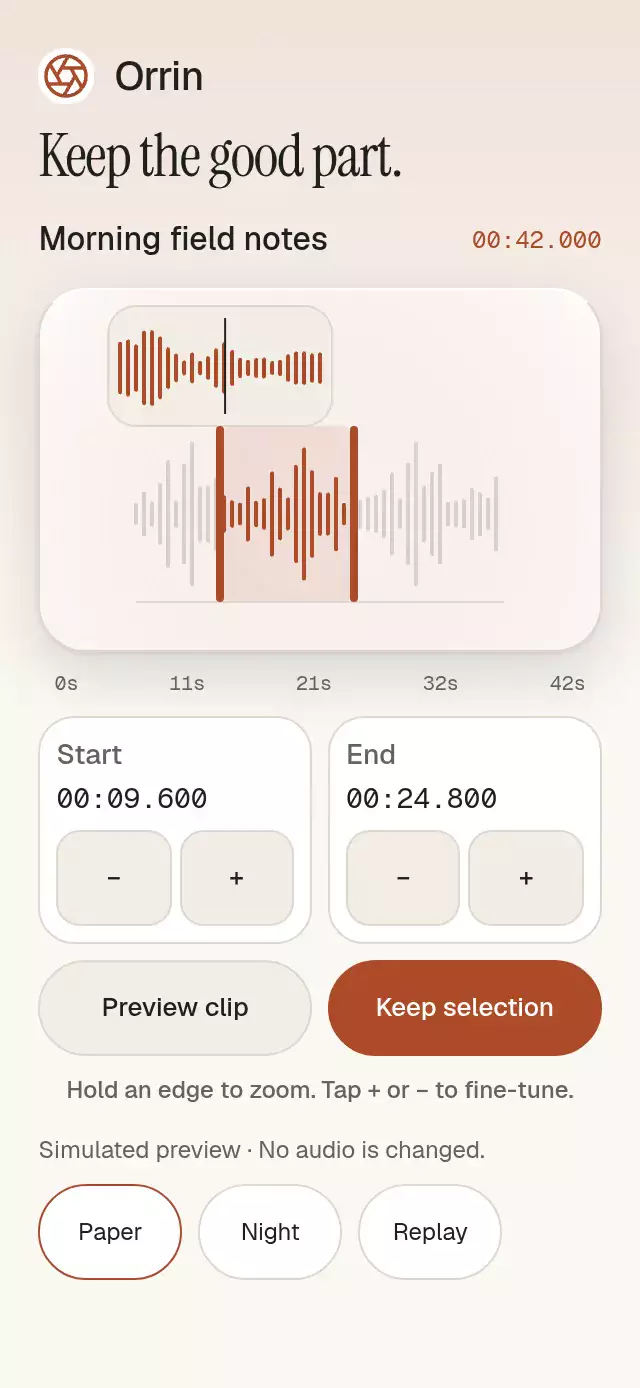
About this animation
An audio interval selector with two handles and a time loupe, with configurable waveform samples, labels, palette, and fonts. It selects intervals and does not play, decode, export, or trim audio files.
How it works
- Samples are clamped to [0, 1]; nonfinite values become zero. The measured host width determines waveform density, with 2-point bars on a 4-point pitch.
- A single UI-thread
rangeStaterecord owns start, end, active edge, zoom center, and zoom target. The loupe derives its eased scale from that record, so continuous boundary updates cannot interrupt the zoom animation. - Directional pans activate after 10 points horizontally and fail after 8 points vertically. Targets extend 48 points outward from each boundary and never overlap. Dragging opens the loupe; a stationary 300 ms hold also opens it. The main overview stays fixed, so opening the loupe never changes the second represented by the finger.
- JS receives range updates at most every 50 ms while dragging and a final update plus one commit on release. The geometry remains on UI. Canceled gestures restore the last accepted selection without a commit.
- The host supplies
playheadand implements playback through callbacks. Confirmation requests the retained interval and sends one accessible announcement. A 260 ms light pass is clipped to the retained bars.
Install
npx expo install @shopify/react-native-skia expo-blur react-native-gesture-handler react-native-reanimated react-native-workletsCopy this folder without demo/ into your project. Use a GestureHandlerRootView at the application root. Expo SDK 58 configures Reanimated's worklets plugin through babel-preset-expo. For Skia on web, initialize CanvasKit before importing/rendering the component, following the Skia web setup. The host owns safe area insets. No additional native modules or audio permissions are needed in this repository's Expo Go setup.
Usage
import { GestureHandlerRootView } from 'react-native-gesture-handler';
import WaveformRangeTrimmer from './waveform-range-trimmer';

export default function Editor() {
  return (
    <GestureHandlerRootView style={{ flex: 1 }}>
      <WaveformRangeTrimmer
        amplitudes={[0.2, 0.7, 0.4, 0.9, 0.3]}
        duration={42}
        defaultRange={{ start: 8.4, end: 24.8 }}
        onConfirm={(range) => saveSelection(range)}
      />
    </GestureHandlerRootView>
  );
}
saveSelection is your application's interval persistence function. With external state and personality knobs:
<WaveformRangeTrimmer
  amplitudes={samples}
  duration={42}
  range={selection}
  onRangeChange={setSelection}
  playhead={playbackPosition}
  onPreviewRequest={playInterval}
  onPauseRequest={pauseAudio}
  colorScheme="dark"
  palette={{ accent: '#FFA980', onAccent: '#151720' }}
  motion={{ durationScale: 0.8, glowOpacity: 0.2 }}
  labels={{ confirm: 'Keep this clip', confirmed: 'Clip selection saved' }}
  formatTime={formatClipTime}
  style={{ width: 300, height: 400, flex: 0, flexBasis: 'auto', flexShrink: 0 }}
/>
The names in the second example are application-owned state, callbacks, samples, and formatter. In controlled mode, props are authoritative: accept requested changes through onRangeChange. An unaccepted request never becomes a committed internal selection. There is no React state update for each rendered frame.
Props
| Prop | Type | Default / behavior |
|---|---|---|
amplitudes | readonly number[] | Required; empty input shows an accessible empty state. |
duration | number | Required seconds; nonfinite or shorter than the minimum shows an invalid state and disables actions. |
range | {start,end} | Controlled selection; wins over internal state. |
defaultRange | {start,end} | Entire duration; initializes uncontrolled state and reset. |
minDuration | number | 1 second; nonpositive/nonfinite values fall back to 1. |
playhead | number | 0; external clock, clamped to duration. |
onRangeChange | (range) => void | Gesture notifications at 20 Hz maximum, discrete requests, and final release. |
onRangeCommit | (range) => void | Once on a completed drag or precision adjustment. |
onPreviewRequest | (range) => void | Host starts playback. |
onPauseRequest | () => void | Host pauses playback. |
onConfirm | (range) => void | Host retains the selected interval. |
labels | Partial<Labels> | Neutral English copy; includes start/end, preview/pause/confirm, empty/invalid/zoom, increase/decrease, precision button symbols, and confirmed announcement. |
formatRulerTime | (seconds) => string | Optional compact ruler labels; defaults to formatTime. |
formatTime | (seconds) => string | MM:SS.mmm; ruler uses the same formatter. |
colorScheme | 'light' | 'dark' | 'auto' | auto; complete Paper and Night palettes. |
palette | Partial<Palette> | Overrides all standard tokens plus highlight for the selection light/border. |
fontFamily | string | System body and control font. |
titleFontFamily | string | System label font. |
monoFontFamily | string | System time font; tabular values recommended. |
motion | {durationScale?,glowOpacity?} | 1 and 0.25; clamped to 0.5–2 and 0–0.3. |
disabled | boolean | false; blocks gestures, buttons, and imperative actions except reset. |
style | StyleProp<ViewStyle> | Applied last to the flex root. |
testID | string | waveform-range-trimmer; stable handle/value/precision/preview/confirm suffixes. |
accessibilityLabel | string | Audio range. |
Palette exposes background, surface, elevated, text, muted, border, accent, onAccent, accentSoft, glow, success, error, scrim, track, focus, and highlight. AudioRange, Palette, Labels, WaveformRangeTrimmerProps, and WaveformRangeTrimmerHandle are exported from index.ts.
The ref exposes setRange(start,end), preview(), pause(), reset(), and confirm(). The extra confirm() method lets the demo show the same public confirmation action during autoplay. setRange requests one change and commit and briefly opens the changed edge's loupe. Nonfinite endpoints fall back to zero/duration, and ranges are clamped in bounds with the minimum duration enforced. Duration changes cancel active geometry; reset/unmount invalidate queued gesture callbacks.
Compatibility
Targets Expo SDK 58, React Native 0.88.0, React 19, Reanimated 4.7.1, Worklets 0.13.0, Gesture Handler 3.3, Skia 2.14.0, and expo-blur 58.0.5. Native architecture is required by Reanimated 4. On Android 12+, the glass capsule uses BlurTargetView and dimezisBlurViewSdk31Plus; older Android uses the tinted fallback. Every blur wrapper has its own radius and clipping.
Raster density is N/A: all artwork is vector or synthetic geometry. Icons: Lucide aperture (ISC), copied exactly from the local kit; the Orrin brand and palette belong to the demo only.
Accessibility
Handles expose adjustable roles and named increment/decrement actions. The visible ± controls offer 0.1-second precision without dragging. Web handles support Tab and arrow keys, Escape cancels, and buttons support normal Enter/Space activation. Logical time and gestures mirror in RTL. Confirmation announces the interval once; intermediate samples are not live announcements. Values and control text remain in normal flow and use system font scaling.
Reduced motion makes geometry changes immediate and removes the confirmation light pass. The internal ScrollView owns overflow when embedded in a 300×400 slot; the demo's outer scroll owns the surrounding page. Pans are limited to outward handle zones, leaving waveform space available for vertical scrolling. Host-provided accessible text and formatters should be localized together.
Why this one
This pattern selects a retained interval with two bounds and a temporal loupe. It complements a waveform playback message or a data scrubber with explicit range confirmation and non-drag precision controls. The frozen overview prevents zoom-induced boundary drift; the loupe shows the same second at its center at every scale.
The demo uses a compact 180-point waveform overview, side-by-side time cards, and one row of four 48-point precision targets. It fits 320×694 and 390×844 without scrolling; shorter windows use a single outer scroll container. Playback, the loupe, and range gestures retain the same behavior.