About this animation
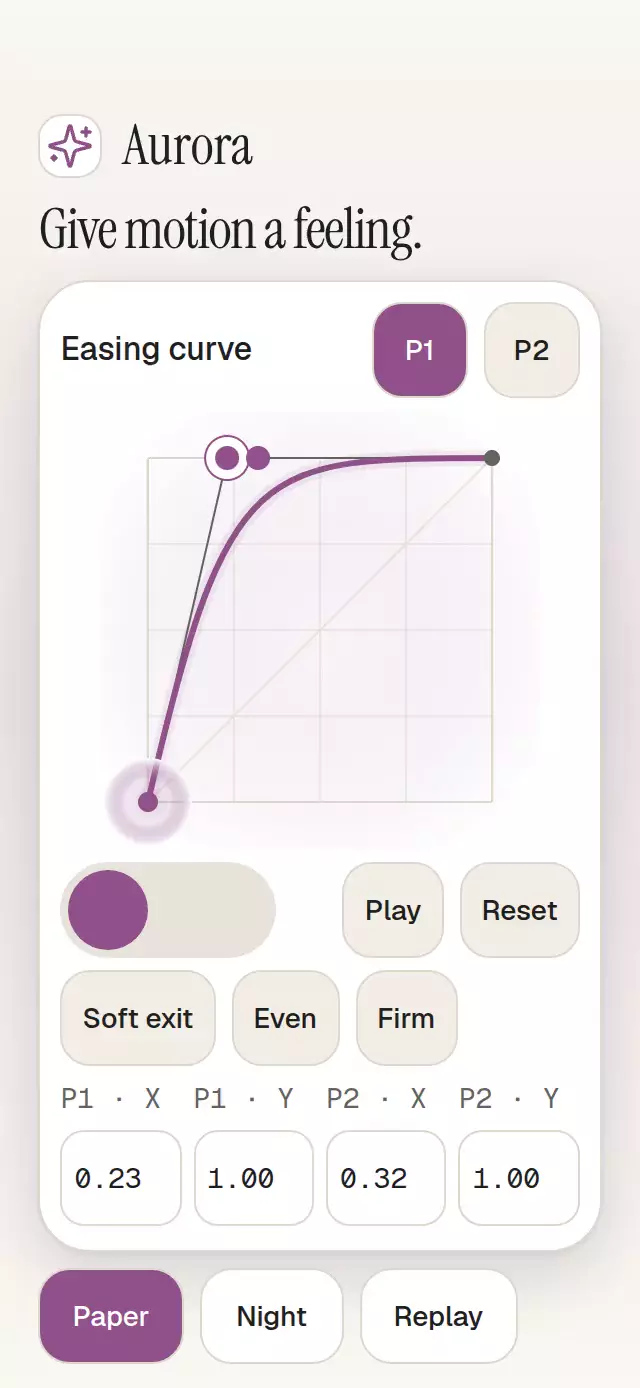
A two-handle easing editor with a motion preview and configurable presets, labels, palette, and fonts.
How it works
- A single UI shared value stores
{ x1, y1, x2, y2 }. Handles, tangent lines, the path, and both previews derive from it. - A separate preview clock supplies normalized time. The evaluator solves
Bx(u) = timewith up to six bounded Newton steps and twelve bisection steps, then returnsBy(u). Endpoints return exactly 0 and 1. - Dragging follows the finger directly. Releasing runs the graph tracer and capsule from the same clock for 500 ms. Presets use an interruptible spring with damping 32, stiffness 300, and explicit mass 1.
- Coordinate inputs commit on blur or Enter. Focus a coordinate to reveal its ±.01 buttons; arrow keys also adjust it. Invalid drafts leave the last valid curve intact. Escape discards a draft.
- Consumer drag notifications are limited to 20 Hz, with one final commit. Drawing stays on UI; numeric text is sampled at 20 Hz and updated exactly at a completed edit.
Install
npx expo install @shopify/react-native-skia react-native-gesture-handler react-native-reanimated react-native-workletsCopy this folder without demo/. Wrap your app in GestureHandlerRootView. Expo configures the Worklets Babel plugin. On web, load CanvasKit before importing the component using Skia's WithSkiaWeb or LoadSkiaWeb; serve canvaskit.wasm from your public assets. The host owns safe areas.
Usage
import { BezierMotionEditor } from './bezier-motion-editor';

export function Editor() {
  return <BezierMotionEditor style={{ flex: 1 }} />;
}
Controlled example with personality knobs:
import { useRef, useState } from 'react';
import {
  BezierMotionEditor,
  type BezierMotionEditorHandle,
  type CurveValue,
} from './bezier-motion-editor';

export function MotionSettings() {
  const editor = useRef<BezierMotionEditorHandle>(null);
  const [curve, setCurve] = useState<CurveValue>({
    x1: 0.23, y1: 1, x2: 0.32, y2: 1,
  });
  return (
    <BezierMotionEditor
      ref={editor}
      value={curve}
      onChange={setCurve}
      presets={[
        { id: 'even', label: 'Even', value: { x1: 0, y1: 0, x2: 1, y2: 1 } },
      ]}
      colorScheme="dark"
      palette={{ accent: '#E1A9DA', onAccent: '#151720' }}
      motion={{ durationScale: 0.8, glowOpacity: 0.2 }}
      previewDuration={1000}
      labels={{
        p1: 'P1', p2: 'P2', x: 'X', y: 'Y', play: 'Play', pause: 'Pause',
        reset: 'Reset', invalid: 'Enter a valid coordinate.', curve: 'Easing curve',
        preview: 'Motion preview', step: 'Step', decrease: '−.01', increase: '+.01',
      }}
    />
  );
}
Props
| Prop | Default | Description |
|---|---|---|
value?: CurveValue | uncontrolled | Authoritative curve. Imperative changes emit one request instead of overriding this prop. A drag uses a temporary visual draft, then returns to the latest accepted prop. |
defaultValue?: CurveValue | (0,0,1,1) | Initial uncontrolled value and reset target. |
onChange?, onCommit? | — | Requested curve / one completed edit. Final notification is independent of the drag throttle. |
presets?: readonly Preset[] | [] | { id, label, value }; invalid or empty IDs are omitted; first duplicate ID wins. Unknown imperative IDs do nothing. |
allowOvershoot?: boolean | false | X always lies in [0,1]. Y lies in [0,1], or [−.5,1.5] when enabled. Crossing X coordinates is valid. |
previewDuration?: number | 1000 | Travel time in ms, followed by a 300 ms hold in regular playback. Invalid durations use 1000. |
labels?: Labels | neutral English | Every control label, error, axis name, and static Step action. Optional increase / decrease labels default to mathematical ±.01. Announcements compose these labels and formatted coordinates. |
formatValue? | two decimal places | Formats coordinate output. Draft entry uses JavaScript decimal notation, independent of display formatting. |
colorScheme? | auto | light, dark, or system preference. Complete Paper / Night palettes are exported. |
palette?: Partial<Palette> | theme palette | All semantic colors including text, focus, error, surfaces, tracks, and glow. |
fontFamily?, titleFontFamily?, monoFontFamily? | system | Interface, heading, and coordinate fonts. Component has no theme dependency. |
motion? | { durationScale: 1, glowOpacity: .25 } | Clamped to .5–2 and 0–.3. Invalid numbers use defaults. |
disabled? | false | Blocks editing and all ref methods except reset. |
active? | true | Host visibility flag. Set false offscreen; backgrounding also stops playback and cancels draft work. |
scrollable? | true | Internal scrolling host for bounded hosts. Set false in a bounded flex host for the compact layout: square graph sized from the remaining height and preview actions beside the rail. |
onInteraction? | — | Lets a demo cancel its own timers on real input. |
style?, testID?, accessibilityLabel? | root defaults | Root is flex:1; style is applied last. Default test ID is bezier-motion-editor. |
BezierMotionEditorHandle: setCurve(value), applyPreset(id), play(duration?), pause(), reset(). Play resumes a paused clock; an optional positive duration changes the next run. Reset stops the clock and invalidates queued edits. In controlled mode reset also requests a value through callbacks.
NaN, Infinity, and out-of-range curves do not replace the last valid value. Invalid initial data falls back to a valid default or Even. Turning overshoot off clamps a previously accepted Y into [0,1]. Controls stay available when the preset list is empty. Test IDs include -graph, -rail, -select-p1, -select-p2, -preset-<id>, -x1, -y1, -x2, -y2, -increase, -decrease, -play, and -reset.
Compatibility
Targets Expo SDK 58, React 19, RN 0.88.0, Reanimated 4.7.1, Worklets 0.13.0, Gesture Handler 3.3, and Skia 2.14.0. These native modules are available in the matching Expo Go. Requires New Architecture and host web CanvasKit initialization.
Raster assets: N/A. No network assets or external art are used. The demo glyph is copied from the local Lucide kit (ISC); the demo font files are provided by the host.
The demo uses a bounded flex layout without a ScrollView. In compact mode, the graph remains square and uses the height left after reserving the controls. All four numeric fields share one row. When the editor is shorter than 440 pt, the window is shorter than 620 pt, or the font scale is at least 1.8, a live monospace cubic-bezier(…) line replaces the fields. Play/Reset sit beside the motion rail. The palette, curve evaluator, spring, and autoplay timeline are unchanged.
Accessibility
All actions have labeled 48 pt targets. P1/P2 selectors explicitly choose a handle when targets overlap. When numeric fields are visible, four labeled text inputs, arrow keys, and shared step buttons provide a complete gesture alternative. Compact low-height layouts show the live formula instead of numeric entry. Errors use text as well as color. Announcements occur only on confirmed edits. Tab/Enter follow native input/button behavior; Escape cancels an input draft. The numeric graph preserves mathematical X direction in RTL; the motion rail follows reading direction.
Reduced motion is observed at mount and through live OS changes. Automatic playback and springs stop; Step advances time by .1 without travel and exposes the current time. In the default scrollable layout, a 300×400 host keeps a 180 pt graph and scrolling controls, and large text reflows the inputs to one column. In compact mode the graph uses the remaining height. The demo hides its decorative header and theme/replay footer below 480 pt of available height to keep the editor controls in view. The default reusable layout retains internal scrolling; compact mode and the demo use no ScrollView. The reusable component adds no safe areas.
Why this one
This edits a function rather than one scalar. The displayed coordinates reproduce the easing, including crossed X handles and stationary tangents. The graph tracer and capsule evaluate the same time sample, so the preview explains what the curve actually does.