About this animation
Related guides
A document review tool with draggable corners and an image loupe, with configurable image, labels, palette, and fonts. Your app supplies capture results and the multipage collection.
How it works
- Your host renders the camera preview and supplies an oriented, frozen image in response to a capture request. The component never opens a camera.
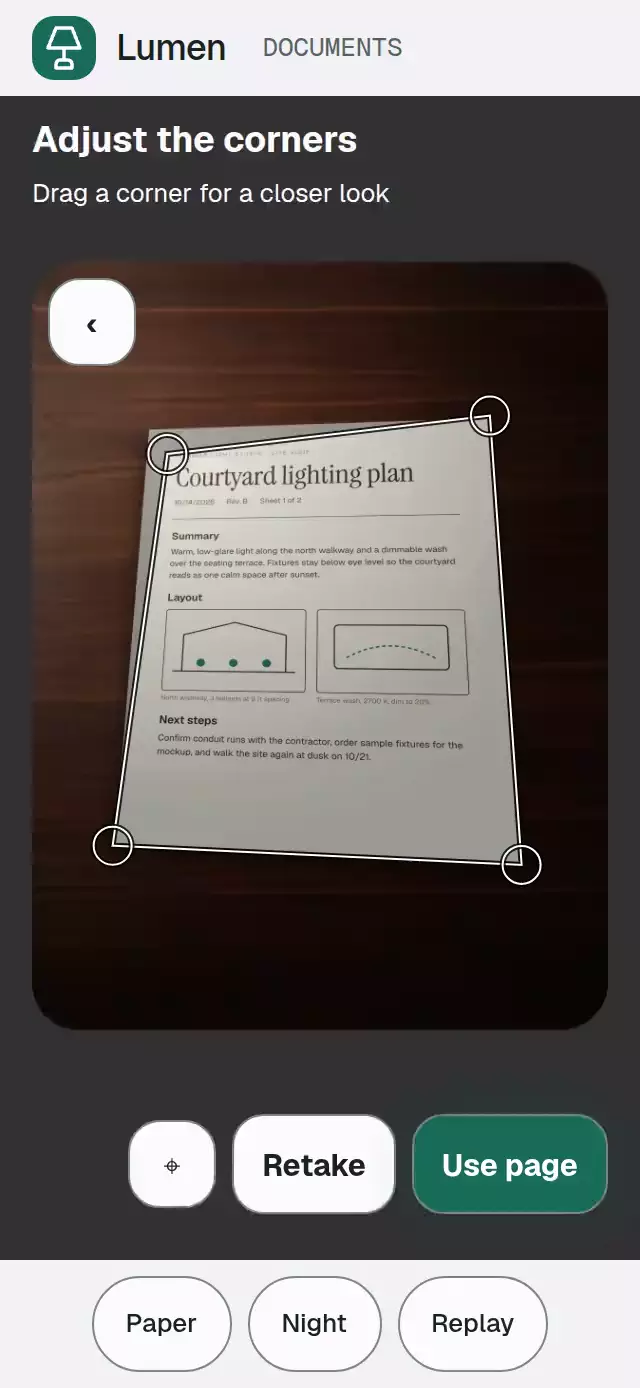
- A single UI record drives the quadrilateral, exterior mask, corner handles, and magnifier. Coordinates always refer to the source image, through the shared cover scale and crop.
- Each corner moves independently. Convexity, minimum edge length, minimum area, and image bounds constrain every proposal. Invalid movement is projected back along the movement segment without reordering corners.
- A completed drag or coordinate nudge proposes corners to the host. Controlled corners remain authoritative; provisional geometry is restored if the host does not authorize the proposal.
- Confirmation requests host acceptance. Only a matching response and effective accepted page list start the transfer. Over 740 ms, the captured quadrilateral straightens with a projective warp, crossfades to the host’s flat image, and springs into the page stack. This warp is visual only; export pixels remain the host’s responsibility.
- Accepted page IDs remain stable. Reconfirming a page replaces it instead of increasing the count. Uncorrected originals keep an Original label.
This is a presentation and editing component. Detection, camera permissions, orientation, OCR, PDF creation, persistence, and pixel correction belong to the host.
Install
Copy the files listed in piece.json into your project, then install SDK-compatible dependencies:
npx expo install @shopify/react-native-skia expo-image react-native-gesture-handler react-native-reanimated react-native-workletsWrap your application in GestureHandlerRootView. Follow Skia's web setup when targeting browsers and load CanvasKit before mounting this component. The component does not install a router, font provider, camera, or safe-area provider.
Usage
A host response is required even in uncontrolled mode. This minimal example supplies an existing image after capture and accepts its original pixels:
import { useRef, useState } from 'react';
import DocumentCornerCapture, {
  type DocumentCornerCaptureHandle,
  type Page,
} from './document-corner-capture';

export function DocumentReview({ page, onSave }: {
  page: Page;
  onSave: (pages: readonly Page[]) => void;
}) {
  const ref = useRef<DocumentCornerCaptureHandle>(null);
  const [capture, setCapture] = useState<{ requestId: string; page: Page }>();
  const [acceptance, setAcceptance] = useState<{ requestId: string; page: Page }>();

  return (
    <DocumentCornerCapture
      ref={ref}
      capture={capture}
      acceptance={acceptance}
      onCaptureRequest={({ requestId }) => setCapture({ requestId, page })}
      onRetake={({ requestId }) => setCapture({ requestId, page })}
      onConfirm={({ requestId, corners }) =>
        setAcceptance({ requestId, page: { ...page, corners } })
      }
      onFinish={onSave}
    />
  );
}
onSave is your application's persistence callback. Supply renderPreview={() => <YourCameraPreview />} for a live preview. The slot is noninteractive; review and magnification always use the frozen image. A standalone source with imageSize and defaultStatus="review" uses the stable page ID source until a host capture supplies its own ID.
Controlled corners and personality knobs:
const [corners, setCorners] = useState<Quad>(page.corners);
const [revision, setRevision] = useState(0);

<DocumentCornerCapture
  source={page.source}
  imageSize={page.imageSize}
  defaultStatus="review"
  corners={corners}
  revision={revision}
  onCornersCommit={(next) => {
    setCorners(next);
    setRevision((value) => value + 1);
  }}
  colorScheme="dark"
  palette={{ accent: '#89DFC0', onAccent: '#102C22' }}
  loupeZoom={1.8}
  maskOpacity={0.32}
  motion={{ durationScale: 1, glowOpacity: 0.18 }}
  labels={{ title: 'Review your page', confirm: 'Keep page' }}
/>
Import Quad from the same entry point. Pair this example with the capture/acceptance handlers above to accept pages.
Props
| Prop | Type | Default | Purpose |
|---|---|---|---|
source, imageSize | Source, {width,height} | — | Frozen oriented pixels and real dimensions. |
renderPreview | () => ReactNode | — | Host camera slot during capture only. |
detectedCorners | Quad | null | Manual inset .08 | Host detection in source coordinates. No detection claim is generated. |
corners, defaultCorners | Quad | Inset .08 | Controlled authorization or initial manual corners. |
revision | number | 0 | Authorization version; changes cancel in-flight gestures. |
onCornersChange | (quad, {pageId,reason}) => void | — | Provisional proposals, at most 20 Hz plus the final value. |
onCornersCommit | (quad, {pageId,revision,reason}) => void | — | One final proposal per completed drag or nudge; none for a canceled drag. |
status, defaultStatus | Status | Capture if preview/source exists, otherwise empty | Controlled or initial phase. |
onStatusChange | (status, {reason,requestId}) => void | — | Phase requests; controlled status must be updated by the host. |
onCaptureRequest, capture | Request callback, {requestId,page} | — | Request and matching frozen photo response. |
onRetake | ({pageId,requestId}) => void | — | Replacement photo request without deleting accepted pages. |
onConfirm, acceptance | Request callback, {requestId,page} | — | Acceptance request and matching host result. |
onPageAccepted | (page) => void | — | Once after effective acceptance for each request ID. |
pages, defaultPages | readonly Page[] | [] | Controlled or initial accepted collection. |
onPagesChange | (pages, {reason,pageId}) => void | — | Proposed replacement/append; controlled stack waits for this array. |
activePageId, onActivePageChange | string | null, callback | Internal | Selected page and selection requests. |
onFinish | (pages) => void | — | Delivers the effective accepted list. |
error | {message,requestId?} | — | Host error; matching errors preserve the current page. |
disabled, readOnly | boolean | false | Disabled blocks actions except reset; read-only permits viewing. |
maxPages | number | 20 | Stops new captures while allowing existing-page review/replacement. |
loupeZoom | number | 2 | Clamped to source density at 3×. |
loupeDiameter | number | 79 | Lens diameter, clamped to 64–96 points. |
maskOpacity | number | .32 | Exterior dimming, clamped to 0–.85. |
cornerStep | number | .005 | Normalized nudge step. Shift+arrow uses .02. |
minEdge, minArea | number | .04, .01 | Normalized geometry constraints. |
labels | Partial<Labels> | Neutral English | All control, instruction, empty, loading, error, and corner copy. |
formatPageCount, formatPageIndex | Functions | Numeric count/index | Localizable collection text. |
formatCorner | (point,name) => string | Name and coordinates | Visible and accessible coordinates. |
formatAnnouncement | (event) => string | Silent | Discrete phase announcements; return an empty string to omit one. |
colorScheme, palette | 'light' | 'dark' | 'auto', Partial<Palette> | Auto, Paper/Night | Complete semantic theme including frame, lens, camera, paper, and shadow roles. |
fontFamily, titleFontFamily, monoFontFamily | string | System | Body, title/action, and coordinate/count fonts. |
motion | {durationScale?,glowOpacity?} | 1, .18 | Timing .5–2; glow input 0–.3, rendered maximum .18. |
onInteraction, onReady, onImageError | Callbacks | — | Real input, frozen image readiness, and image failures. |
style, testID, accessibilityLabel | Standard container props | Flex root, document-corner-capture | Embedding, stable test prefix, accessible root label. |
Point={x:number,y:number}. Quad is a readonly tuple in physical TL, TR, BR, BL order. Each coordinate is normalized to the oriented source image; RTL does not mirror pixels.
Page={id,source,imageSize,corners,label,correctedSource?,correctedSize?}. Sources use expo-image's public source type. Supply the corrected dimensions when supplying corrected pixels. All IDs must be unique. Invalid geometry or dimensions block confirmation and show an error; unknown page IDs are ignored. Finite out-of-range movement is constrained, while nonfinite deltas are ignored. Nonfinite revision values fall back to zero. Duplicate or invalid pages are omitted from the displayed stack and block new capture/confirmation until the host supplies a valid list. Invalid host corners are never silently accepted as a replacement quad.
The handle exposes capture(), retake(), openPage(id), closeReview(), selectCorner(id), adjustCorner(id,delta), confirm(), finish(), and reset(). Programmatic actions request the same changes as touch actions. reset() invalidates pending request IDs and restores uncontrolled defaults. Late responses and duplicate response IDs are ignored. With controlled pages, publish the proposed page including its returned source, corrected source, and corners before acceptance is reported. Keep image source object identities stable between renders.
When controlling corners, update them when opening a different page as well as when accepting an edit. Controlled activePageId and status must also honor the corresponding callbacks. Confirmation does not repeat a geometry commit. Capture and processing wait for actual host data; neither fabricates pixels after a timeout.
Compatibility
Expo SDK 58, React Native 0.88.0 with New Architecture, React 19, Reanimated 4.7.1, Worklets 0.13.0, Gesture Handler 3.3, Skia 2.14.0, and Expo Image 58. Targets iOS, Android, and web with the installed stack. Compatible with Expo Go's bundled native modules; custom camera providers may require a development build.
The host owns safe areas and supplies a bounded flex container. The component uses a 3:4 viewer with 16-point side margins, a 24-point radius, and a shared cover transform for the photo and editing geometry. Short containers use a smaller 3:4 viewer; wide containers place controls beside it. The demo reserves a separate bottom bar for its theme controls. Coordinates recompute after resize or orientation changes. Fine adjustments open an overlay from the labeled coordinate icon. Keep the last camera frame mounted while preparing a page; a subtle 1.2-second sweep indicates progress.
Accessibility
Corner targets and controls are at least 48×48 points. Use Adjust coordinates to select a corner and move it with four labeled buttons. On web, corner selectors support arrows, Shift+arrow, Escape to cancel the active drag, and Enter to request acceptance. Completed nudges are commits; canceling later does not undo an already authorized edit.
Reduced motion replaces transfer movement with a 200 ms fade and removes scale feedback. The active geometry remains valid when the system preference changes. State changes can announce through formatAnnouncement; no per-frame announcements are generated. The -checkpoint accessibility label contains phase, page ID, authorized quad, accepted IDs, and revision for host automation. State and failures also have text; selection has a border and accessible selected state.
Stable suffixes include -capture, -confirm, -retake, -finish, -corner-tl/tr/br/bl, -select-tl/tr/br/bl, -page-<id>, -nudge-left/right/up/down, and -checkpoint.
Why this one
A free convex quadrilateral gives each document corner its own identity while the photograph stays still. The lens shows the same source detail under that corner. Request IDs and host authorization connect this visual editing workflow to a real capture pipeline without pretending to perform detection or image processing.
Demo artwork is original, supplied as coherent camera/flat pairs. Document layouts use the project's OFL fonts on an original generated tabletop. The Lumen lamp uses the project's Lucide kit (ISC). No reference imagery or reference branding ships with this folder.