About this animation
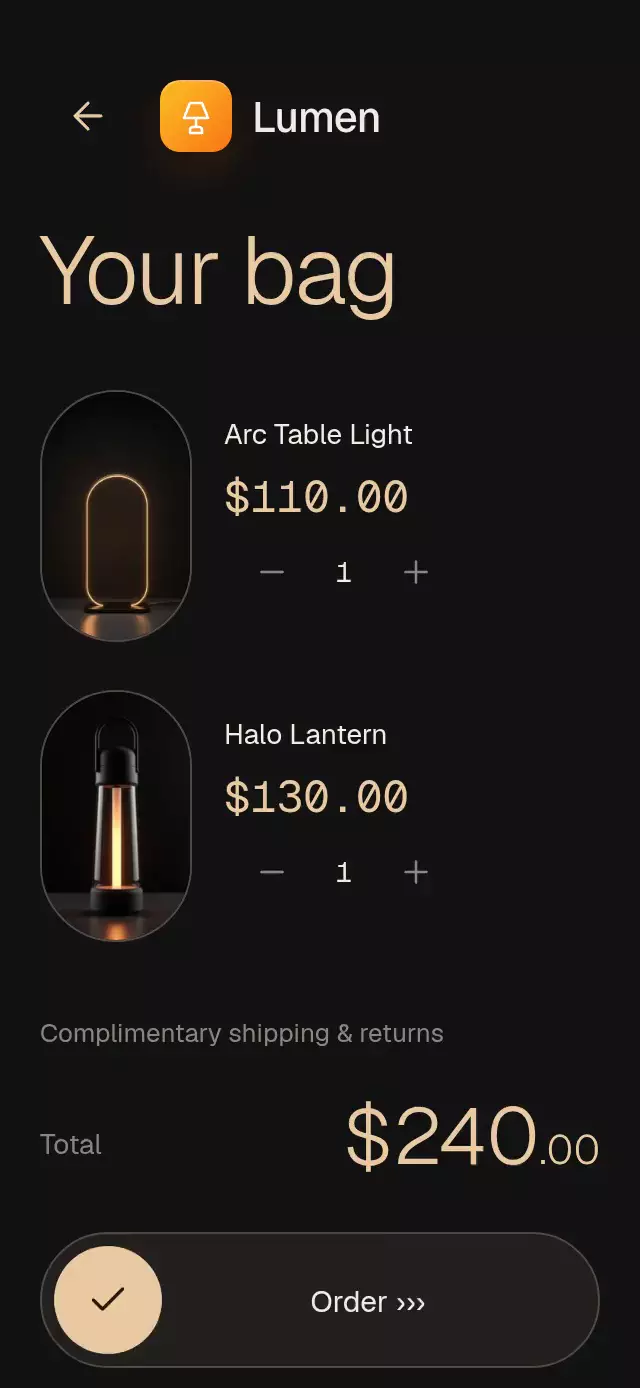
A lighting storefront with image-anchored details and slide-to-order checkout, with configurable products, labels, palette, and fonts.
Why this one
A product page usually describes an object. This one lets shoppers use it: tap the lantern to light it, or drag upward to tune its intensity. The same continuous value crossfades matched photographs, warms the room, illuminates the heading, and reveals the product details. The demo uses original local artwork and the Lumen identity from the catalog kit.
How it works
Product photos load into memory at mount, with decoded references reused in the collection, detail, and bag. Images load eagerly on web without an entry fade. Hotspots wait until the unlit hero has rendered, and their labels wrap between words. The demo starts its autoplay timeline after onReady.
- The collection measures each capsule in window coordinates. Opening a product interpolates its photo from that measured capsule into the large image with an interruptible spring.
- One UI-thread light value drives the on/off crossfade, Skia radial halo, background temperature, heading glow, and staggered hotspot reveals.
- Hotspots use image-relative coordinates. Their lines grow before their glass labels fully appear; tapping an arrow toggles its label.
- Gesture Handler races tap and pan on the product and the order control. Press feedback has its own shared value, keeping light intensity independent from pressure.
- The bag manages quantities locally. Completing the slider settles to the endpoint and calls
onOrderonce. This is a presentation component; the host handles payment and fulfillment.
Install
npx expo install @shopify/react-native-skia expo-blur expo-image expo-linear-gradient react-native-gesture-handler react-native-reanimated react-native-workletsUse a GestureHandlerRootView in the host app and configure Reanimated/worklets for your Expo SDK. On web, initialize CanvasKit before mounting this component (the catalog uses its withSkia loader). Copy the component, icons.ts, and index.ts; demo artwork is optional and supplied separately through props.
Usage
import { useRef } from 'react';
import { LampHotspotShowcase, type LampHotspotShowcaseRef } from './lamp-hotspot-showcase';

const showcase = useRef<LampHotspotShowcaseRef>(null);

<LampHotspotShowcase
  ref={showcase}
  products={[{
    id: 'portable',
    name: 'Portable\nLantern',
    price: 130,
    imageOff: require('./assets/lamp-off.jpg'),
    imageOn: require('./assets/lamp-on.jpg'),
    details: [{ label: 'Glass diffuser', point: { x: 0.55, y: 0.56 }, side: 'right' }],
  }]}
  onOrder={items => submitOrder(items)}
/>

// Optional controls and personality knobs:
showcase.current?.openProduct('portable');
showcase.current?.setGlow(0.65);<LampHotspotShowcase
products={products}
cart={[{ productId: 'portable', quantity: 1 }]}
palette={{ background: '#101210', surface: '#262B25', text: '#FAFFF6', muted: '#ADB5A5', accent: '#C9DEB0', border: '#485341', glow: '#C2DD92', onAccent: '#192016' }}
labels={{ discover: 'Objects for evening', order: 'Place order' }}
glowStrength={0.45}
fontFamily="YourRegularFont"
headingFontFamily="YourLightFont"
formatPrice={amount => `$${amount.toFixed(2)}`}
/>Use matching on/off photographs with identical framing and aspect ratio. Hotspot positions are normalized against the full uncropped image; keep labels short and points near the object center. The demo's main image is capped at 256 points for its 768-pixel source. Other aspect ratios require corresponding artwork preparation.
Props
| Prop | Type | Default | Purpose |
|---|---|---|---|
products | LampProduct[] | Required | IDs, names, numeric prices, matched images, and labeled points. |
cart | LampCartItem[] | [] | Initial locally editable quantities. |
palette | Partial<LampPalette> | Warm black / pale gold | Override all eight color roles for another theme. |
labels | Partial<LampLabels> | English interface copy | All structural text and announcements. |
glassTint | light or dark | dark | Match glass rendering to the supplied palette. |
brand | ReactNode | None | Brand tile and wordmark slot. |
fontFamily | string | System | Interface typeface. |
headingFontFamily | string | System | Editorial heading typeface. |
monoFontFamily | string | System | Price and quantity typeface. |
formatPrice | (number) => string | USD, two decimals | Localized amount formatting. Fractional text is half-size for decimal-dot formats. |
glowStrength | number | 0.65 | Maximum radial light opacity, clamped to 0–1. |
onReady | () => void | None | Images prepared; hosts can start autoplay after initial loading. |
onBuy | (product) => void | None | Product added and bag opened. |
onOrder | (cart) => void | None | Order completed, positive quantities only. |
onInteraction | () => void | None | Touch-start callback for canceling host autoplay. |
style | StyleProp<ViewStyle> | None | Root style; root defaults to flex: 1. |
testID | string | lamp-hotspot-showcase | Prefix for product, light, bag, quantity, buy, back, and order controls. |
Ref methods: openProduct(id), setGlow(0..1), buy(), order(), and reset() (restores the initial cart). The demo owns autoplay: collection → open at 0.75 s → light at 1.35 s → bag at 4 s → order at 5.7 s → return at 8 s. Any touch cancels its timers, including subsequent loops.
Compatibility
Expo SDK 58, React Native 0.88.0, Reanimated 4.7.1, worklets 0.13.0, and Skia 2.14.0. Expo Go supports the installed modules. Supports iOS, Android, and web.
The host supplies safe-area insets. The component measures its own container, caps content width at 500 points, and reduces the hero height in short containers. Vertical scrolling keeps content available at 320×568, 320×694, 390×844, landscape, and a 300×400 embedded size. Larger accessibility text may require scrolling. Android blur targets the photograph through BlurTargetView, with dimezisBlurViewSdk31Plus; older Android versions retain a tinted surface. No network images or native dependencies beyond the listed Expo-compatible stack.
Accessibility
Every action has a 48-point minimum target, a role and a label. Tap is an alternative to both drag gestures. The product exposes screen-reader increment/decrement/activate actions. Product changes, light endpoints, bag opening, and order completion are announced. Quantity changes use discrete text rather than digit reels.
Reduced motion replaces the capsule flight and light change with 200 ms fades, suppresses pulse/line scaling and press scaling, and fades the order state. The top-right header area is reserved for the catalog viewer.
Icons: Lucide (ISC), copied from the project kit. Demo brand: Lumen from docs/kit/marcas.json.