About this animation
Related guides
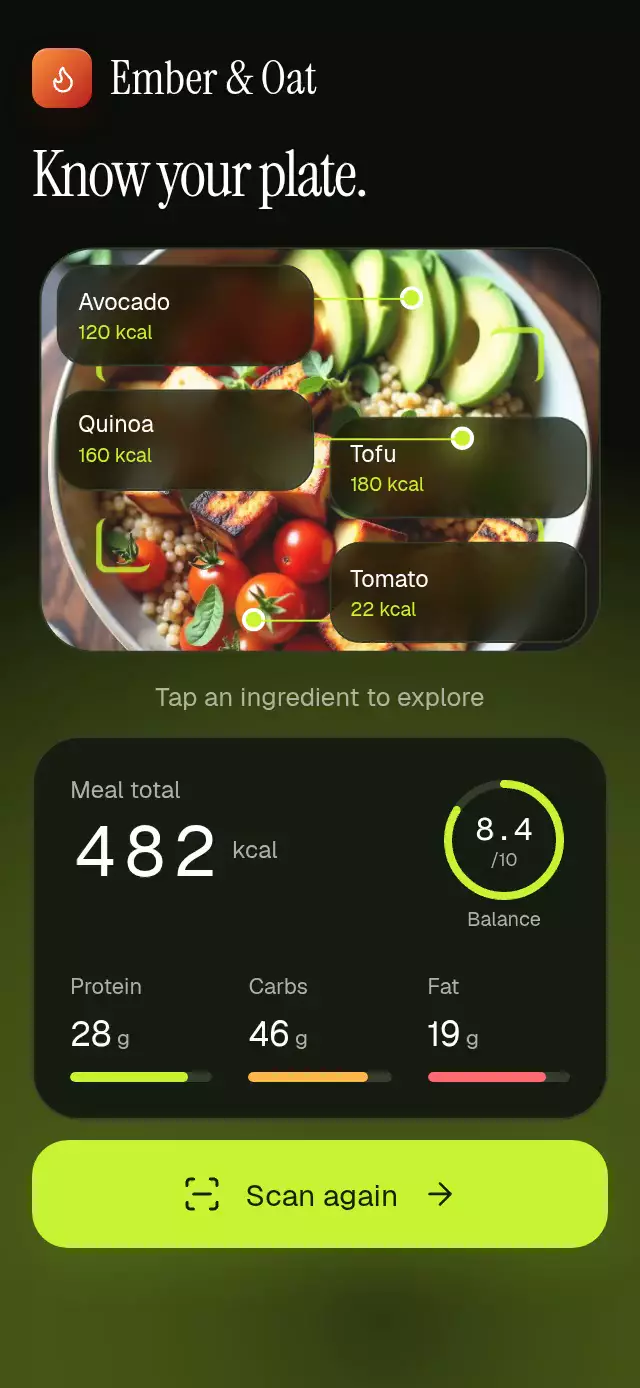
An animated nutrition scan with ingredient labels and a results panel, using your photo, labels, fonts, and theme. Your app supplies ingredient and macro data; the component does not capture photos or infer nutrition.
Why this one
Instead of a spinner followed by a table, the scan shows its work: the frame settles around the plate, a luminous line passes down and back up, ingredient anchors release glass labels, and the photo makes room for the nutrition panel. Selecting an ingredient connects the visual detection to its calorie and macro breakdown.
This is a visualization of application-supplied nutrition data. It does not use the camera, identify food, or estimate nutrition from an image.
How it works
onLayoutmeasures the host. The photo spans the available width with a 440-point cap; small containers can scroll vertically.- One continuous UI-thread progress value coordinates the 3-second scan: framing at 0–360 ms, down-and-up scan at 360–1380 ms, staggered detections at 1410–1935 ms, photo contraction at 2040–2520 ms, and nutrition at 2100–3000 ms.
- A clipped second rendering of the actual image uses a color matrix to brighten the scanned region. A translucent gradient trails the scan line inside the photo.
- Ingredient labels use rounded
BlurViewsurfaces over aBlurTargetView. Gesture Handler taps have their own pressure springs. Their anchor coordinates track the image's centered cover crop. - Calorie columns roll on the UI thread, each carrying into the next column and settling at the exact integer. The three macro bars grow in sequence; the balance ring uses a single continuous path.
- Tapping a label dims the other detections and updates the panel. Tap it again, or tap the panel's calorie heading, to restore the meal totals. Repeated scan requests resume an active scan; completed scans restart.
Install
npx expo install @shopify/react-native-skia expo-blur react-native-gesture-handler react-native-reanimated react-native-workletsUse a GestureHandlerRootView at your app root and configure Reanimated/Worklets as required by your Expo SDK. For Skia on web, initialize CanvasKit through your host's Skia web setup. The demo additionally uses expo-linear-gradient for its kit brand tile and host-loaded fonts.
Usage
import MealScanNutrition from './meal-scan-nutrition';

<MealScanNutrition
  image={require('./assets/bowl.jpg')}
  ingredients={[
    { name: 'Tofu', kcal: 180, x: 0.4, y: 0.52,
      macros: { protein: 20, carbs: 4, fat: 10 } },
  ]}
  totals={{ kcal: 482, protein: 28, carbs: 46, fat: 19, balance: 8.4 }}
  onScan={() => requestNutrition()}
/>
Customize copy, typography, and the whole palette:
const scanner = useRef<MealScanNutritionRef>(null);

<MealScanNutrition
  ref={scanner}
  image={photo}
  ingredients={ingredients}
  totals={totals}
  duration={2800}
  fontFamily="YourSans"
  titleFontFamily="YourDisplay"
  monoFontFamily="YourMono"
  labels={{ title: 'Lunch, understood.', scan: 'Analyze lunch' }}
  theme={{ accent: '#C6F432', surface: '#171C12' }}
  testID="lunch-scan"
/>

// Event handlers or effects:
scanner.current?.scan();
scanner.current?.selectIngredient(0);
scanner.current?.reset();
Import MealScanNutritionRef from the same folder. The demo owns autoplay: 1.5-second idle, scan, labels, panel, Tofu selection at 5.1 seconds, total at 6.7 seconds, reset at 8.2 seconds. All timers are cleaned up.
Props
| Prop | Type | Default | Description |
|---|---|---|---|
image | Skia DataSourceParam | Required | Local module or image URI; portrait 4:5 recommended. |
ingredients | MealIngredient[] | Required | Names, kcal, normalized photo coordinates, and macros in grams. Four detections recommended. |
totals | MealMacros & { kcal; balance } | Required | Meal nutrition and balance score from 0 to 10. |
onScan | () => void | — | Scan request callback. |
labels | Partial<Labels> | English copy | All visible copy, units, and announcements. |
theme | Partial<MealScanTheme> | Dark/lime | Background, surface, text, muted, border, accent, amber, coral, buttonText, glass. Supply all fields for a complete light theme. |
fontFamily | string | System | Interface text. |
titleFontFamily | string | Interface font | Display heading. |
monoFontFamily | string | System | Calorie columns and score. |
duration | number | 3000 | Timeline duration in ms, minimum 1000. |
header | ReactNode | — | Optional product identity. |
style | StyleProp<ViewStyle> | — | Root container styling. |
testID | string | meal-scan-nutrition | Root ID; controls append -scan, -total, or -ingredient-N. |
The forwarded ref exposes scan(), reset(), and selectIngredient(index | null). Values are supplied in kcal and grams; replace their visible unit labels through labels. Calories display nonnegative whole values up to 9999. Ingredient names should be short enough for two-line glass labels. More than four detections may need custom label placement to avoid collisions.
Compatibility
Expo SDK 58; React Native 0.88.0; Reanimated 4.7.1; Worklets 0.13.0; Skia 2.14.0. Dependencies are included in the project's Expo Go stack. Supports iOS, Android, and web. The host applies safe area insets; the component does not add device insets. Vertical scrolling preserves access in small containers, landscape, and larger text settings. Use a high-resolution local image to prevent empty remote-image scan entrances.
Accessibility
Scan and total controls expose button roles and labels. Ingredient labels support touch and accessibility activation. Scan start, nutrition readiness, reset, and ingredient selection are announced. Pressure feedback uses independent shared values. Reduced motion removes breathing, scan travel, panel translation, and digit travel, replacing changes with short fades. No per-frame React state is used.
Icons: Lucide (ISC), copied from the repository kit. Demo identity: Ember & Oat, from the repository brand kit. Photo: supplied local demo art, 1024×1280.