About this animation
An approval flow where a swinging cradle becomes a coin and offer, with configurable offer data, coin image, colors, and fonts.
Why this one
A spinner cannot respond to your touch. This waiting object exchanges momentum between its end balls, lets you pull and release either end, and turns its final ball into the outcome. Chrome highlights, a pink contact pulse, a violet atmosphere, and an iridescent coin give the flow its own identity.
How it works
onLayoutmeasures the host container. The cradle and coin use local dimensions, a capped width, and a compact layout; overflow remains scrollable.- A UI frame callback integrates angular acceleration
−ω² sin(θ)with four substeps and low damping. Contact transfers angular velocity to the opposite end; the middle three balls remain fixed. The default complete exchange takes about 1.1 seconds. - Gesture Handler combines exclusive pan and tap gestures. Pulling suspends integration; release resumes from that angle. Press feedback has a separate spring with explicit mass.
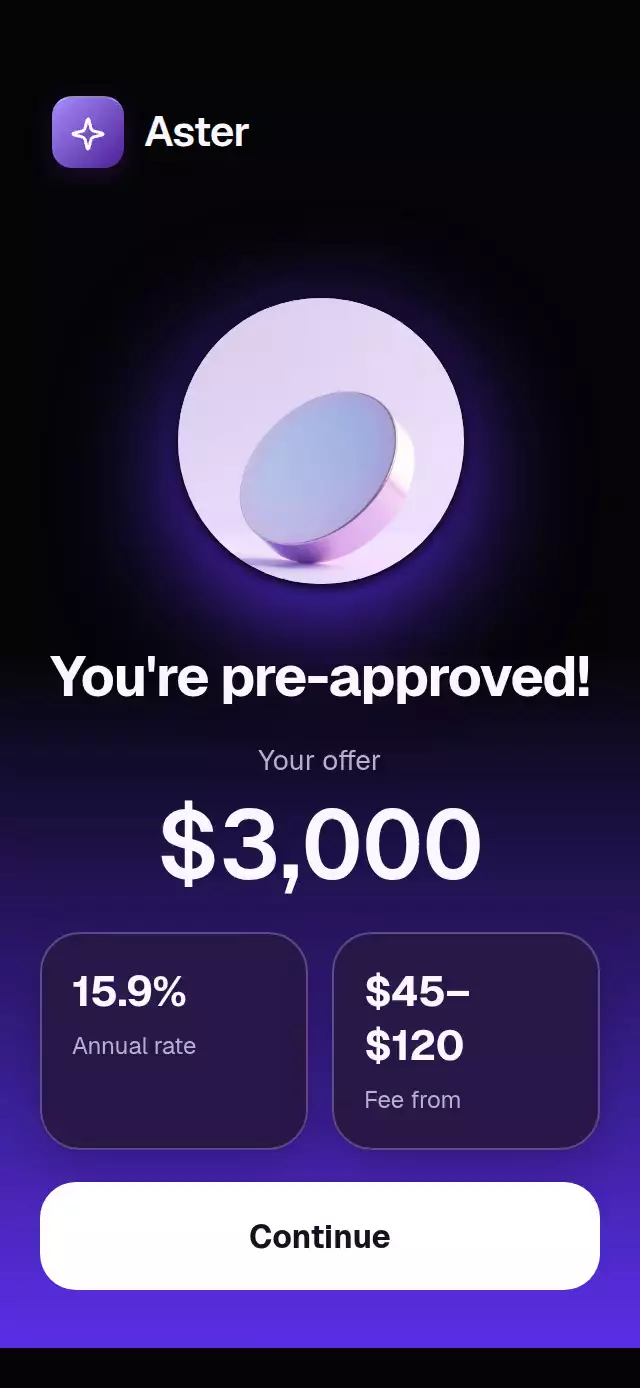
start()calls the supplied check. Only its current request can approve; rejection leaves a retryable checking state.finish()can approve manually, including while the promise is pending.- One approval progress drives the last ball's flight, circle growth, perspective rotation, coin crossfade, landing ring, amount, and staggered rate cards. Digit columns and separator widths derive from the amount on UI and settle at exact integers.
- The demo runs four seconds of checks followed by three seconds of approval. Touch stops future autoplay cycles while the active check still completes.
Install
npx expo install @shopify/react-native-skia expo-image expo-linear-gradient react-native-gesture-handler react-native-reanimated react-native-workletsUse a GestureHandlerRootView in the host app. For Skia on web, configure CanvasKit using the installed Skia package's web setup and load it before mounting the component. The catalog host must register this demo with its Skia loader. No registration changes are included in this folder.
Usage
import { useRef } from 'react';
import { Button, View } from 'react-native';
import NewtonCradleApproval, {
  type NewtonCradleApprovalRef,
} from './NewtonCradleApproval';

export function ApplicationScreen() {
  const approval = useRef<NewtonCradleApprovalRef>(null);
  return (
    <View style={{ flex: 1 }}>
      <Button title="Check my offer" onPress={() => approval.current?.start()} />
      <NewtonCradleApproval
        ref={approval}
        check={async () => { await submitApplication(); }}
        offer={{ amount: 3000, annualRate: '15.9%', fee: '$45–$120' }}
        coinSource={require('./assets/coin.jpg')}
        onContinue={openOffer}
      />
    </View>
  );
}
submitApplication and openOffer are host-provided functions. Copy your own image; the reusable component never imports demo assets. The image is decorative, clipped to a circle and enlarged by 1.28× to emphasize the coin.
For a slower, quieter variant, pass period={1.4}, releaseAngle={20}, stepDuration={1800}, and approvalDuration={1000}. Supply a complete light palette through colors to change background, atmosphere, ink, surfaces, wires, chrome, and controls together. Fonts are supplied by the host; the demo uses Geist and Geist Mono and locally loads Geist 600/700 from the installed font package.
The forwarded ref exposes start() and finish(). The initial state is checking; the promise is invoked only by start(). Without a check callback the cradle continues until finish(). A rejected check never displays approval and can be retried by tapping the cradle. onContinue belongs to the host; in the demo it starts another check.
Props
| Prop | Type | Default | Description |
|---|---|---|---|
offer | NewtonOffer | Required | Whole-unit amount, formatted annual rate, formatted fee. Amount is clamped to 0–999,999,999. |
steps | readonly string[] | Three generic statuses | Checking messages; empty lists use the waiting title. |
check | () => Promise<unknown> | None | Approval on resolution, retry on rejection; stale results ignored. |
coinSource | ImageSourcePropType | None | Image inside the circle; chrome gradient fallback. |
colors | Partial<NewtonPalette> | Dark violet/pink palette | Every functional color, including chrome stops and shadows. |
waitingTitle | string | Hold tight… | Checking headline. |
waitingBody | string | We're checking a few things. This takes a few seconds. | Checking explanation. |
approvedTitle | string | You're pre-approved! | Result headline. |
offerLabel | string | Your offer | Amount caption. |
rateLabel / feeLabel | string | Annual rate / Fee from | Card captions. |
continueLabel | string | Continue | Action text and accessibility label. |
gestureHint | string | Pull an end ball. Let momentum do the rest. | Visible interaction instruction. |
errorLabel | string | Check interrupted. Tap to try again. | Error copy and announcement. |
currencySymbol / groupingSeparator | string | $ / , | Formatting for whole-unit rolling figures. Decimal amounts are not supported. |
cradleLabel | string | Interactive Newton cradle | Accessible object name. |
cradleHint | string | Drag an end ball or tap to release it. | Accessible instruction. |
approvalAnnouncement | string | Your offer is ready. | Important state announcement. |
fontFamily | string | System | Body typeface. |
headingFontFamily | string | System | Heading and action typeface. |
amountFontFamily | string | System | Tabular figure typeface. |
monoFontFamily | string | System | Status typeface. |
period | number | 1.1 | Complete exchange period, seconds; minimum 0.5. |
releaseAngle | number | 28 | Initial/tap angle, degrees; clamped to 1–55. |
stepDuration | number | 1400 | Status interval, ms; minimum 400. |
approvalDuration | number | 900 | Full result entrance, ms; minimum 400. The flight finishes at 65% (585 ms by default). |
onApproved | () => void | None | Called once per approval. |
onCheckError | (error: unknown) => void | None | Failed check callback. |
onInteraction | () => void | None | Touch signal for stopping host autoplay. |
onContinue | () => void | None | Continue action. |
style | StyleProp<ViewStyle> | None | Root style. Host supplies safe-area insets. |
testID | string | newton-cradle-approval | Root; -cradle and -continue identify controls. |
Compatibility
Expo SDK 58, React Native 0.88.0, Reanimated 4.7.1, Worklets 0.13.0, Skia 2.14.0. All dependencies are already installed in this project. Expo Go includes the required native modules for this SDK.
Supports iOS, Android, and web. No video recording is included. The scroll layout supports constrained containers including 300×400 and landscape; the host should provide a bounded height.
Accessibility
The cradle is a labeled button with a screen-reader activation action and a tap alternative to dragging. Continue is a labeled button with a 54-point minimum height. Approval and errors are announced. The offer exposes one formatted amount rather than reading its individual rolling digits. Checking content is excluded from accessibility after approval.
Reduced motion stops the pendulum, removes flights, rotation, digit rolling, contact pulses, ring expansion, and card travel, and replaces the result entrance with a 200 ms fade. The host must supply localized visible and accessible text through props.
Icons: Lucide (ISC), copied from the repository kit. Demo brand: Aster from that kit.