About this animation
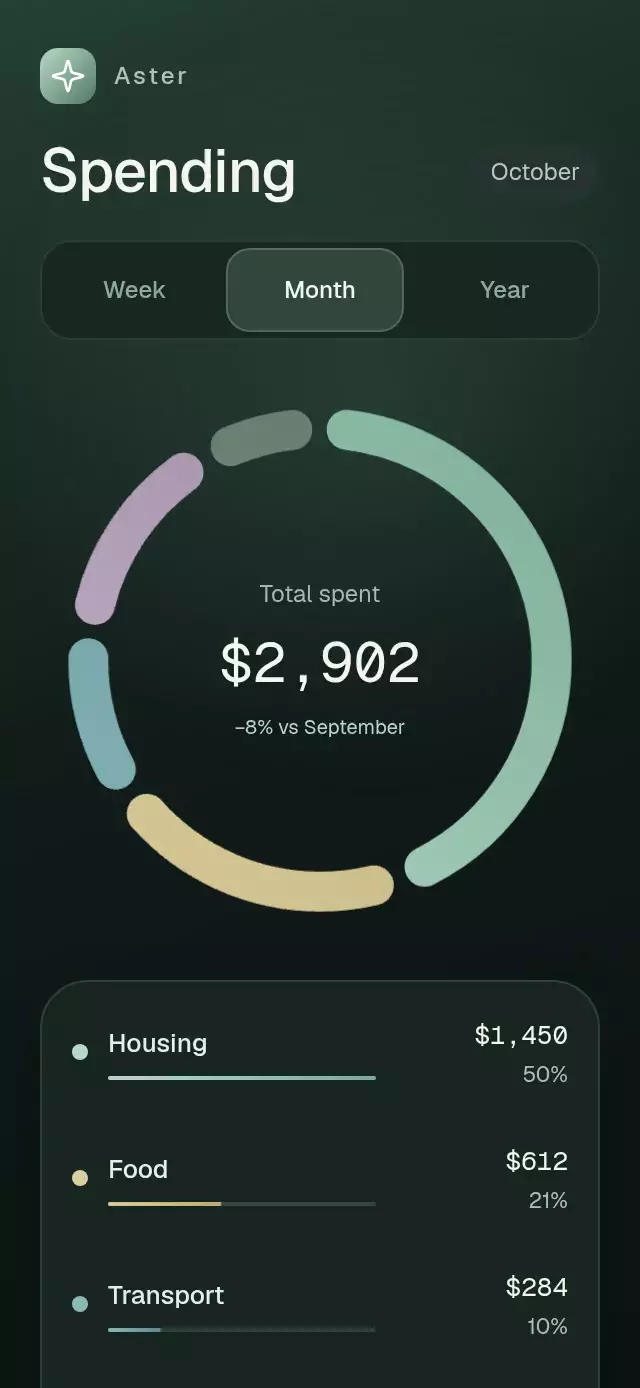
A spending donut with animated period changes and category selection, with configurable categories, copy, fonts, and accent color.
Why this one
Round caps are included in the chart's geometry rather than painted across a tiny gap. Each segment keeps a seven-point separation, including when the selected stroke thickens. A restrained sage, sand, and slate palette sits on a deep green surface.
How it works
- A shared entrance progress sweeps through rounded Skia paths and reveals the legend.
- Period amounts interpolate on the UI thread; boundaries reserve cap and gap space before distributing the remaining circumference by category share.
- Selection increases stroke width and adds a blurred glow within the arc material, while other categories recede. The arcs stay on the same ring.
- Chart taps use the same boundaries as the rendered paths. Tap the center or the selected legend row to restore the total.
- The center amount is one formatted, tabular text run, with natural comma spacing and no negative tracking. UI-thread animated props keep amounts and percentages in sync with the geometry.
- The dashboard uses normal layout and scrolling, with a capped content width for tablets and small embedded containers. Reduced Motion removes sweeps, scaling, and spring interpolation.
Icons: Lucide (ISC).
Install
npx expo install expo-linear-gradient @shopify/react-native-skia react-native-gesture-handler react-native-reanimated react-native-workletsUsage
import { DonutSpendBreakdown } from './DonutSpendBreakdown';

<DonutSpendBreakdown />;

<DonutSpendBreakdown
  brandName="Aster"
  title="Spending"
  dateLabel="October"
  comparisonLabel="−8% vs September"
  initialPeriod="month"
  onSelectionChange={(category) => saveFocus(category?.id)}
  onPeriodChange={(period) => savePeriod(period)}
/>
The forwarded ref exposes replay(), selectCategory(index | null), and setPeriod(period).
Props
| Prop | Type | Default | Description |
|---|---|---|---|
categories | SpendCategory[] | undefined | Spending categories. The first five are displayed. |
initialPeriod | SpendPeriod | 'month' | Initially selected reporting period. |
brandName | string | 'Finance' | Product name shown in the header. |
title | string | 'Spending' | Screen heading. |
dateLabel | string | 'October' | Month label shown beside the heading. |
comparisonLabel | string | '−8% vs September' | Comparison copy under the total. |
fontFamily | string | undefined | Main interface typeface. |
mediumFontFamily | string | undefined | Medium interface typeface. |
monoFontFamily | string | undefined | Monospaced typeface for amounts. |
onSelectionChange | (category: SpendCategory | null) => void | undefined | Called after a category selection changes. |
onPeriodChange | (period: SpendPeriod) => void | undefined | Called after the reporting period changes. |
accessibilityLabel | string | 'Spending breakdown' | Screen-reader label for the chart. |
style | StyleProp<ViewStyle> | undefined | Optional outer-container styling. |
testID | string | undefined | Test identifier applied to the outer container. |
accentColor | string | '#B6D9C7' | Accent used by the summary gradient. |
duration | number | 1050 | Entrance sweep duration in milliseconds. |
Compatibility
Built for Expo SDK 58, React Native 0.88, Reanimated 4.7, React Native Worklets 0.13, and React Native Skia 2.14. Supports iOS, Android, and web. Works in Expo Go because all native dependencies are included in the SDK client.
Accessibility
The period tabs and every category row expose labeled button states and minimum 48-point targets. The donut exposes its current summary as an adjustable chart, while the rows provide a direct touch alternative to angular chart selection. Reduced Motion removes the drawing sweep, spring interpolation, scaling, and travel, replacing them with short fades and immediate geometry updates.
Layout
This is a dark dashboard surface. The host screen supplies safe-area insets. Content scrolls in short or landscape containers; the chart is capped at 300 points and the content at 440 points. The amount uses the provided monospaced font (Geist Mono in the demo), with tabular numerals and normal spacing. Very large custom amounts may require a smaller font.