About this animation
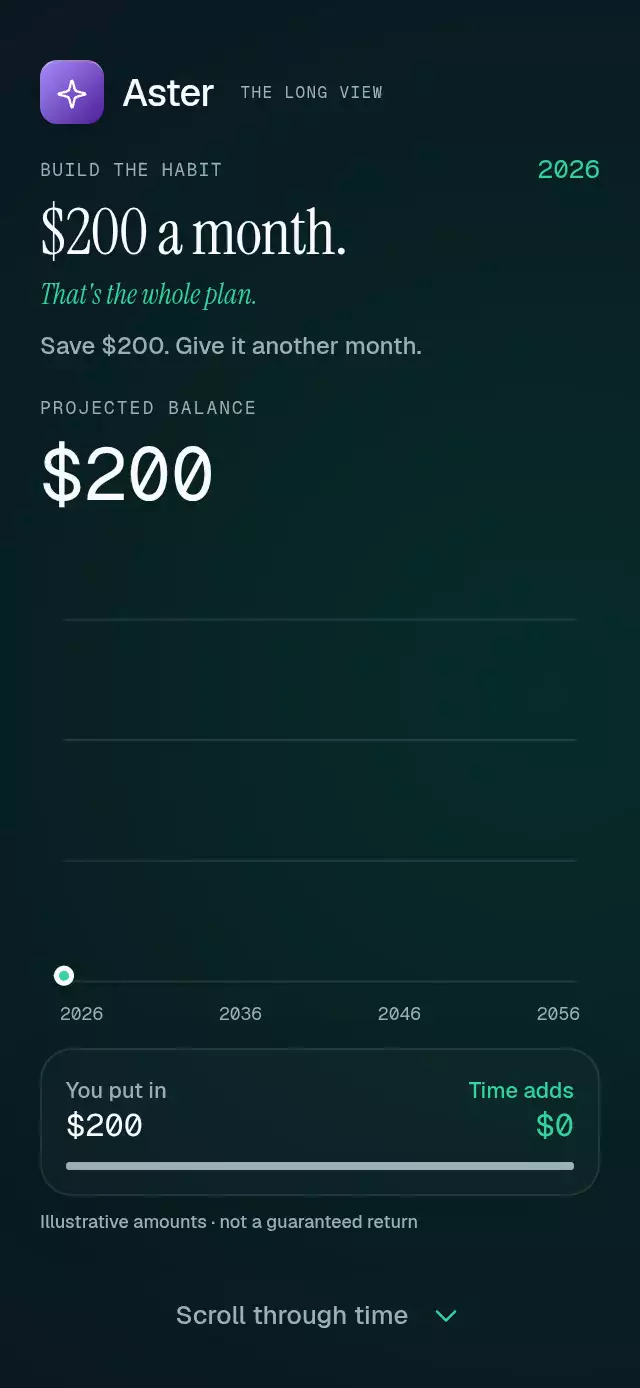
A scroll-driven savings story with a rolling balance and growth curve, with configurable chapters, labels, accent color, and fonts.
How it works
- A measured, five-page ScrollView supplies progress from 0–4. Four milestones lead to a closing action; the final chart remains visible on page four. Touch or wheel input interrupts imperative scrolling.
- One spring follows scroll progress with explicit mass 1, stiffness 300, and damping at least 28. Year, balance, contributions, columns, and the curve derive from that progress on the UI thread. Amounts hold near chapter rests and interpolate between supplied milestones.
- The chart retains its final balance as a fixed vertical scale. Eighteen chronological columns reveal in order: muted lower sections represent deposits; accent upper sections represent earned growth. There are no falling objects. Convex interpolation respects the supplied balances; this is an illustrative story, not a fixed-rate calculator.
- All three figures share
RollingNumber, which formats rounded targets withtoLocaleString('en-US')without leading zeros. The scroll handler sends progress to JS withscheduleOnRN; a 120 ms throttle and trailing update preserve the final value after wheel, touch, or autoplay scrolling stops. Changed characters crossfade and move 0.35 em over 180 ms with an ease-out curve. Unchanged characters stay still, and new leading characters fade in from below. Each update replaces the previous transition, so unfinished layers never accumulate. Text stays in flow, uses tabular numbers, and needs no clipped digit strips. Reduced motion displays the target immediately. The principal amount stays above the chart, and a selected-chapter summary supplies readable amounts to assistive technology. - At the final milestone, light intensifies inside the curve and a fine ring expands from its endpoint. The effect reverses with scrolling; no opaque sweep covers the text. A single fixed footer control stays in the reserved bottom space, with 48-point minimum height; its label and action follow the selected chapter.
- The layout measures its parent, limits its width, and uses a side-by-side composition in landscape. Short portrait containers omit supporting copy and, below 450 points, the subtitle. The chart takes the remaining space. The host supplies safe-area padding.
Install
npx expo install react-native-reanimated react-native-worklets @shopify/react-native-skiaUse SDK-compatible versions. This repository uses Expo SDK 58, React Native 0.88.0, Reanimated 4.7.1, worklets 0.13.0, and Skia 2.14.0. On web, load CanvasKit before importing the component with Skia's web integration. No image assets or shared application theme are required.
Usage
import { CompoundGrowthScroll } from './compound-growth-scroll';

<CompoundGrowthScroll
  monoFontFamily="GeistMono_400Regular"
  fontFamily="Geist_500Medium"
  serifFontFamily="InstrumentSerif_400Regular"
  italicFontFamily="InstrumentSerif_400Regular_Italic"
  onStart={() => openSavingsPlan()}
/>;
Load these optional fonts in the host. Without font props, system fonts are used. Give the parent a bounded height. For a light palette, customize the full material:
<CompoundGrowthScroll
  backgroundColor="#F4F8F6"
  finalBackgroundColor="#E5F5EC"
  textColor="#11271E"
  mutedColor="#526D61"
  accentColor="#07835D"
  borderColor="#C6DCD0"
  surfaceColor="#FFFFFFCC"
  buttonTextColor="#FFFFFF"
  ctaLabel="Build my plan"
  testID="savings-story"
/>;
Props
| Prop | Default | Purpose |
|---|---|---|
chapters | Four illustrative milestones | Tuple of four GrowthChapter objects: title, subtitle, eyebrow, years, balance, contributed. Supply positive nondecreasing balances, strictly increasing year offsets starting at zero, and contributions between zero and balance. |
startYear | 2026 | Calendar year at the first milestone. |
accentColor | #34D399 | Curve, growth, final light, and CTA. |
backgroundColor | #0B1220 | Base background. |
finalBackgroundColor | #062D27 | Ambient gradient color. |
textColor | #F8FAFC | Primary text and balance. |
mutedColor | #9AAFB7 | Secondary text, contributions, and their bar segment. |
borderColor | #A8D9C522 | Grid and material borders. |
surfaceColor | #FFFFFF06 | Breakdown card. |
buttonTextColor | #062B22 | CTA text and icon. |
fontFamily | System | Interface font. |
serifFontFamily | System | Editorial headline font. |
italicFontFamily | Interface font | Subtitle font. |
monoFontFamily | System | Balance and metadata font. |
brand | None | Optional top-left brand node. Keep it compact; the upper-right 56 points are reserved for the host viewer. |
supportingText | Save $200. Give it another month. | Supporting sentence; hidden in compact layouts. |
closingTitle | Your future starts small. | Closing headline. |
balanceLabel | PROJECTED BALANCE | Principal amount caption. |
contributionLabel | You put in | Deposit caption. |
growthLabel | Time adds | Earned growth caption. |
projectionNote | Illustrative amounts · not a guaranteed return | Projection footnote. |
nextLabel | Scroll through time | Tap alternative to scrolling. |
planLabel | Make it your plan | Navigation to closing page. |
currencySymbol | $ | Rolling amount prefix. Digits use whole amounts and US grouping commas. |
formatYear | String(year) | Visible calendar-year formatting. |
formatAmount | US dollars, whole amounts | Accessible summary formatting. Set alongside currencySymbol for other currencies. |
ctaLabel | Start with $200 | Final action text. |
ctaAccessibilityLabel | ctaLabel | Final accessible action label. |
springDamping | 28 | Scroll-following damping, clamped to at least 28. Mass is explicitly 1. |
snapToChapters | true | Native chapter snapping; disabled on web. |
onStart | None | Final action callback. |
onInteraction | None | First user touch, drag, or wheel callback. |
onChapterChange | None | Nearest page index, including closing page 4. |
style, testID | None | Root styling and test identifier. Actions use -next-0 through -next-3, and -confirm. |
The forwarded CompoundGrowthScrollRef preserves goTo(chapter, duration = 650) and reset(). goTo accepts 0–4. reset immediately returns to the opening. Orientation changes preserve the selected page. Autoplay stays in the demo.
Compatibility
Targets Expo SDK 58, React Native 0.88.0, and Reanimated 4.7.1 on iOS, Android, and web. Uses the SDK-compatible Expo Go modules listed in piece.json. The host supplies safe-area insets.
Accessibility
Navigation and CTA buttons have roles, descriptive labels, press feedback, and 48-point minimum heights. The principal figure has an accessible summary containing the selected year, total, deposits, and earned growth. Decorative rolling digits are hidden from assistive technology. Only one headline is mounted at a time.
Reduced motion uses immediate chapter poses and navigation, stationary digits, and no endpoint ring. Demo autoplay stops entirely under reduced motion. The host handles safe areas.
Demo
The Aster demo uses the repository kit's purple gradient tile and Lucide sparkle glyph. Autoplay draws all thirty years from 0.25–2.55 seconds, reaches the closing action at 3.3 seconds, holds it, and resets at 4.6 seconds on a 5.2-second loop. Touch or wheel stops the loop. Reduced motion disables it.
Layouts target 320×568, 390×844, 430×932, 1024×1366, 844×390, and an embedded 300×400 parent. No raster art is needed. Icons are copied Lucide paths from the repository kit (ISC).