About this animation
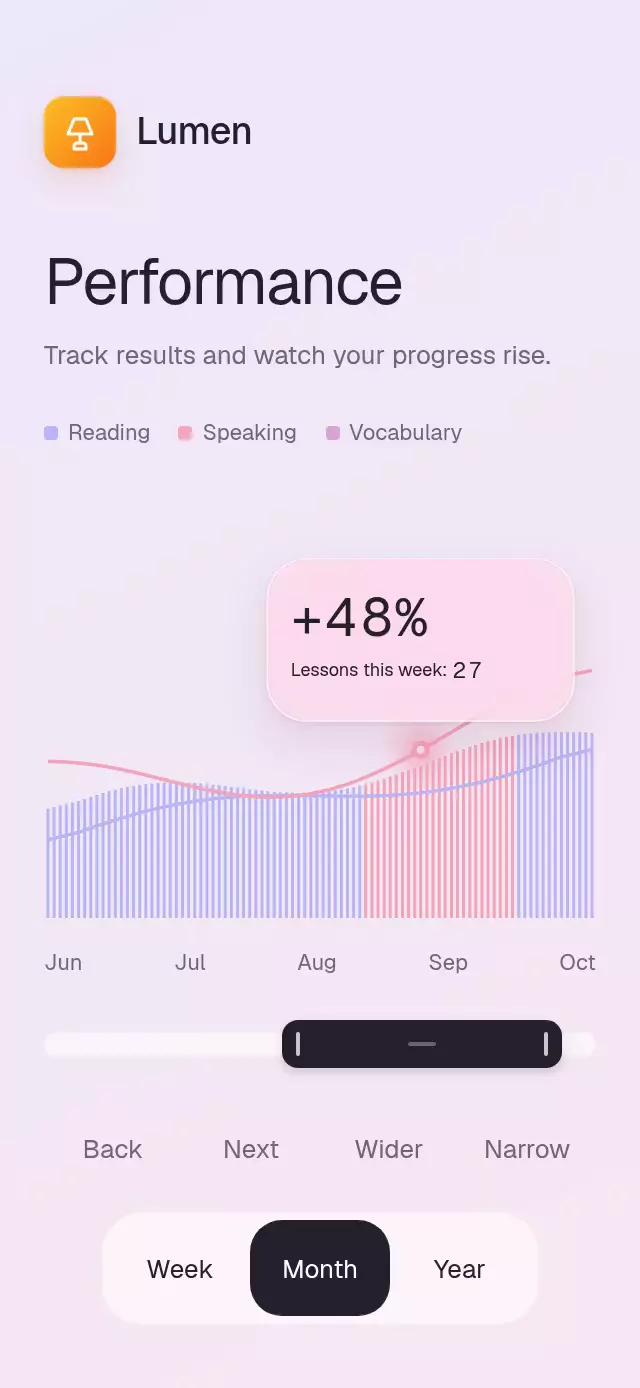
A performance chart with a draggable range window and following insight bubble, with configurable series, labels, colors, and fonts.
Why this one
Instead of locking a chart to a fixed period, the user moves and resizes an interval with one thumb. The selected bars, rolling change percentage, lesson count, and curve marker respond together. The demo adds a warm Lumen identity and an editorial footer to the soft lavender and pink chart.
How it works
- The first series drives the bar envelope, the second drives the pink curve and marker, and the third drives the lavender curve. Missing curves fall back to the previous series. All values share a normalization scale.
- A single shared tuple contains both range boundaries. Center drags move it; edge drags resize it. Tap the track to center the window at that point.
- Skia builds one path per bar color in one Canvas. A narrow blurred edge path lights the bars entering or leaving the interval. The bubble stays within the chart bounds.
- An intro progress grows the bars in a left-to-right wave and trims both curve paths. Explicit mass, stiffness, and damping keep range transitions interruptible with minimal overshoot.
- Week uses interpolated data; Month and Year progressively smooth neighboring samples. Changing periods morphs heights and adjusts the range width around its current center.
- Independent digit columns roll only at their own carry. The percentage is the absolute change between the first series' interval endpoints, capped at 99; the lesson count is its rounded center value, capped at 99. Numeric targets settle on integers.
Install
npx expo install @shopify/react-native-skia expo-blur react-native-gesture-handler react-native-reanimated react-native-workletsCopy this folder, excluding demo/, into your project. Put the application under GestureHandlerRootView. On web, load CanvasKit before mounting this component using Skia's supported web loader. The host loads any custom fonts. No image assets or new native modules are required in this repository's Expo Go setup.
Usage
import { RangeScrubPerformance } from './range-scrub-performance';

<RangeScrubPerformance
  series={[
    { label: 'Reading', values: [12, 18, 16, 24, 29] },
    { label: 'Speaking', values: [15, 19, 22, 25, 31] },
    { label: 'Vocabulary', values: [14, 17, 20, 23, 28] },
  ]}
  style={{ height: 480 }}
/>
const chart = useRef<RangeScrubPerformanceRef>(null);
<RangeScrubPerformance
ref={chart}
series={series}
range={[0.35, 0.7]}
period="month"
onRangeChange={saveRange}
onPeriodChange={savePeriod}
fontFamily="YourInterfaceFont"
monoFontFamily="YourNumberFont"
bubbleFormat={{ prefix: '+', suffix: '%', caption: 'Sessions in range:' }}
colors={{ background: '#1A1624', text: '#FFF4FA', muted: '#C8B8D2', track: '#FFFFFF18', glass: '#713A6099', border: '#FFFFFF44', active: '#FBE8F2', activeText: '#251727' }}
/>
chart.current?.setRange(0.5, 0.85);
chart.current?.setPeriod('week');
chart.current?.enter();The component keeps local interaction responsive and accepts subsequent range and period changes. Callbacks report committed gestures and imperative changes, not every frame. Pass stable data arrays for best performance. The ref exposes setRange(a, b), setPeriod(period), and enter().
Props
| Prop | Type | Default | Description |
|---|---|---|---|
series | readonly PerformanceSeries[] | Required | Three labeled, nonnegative point arrays; invalid values become zero. |
range | [number, number] | [0.43, 0.7] | Normalized interval; bounds and minimum width are enforced. |
onRangeChange | (range) => void | — | Committed range callback. |
period | 'week' | 'month' | 'year' | 'month' | Initial or externally updated aggregation. |
onPeriodChange | (period) => void | — | Aggregation callback. |
onInteraction | () => void | — | Touch or accessibility interaction; demo uses it to stop autoplay. |
title | string | 'Performance' | Heading. |
subtitle | string | 'Explore your progress over time.' | Supporting text. |
axisLabels | readonly string[] | Jun–Oct | Evenly spaced axis text. |
periodLabels | [string, string, string] | Week, Month, Year | Period control text. |
bubbleFormat | { prefix, suffix, caption } | +, %, Results in this range: | Bubble text; keep labels short. |
accessibilityLabel | string | 'Performance range' | Selector name and range announcement prefix. |
accessibilityHint | string | Gesture instructions | Selector instructions. |
rangeActionLabels | [string, string, string, string] | Move forward/backward, expand, narrow | Accessible selector action text. |
rangeButtonLabels | [string, string, string, string] | Back, Next, Wider, Narrow | Visible tap alternatives for moving and resizing. |
formatRangeAnnouncement | (a, b) => string | Interval percentage | Committed interval announcement formatter. |
colors | Partial<PerformancePalette> | Lavender/pink palette | Background, text, muted, lavender, pink, third, track, active, activeText, glass, border. |
fontFamily | string | System | Interface font. |
monoFontFamily | string | System | Digit font; a monospace font is recommended. |
barCount | number | 90 | 20–120 bars. |
enterDuration | number | 1100 | Intro duration in milliseconds. |
minimumRange | number | 0.18 | Minimum interval width, clamped to 0.12–0.8. |
style | StyleProp<ViewStyle> | — | Root styling; root has flex: 1. |
testID | string | 'range-scrub-performance' | Root ID and range/week/month/year suffixes. |
Compatibility
Expo SDK 58, React Native 0.88.0, Reanimated 4.7.1, Worklets 0.13.0, Skia 2.14.0. Supports iOS, Android, and web. Android blur uses a BlurTargetView and the SDK 31+ blur method, with a tinted fallback on older versions.
The component measures its own chart with onLayout, caps content width at 520 pt, and uses a scrollable compact layout. It accepts a 300×400 container without losing controls. The parent provides safe area insets. Large font sizes can scroll rather than overlap.
Accessibility
The selector has an adjustable role with increment/decrement and expand/shrink actions. Track taps and four 48 pt buttons provide alternatives for moving and resizing; period buttons expose selected states and activate actions. Range and period commits announce their changes. Hit areas are at least 48 pt high, with 48 pt edge zones. Reduced motion removes the intro wave, curve sweep, edge flash, rolling transitions, pressure scale, and inertial motion; the introduction and committed programmatic range/period changes fade over 200 ms.
Demo timeline
0–1.1 s: bars grow and curves draw. At 1.55 s the range slides from Aug toward Sep, bringing the insight bubble with it. Subsequent steps widen the range, switch to Week, switch to Month, restore the initial range, and replay the intro. Any touch stops the loop. All autoplay timers are cleaned up when the demo unmounts.
Icons: Lucide (ISC). The Lumen lamp glyph and orange gradient come from the local demo brand kit.