About this animation
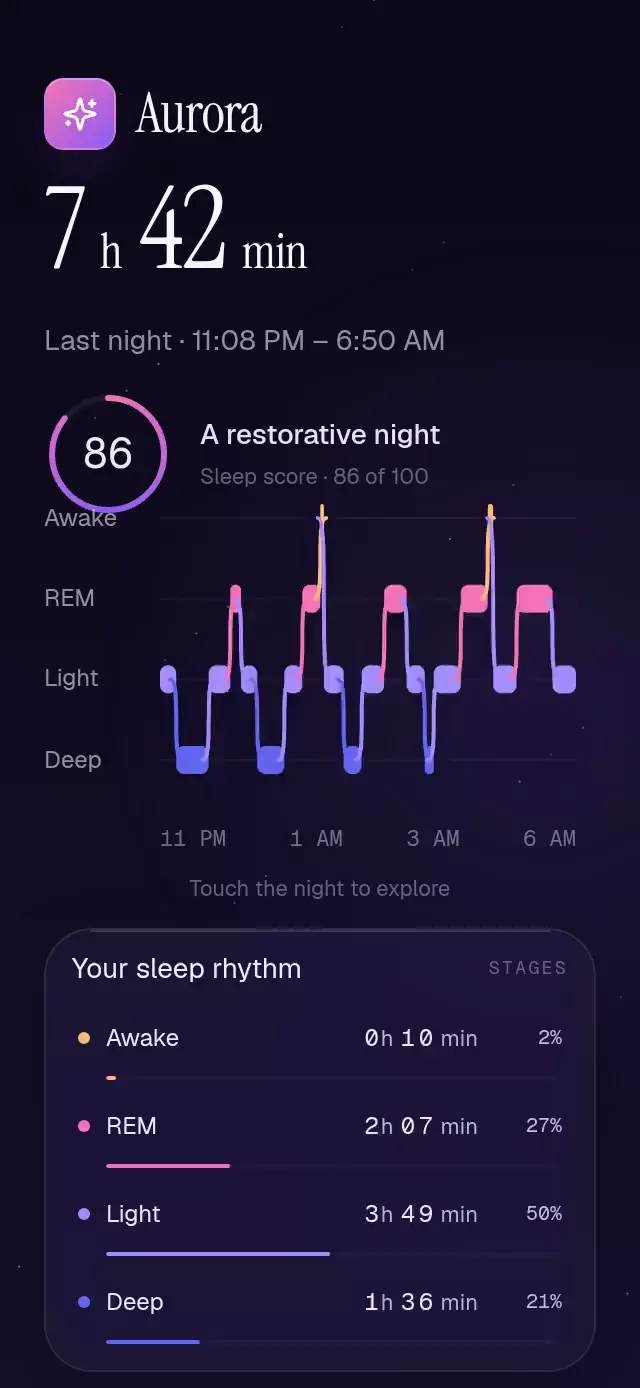
A sleep-stage chart with rolling totals and a linked inspection cursor, with configurable segments, start time, stage colors, and fonts.
Why this one
Each block grows from its own left edge in chronological order. Rounded, continuous connectors describe the transitions between stages. Inspecting a time illuminates its stage, dims the others to 35%, and highlights the matching summary row. The result makes a night's structure easier to explore than flat bars with square corners.
How it works
- Filter invalid segments and normalize their durations into one time axis. The example covers 462 minutes, including two brief awakenings and 96 minutes of deep sleep.
- Animate
revealfrom 0 to 1 over 1,400 ms with the curve(0.23, 1, 0.32, 1). Every Skia block derives its width from that time; connectors draw as the reveal reaches them. - Derive the rolling hours and minutes and the summary bars from the same reveal. Digits rest on whole numbers and move only near their carry.
- Compose a horizontal pan and a tap with Gesture Handler.
cursorXcontrols normalized time;activecontrols the cursor's spring fade. A tap holds the cursor for one second. - Derive the active stage, point, floating time label, and summary highlight on the UI thread. Summary buttons toggle a persistent stage selection.
- Measure the component with
onLayout. The demo uses a continuous Skia score ring, the Aurora kit glyph, a nocturnal gradient, and 30 stationary stars. Autoplay reveals the night, sweeps the cursor from 1.5 to 2.8 seconds, and repeats every 4.8 seconds.
Install
Copy this folder into your project. The reusable component needs no catalog code, theme imports, or demo assets.
npx expo install @shopify/react-native-skia expo-blur react-native-gesture-handler react-native-reanimated react-native-workletsVersions used: Skia 2.14.0, expo-blur ~58.0.5, Gesture Handler ~3.3.0, Reanimated 4.7.1, and worklets 0.13.0. Wrap the app in GestureHandlerRootView. The demo additionally uses expo-linear-gradient and the host's loaded Geist, Geist Mono, and Instrument Serif fonts.
For web, load CanvasKit before importing this component through Skia's WithSkiaWeb or the host's equivalent lazy loader. Do not statically import a Skia screen into an application before CanvasKit is ready.
Usage
import { View } from 'react-native';
import { SleepStagesChart } from './sleep-stages-chart';

export function Night() {
  return (
    <View style={{ flex: 1, backgroundColor: '#0A0816', padding: 22 }}>
      <SleepStagesChart />
    </View>
  );
}
import { useRef } from 'react';
import { SleepStagesChart, type SleepStagesChartRef } from './sleep-stages-chart';
export function CustomNight() {
const chart = useRef<SleepStagesChartRef>(null);
return (
<SleepStagesChart
ref={chart}
startMinute={1388}
revealDuration={1400}
stageColors={['#FDBA74', '#F472B6', '#A78BFA', '#6366F1']}
segments={[
{ stage: 'Light', minutes: 25 },
{ stage: 'Deep', minutes: 40 },
{ stage: 'Light', minutes: 20 },
{ stage: 'REM', minutes: 15 },
]}
onStageChange={(stage) => saveSelectedStage(stage)}
/>
);
}saveSelectedStage represents your own application callback. Supply font props after loading your preferred typefaces.
Props
| Prop | Type | Default | Description |
|---|---|---|---|
segments | readonly SleepSegment[] | DEFAULT_SLEEP_SEGMENTS | Positive, chronological durations in minutes; invalid entries are ignored. |
startMinute | number | 1388 | Minutes after midnight; displayed as U.S. 12-hour time. |
stageColors | readonly [string, string, string, string] | Peach, pink, lavender, indigo | Colors for Awake, REM, Light, Deep. |
revealDuration | number | 1400 | Chronological entrance duration in milliseconds. |
fontFamily | string | System | Labels and interface text. |
monoFontFamily | string | System | Rolling digits and time labels. |
onStageChange | (stage: SleepStage) => void | — | Runs on the JS thread after a chart gesture or summary selection. |
accessibilityLabel | string | Exploration instructions | Accessible chart description. |
style | StyleProp<ViewStyle> | — | Outer container overrides; the root defaults to flex: 1. |
testID | string | — | Automation identifier. |
SleepStage is 'Awake' | 'REM' | 'Light' | 'Deep'. A SleepSegment contains stage and minutes.
Ref methods: replay(), inspect(position, duration?) (position 0–1, duration in milliseconds), and dismiss(). Reveal timing is independent of direct cursor manipulation, so interaction remains available during the entrance.
Compatibility
Designed for Expo SDK 58, React Native 0.88.0, Reanimated 4.7.1, and Skia 2.14.0. The stack is included in the project's Expo Go environment. Android blur uses BlurTargetView and dimezisBlurViewSdk31Plus; older Android versions retain a translucent fallback. The default surface is dark.
Supports iOS, Android, and web. Allow at least 392 pt of height for the default chart and summary; the demo adapts its layout to 320×694 and 390×844.
Accessibility
The chart has an adjustable role, a textual summary of all four stages, and increment/decrement actions to explore time. Every summary button has a descriptive label including duration and percentage and a 44 pt hit area. Tap inspection is an alternative to dragging. Decorative canvases and rolling digits do not replace the textual summary.
With reduced motion, the full chart and final totals appear immediately, the cursor has no spring or animated travel, and autoplay does not sweep or replay the entrance.
Icons: Lucide (ISC), copied from the project kit. Aurora is a demo identity from the project kit; it is not part of the reusable component.