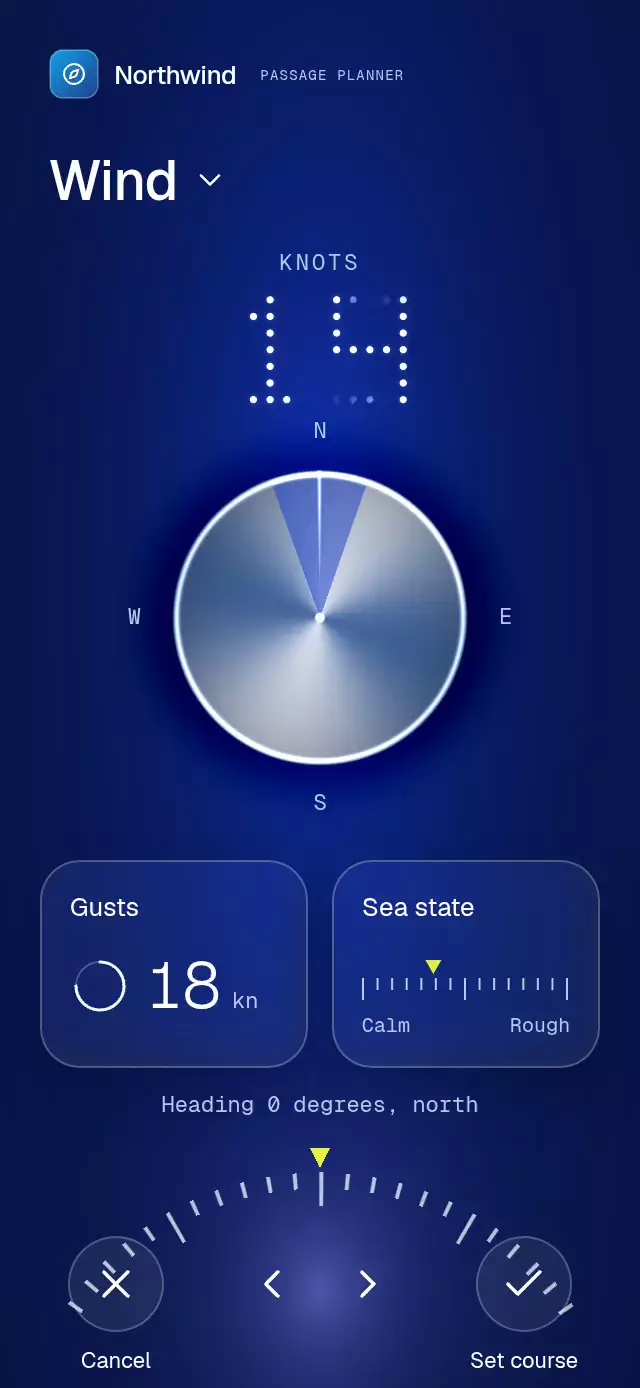
About this animation
A wind compass with an inertial heading ruler and configurable speed data, copy, colors, and fonts.
Why this one
Dragging a conventional compass covers the heading you are choosing. Here, a separate arc below the instrument controls a continuous course while the compass remains clear. Confirmation turns its illuminated sector into a sweeping light fan and warms the tinted background toward southerly headings. The ruler and dot numerals are rendered in the same material shader, rather than covered with a rectangular shine effect.
How it works
- One continuous heading shared value drives the compass sector and the polar ruler. The heading is normalized only for labels and callbacks, so crossing north does not jump.
- A pan cancels the active spring. Release projects velocity by 499 ms, snaps to
step, and settles with a critically damped spring (mass: 1,stiffness: 240,damping: 32). - A discrete heading reaction calls the wind function on the JavaScript thread. The shader staggers dot cells directly between the previous and target wind numerals over 240 ms; React never draws animation frames.
- The Skia shader builds a conical metal disk, illuminated sector, cobalt radial atmosphere, and lavender bottom glow. Two real blur cards share one Android blur target.
- Confirmation widens and sweeps a light fan for 560 ms, fills the check, and shifts the background according to the heading. Any new interaction interrupts it.
- The demo runs a 4.8-second loop: start at 0°, 135° at 1.2 s, 220° at 1.9 s, confirm at 2.45 s. The wow begins before 3 s.
Install
npx expo install @shopify/react-native-skia expo-blur react-native-gesture-handler react-native-reanimated react-native-workletsTested dependency versions for compilation: Skia 2.14.0, expo-blur ~58.0.5, Gesture Handler ~3.3.0, Reanimated 4.7.1, worklets 0.13.0. Wrap your app in GestureHandlerRootView. Use the normal Reanimated/worklets Babel configuration supplied by Expo. On web, initialize CanvasKit before importing this component (for example, your host's lazy withSkia boundary). The component itself has no catalog or theme imports.
Usage
import { CompassArcGauge } from './compass-arc-gauge';

<CompassArcGauge onConfirm={(degrees) => saveCourse(degrees)} />;
With personality and external control:
const instrument = useRef<CompassArcGaugeRef>(null);

<CompassArcGauge
  ref={instrument}
  defaultHeading={90}
  step={5}
  speedByHeading={[14, 16, 19, 17, 12, 11, 15, 13]}
  colors={{ accent: '#CFFF79', cobalt: '#164A99', warm: '#775064' }}
  texts={{ title: 'Your course', confirm: 'Sail this way' }}
  fontFamily="YourInterfaceFont"
  monoFontFamily="YourMonoFont"
  onHeadingChange={(degrees) => updateDraft(degrees)}
/>;
// In an event handler:
instrument.current?.setHeading(135);
instrument.current?.confirm();
Import the ref type from the same entry point. Call confirm() after a requested animation has settled if you want to confirm that destination. Passing heading lets the host update the course; callbacks report normalized snapped degrees. Echoing the unchanged callback value does not restart an animation.
Props
| Prop | Type | Default | Purpose |
|---|---|---|---|
heading | number | Uncontrolled | External heading in degrees |
defaultHeading | number | 0 | Starting course and cancel destination |
step | number | 5 | Snap interval; invalid values fall back to 5 |
onHeadingChange | (degrees) => void | — | Discrete snapped heading updates |
onConfirm | (degrees) => void | — | Confirmed normalized course |
onCancel | () => void | — | Cancel action |
speedByHeading | number[] | (degrees) => number | Eight invented wind sectors | Wind value, clamped to 0–99 |
gusts | number | 18 | Supporting gust value |
seaState | number | 0.35 | Calm-to-rough marker, clamped to 0–1 |
colors | Partial<CompassArcGaugeColors> | Cobalt/night/lavender/lime | Complete palette: night, cobalt, lavender, accent, silver, steel, warm, text, muted, glass, border |
texts | Partial<CompassArcGaugeTexts> | English instrument labels | Title, units, card copy, actions, cardinal and direction arrays |
formatHeading | (degrees, direction) => string | Heading … degrees, … | Visible and spoken heading |
fontFamily | string | System | Body font |
titleFontFamily | string | Body font | Title font |
lightFontFamily | string | Body font | Large gust numerals |
monoFontFamily | string | System | Mono labels and heading |
headerAccessory | ReactNode | — | Brand content in upper-left region |
maxWidth | number | 480 | Tablet width limit |
confirmationDuration | number | 560 | Fan duration in milliseconds |
style | StyleProp<ViewStyle> | — | Root style |
testID | string | compass-arc-gauge | Root and stable control identifiers |
Shader palette inputs use six-digit hex; glass and border can use RGBA. The included Northwind demo uses only the kit's compass glyph and blue gradient. Icons: Lucide (ISC).
Compatibility
Expo SDK 58, React Native 0.88.0, Reanimated 4.7.1, worklets 0.13.0, Skia 2.14.0. Uses installed Expo Go modules; no haptics dependency. Supports iOS, Android, and web.
The host owns safe-area insets. Root uses flex: 1, reads its own onLayout, limits tablet width, and scrolls vertically when the instrument's minimum height (max(640, width × 2.05)) exceeds its container (including landscape and 300×400 embeds). No controls occupy the upper-right viewer-close region.
Accessibility
The ruler is adjustable with increment/decrement actions and a live heading label including compass direction. The two 48×48 step controls provide a tap alternative; cancel and confirm also have 48-point circular controls. Reduced motion removes velocity projection and the sweeping fan, replaces course animation with a short fade, and retains the filled confirmation state. All control labels and heading formatting are customizable.
Review notes
The 320×694 and 390×844 layouts separate title, wind numerals, compass, cards, heading, and footer in distinct vertical bands. The upper-right corner is empty. At small or rotated sizes the instrument scrolls instead of shrinking touch targets. The fan is computed as angular light inside the shader, never a block above the content.