About this animation
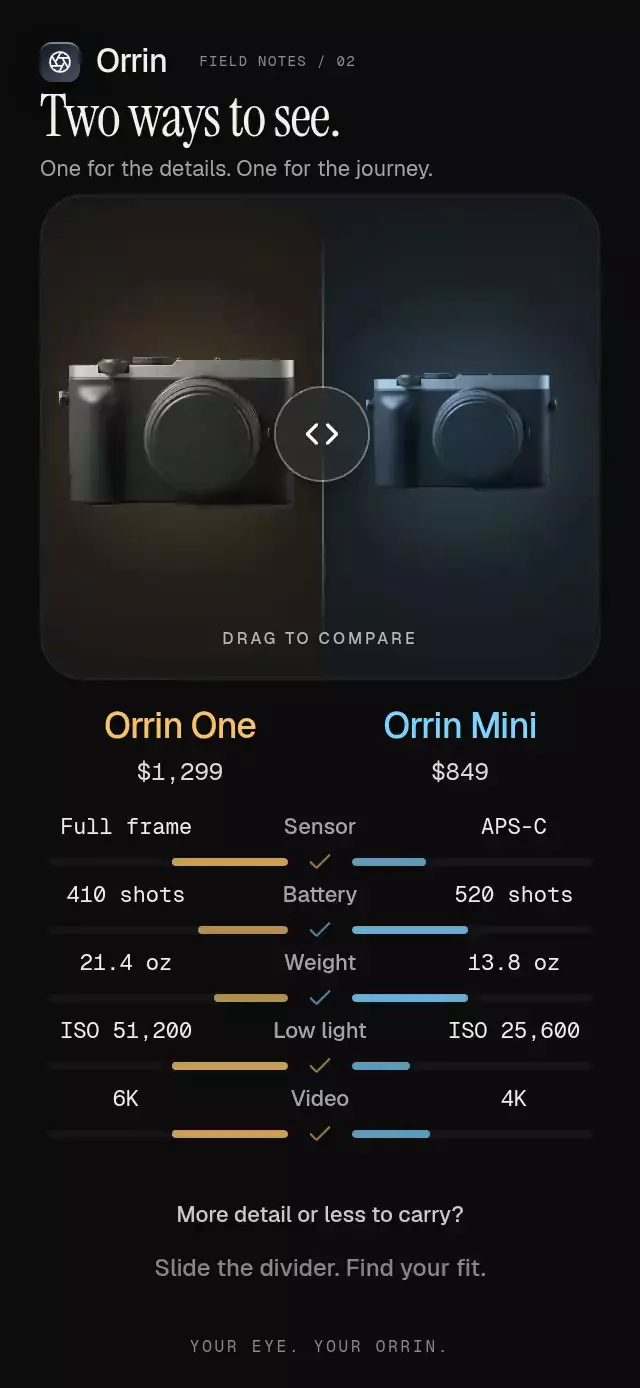
A product comparison with a draggable space-sharing divider, with configurable products, specifications, background color, and fonts.
Why this one
Facing bars redistribute with the divider while preserving each specification's true winner. Expanding the winning side grows its camera to roughly 55% of screen width and centers an accent light behind it; crossing 70% locks the comparison and reveals a contextual choice. This turns a static two-column table into a physical decision without hiding the underlying data.
How it works
- Measure the container with
onLayout; allocate the image stage after reserving 34-point specification rows and the choice area. The demo starts the stage at 14% of screen height and extends it to about 50%. - A single shared progress value drives both clipped product regions, camera scale, light, divider, and facing bars.
- Pan and tap gestures share the same interruptible spring. Dragging cancels the current animation and preserves its position; release transfers velocity into the settling spring.
- Specification values roll into clipped, measured windows. The winner check brightens with its side's emphasis.
- Crossing 70% exposes a selection summary and choose button. Discrete transitions alone reach React through
scheduleOnRN. - The demo schedules Mini → balanced → One → hold, looping every 4.8 seconds. Touch cancels its timers.
Install
npx expo install react-native-reanimated react-native-worklets react-native-gesture-handler @shopify/react-native-skia expo-blur expo-linear-gradientCopy this folder, excluding demo/. Wrap the host in GestureHandlerRootView. Configure Reanimated/worklets for your host Expo version. On web, load CanvasKit with Skia's WithSkiaWeb boundary before importing the component. Keep product images local and provide their sources through props. No demo image is imported by the component.
Usage
import { SpecCompareDuel } from './spec-compare-duel';

<SpecCompareDuel
  products={[
    { name: 'Camera One', price: '$1,299', image: require('./camera.png'), accent: '#F5C26B', bestFor: 'low light, 6K' },
    { name: 'Camera Mini', price: '$849', image: require('./camera.png'), accent: '#7DD3FC', bestFor: 'travel', imageScale: 0.78, coolTint: true },
  ]}
  specifications={[
    { label: 'Battery', values: ['410 shots', '520 shots'], scores: [0.79, 1] },
  ]}
/>
Personalize motion and typography, and connect the selection to your checkout:
<SpecCompareDuel
  ref={comparisonRef}
  products={products}
  specifications={specifications}
  fontFamily="YourInterfaceFont"
  monoFontFamily="YourNumericFont"
  springDamping={32}
  heroFraction={0.4}
  onChoose={(side) => openCheckout(side)}
/>
// In an event handler: comparisonRef.current?.focus('left');
The imperative ref exposes focus('left' | 'right' | null) and replay() (specification entrance).
Props
| Prop | Type | Default | Description |
|---|---|---|---|
| products | readonly [DuelProduct, DuelProduct] | Required | Name, formatted price, image, accent, summary; optional imageScale and coolTint. |
| specifications | readonly DuelSpecification[] | Required | Unique label, two values, two normalized scores. Higher is better; invert scores for weight. |
| fontFamily | string | System | Interface font. |
| monoFontFamily | string | System | Numeric font. |
| backgroundColor | string | #0C0C0D | Base surface. |
| springDamping | number | 28 | Damping, clamped to at least 28 for restrained settling. |
| heroFraction | number | 0.42 | Relative hero height, clamped to 0.3–0.48. |
| accessibilityLabel | string | Product comparison divider | Adjustable control label. |
| onSelectionChange | (side or null) => void | — | Reports locked or balanced state. |
| onChoose | (side) => void | — | Reports confirmed choice. |
| onInteraction | () => void | — | Stops external playback on interaction. |
| style | StyleProp<ViewStyle> | — | Container style. |
| testID | string | — | Root identifier. |
The image stage has no fixed maximum height. At balance, the full-size camera spans about 40% of screen width; imageScale preserves the smaller model’s relative size. Focusing either side grows its camera to the same hero size while the other contracts to half its balanced size. Rows retain one label/value line and facing bars, without extra divider rules.
Colors should be six-digit hex strings for the radial light's alpha stops. Scores should be in [0, 1]. The shipped layout targets two products and five concise specification rows; use a sufficiently tall container for larger datasets.
Compatibility
Built for Expo SDK 58, React Native 0.88.0, Reanimated 4.7.1, worklets 0.13.0, Gesture Handler 3.3, and Skia 2.14.0. Uses SDK 58 BlurTargetView for Android blur. Compatible with this project's Expo Go modules; other hosts need compatible native modules or a development build.
Accessibility
Product-name buttons provide a tap alternative to dragging, with selected states. The divider supports adjustable increment/decrement actions. Every row announces both values and the actual winner. Selection and confirmation are announced; the footer is a polite live region. Interactive targets are at least 48 points.
Reduced motion keeps camera scale fixed, disables blur and numeric travel, and replaces settling springs with 200 ms changes. No particles, trails, or flights are used. The upper-right area is reserved for the catalog viewer's close button.
Icons: Lucide (ISC). Demo identity: Orrin, from the repository's brand kit. The public component has no brand defaults and no dependency on shared theme files.