About this animation
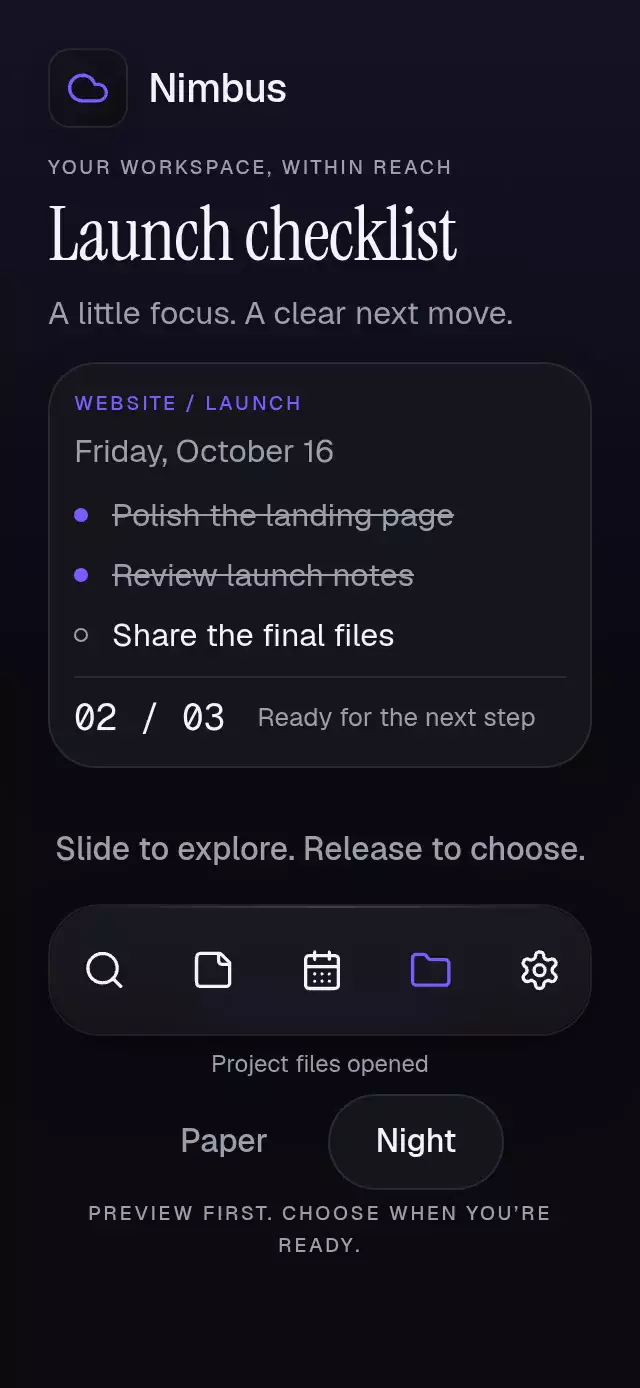
An action dock that magnifies drag previews and executes on release, with configurable actions, labels, palette, and fonts.
Why this one
A two-cell proximity kernel enlarges the nearest icon to 1.32× and its neighbor to about 1.12×, lifting the candidate by 12 pt. A blurred violet lens follows the finger and contracts over 280 ms on execution. Leaving the vertical band cancels permanently for that gesture. Direct taps, keyboard activation, and screen reader actions remain available. Extra actions wrap instead of shrinking touch targets.
How it works
- The dock measures its own width with
onLayout; up to five cells fit each row, each at least 48×64 pt. - A Gesture Handler pan writes one continuous
scrubPosition. Icon scale, lift, and lens position derive on the UI thread. Pressure uses an independent spring. - Crossing a candidate boundary sends one discrete
onPreviewchange to JS. Previewing never callsonAction. - Release commits the enabled candidate once. Moving outside the horizontal bounds or more than 64 pt vertically from the starting row center cancels until the next gesture.
- A tap competes with the pan through
Gesture.Exclusive. Springs have explicit mass; a separate 280 ms clock contracts the lens. BlurTargetViewsupplies real content behind the glass, and theBlurViewhas its own clipping radius. All icons and the blurred lens share one Skia canvas.
Install
npx expo install @shopify/react-native-skia expo-blur expo-linear-gradient react-native-gesture-handler react-native-reanimated react-native-workletsUse a GestureHandlerRootView at the app root. Follow the host Expo SDK's Reanimated/worklets setup. On web, initialize CanvasKit before mounting this component (the demo requires the catalog's Skia loader). No fonts or assets are fetched remotely. Icons: Lucide (ISC).
Usage
import ScrubMagnifyDock from './scrub-magnify-dock';

<ScrubMagnifyDock
  actions={[
    { id: 'search', label: 'Search', icon: 'search' },
    { id: 'notes', label: 'Notes', icon: 'sticky-note' },
  ]}
  onAction={id => openAction(id)}
  cancelLabel="Canceled. No action taken."
  accessibilityLabel="Workspace actions"
  labels={{
    idle: 'Slide to explore. Release to choose.',
    empty: 'No actions available.',
    unavailable: 'This action is unavailable.',
    executed: 'Opened',
    hint: 'Activate or slide and release to choose.',
  }}
/>
Add selectedId={selected} and update it inside onAction for controlled selection. Add magnification={1.4}, colorScheme="light", a complete palette, or fontFamily to customize. A controlled selection change plays the same lens confirmation without invoking onAction.
const dock = useRef<ScrubMagnifyDockRef>(null);
// Request previews without executing an action:
dock.current?.preview('notes');
dock.current?.clearPreview();
dock.current?.reset();
Props
| Prop | Type | Default | Purpose |
|---|---|---|---|
| actions | readonly DockAction[] | required | {id,label,icon,disabled?} entries |
| onAction | (id: string) => void | required | One callback for valid user activation |
| onPreview | (id: string | null) => void | — | Candidate changes, including clearing |
| selectedId | string | uncontrolled | Controlled selection takes precedence |
| magnification | number | 1.32 | Finite values clamped to 1–1.5 |
| cancelLabel | string | required | Visible and spoken cancellation message |
| labels | object | required | idle, empty, unavailable, executed, hint |
| colorScheme | light / dark / auto | auto | Complete appearance |
| palette | DockPalette | Night or Paper | background, surface, text, muted, border, accent, success, error |
| fontFamily | string | system | Status and preview typography |
| titleFontFamily / monoFontFamily | string | system | Reserved integration font slots; this dock has no heading or numeric text |
| accessibilityLabel | string | required | Group description |
| onInteractionStart | () => void | — | Stop host autoplay on real input |
| style | StyleProp<ViewStyle> | — | Root layout override |
| testID | string | scrub-magnify-dock | Root; buttons append -action-ID |
The icon keys shipped in icons.ts are search, sticky-note, calendar-days, folder, settings, cloud, check, and arrow-up-right. Unknown icon keys use search. Empty lists show labels.empty. Empty IDs and duplicate IDs after the first are omitted. Unknown/disabled preview IDs clear the preview and announce labels.unavailable. Unknown selected IDs highlight nothing. Nonfinite magnification uses 1.32. Disabled actions never execute. reset() clears transient state and uncontrolled selection; controlled selection remains owned by the host. No ref method executes onAction.
Compatibility
Targets Expo SDK 58, React Native 0.88.0, Reanimated 4.7.1, worklets 0.13.0, and Skia 2.14.0. Uses installed Expo Go modules; no additional native dependency is introduced.
The autoplay confirmation is scheduled at 1.8 seconds. The lens is a blurred Skia circle beneath the icons, never a rectangular overlay across text.
The demo uses intrinsic sizing with nonshrinking caption, icon, and result regions. The caption can grow for larger text without covering the project card. The scroll host handles short viewports, including 320×568; 320×694 and 390×844 use the same flow. The upper-right close area, 1.8-second autoplay confirmation, and blurred lens remain unchanged.
Icons remain 22 pt and action cells remain at least 48×64 pt. The demo measures its host height: at 660 pt and above it uses a plain View; shorter hosts use one outer ScrollView with its indicator hidden. The dock is positioned before the secondary feedback, theme controls, and footer so it is visible on entry at 320×568. The upper-right close area stays clear, text remains in flow, and the 1.8-second autoplay confirmation and blurred lens are preserved.
No error was reported in this piece.
Accessibility
The root uses flex: 1; it applies no safe area. For intrinsic height inside a scrolling host, use style={{flex: 0, flexBasis: 'auto', flexShrink: 0}}; flex: 0 alone collapses the dock's layout space on web. The caption reserves at least two lines above the shell with a 16 pt gap, and neither the caption nor the icon row shrinks. The demo places its result in a separate, stable single-line row 4 pt below the shell. At 300 pt, all five actions fit in one row. Larger lists wrap; the host should scroll very tall lists. Labels stay in flow and support font scaling. Each action exposes a button role, selected/disabled state, an activation action, and a stable test ID. Web uses Enter/Space and native readers use accessible activation. Cancellation and execution are announced.
Reduced motion removes lift, scaling, and the traveling lens; status changes fade in over 200 ms. No idle animation runs. The demo alone owns autoplay: preview at 600–1500 ms, host action result at 1800 ms, reset at 3800 ms, repeat at 5000 ms. The host demonstrates its controlled action result without fabricating a user callback; real input cancels timers, and unmount cleans them up.