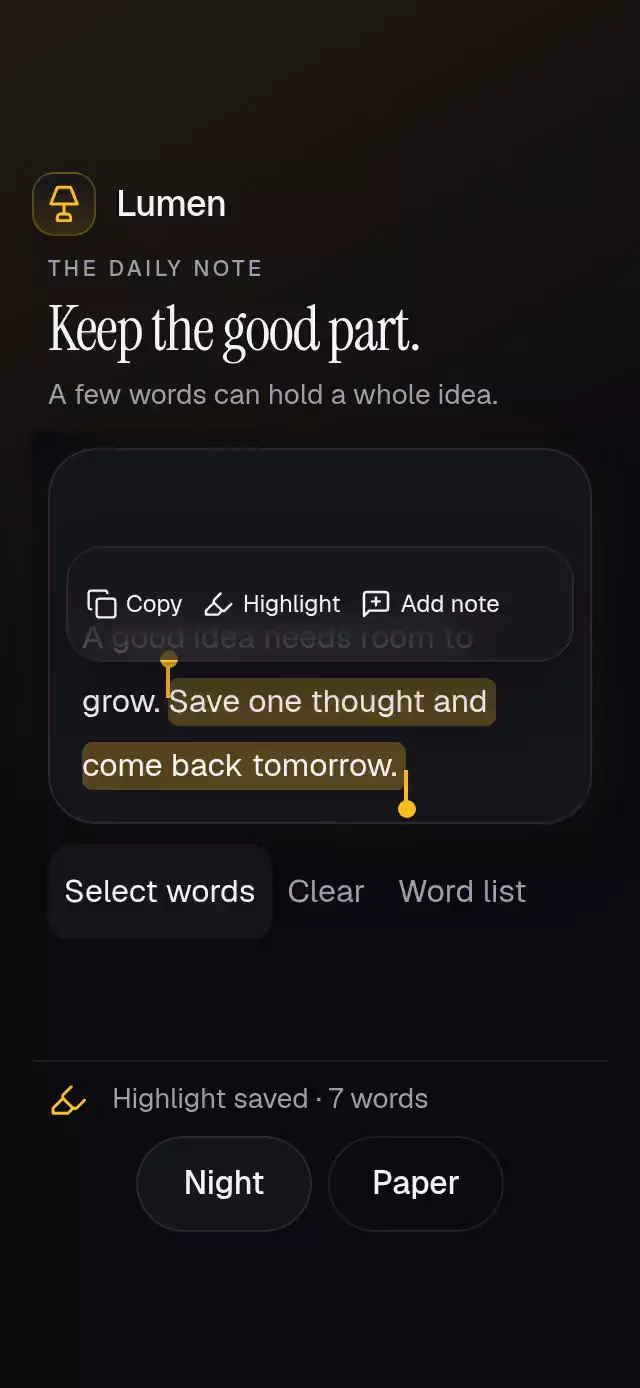
About this animation
A text selection surface with draggable handles and a floating toolbar, with configurable tokens, actions, palette, and fonts. It uses custom token selection rather than system text selection.
Why this one
The origin is a live range of words, rather than a fixed context-menu target. Each action receives the inclusive range and its text. Wrapped lines share continuous highlights, the toolbar follows the first selected line without flying through the selection, and a word-button list provides a touch and screen-reader alternative to dragging. Reflow preserves uncontrolled endpoint IDs. Token text renders immediately in normal flow; layout measurements only position the selection overlays.
How it works
- Tokens flow into a wrapping container. Each token has a direct child View that reports its rectangle through
onLayout; the gesture detector sits inside that View so its web wrapper cannot change the measurement origin. - A single UI-thread selection value drives both handles, the line highlight extents, and toolbar placement. Geometry changes update layout only; dragging does not rerender React on every frame.
- Hold a word for 350 ms, tap it, or use Select words. Each handle finds the nearest measured token. A completed gesture publishes one range request.
- Highlights stitch across each selected line in 240 ms. When the first selected line changes, the toolbar fades out, relocates above that line, and fades in within 220 ms, avoiding a flight across text.
- Actions deliver their ID, range, and space-joined text to the host. Copy shows a check and Copied feedback; no clipboard package is called. Persistence and clipboard behavior belong to the host.
Install
npx expo install react-native-reanimated react-native-worklets react-native-gesture-handler expo-blur @shopify/react-native-skiaCopy this folder without demo/ into your project. Provide a GestureHandlerRootView at the app root. Follow the installed Skia version's web setup to load CanvasKit before mounting; native Expo Go SDK 58 includes the installed modules. The demo additionally uses expo-linear-gradient and the repository's preloaded fonts. Icons: Lucide (ISC), copied from the local kit.
Usage
import { useRef } from 'react';
import SelectionActionToolbar, {
  type SelectionActionToolbarRef,
  type SelectionLabels,
} from './selection-action-toolbar';

const labels: SelectionLabels = {
  select: 'Select words', clear: 'Clear',
  earlier: 'Earlier word', later: 'Later word',
  startHandle: 'Selection start', endHandle: 'Selection end',
  words: 'Choose individual words', selected: 'Selected:',
  cleared: 'Selection cleared', empty: 'No words yet',
  invalid: 'Unable to select these words', copied: 'Copied',
  highlighted: 'Highlight saved', noted: 'Note added',
};

function Note() {
  const ref = useRef<SelectionActionToolbarRef>(null);
  return (
    <SelectionActionToolbar
      ref={ref}
      tokens={[{ id: 'a', text: 'Keep' }, { id: 'b', text: 'going.' }]}
      actions={[{ id: 'copy', label: 'Copy' }]}
      labels={labels}
      accessibilityLabel="Select words in your note"
      onAction={(id, range, text) => saveSelection(id, range, text)}
    />
  );
}
saveSelection is your host callback. For a controlled, customized version:
<SelectionActionToolbar
  tokens={tokens}
  range={range}
  onRangeChange={setRange}
  actions={actions}
  onAction={handleAction}
  labels={labels}
  accessibilityLabel="Notebook passage"
  colorScheme="dark"
  palette={myCompletePalette}
  fontFamily="MyBodyFont"
  monoFontFamily="MyNumberFont"
  style={{ flex: 1 }}
  testID="notebook-selection"
/>
Props
| Prop | Type | Default | Purpose |
|---|---|---|---|
tokens | readonly {id: string; text: string}[] | Required | Unique, nonempty IDs; rendered in input order. |
range | {start: number; end: number} | null | undefined | Controlled inclusive range; null explicitly clears. |
onRangeChange | (range | null) => void | — | Completed user and ref requests. |
actions | readonly {id: string; label: string}[] | Required | Host actions; an empty list is supported. |
onAction | (id, range, text) => void | — | Host clipboard, highlights, or notes. |
onReady | () => void | — | Notifies the host when all tokens have nonzero measured rectangles. May fire again after reflow. |
labels | SelectionLabels | Required | All controls, announcements, errors, and statuses. |
colorScheme | 'light' | 'dark' | 'auto' | 'auto' | Complete Paper/Night defaults. |
palette | SelectionPalette | Scheme defaults | background, surface, text, muted, border, accent, success, error; color strings. |
fontFamily | string | System font | Body and controls. |
titleFontFamily | string | System font | Reserved common heading hook; this component has no heading. |
monoFontFamily | string | System font | Alternative word list indices. |
style | StyleProp<ViewStyle> | — | Root host sizing. |
testID | string | 'selection-action-toolbar' | Root; suffixes -select, -clear, -earlier, -later, -words, -word-<id>, -action-<id>, -start-handle, -end-handle. |
accessibilityLabel | string | Required | Root description. |
labels keys: select, clear, earlier, later, startHandle, endHandle, words, selected, cleared, empty, invalid, copied, highlighted, noted. Supply every string explicitly. selected prefixes the selected text announcement. Custom actions use noted as their default confirmation; use neutral wording when appropriate.
Imperative API and edge cases
select(start, end)truncates finite numbers, clamps each endpoint to[0, tokens.length - 1], and sorts them. Ranges are inclusive. Reversed ranges are valid.clear()andreset()request null.act(id)runs the same action handler as its toolbar button for the current selection.- There is no internal autoplay. The demo waits for
onReady, then repeats an 8,200 ms sequence: grow words 1–6 individually at 400–1,650 ms, invoke Copy at 2,300 ms, clear at 3,300 ms, grow words 7–13 at 3,900–5,400 ms, invoke Highlight at 6,100 ms, and clear at 7,400 ms. Any real touch cancels the demo timers; unmount cleans them up. Copy demonstrates the callback and feedback without writing the clipboard. - Controlled props prevail: refs and completed gestures request changes through
onRangeChange; they never override a controlled range. Uncontrolled selections retain endpoint IDs after reordering or width changes. Removed endpoint IDs clear the rendered selection. - Empty data displays
labels.empty; duplicate/empty token IDs displaylabels.invalidand disable token selection. Missing endpoints are cleared. Nonfinite imperative inputs produce the accessible invalid status. Nonfinite controlled inputs display no selection. - Unknown action IDs are ignored. Action IDs should be unique. Text is joined with a single space; punctuation should belong to a token. A token can wrap internally if longer than the host; use word-sized tokens for accurate handle geometry.
- No system selection API, private API,
setNativeProps, network images, or clipboard access.
Compatibility
Targets Expo SDK 58, React Native 0.88.0, Reanimated 4.7.1, worklets 0.13.0, Gesture Handler 3.3, and Skia 2.14.0. Expo Blur uses its own rounded clip and an Android BlurTargetView; background contrast remains sufficient when blur is unavailable.
On web, each measured token sits directly in the words view, outside the gesture wrapper. The card follows text height and only reserves toolbar space during selection. The existing autoplay demonstrates two progressive ranges and both action callbacks.
Implementation notes
Words, stitched highlights, and handles share one local coordinate system. The floating bar ends 8 points above the first selected line, inside the card; Select words, Clear, Word list, Night, and Paper stay in their own rows. The first selection begins at 400 ms and the second at 3,900 ms. The compact layout preserves the viewer's upper-right corner; small windows use the existing outer scroll fallback.
Accessibility
The root uses flex: 1, no safe-area padding, and measures local token rectangles. Give it a bounded host (including 300×400); the expanded word list or overflowing content uses an internal ScrollView without a visible indicator. The passage and controls use normal Views when they fit. Large text and longer passages remain reachable. While a selection is active, the toolbar reserves its measured height plus an 8-point gap inside the card. Its bottom stays 8 points above the first selected line. Clearing the selection removes that reserved space. Highlights and handles use the same local rectangles as the words; demo controls stay in a separate row below the card. The word-list button also exposes Earlier word and Later word controls. The demo uses normal flow at 320×694 and 390×844, with a single outer ScrollView below 650 points of window height. Theme controls stay below the piece; the upper-right viewer corner stays free.
Buttons and handle hit areas are at least 48×48. Small inline token taps are supplemented by Select words, Earlier word, Later word, and a word-button list with 48-point targets. Handle labels point readers to the alternate controls. Important changes announce their text.
Reduced motion uses 200 ms state fades, immediate geometry changes, no toolbar travel, no highlight sweep, and no pressure scaling. There are no particles or traveling gloss layers.