About this animation
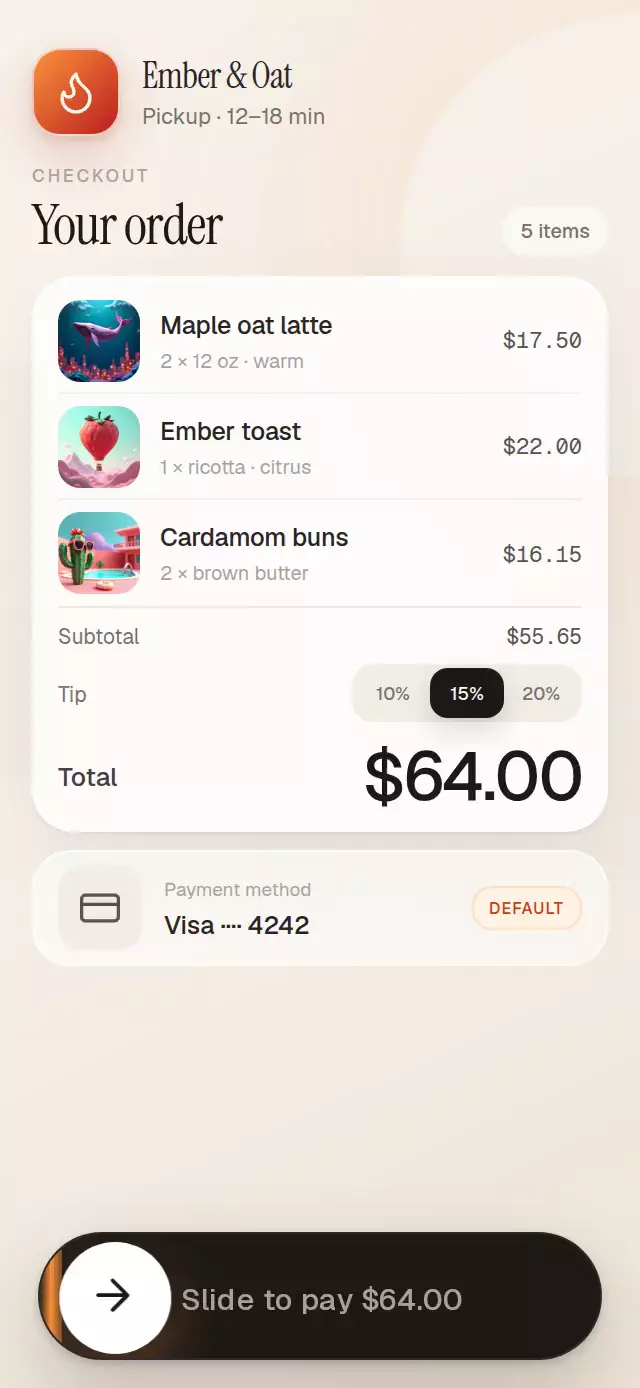
This React Native slider button turns a deliberate drag into a choreographed confirmation scene. A warm trail follows the thumb, a Skia highlight moves inside the prompt glyphs, and the thumb expands into a loading ring and drawn check. Incomplete drags spring back, while a normal press offers an alternative to dragging. Configure the label, amount, colors, optional success badge, and completion callback, or use the complete and reset ref methods. The callback follows the visual success sequence; the host remains responsible for the actual operation and its pending or failure states. The slider button tutorial demonstrates an async confirmation model separately.
When to use it
- Request a deliberate confirmation.
- Add a visual confirmation to a host-owned operation.
- Customize a drag-to-confirm scene.
Related guides
A payment slider that springs back or morphs into success, with configurable label, amount, track color, and label font asset.
Why this one
Typical payment sliders stop at a moving thumb and a flat text fade. This version keeps the warm trail physically attached to the drag, clips a real Skia light sweep inside the prompt glyphs, and turns the same thumb into the loading ring and hand-drawn confirmation. Optional composed content and a success badge make the interaction feel native to a real checkout instead of an isolated control.
How it works
onLayoutconverts the component width into a responsive 88% track and a local travel distance.- One continuous Reanimated value covers the full state machine: 0–1 is the drag, 1–2.1 is the expansion and rotating ring, and 2.1–3 draws the check and reveals the badge.
- Gesture velocity contributes to the completion decision. A release before 85% returns with an interruptible spring.
- The prompt is Skia text with a moving
LinearGradientshader, so the highlight remains inside the letterforms. - The white thumb expands to the full track before the Lucide loading ring rotates for 700 ms and the Lucide check path draws with
end. - A press activates the same sequence for keyboard, switch, and touch users who cannot drag.
Install
npx expo install expo-linear-gradient @shopify/react-native-skia react-native-gesture-handler react-native-reanimated react-native-workletsWrap the app root with GestureHandlerRootView. On web, initialize CanvasKit before loading this component, following Expo's React Native Skia setup.
Usage
import { SlideToPay } from './slide-to-pay';

export function Checkout() {
  return (
    <SlideToPay amount="$64.00" onComplete={() => submitOrder()}>
      <OrderSummary />
    </SlideToPay>
  );
}
Customize the visual personality and control it with a ref:
import { useRef } from 'react';
import { SlideToPay, type SlideToPayRef } from './slide-to-pay';

const paymentRef = useRef<SlideToPayRef>(null);

<SlideToPay
  ref={paymentRef}
  accentColor="#FB923C"
  amount="$64.00"
  bottomInset={24}
  labelFont={require('./Geist-Medium.ttf')}
  shimmerColor="#FED7AA"
  successBadge={<PaidBadge />}
  successBadgeStyle={{ right: 24, top: 180 }}
/>;

paymentRef.current?.complete();
paymentRef.current?.reset();
Props
| Prop | Type | Default | Description |
|---|---|---|---|
children | ReactNode | undefined | Content displayed behind the bottom-anchored payment control. |
label | string | 'Slide to pay' | Payment prompt rendered inside the track. |
amount | string | '$0.00' | Price appended to the payment prompt. |
trackColor | string | '#1C1917' | Dark track surface. |
accentColor | string | '#FB923C' | Warm gesture trail color. |
knobColor | string | '#FFFFFF' | Knob and final expanded surface. |
iconColor | string | '#1C1917' | Arrow, spinner, and check color. |
labelColor | string | '#A8A29E' | Resting label color. |
shimmerColor | string | '#FED7AA' | Bright color that sweeps inside the label. |
labelFont | DataSourceParam | undefined | Skia font source for the payment prompt. |
trackWidthRatio | number | 0.88 | Width of the track as a fraction of the container. |
bottomInset | number | 18 | Distance between the track and the bottom edge. |
successBadge | ReactNode | undefined | Optional success badge rendered with the completion sequence. |
successBadgeStyle | StyleProp<ViewStyle> | undefined | Position and dimensions for the success badge. |
onComplete | () => void | undefined | Called once the success sequence settles. |
accessibilityLabel | string | undefined | Screen-reader label. |
style | StyleProp<ViewStyle> | undefined | Style for the full-size outer container. |
testID | string | undefined | Test identifier applied to the outer container. |
duration | number | 760 | Payment completion highlight duration in milliseconds. Spring physics and reduced-motion timing are unchanged. |
The forwarded ref exposes complete() and reset().
Compatibility
- Expo SDK 58
- React Native 0.88
- Reanimated 4.7 and Worklets 0.13
- React Native Skia 2.14
- iOS: supported
- Android: supported
- Web: supported
- Works in Expo Go because the required native modules are included in the SDK
Accessibility
The 64 pt track exceeds the minimum touch target and exposes a labeled adjustable control with an activate action. A normal press runs the same completion as a drag. With reduced motion enabled, the component presents the final paid state immediately, without translation, rotation, or spring motion.
FAQ
- Does reaching the end verify a transaction?
- No. onComplete runs after the visual success sequence settles. The host must verify the real operation and manage pending and failure behavior.
- Can the control activate without dragging?
- Yes. A press activates the same sequence, and the component exposes an accessible activation action.
- Can I customize or replay the sequence?
- Labels, amount, colors, and an optional success badge are configurable. The forwarded ref exposes complete and reset.