About this animation
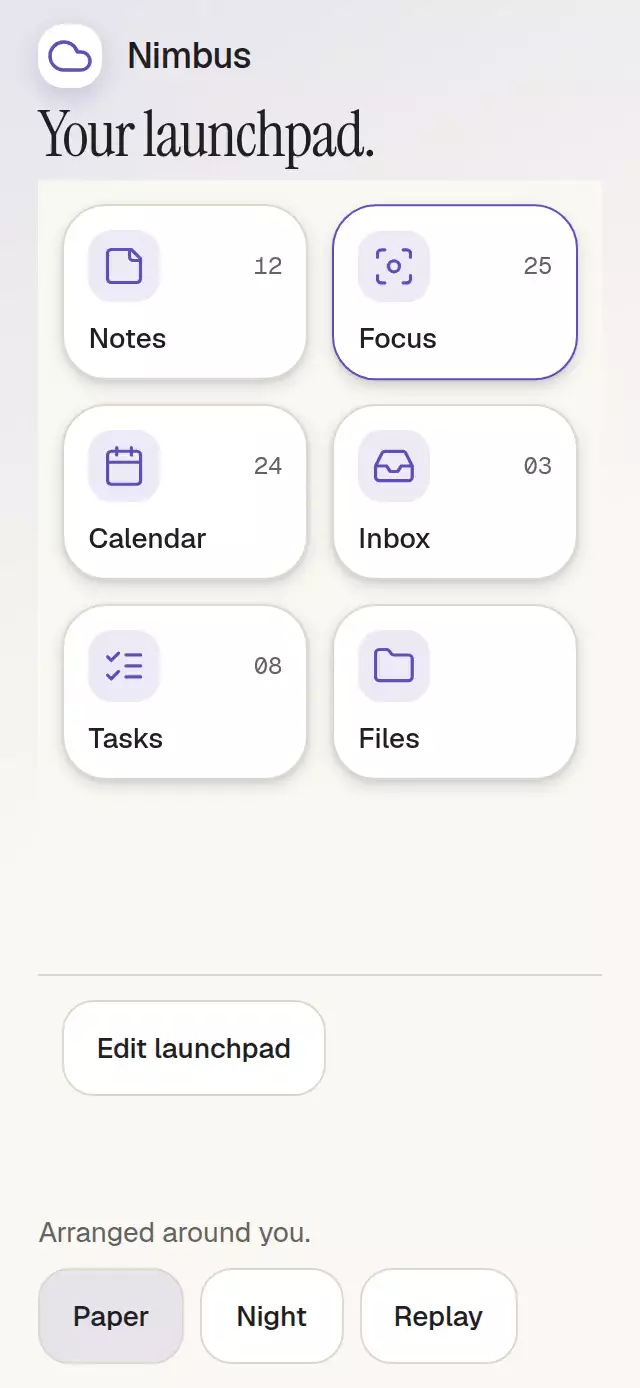
A reorderable tile grid with predictive slots and moving neighbors, with configurable items, column count, palette, and fonts.
How it works
One UI-thread DragState records the original order, active identity, position, target, velocity, and invalidation epoch. Neighbors derive their provisional slots from it. A 55% cell crossing with an 8-point reversal margin updates the gap; a drop commits once after settling. Cancellation restores the original order without notifying. The active item is rendered once.
The viewport's 40-point edge bands scroll up to 140 points/second during dragging. Coordinates include the scroll offset. Leaving a band or finalizing stops auto-scroll. A native scroll gesture waits for the long-press pan to fail, so ordinary movement before activation remains scrolling.
Surface springs use damping 36, stiffness 300, mass 1; drop springs use damping 30, stiffness 260, mass 1 and velocity in points/second (matching the translation's units). Pressure is separate, 0.97; lift is capped at 1.02. The shadow closes over 240 ms. Reduced motion removes flights, springs, and scale; changing the setting cancels an active interaction into a valid order.
Install
Copy this folder without demo/ into your project. In an Expo SDK 58 project:
npx expo install expo-image react-native-gesture-handler react-native-reanimated react-native-workletsPlace your app under GestureHandlerRootView. Expo's Babel preset configures Reanimated. No additional native module is required beyond the installed Expo Go modules.
Usage
import React, { useRef } from 'react';
import { View } from 'react-native';
import SortableTileGrid, { type SortableTileGridHandle } from './sortable-tile-grid';

export function Launchpad() {
  const grid = useRef<SortableTileGridHandle>(null);
  return (
    <View style={{ height: 400 }}>
      <SortableTileGrid
        ref={grid}
        items={[
          { id: 'notes', label: 'Notes', icon: 'sticky-note', badge: '12' },
          { id: 'files', label: 'Files', icon: 'folder' },
        ]}
        defaultOrder={['files', 'notes']}
        columns={3}
        colorScheme="auto"
        motion={{ durationScale: 1, glowOpacity: 0.25 }}
      />
    </View>
  );
}
Controlled usage: pass order={order} and onOrderChange={setOrder}. ref.current?.move('notes', 0) opens a predictive gap and uses the same settling and confirmation path as dropping. A controlled order stays authoritative until the parent accepts a request.
Props
| Prop | Default / behavior |
|---|---|
items | Required readonly { id, label, icon, badge?, disabled? }[]; KitIconName exported |
order, defaultOrder | Controlled or initial order; source order otherwise |
columns | 3; accepts 2, 3, 4; narrow hosts under 320 points and large text use 2 |
tileAspectRatio | 1; preferred width / height ratio, with enough height retained for scaled and wrapped labels |
editing | Controlled edit mode; otherwise built-in Edit / Done |
onOrderChange | One new ID array per changed, confirmed order; no callback for cancellation/no-op |
onItemPress | Idle enabled tile activation |
labels | Edit, Done, Move before/after, Cancel, empty, and zero-based position formatter; supply the complete object to localize |
colorScheme, palette | Auto; complete Paper / Night semantic defaults with partial overrides |
fontFamily, titleFontFamily, monoFontFamily | System fonts; no theme dependency |
disabled | Blocks gestures, opening, move, and cancelDrag; reset remains available |
motion | durationScale clamped 0.5–2, glowOpacity 0–0.3; nonfinite values use defaults |
style, testID, accessibilityLabel | Root overrides last; default testID sortable-tile-grid |
Palette includes background, surface, elevated, text, muted, border, accent, onAccent, accentSoft, glow, success, error, scrim, track, focus, shadowNear, shadowFar, shadowLifted, and highlight. Extra shadow/highlight tokens are public. All visible copy and announcement formatting are replaceable. Badges are content, with no baked-in number/date formatting.
Handle: move(id, toIndex), cancelDrag(), reset(). Finite indices truncate and clamp; unknown IDs and nonfinite indices do nothing. Disabled items cannot initiate moves but shift with their neighbors. Reset requests the reconciled initial order once if changed, without forcing a controlled value. Items/order changes invalidate pending commits and adopt the new input. Duplicate/empty IDs are discarded (first valid ID wins), unknown order IDs disappear, new IDs append. Supply immutable arrays. No storage/network side effects.
Compatibility
Built for Expo SDK 58, React Native 0.88.0, Gesture Handler 3.3, Reanimated 4.7.1, and worklets 0.13.0. Requires a bounded host with flex: 1 or a height. The component measures its own width, uses internal scrolling, and adapts row height for scaled/wrapped labels. A 300×400 host uses two columns. Tablet demos cap their content width; landscape recomposes the header beside the grid. No raster art: density, download, loading/error budgets are N/A. Icons are local SVG data generated from kit paths.
Headless web checks cover tap, diagonal drag, cancellation, keyboard and visible movement controls, both themes, six viewport sizes, 30-item auto-scroll, callback counts, disabled actions, and replacing items mid-move. No performance or visual score is claimed here.
Accessibility
Tiles expose stable ID-based testIDs, button role, disabled/selected state, and a formatted position. Accessibility actions move before/after and cancel. Edit mode also exposes visible 48-point movement controls after selecting a tile. On web, Tab focuses tiles, Enter/Space opens or selects, arrows confirm one step (up/down by row), and Escape cancels. Reordering keeps keyed tile identities and keyboard focus. One position announcement accompanies each confirmed move, never each frame. RTL mirrors columns and horizontal keyboard movement.
The host supplies safe areas once. The demo consumes the host’s SafeAreaProvider, applies its insets once, and supplies fonts and explicit American English copy. For constrained hosts with very large localized text, allow enough height for the wrapping toolbar and a scrollable grid.
Why this one
A list only exposes one axis. This grid makes a two-dimensional destination legible before release while preserving one portable order, interruption, cancellation, keyboard control, and reader actions. The Nimbus demo is original product copy and kit identity. Icons: Lucide (ISC), copied exactly from the repository kit; retain the Lucide license when redistributing. No reference assets are shipped.
The Nimbus demo uses six tiles with a 1.5 aspect ratio and a compact header on shorter screens so the complete launchpad fits without scrolling at 320×694 and 390×844. Reordering and settling use the same interaction path.