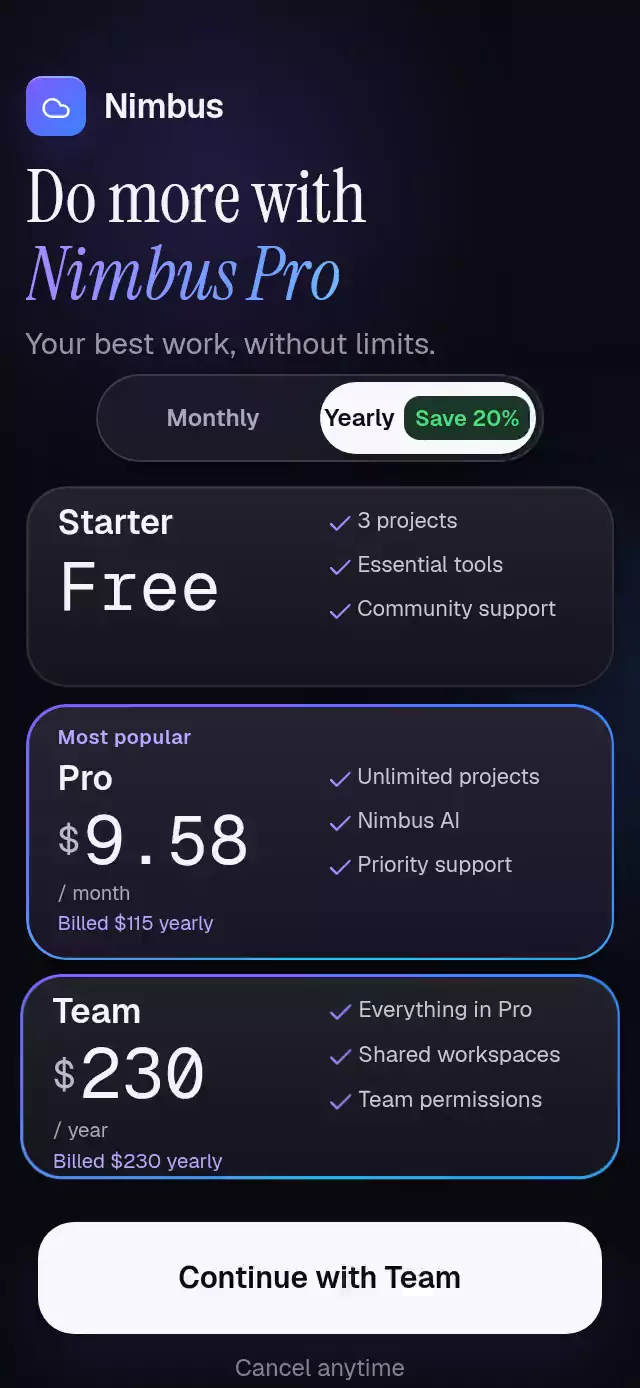
About this animation
A paywall with height-based plan pillars and illuminated features, with configurable plans, features, labels, and fonts.
Why this one
Equal cards hide the difference between plans. These bottom-aligned pillars make that difference visible. A plan-colored aura and illuminated benefits explain what changes before the user reads the details. Prices roll in tabular columns; the CTA shimmer is a shader inside its letters, never a rectangle over the text.
How it works
onLayoutmeasures the container. The header, pillars, benefits, and footer use its width and height.- One continuous
selectedvalue drives pillar widths, the accent color, and feature inclusion. Tap and pan use Gesture Handler's exclusive recognition. - Release velocity projects the destination, then an interruptible spring settles on the nearest plan.
- Pillars grow from a shared bottom with 80 ms offsets; benefit illumination follows with 50 ms offsets.
- Billing uses a separate shared value. Each price column moves only at its carry and fades away from its resting digit.
- The CTA scales on touch, becomes a continuous loading arc for 900 ms, then confirms success. The font shader sweeps every three seconds.
Install
npx expo install @shopify/react-native-skia expo-blur expo-linear-gradient react-native-gesture-handler react-native-reanimated react-native-workletsUse a GestureHandlerRootView at your app root and load your font families before showing the paywall. For web, initialize CanvasKit before importing this component, following your installed Skia setup. The host catalog must load this piece through its Skia-aware lazy loader.
Usage
import { TierPillarsPaywall } from './tier-pillars-paywall';

<TierPillarsPaywall onClose={() => dismiss()} onTrialStart={(plan, yearly) => beginCheckout(plan, yearly)} />;
Customize typography and physics:
<TierPillarsPaywall
  ref={paywallRef}
  title="Make room for"
  subtitle="your best work."
  fontFamily="YourInterfaceFont"
  titleFontFamily="YourEditorialFont"
  italicFontFamily="YourEditorialItalic"
  monoFontFamily="YourMonoFont"
  buttonFontSource={require('./assets/interface-medium.ttf')}
  springDamping={26}
  springStiffness={280}
/>
ref exposes select(index), setYearly(boolean), replay(), and startTrial(). Use onTrialStart to connect your billing flow and trialStatus to display its result. The component never simulates a purchase. The demo supplies Nimbus branding, fonts, close/restore/terms actions, and a 9.5-second autoplay loop.
Props
| Prop | Type | Default | Description |
|---|---|---|---|
labels | Partial<TierPillarsPaywallLabels> | American English defaults | yearly: Yearly; monthly: Monthly; restorePurchase: Restore purchase; terms: Terms; yearlyAccessibility: Yearly billing, save 20 percent; monthlyAccessibility: Monthly billing. Omitted keys retain their defaults. |
| plans | readonly tuple of three TierPlan | Free / Pro / Team | Names, prices, relative heights, hex accents, and five inclusion flags. |
| features | readonly tuple of five strings | AI drafts, storage, spaces, sync, history | Feature labels in kit icon order. |
| title / subtitle | string | Make room for / your best work. | Two headline lines. |
| brandName | string | Your workspace | Brand caption. |
| trialLabel / successLabel | string | Continue / You're in | CTA states. |
| badgeLabel | string | Most loved | Selected pillar badge. |
| initialIndex | number | 1 | Initial selection, clamped to 0–2. |
| fontFamily | string | system | Interface font. |
| titleFontFamily / italicFontFamily | string | system | Headline fonts. |
| monoFontFamily | string | system | Price font. |
| buttonFontSource | Skia DataSourceParam | undefined | Font file for the letter shader; system text fallback when absent. |
| springDamping / springStiffness | number | 52 / 260 | Selection physics. Damping is raised as needed to keep ζ ≥ 0.8 with the installed default mass. |
| onPlanChange | (index: number) => void | undefined | Nearest plan change during interaction. |
| onPeriodChange | (yearly: boolean) => void | undefined | Billing selection. |
| trialStatus | 'idle' | 'loading' | 'success' | 'idle' | Host-controlled CTA state. |
| onTrialStart | (index: number, yearly: boolean) => void | undefined | Requests a trial using the current plan and period. The host performs billing and controls trialStatus; the demo simulates a 900 ms response. |
| onClose / onRestore / onTerms | () => void | undefined | Host actions. |
| style | StyleProp<ViewStyle> | undefined | Root styling; provide a bounded container. |
| testID | string | undefined | Test identifier. |
Compatibility
Containers below 740 points use a compact layout in normal flow. Benefits reserve space before billing, and shorter hosts can scroll vertically.
Expo SDK 58, React Native 0.88.0, Reanimated 4.7.1, Worklets 0.13.0, Skia 2.14.0. Uses installed Expo Go modules. Android blur uses one BlurTargetView shared by all pillars and falls back to tinted material below Android 12. Designed for 320×694 and 390×844 portrait containers.
Accessibility
Plans expose radio roles, prices, billing periods, selection state, and an accessibility activation action. Every gesture has a tap alternative. Billing and footer links have 44 pt hit areas; the CTA is 56 pt tall. Reduced motion removes growth, shimmer, rotation, drag tracking, and pressure scaling; selection and illumination use short fades/timed changes. The trial result remains visible until replay.
Icons: Lucide (ISC). The demo's Nimbus tile and cloud glyph come from the repository brand kit.
Spring damping floors use Reanimated 4.7.1’s default mass of 4 when the configuration does not set a mass. Stiffness and mass remain unchanged.
Customization notes
Set each plan color through plans[].color; the pillar, selected heading, and CTA follow that plan.