About this animation
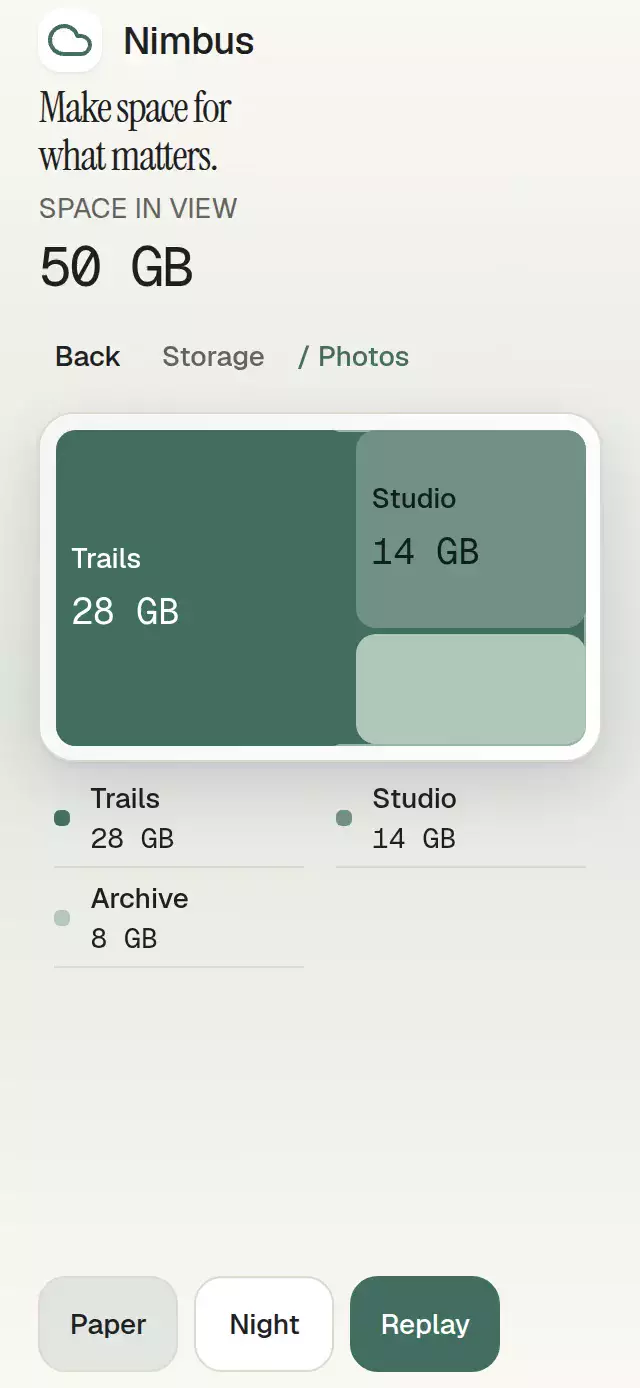
A proportional treemap with spatially continuous drilldown and configurable hierarchy, labels, palette, and fonts.
How it works
- Validate globally unique IDs, at most 100 leaves and eight input levels below the root. Branch totals sum finite, nonnegative leaves; an explicit branch
valueis ignored. Missing leaf values become zero. - Squarify siblings with an original, deterministic row-packing algorithm. Rectangle areas encode their share of the parent before the 3-point visual gaps. Zero values remain in the list and receive no painted area.
- At each level, combine multiple children whose projected area is below
minTileAreainto an inspectable Other branch. Its sum is exact. Synthetic IDs append::other(with collision avoidance); its descendants retain their original IDs. Aggregation uses the measured full chart area for each level. Resizing can change grouping, so validate stored paths after data or host changes. - Save every node's rectangle in root coordinates. A single Reanimated progress value interpolates a camera rectangle from the current pose to the requested branch. All visible rectangles use that same matrix and the chart clips siblings; this is not a crossfade between replacement charts.
- Parent labels leave in the first 90 ms, child labels enter at 220–340 ms, and the camera settles at 380 ms. Back uses the same deterministic rectangles. Interruptions capture the current camera pose. Data changes rebuild the layout and retarget that pose by ID.
Install
npx expo install react-native-reanimated react-native-worklets expo-linear-gradientCopy this folder without demo/. Reanimated 4 requires its compatible react-native-worklets runtime and worklets Babel setup; Expo SDK 58 supplies that setup through babel-preset-expo. No D3 or native chart dependency is required.
Usage
import { View } from 'react-native';
import { TreemapDrilldown, type TreeNode } from './treemap-drilldown';

const data: TreeNode = {
  id: 'root', label: 'Library', children: [
    { id: 'images', label: 'Images', children: [
      { id: 'recent', label: 'Recent', value: 60 },
      { id: 'saved', label: 'Saved', value: 20 },
    ] },
    { id: 'documents', label: 'Documents', value: 20 },
  ],
};

// Give the component a bounded host; the host owns safe areas.
export default function Example() {
  return (
    <View style={{ height: 500 }}>
      <TreemapDrilldown data={data} />
    </View>
  );
}
Controlled navigation and visual knobs:
const ref = useRef<TreemapDrilldownHandle>(null);
const [path, setPath] = useState<readonly string[]>([]);
<TreemapDrilldown
  ref={ref}
  data={data}
  path={path}
  onPathChange={setPath}
  onLeafSelect={id => openFileGroup(id)}
  colorScheme="dark"
  palette={{ accent: '#98D3B9', focus: '#98D3B9' }}
  formatValue={value => `${value} MB`}
  motion={{ durationScale: 1.2, glowOpacity: 0.2 }}
  minTileArea={2304}
/>
// ref.current?.drillTo('images'); ref.current?.back();
// ref.current?.goToPath(['images']); ref.current?.reset();
Import the handle type from this folder. drillTo acts on a direct child of the current branch and selects a leaf through onLeafSelect; goToPath accepts branch IDs excluding the root. Controlled refs request one callback and wait for the parent prop. The component never overrides a controlled path. Reset requests the root even when disabled. Repeated requests for the current path do not emit callbacks.
Props
| Prop | Default | Description |
|---|---|---|
data: TreeNode | Required | Globally unique string IDs, labels, optional values and children. |
path: readonly string[] | Uncontrolled | Current branch ID path excluding root. |
defaultPath | [] | Initial uncontrolled branch path. |
onPathChange(path) | — | One callback per valid, different navigation request. |
onLeafSelect(id) | — | Discrete leaf selection callback. |
formatValue(value) | String | Used for every visible and accessible value. |
minTileArea | 2304 | Minimum projected area in square points before grouping multiple small positive nodes. 0 disables grouping. |
labels | Neutral English | root, back, empty, invalid, other, total, openCategory(label). |
colorScheme | auto | light, dark, or system appearance. |
palette | Paper / Night | Partial complete palette, including four tile1…4 fills, tileInk1…4 inks, highlight, and transparent. |
fontFamily | System | Body and controls. |
titleFontFamily | System | Total caption. |
monoFontFamily | System | Numeric values. |
scrollEnabled | true | Own vertical scroll; set false when the host manages layout or scrolling, as in the demo. |
disabled | false | Blocks touch and imperative actions except reset. |
motion | {durationScale: 1, glowOpacity: 0.25} | Scale clamped to 0.5–2, glow to 0–0.3. |
style | — | Applied last to the flex root. |
testID | treemap-drilldown | Stable -chart, -back, -crumb-ID, -tile-ID, and -row-ID suffixes. |
accessibilityLabel | — | Chart/data-list name. |
ref | — | TreemapDrilldownHandle: drillTo, back, goToPath, reset. |
The full palette contains background, surface, elevated, text, muted, border, accent, onAccent, accentSoft, glow, success, error, scrim, track, and focus, in addition to the chart tokens above. Changing a tile fill also requires a matching contrasting ink.
Duplicate/empty IDs, invalid leaf values, overflowing sums, more than 100 leaves, or excessive depth show labels.invalid and disable navigation. Unknown or non-branch path segments also show that message; they never silently open a different branch. Supply a corrected controlled path, or call reset in uncontrolled mode. An empty or all-zero tree shows labels.empty. An empty branch with no children is treated as a zero-valued leaf. Immutable data replacement is required for updates.
Compatibility
Targets Expo SDK 58, React 19.2, React Native 0.88.0, Reanimated 4.7.1 and Worklets 0.13.0. Uses modules available in Expo Go. Universal React Native source; no DOM or web-only import in the shipped component. The demo additionally uses Skia 2.14.0 for the kit's Nimbus cloud glyph, Expo fonts, and safe-area context; a web demo host must load CanvasKit before importing the demo.
No runtime FPS claim is made.
Accessibility
Back, breadcrumbs and every equivalent list action have targets at least 48 points. Tiles below that target size have no touch action; data stays available in the list, including zeros and grouped children. Small visual tile labels are hidden at large font scales without removing data. Screen readers use the equivalent list rather than repeating chart tiles. Selected leaves expose a selected state and a visible accent border. Branch actions include their names and formatted values.
Tab and Enter use native button semantics on web; Escape returns one level. User navigation restores keyboard focus to the current breadcrumb; autoplay does not move focus. Breadcrumbs scroll horizontally. Logical row layout and chart geometry mirror in RTL. Reduced motion replaces the spatial zoom with an immediate state change; there are no decorative loops. By default the component owns its vertical scrolling (indicators hidden); scrollEnabled={false} delegates it to the host. The demo uses a fixed layout without vertical scrolling, with a compact headline below 740 points of window height and 48-point theme and replay controls kept in the footer. The equivalent legend uses two columns at regular font sizes when the chart is at least 240 points wide, and a single column for narrower hosts or larger text. The host owns safe areas. Use style for a bounded 300×400 embed.
Why this one
Area carries meaning while the camera preserves where a branch came from. Reversible breadcrumbs and a complete, equivalent list make the same hierarchy usable beyond the chart's smallest cells. The included Nimbus storage demo uses original synthetic data, two complete themes, and a five-second public-handle autoplay sequence. No raster assets: resolution and image budgets are N/A.
Icons: Lucide (ISC), copied from the repository kit. Nimbus is the demo identity from that kit; no reference artwork or implementation is distributed.