About this animation
A waterfall chart with connected balance contributions and animated inspection, with configurable changes, labels, palette, and fonts.
Why this one
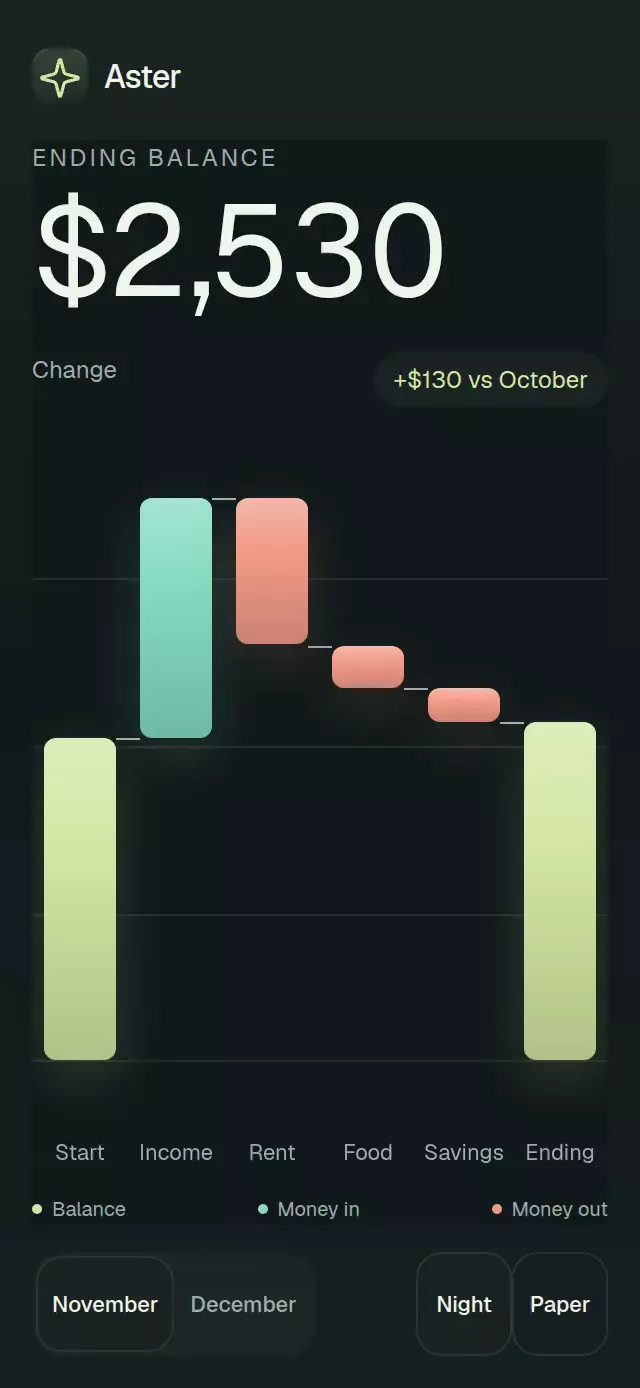
The chart fills its host instead of sitting inside a small card. Wide olive totals, mint income, and coral expenses share one cumulative scale. Selecting a bar lifts it, dims its neighbors, and shows a detail bubble with its signed amount and resulting balance. All public props and imperative methods remain available.
How it works
- Validate finite values and unique contribution IDs, then calculate cumulative endpoints on one scale that includes zero.
- Measure the host with
onLayout. Bars use 76% of each slot, 6-point corners, vertical material gradients, a soft glow, and thin connections at the cumulative balance. - Drive the waterfall entrance with one UI-thread clock: 90 ms between steps, 440 ms of travel per step. The headline rolls from the starting balance to the final balance over 1050 ms.
- Roll digit columns only at their carry, fading each glyph with distance. Invisible sizing glyphs reserve their width. Custom formatters with different start/end structures display the exact final string directly.
- Animate selection lift and pressure with interruptible, explicitly massed springs. Touching the selected bar clears it. Selecting totals is also supported through their
__startand__endIDs. - Keep six slots visible; larger datasets scroll horizontally.
compactomits the ledger and gives that space to the chart.
Install
npx expo install react-native-reanimated react-native-worklets expo-linear-gradientThe optional demo also uses the installed @shopify/react-native-skia package for its Lucide brand tile. Icons are copied from the local kit into icons.ts (ISC). Configure CanvasKit only when using the optional demo on web.
Usage
import { useRef } from 'react';
import { View } from 'react-native';
import { WaterfallBalanceBridge, type WaterfallBalanceBridgeRef } from './waterfall-balance-bridge';

const labels = {
  balance: 'Ending balance', hint: 'Select a contribution',
  total: 'Balance', increase: 'Money in', decrease: 'Money out',
  table: 'Balance ledger', before: 'Starting', change: 'Change', after: 'Ending',
  empty: 'No contributions', invalid: 'Balance data is unavailable',
};

export function Balance() {
  const bridge = useRef<WaterfallBalanceBridgeRef>(null);
  return (
    <View style={{ height: 400, width: 300 }}>
      <WaterfallBalanceBridge
        ref={bridge}
        compact
        startingValue={2400}
        changes={[
          { id: 'income', label: 'Income', value: 1800 },
          { id: 'rent', label: 'Rent', value: -1100 },
        ]}
        startingLabel="Starting"
        endingLabel="Ending"
        formatValue={(value) => `$${value.toLocaleString('en-US')}`}
        labels={labels}
        accessibilityLabel="Monthly balance bridge"
      />
    </View>
  );
}
Personality and controlled selection:
<WaterfallBalanceBridge
  {...balanceProps}
  selectedId={selectedId}
  onSelect={setSelectedId}
  colorScheme="light"
  palette={{ accent: '#7552C2', success: '#157B58', error: '#C63F34' }}
  fontFamily="YourBodyFont"
  titleFontFamily="YourTitleFont"
  monoFontFamily="YourNumberFont"
  testID="account-bridge"
/>
Props
| Prop | Type | Default / behavior |
|---|---|---|
startingValue | number | Required; finite initial balance |
changes | readonly BalanceChange[] | Required; ordered { id, label, value } contributions |
startingLabel, endingLabel | string | Required total labels |
formatValue | (value: number) => string | Required; formats signed balances and absolute contribution magnitudes; the component supplies contribution signs |
labels | BridgeLabels | Required; every field appears in the usage example |
onSelect | (id: string | null) => void | Optional; one callback per changed request |
selectedId | string | null | Omit for internal selection; otherwise controlled |
colorScheme | 'light' | 'dark' | 'auto' | auto; follows system appearance |
palette | Partial<BridgePalette> | Theme overrides: background, surface, text, muted, border, accent, success, error |
fontFamily, titleFontFamily, monoFontFamily | string | System fonts |
accessibilityLabel | string | Required root description |
compact | boolean | false; omit the ledger and expand the chart to the host height |
style | StyleProp<ViewStyle> | Root override; flex: 1 by default |
testID | string | waterfall-balance-bridge |
labels.balance labels the ending headline; hint supplies the comparison context beside the signed net change; total, increase, and decrease label the legend; table, before, change, and after label the ledger and accessible row descriptions; empty and invalid are the fallback messages.
Ref and data behavior
select(id)requests an existing bar. Unknown IDs are ignored. Repeated selection does not duplicate callbacks.reset()requests a null selection. It does not reset the parent's dataset or own any autoplay timers.- Controlled props win. A ref request only calls
onSelect; visual selection waits for the parent to updateselectedId. External prop changes do not echo callbacks. - Empty
changesrenders equal starting and ending totals and the empty message. - Nonfinite amounts, duplicate or empty IDs, and accumulated numeric overflow produce the accessible
labels.invalidalert. The fallback headline is formatted zero. A controlled selection missing from the current data renders the net-change summary without selecting a bar. - Test IDs: root,
-chart,-detail, and-step-<id>(including__startand__end).
Compatibility
Target: Expo SDK 58, React Native 0.88.0, React 19.2.3, Reanimated 4.7.1. The required modules are already in this project's Expo Go stack. No additional dependency was installed.
Implementation notes
The previous component forced a 96-point compact chart (original line 439) and 52%-width bars (original line 246) inside a bordered card, while its equation dominated the composition. This version removes the outer card and equation, expands the chart, and gives the headline a clear typographic hierarchy. Axis labels have dedicated 48-point rows; the selected amount uses the caller's title font (Instrument Serif in the demo). Material comes from gradients inside the bars and shadows, with no traveling rectangle over text. No image generation is needed.
Accessibility
The root measures its own width and height and applies no safe-area insets. The host supplies those insets and owns any vertical scrolling. A compact 300 × 400 embedding retains the headline, detail, chart, and legend. The default variant also includes a ledger; provide additional height for large datasets. The chart scrolls horizontally when its minimum 48-point slots exceed the host width. All bar slots are accessible buttons and at least 48 points wide. Font scaling remains enabled.
The demo uses a full-height compact layout, a month segmented control, and discreet Night/Paper controls. At 320 × 694 and 390 × 844 the page has no vertical ScrollView. Below 600 points tall, including landscape, or with enlarged text it uses one outer scroll host with its indicator hidden. The 570-point minimum content height preserves the interaction in short screens. No control competes with the viewer's upper-right close button.
Screen readers receive the exact final headline, signed contribution and resulting balance for each button, selected states, and a balance announcement on selection. Reduced motion shows the final numbers and bars directly and removes travel, pressure scaling, and selection lift. No animation updates React state per frame.
Autoplay reveals the waterfall immediately, selects Rent at 1500 ms, changes month at 2800 ms, clears selection at 4300 ms, restores November at 5000 ms, and repeats every 6500 ms. A real touch cancels autoplay; unmount clears every timer. The first month's net-change pill reads “+$130 vs October.”