About this animation
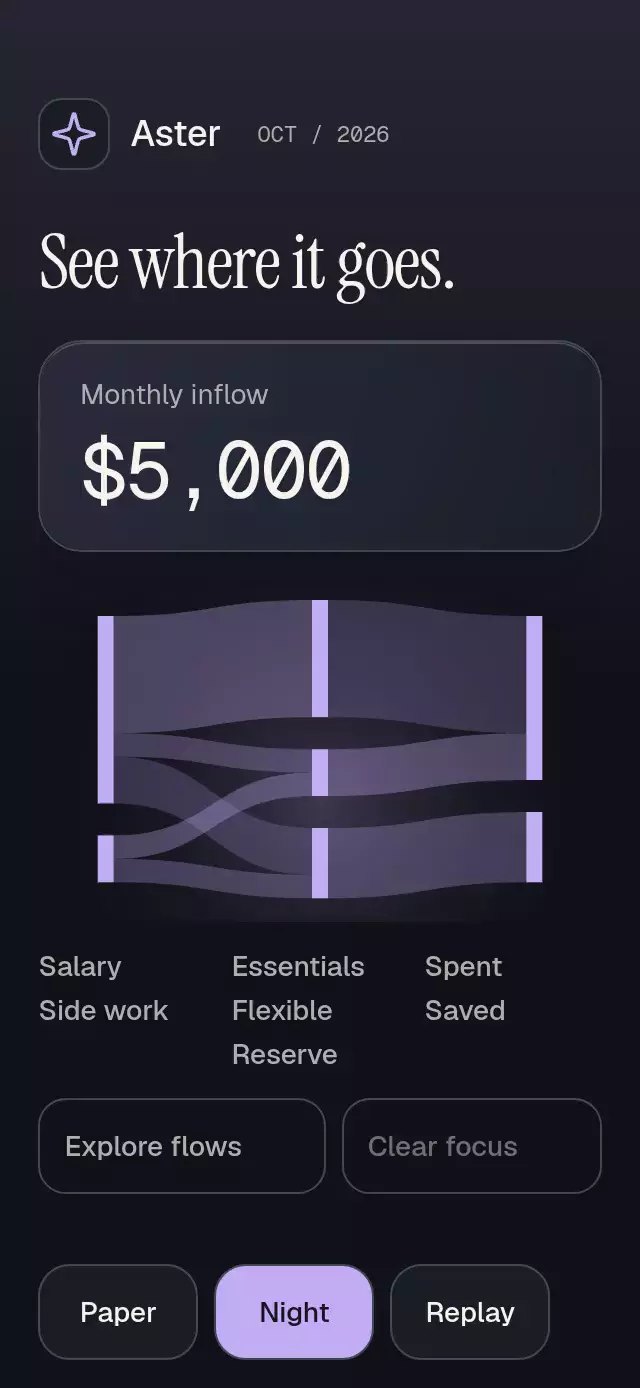
A flow diagram with proportional ribbons and node or link focus, with configurable nodes, links, palette, and fonts.
How it works
- Validate IDs, finite nonnegative amounts, increasing columns, and internal conservation within 0.01 units. Invalid datasets expose their rows without drawing a misleading diagram.
- Compute one pixels-per-unit scale for every node and ribbon, with 8-point nodes and 16-point vertical gaps. Zero links are omitted; small links never receive a fabricated minimum thickness.
- Precompute cubic ribbon paths and use the same paths for geometric tap testing. Selection changes opacity rather than geometry.
- Derive ribbon opacity from a shared focus progress. A separate 420 ms pulse trims the selected centerline while the single total rolls into place. Node totals use the larger of inflow and outflow, rather than adding both.
- Keep all text outside the Canvas. Expand the equivalent flow list to reach every link and node using a keyboard, screen reader, or a 48-point button.
Install
Copy this folder, excluding demo/, into your project.
npx expo install @shopify/react-native-skia react-native-gesture-handler react-native-reanimated react-native-worklets expo-blur expo-linear-gradientDeveloped against Expo SDK 58, React Native 0.88.0, React 19.2.3, Skia 2.14.0, Gesture Handler 3.3, Reanimated 4.7.1, expo-blur 58.0.5, and expo-linear-gradient 58.0.3. Configure Reanimated and wrap your application in GestureHandlerRootView. On web, load CanvasKit before importing the component, following Skia's web setup. No chart library, provider, external assets, or network request is required by the component.
Usage
import SankeyFlowFocus from './components/sankey-flow-focus';

const nodes = [
  { id: 'income', label: 'Income', column: 0 },
  { id: 'spending', label: 'Spending', column: 1 },
] as const;
const links = [
  { id: 'income-spending', source: 'income', target: 'spending', value: 1200 },
];

// The parent supplies a bounded height and any safe-area padding.
<SankeyFlowFocus nodes={nodes} links={links} maxColumns={2} style={{ height: 400, flex: 0 }} />;
Controlled selection and personality knobs:
const chart = useRef<Handle>(null);
const [selected, setSelected] = useState<Selection>(null);

<SankeyFlowFocus
  ref={chart}
  nodes={nodes}
  links={links}
  maxColumns={2}
  selected={selected}
  onSelect={setSelected}
  colorScheme="dark"
  palette={{ accent: '#C2ADF5', focus: '#C2ADF5' }}
  flowColors={{ 'income-spending': '#AA95D6' }}
  motion={{ durationScale: 0.8, glowOpacity: 0.2 }}
  formatValue={(value) => `$${value.toLocaleString('en-US')}`}
/>;

// Methods request a controlled change through onSelect once.
chart.current?.focusLink('income-spending');
Import Handle and Selection from the same folder. Supply all localized labels, node names, and formatters through props. The demo's Aster branding and fonts are separate from the component.
Props
| Prop | Default | Behavior |
|---|---|---|
nodes: readonly FlowNode[] | Required | Unique IDs and labels, columns 0–2; maximum 12 nodes. |
links: readonly FlowLink[] | Required | Unique IDs, source, target, and finite amount; maximum 20 links. |
maxColumns: 2 | 3 | 3 | Two-column data uses columns 0 and 1. |
selected: Selection | Uncontrolled | {kind: 'node' | 'link', id} or null. |
defaultSelected: Selection | null | Initial uncontrolled focus. |
onSelect(selection) | None | One request per user or imperative selection action. |
formatValue(value) | US number format | Formats totals, rows, and announcements. |
labels: Partial<Labels> | Neutral English | total, from, to, amount, clearSelection, empty, invalid, showFlows, hideFlows, and flow(source, target, formattedValue). |
flowColors | Three violet palette tokens | Optional color per link ID. |
colorScheme | 'auto' | 'light', 'dark', or system. |
palette: Partial<Palette> | Paper/Night | All semantic colors plus ribbonSecondary, ribbonTertiary, and highlight. |
fontFamily, titleFontFamily, monoFontFamily | System | Host fonts; no catalog dependency. |
motion | {durationScale: 1, glowOpacity: .25} | Finite values clamp to 0.5–2 and 0–0.3. |
disabled | false | Blocks selection and replay, including handle calls; reset remains available. |
style | None | Applied last to the flex root. |
testID | 'sankey-flow-focus' | Stable root, -diagram, -node-ID, -flow-ID, -toggle-list, -flow-list, -clear. |
accessibilityLabel | None | Optional host description. |
The handle exposes focusNode(id), focusLink(id), clear(), replay(), and reset(). Replay reruns the entrance and preserves focus. Reset requests no selection, closes details, and replays. Unknown IDs are ignored. A focus whose ID remains in a replacement dataset is retained; removed IDs fall back to no focus. Controlled props always win. Treat input arrays as immutable.
Empty arrays or all-zero links show the empty label. Duplicate IDs, backward or same-column links, orphan links, negative/nonfinite amounts, exceeded budgets, and unbalanced internal nodes show the invalid label and raw rows. Duplicate rows receive distinct React keys but retain their supplied IDs in test selectors. Formatters must accept finite numbers; nonfinite row values use the invalid label.
Compatibility
This is an Expo/RN component, with iOS, Android, and web implementations supplied by the installed libraries.
The total card blurs its own mineral gradient through a BlurTargetView. Android uses dimezisBlurViewSdk31Plus; older Android versions retain a legible solid base. Both the material and its clipping layers have their own radius. The diagram uses one Canvas; the demo adds one small brand Canvas. Raster assets and image-density requirements: N/A.
Accessibility
All labels are React Native text outside the Canvas. The component owns vertical scrolling so the expanded equivalent list remains reachable in a 300×400 container or with large type. The host owns safe areas. The demo keeps theme and replay controls in the lower flow. No essential text is truncated and font scaling stays enabled.
Explore flows exposes node buttons and every nonzero From/To/Amount row with selected and disabled states. These controls have a minimum height of 48. Narrow ribbons use exact geometry rather than overlapping enlarged targets. Tab and Enter activate buttons on web; Escape clears selection. RTL mirrors chart columns and keeps list content in logical order. A confirmed focused selection generates one screen reader announcement, never one per frame.
useReducedMotion() supplies the initial preference, with a live reduceMotionChanged subscription. Reduced motion reveals the graph immediately, removes the traveling pulse and total translation, and changes focus with a 200 ms fade. No decorative loop runs inside the component. The demo's optional five-second autoplay uses public handle methods, stops on real input/background, and clears timers on unmount.
Why this one
A many-to-many diagram explains where resources move while preserving amount through each intermediate node. Focus never inflates a small ribbon, shifts a node, or counts both sides of an internal transfer. The equivalent list keeps the financial story available when geometry alone is too small to touch.
The reference informed only the general Sankey pattern. Geometry, code, data, copy, palette, and interaction are original. The demo uses the kit's exact Aster name and ISC-licensed Lucide sparkle path. Demo fonts are provided by the host under their respective OFL licenses. No reference artwork is shipped. Distribution is subject to the enclosing Native Animation license.