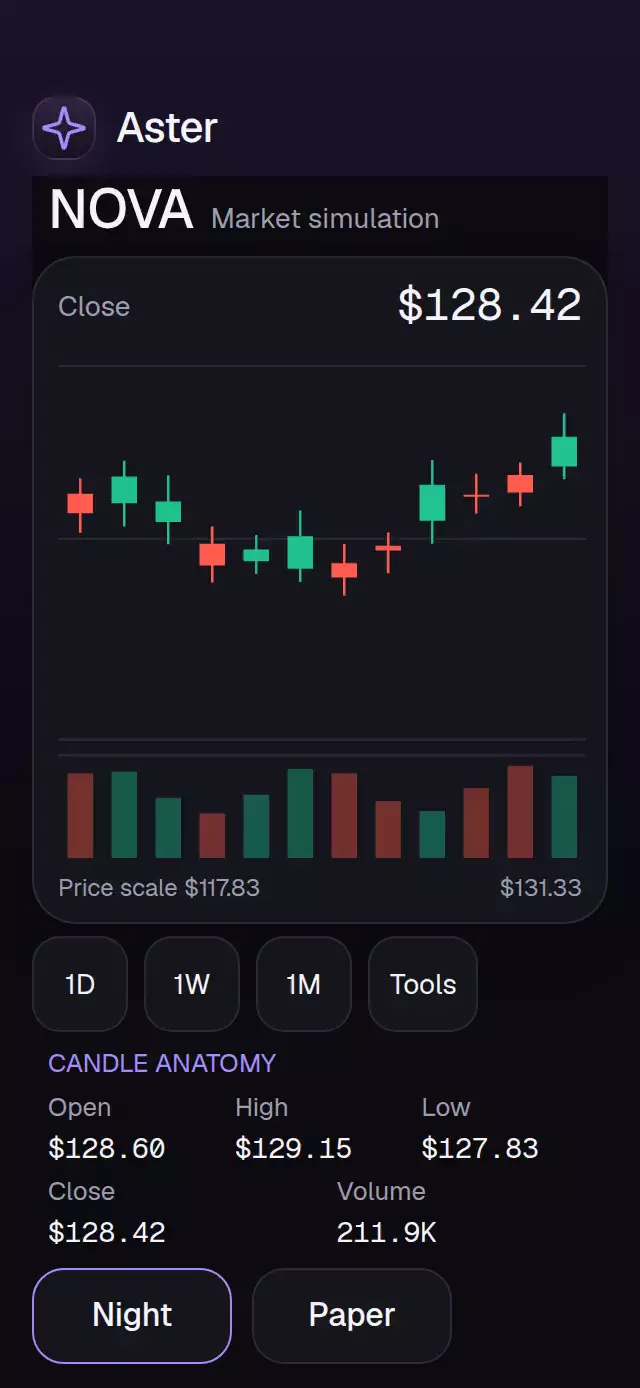
About this animation
An OHLC chart with pinch zoom and a candle lens, with configurable candles, labels, palette, and fonts.
Why this one
A common price scale preserves actual highs and lows across window changes. Volume has a separate zero baseline in the bottom 18% of the plot. Pinch keeps the candle under the initial focal point anchored, while buttons provide equivalent zoom, pan, and selection. A text OHLC table gives an alternative to reading the canvas. Rendering work is bounded by the visible window, never one native node or canvas per sample.
How it works
- Validate the complete series, including finite timestamps and prices, unique nonempty IDs, OHLC bounds, and nonnegative volume.
- Measure the embedding container with
onLayout. At widths up to 320 points, show no more than 12 candles; elsewhere the maximum is 60. - Store
{ start, count }in one shared value. Pan, pinch, imperative commands, and buttons update the same window. A spring uses explicit mass and inherits pan velocity. - Build six paths for rising/falling bodies, wicks, and volume in one Skia Canvas. Bodies grow from open, with a 12 ms stagger; no interpolated market data or invented extremes.
- Selecting a candle opens a 260 ms circular anatomy lens. Its four OHLC leader lines separate while the formatted price rolls in measured digit columns, with separators in their own natural widths. Selection changes cross to React only at discrete interactions.
- The demo drives
select,zoomTo, andreseton a 5 second loop. Direct touch cancels all timers. No autoplay lives in the component.
Install
npx expo install @shopify/react-native-skia@2.14.0 react-native-gesture-handler@~3.3.0 react-native-reanimated@4.7.1 react-native-worklets@0.13.0Use a GestureHandlerRootView in the host application. Load Skia with the host's usual web CanvasKit initialization before rendering the component. Fonts belong to the host; the component does not import the catalog or theme. The demo additionally uses expo-linear-gradient.
Usage
import { CandlestickVolumeChart, type ChartLabels } from './candlestick-volume-chart';

// Supply every label in ChartLabels; see the demo for a complete English example.
<CandlestickVolumeChart
  candles={candles}
  labels={labels}
  accessibilityLabel="Asset OHLC and volume"
  formatPrice={value => `$${value.toFixed(2)}`}
  formatVolume={value => value.toLocaleString('en-US')}
  formatDate={timestamp => new Date(timestamp).toLocaleString('en-US')}
/><CandlestickVolumeChart
ref={chartRef}
candles={candles}
labels={labels}
selectedId={selection}
onSelectionChange={candle => setSelection(candle?.id ?? null)}
visibleCount={24}
colorScheme="dark"
palette={{ accent: '#A78BFA' }}
fontFamily="YourInterfaceFont"
titleFontFamily="YourHeadingFont"
monoFontFamily="YourNumericFont"
accessibilityLabel="Asset OHLC and volume"
formatPrice={formatPrice}
formatVolume={formatVolume}
formatDate={formatDate}
style={{ flex: 1 }}
testID="asset-chart"
/>Props
| Prop | Type | Default | Purpose |
|---|---|---|---|
| candles | readonly Candle[] | Required | Immutable OHLC and volume samples in display order. |
| visibleCount | number | 24 | Initial/reset window; clamped to data and responsive limits. |
| selectedId | string or null | Uncontrolled | Controlled selection always takes precedence. |
| onSelectionChange | (Candle or null) => void | — | Requests a different selection once per action. |
| formatPrice / formatVolume / formatDate | (number) => string | Required | All prices, volumes, dates, and announcements. |
| labels | ChartLabels | Required | Complete visible and accessibility copy. |
| colorScheme | light / dark / auto | auto | Full appearance, with system preference in auto. |
| palette | Partial ChartPalette | Night/Paper | background, surface, text, muted, border, accent, success, error. |
| fontFamily / titleFontFamily / monoFontFamily | string | System font | Host-managed fonts. |
| onInteraction | () => void | — | Direct interactions, for stopping external autoplay. |
| style | StyleProp ViewStyle | — | Embedding root; defaults to flex: 1. |
| testID | string | candlestick-volume-chart | Root/control prefix. |
| accessibilityLabel | string | Required | Chart description. |
Candle contains id, timestamp (milliseconds), open, high, low, close, and volume. Supply data in chronological order when a chronological chart is desired.
labels.tools and labels.hideTools optionally customize the compact toolbar toggle (defaults: "Tools" and "Chart").
labels keys: title, subtitle, open, high, low, close, volume, priceScale, previous, next, zoomIn, zoomOut, panBack, panForward, reset, table, hideTable, empty, invalid, detail, hint, selected, cleared, date, and periods (three labels). Period buttons request trailing windows of 12, 24, and 48 samples, capped by the container; they do not aggregate or fabricate data. Provide appropriately sampled candles for actual day/week/month aggregation.
Ref
select(id): select by ID. Unknown IDs clear selection; controlled mode requestsnullthrough the callback.zoomTo(start, count): fractional sample offset and window width, clamped to the series. Nonfinite arguments are ignored. Selection is preserved.reset(): restore the initial trailing window and request deselection.
Empty data displays labels.empty; any invalid sample rejects the entire series with labels.invalid and an accessible alert. Constant prices receive a padded finite scale. Unknown controlled IDs display the latest candle summary without a selected lens. Neither rendering nor ref construction reads refs during render.
Accessibility
All actions have labels, roles, 48 point targets, and stable suffixes (-previous, -next, -zoom-in, -zoom-out, -pan-back, -pan-forward, -reset, -table, -period-0 through -period-2). Important selection changes announce the timestamp and close. Previous/Next keeps the selected candle in view. Tools opens a compact panel with the existing selection, zoom, pan, reset, and table actions. The table shows the selected record (the latest record by default); Previous/Next browses the series without a scrolling list. Chart returns to the plot. Numeric data remains available as native text.
Reduced motion replaces entry and detail displacement with 200 ms fades and uses immediate window changes. The chart retains pan and pinch under direct manipulation. No font scaling is disabled. The component has no internal scroll container. It measures the available plot height and keeps its candle anatomy lens circular. The host owns safe areas and any full-screen overflow needed for unusually small containers or large accessibility text. The demo uses a single fixed-screen composition, with Night/Paper on screen; its editorial headline is omitted below 740 points of height. Below 568 points, one full-screen outer scroll container without an indicator keeps all content reachable.
Compatibility
Target: Expo SDK 58, React Native 0.88.0, Reanimated 4.7.1, Worklets 0.13.0, Skia 2.14.0. Uses installed Expo Go modules. Web requires host CanvasKit setup.
The demo places brand and headline on the left, with no upper-right actions. Main content is in flow, the chart fills the remaining height without a scroll area, and variant controls follow it. The lens is a circular optical detail surface with a real blurred halo, not a rectangular shine layer.
Icons: Lucide (ISC), copied from the local kit. No external art, reference assets, brands, or network data are shipped.