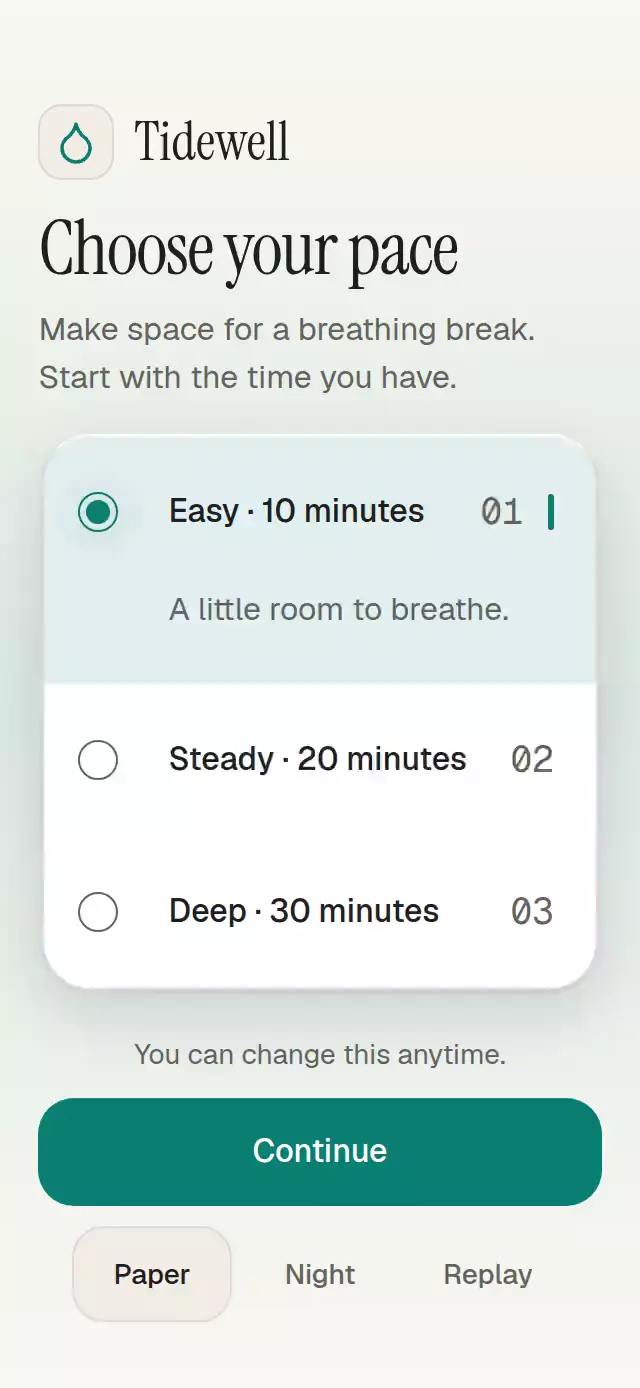
About this animation
This React Native radio buttons group stores one form value in a vertical list of labeled options. A liquid dot travels along a dedicated rail while the selected option’s measured description expands in normal layout. The host can accept or reject controlled value requests, or use uncontrolled state and the select/reset ref methods. Options support stable IDs, descriptions, metadata, and disabled states. Radio and radiogroup semantics report the accepted value, while keyboard access and large touch targets provide direct alternatives to the visual effect. Reduced Motion sets final geometry immediately. Choose it for a visible single-choice form group; the published API supports vertical layout and requires Skia initialization on web.
When to use it
- Choose one visible form option.
- Reveal details beside the selected radio.
- Keep disabled choices visible without allowing selection.
Related guides
A radio group with a liquid selection dot and expanding descriptions, with configurable options, labels, palette, and fonts.
How it works
- Each header and description measures its natural layout. Descriptions stay in document flow through an animated height viewport, so longer copy and larger text push later rows down.
- One
selectionProgressshared value (namedprogressin the source) drives expansion weights, dot position, deformation, the neck, and settling. Press feedback uses independent shared values. - A retarget snapshots all current expansion weights and liquid geometry in one UI-thread transaction. Restarting progress therefore preserves the current position and shape instead of returning to an old row.
- The dot compresses over 80 ms, travels over 160 ms, and settles with an explicit mass-1 spring. The neck closes before the small trailing surface retracts. There is one Canvas for the group, with a radial halo confined to the left rail (right in RTL).
- Selection semantics update once, when a request is accepted by uncontrolled state or supplied by a controlled host. Animation completion never calls
onValueChange. - Reduced motion sets the final geometry immediately, removing the traveling neck. The component subscribes to changes while mounted.
Install
npx expo install @shopify/react-native-skia react-native-reanimated react-native-workletsCopy this folder without demo/. Use Expo's SDK-compatible versions. This implementation targets Expo SDK 58, React 19.2, React Native 0.88.0, Reanimated 4.7.1, Worklets 0.13.0, and Skia 2.14.0. No Gesture Handler wrapper is required: this is a tap control, with no Pan competing against Pressable.
For web, initialize CanvasKit before importing the component, following Skia's web setup. A host can lazily import this module after LoadSkiaWeb({ locateFile: () => '/canvaskit.wasm' }) resolves. The host supplies the matching CanvasKit WASM file. Native platforms do not need this web initialization.
Usage
import { LiquidRadioGroup } from './liquid-radio-group';

const options = [
  { id: 'short', label: 'Short', description: 'A brief pause.' },
  { id: 'long', label: 'Long', description: 'A little more time.' },
];

// The root owns scrolling inside a bounded host; the host owns safe areas.
<View style={{ height: 400 }}>
  <LiquidRadioGroup
    options={options}
    defaultValue="short"
    labels={{
      group: 'Pause duration',
      empty: 'No durations available.',
      unavailable: 'Choose an available duration.',
    }}
    onValueChange={(id) => saveDuration(id)}
  />
</View>;
Controlled value, theme, motion knobs, and public handle:
const control = useRef<LiquidRadioGroupHandle>(null);
const [value, setValue] = useState('short');

<LiquidRadioGroup
  ref={control}
  options={options}
  value={value}
  onValueChange={setValue}
  colorScheme="dark"
  palette={{ accent: '#67E3CD', focus: '#67E3CD' }}
  dotSize={22}
  connectorWidth={10}
  motion={{ durationScale: 1.2, glowOpacity: 0.2 }}
/>;

control.current?.select('long');
control.current?.reset();
Import LiquidRadioGroupHandle from the folder for the second example. Use your app's font-family names through fontFamily, titleFontFamily, and monoFontFamily. The demo imports Geist and Instrument Serif from the host theme; these are not component dependencies.
For use inside an outer ScrollView, set scrollable={false} and allow natural height with style={{ flex: 0, flexBasis: 'auto', flexShrink: 0 }}. The group then expands fully and the outer host owns the scroll. In a bounded container, keep the default flex: 1 so the group's internal ScrollView remains reachable. The component adds 16-point gutters for its material shadow; account for these when aligning the panel to surrounding text.
Props
| Prop | Type | Default | Behavior |
|---|---|---|---|
options | readonly RadioOption[] | Required | { id, label, description?, meta?, disabled? }. IDs must be unique, nonempty strings. |
value | string | Uncontrolled | A supplied value always wins. Unknown values leave every radio unchecked and display labels.unavailable. |
defaultValue | string | First enabled option | Initializes internal state. Invalid defaults intentionally leave no selection. |
onValueChange | (id: string) => void | None | One call per distinct change request. Controlled hosts may accept or reject the request. |
orientation | 'vertical' | Vertical | Only vertical layout is supported in v1. |
labels | { group; empty; unavailable } | Options / neutral help | All group/help copy is replaceable. |
disabled | boolean | false | Blocks touch, keyboard navigation, and select, retaining selection. |
dotSize | number | 20 | Finite values clamp to 16–28 points; NaN/Infinity use the default. |
connectorWidth | number | 8 | Finite values clamp to 2–14 points; NaN/Infinity use the default. |
colorScheme | 'light' | 'dark' | 'auto' | 'auto' | Complete Paper/Night themes, including text and controls. |
palette | Partial<Palette> | Theme tokens | Overrides background, surface, elevated, text, muted, border, accent, onAccent, accentSoft, glow, success, error, scrim, track, focus, highlight, shadowNear, and shadowFar. The standalone form paints its panel; its host owns the surrounding background. |
fontFamily | string | System | Body font, 16/24. |
titleFontFamily | string | Body font | Control labels, 16/24. |
monoFontFamily | string | Body font | Metadata, 18/26. No font weights are forced. |
motion | { durationScale?; glowOpacity? } | 1, 0.25 | Finite values clamp to 0.5–2 and 0–0.3; invalid numbers use defaults. |
style | StyleProp<ViewStyle> | flex: 1 | Root overrides applied last. No safe-area padding. |
scrollable | boolean | true | Set to false for natural-height content without an internal ScrollView. The host then owns overflow. |
testID | string | liquid-radio-group | Stable controls: ${testID}-option-${id}. |
accessibilityLabel | string | labels.group | Accessible group name. |
select(id) requests an enabled option; unknown, disabled, and already-selected IDs do nothing. reset() requests the default (or first currently enabled option when no default was supplied), and is allowed while the group is disabled. An explicitly disabled default cannot be selected by reset. In controlled mode both methods request through the callback and never replace the host's value. Reset also cancels the running transition; there are no completion callbacks to invalidate.
Duplicate IDs retain the first entry. Empty IDs are dropped. An empty list displays labels.empty, with no selection. If data removes the current option, the component leaves selection empty rather than silently choosing another form value. Adding data to an initially empty uncontrolled group does not manufacture a selection; use select or a controlled value. A controlled value may retain a disabled option, but no action can newly select it.
Compatibility
- Expo Go includes the installed Skia/Reanimated runtimes for SDK 58; no extra native module was added. Compilation does not establish native FPS or touch behavior.
- Raster assets and density budgets: N/A. All form geometry is vector; no external art is loaded.
Accessibility
Rows expose radio, checked, disabled, their label/metadata, and the description as a hint. The parent exposes radiogroup. Empty/invalid-value help is accessible. Selection is also indicated by a filled dot and a side marker, rather than color alone. A polite web live region and a discrete native announcement use the supplied option copy; nothing announces per frame.
Tab reaches enabled rows. Enter/Space explicitly select the focused radio on web. Arrow keys move and select among enabled rows, wrapping at the ends; Home/End choose the first/last enabled option. Horizontal arrow meaning follows RTL. There is no popover or keyboard trap, so Escape requires no custom dismissal. Focus remains on the row being operated.
Each row has at least 76 points of height. Text is not truncated and scaling is enabled. The detail viewport grows from actual measured content; constrained hosts scroll. Disabled rows cannot be selected through the ref or keyboard. Reduced motion removes travel, deformation, and springs while retaining all content and actions. Consumer palette overrides must preserve contrast.
Why this one
This is a form value, not a tab navigator or horizontal segmented control. The dot transfers through a dedicated vertical rail while contextual detail opens at the selected row. Code, layout, demo copy, and identity are original; the external visual reference was used only for the liquid-selection pattern. No reference assets are distributed.
The demo's Tidewell name and droplet glyph come from the approved brand kit. The exact Lucide droplet path is ISC licensed (Lucide contributors); the host's demo fonts use SIL OFL. Skia uses MIT, and Reanimated/Worklets use MIT. Preserve their package license notices. The catalog's distribution license is determined by the host project; this README does not grant a separate license.
The demo loops Easy → Steady → Deep → Easy every 1.4 seconds in autoplay and Replay. Touch or pointer interaction stops the loop. At standard phone heights it uses natural-height views with compact spacing; short hosts use one outer ScrollView with a hidden indicator. Confirmation replaces the footer text without increasing content height.
FAQ
- Can I control the selected radio value?
- Yes. Supply value with onValueChange, or use defaultValue for local state. An unknown controlled ID leaves every option unchecked and displays the configured unavailable help.
- Can disabled options be selected through the ref?
- No. Touch, keyboard actions, and ref selection all reject disabled options. A controlled host may retain an already disabled value, but user actions cannot newly choose it.
- Does the group support keyboard input and Reduced Motion?
- Yes. On web, Enter/Space selects, arrows move and select enabled options, and Home/End choose endpoints. Rows expose radio and checked semantics. Reduced Motion removes travel and deformation.