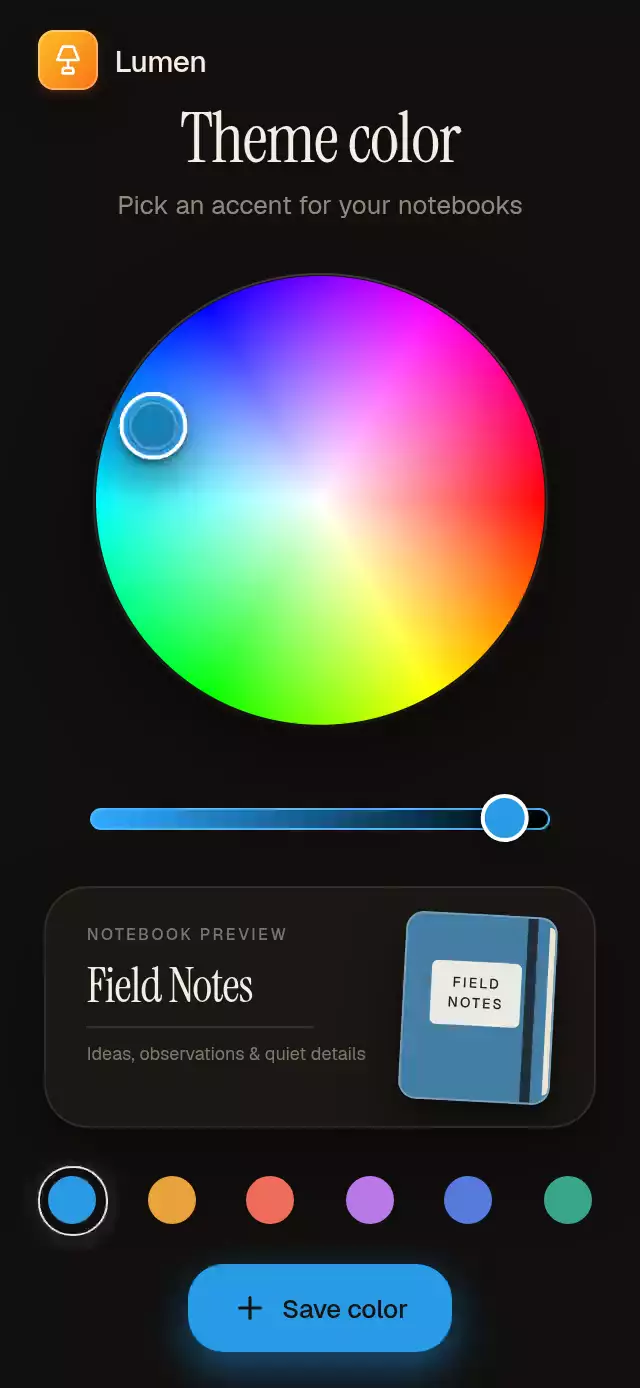
About this animation
This React Native color picker pairs a hue-and-saturation wheel with a separate brightness rail. One HSV shared value coordinates the thumb, notebook preview, ambient light, and hexadecimal output. Select a saved swatch to follow the shortest hue arc, or save the current color with a small flight into the swatch row. Supply initialColor, savedColors, labels, and fonts; use onColorChange to update your theme and onSaveColor to persist a choice after the save flight completes. The component includes a notebook-style preview you can adapt in the copied source.
When to use it
- Choose an accent color for a workspace.
- Preview a cover color before saving.
- Offer reusable saved theme swatches.
An HSV color picker with a live preview and save flight, with configurable initial color, saved swatches, copy, and fonts.
Why this one
Most color wheels stop at a technical picker. This one makes the choice feel useful immediately: the selected color lights the room, dyes a realistic notebook cover, updates the brightness rail, and becomes a saved swatch through a short spatial transition. Saved colors travel along the shortest hue arc instead of snapping across the wheel.
How it works
- A Skia
SweepGradientsupplies hue while a white-to-transparentRadialGradientsupplies saturation. - One shared HSV object drives the thumb position, selected color, ambient light, notebook cover, brightness rail, and button.
- Gesture Handler maps pointer coordinates into polar hue and saturation values while constraining the thumb to the circle.
- The brightness gesture updates the value channel without re-rendering React on every frame.
- Saved swatches spring through the shortest angular path; saving launches a small color sample into the row.
- An imperative ref exposes
selectColor,playIntro, andsaveColorfor product flows and demo automation.
Install
npx expo install expo-blur expo-linear-gradient @shopify/react-native-skia react-native-gesture-handler react-native-reanimated react-native-workletsUsage
import { ColorWheelPicker } from './ColorWheelPicker';

export function ThemeEditor() {
  return <ColorWheelPicker onColorChange={(hex) => updateTheme(hex)} />;
}<ColorWheelPicker
initialColor="#E8A23B"
notebookTitle="Studio Notes"
savedColors={['#E8A23B', '#EE6D5A', '#B878E6', '#5879DE', '#39A68B', '#D2C75B']}
title="Accent color"
subtitle="Choose a color for your workspace"
/>Props
| Prop | Type | Default | Description |
|---|---|---|---|
title | string | 'Theme color' | Editor heading. |
subtitle | string | 'Pick an accent for your notebooks' | Supporting editor copy. |
notebookTitle | string | 'Field Notes' | Preview notebook title. |
saveLabel | string | 'Save color' | Label for the save action. |
initialColor | string | '#E8A23B' | Initial color selected by the wheel. |
savedColors | string[] | DEFAULT_COLORS | Six or more hexadecimal colors shown in the saved row. |
fontFamily | string | undefined | Main interface typeface. |
mediumFontFamily | string | undefined | Medium interface typeface for controls. |
titleFontFamily | string | undefined | Editorial typeface for the heading and notebook title. |
monoFontFamily | string | undefined | Monospaced typeface for the live hexadecimal value. |
onColorChange | (hex: string) => void | undefined | Called after the selected color changes. |
onSaveColor | (hex: string) => void | undefined | Called after the save flight completes. |
hueAccessibilityLabel | string | 'Hue' | Screen-reader label for the hue control. |
saturationAccessibilityLabel | string | 'Saturation' | Screen-reader label for the saturation control. |
brightnessAccessibilityLabel | string | 'Brightness' | Screen-reader label for the brightness control. |
style | StyleProp<ViewStyle> | undefined | Optional style for the outer container. |
testID | string | undefined | Test identifier applied to the outer container. |
Ref methods
| Method | Description |
|---|---|
selectColor(hex) | Springs to a hexadecimal color through the shortest hue arc. |
playIntro() | Plays the half-wheel signature tour. |
saveColor() | Launches and saves the current color. |
duration | number |
Compatibility
- Expo SDK 58, React Native 0.88, Reanimated 4.7, Worklets 0.13, and Skia 2.14.
- iOS: supported.
- Android: supported.
- Web: supported.
- Works in Expo Go with the SDK-compatible packages listed above.
Accessibility
Hue, saturation, and brightness are separate adjustable controls with increment and decrement actions. Saved colors and the save action have button roles and 44-point hit areas. Reduced Motion replaces the color tour, arcs, springs, and save flight with short fades or direct transitions.
Icons: Lucide (ISC).
FAQ
- What color values does this picker return?
- The wheel edits hue and saturation, and the rail edits brightness. onColorChange and onSaveColor return hexadecimal color strings. The public API does not expose an alpha channel or an eyedropper.
- Can I select or save a color programmatically?
- Yes. The ref provides selectColor(hex), saveColor(), and playIntro(). Supply initialColor and savedColors for the initial palette, and persist saved choices through your application callback.
- Is the color picker accessible without dragging?
- Hue, saturation, and brightness expose separate adjustable controls with increment and decrement actions. Saved swatches and Save have button roles and 44-point hit areas. Reduced Motion replaces tours and flights with short fades or direct transitions.