About this animation
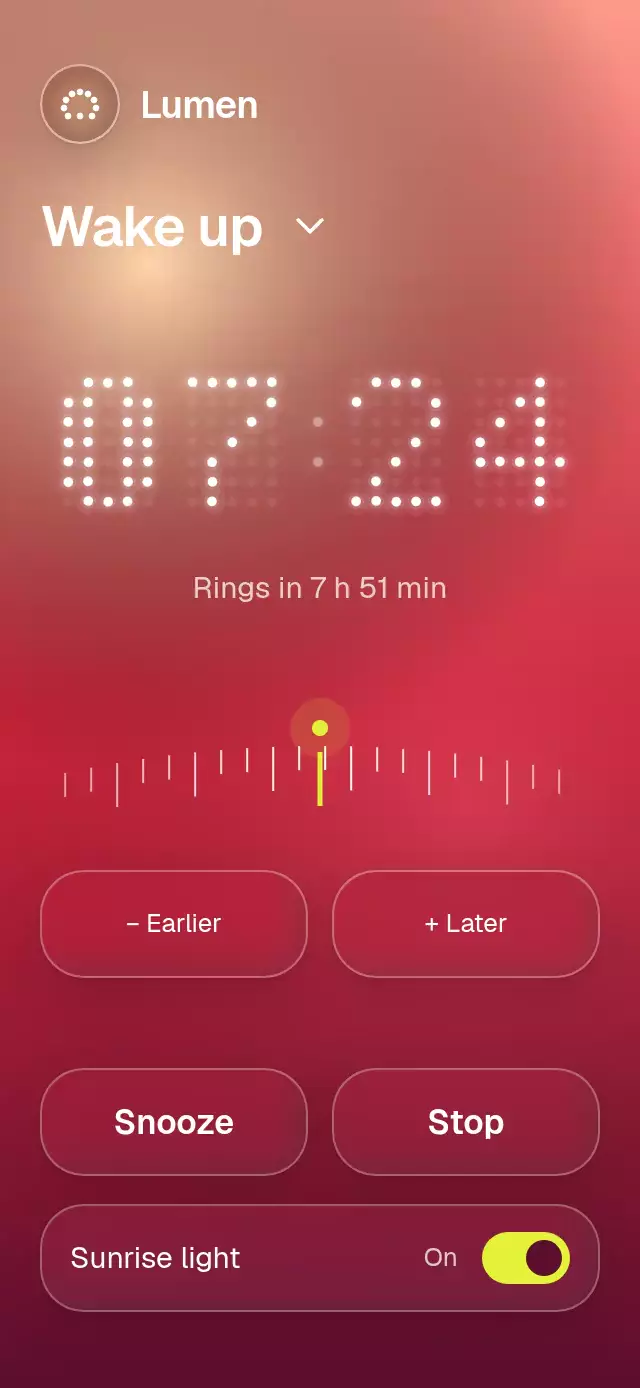
An alarm clock with morphing dot numerals and a snooze scatter, with configurable time, labels, dot color, and fonts.
Why this one
Most dot clocks switch cells on and off. This one matches live particles to their nearest new cells and carries them through each change. The curved minute dial replaces a wheel picker, with momentum, snapping, and equally capable tap controls. Snooze becomes a floating particle cloud instead of another number swap.
How it works
- Each numeral is a 5 × 7 bitmap. A nearest-neighbor assignment pairs visible source dots with destination cells; surplus dots shrink away and missing dots appear with a small circular flash.
- Four shared progress values drive four digit transitions. Each transition samples its current positions before interruption. Columns trail by approximately 12 ms within the 520 ms spring; all spring configurations avoid overshoot.
- A single Skia Canvas renders every clock dot. A derived picture batches
drawCirclecommands, including the dim grid and circular halos, without a React component or shared value per point. The background and dial use separate canvases. - The dial stores a continuous minute position. Dragging requests steps immediately; release projects velocity for 180 ms, caps the coast at 90 minutes, and springs to a step. Programmatic changes bypass snapping so a nine-minute snooze remains exact.
- Snooze disperses for about 360 ms, floats for about 110 ms, and regroups by 900 ms. Initial dots arrive from the same cloud in 600 ms. The demo changes 06:45 → 07:00 at 1.5 seconds → 07:15 at 2.8 seconds → 07:24 at 4.2 seconds, repeating every 6.6 seconds.
- React updates only for layout, discrete time changes, and settings. Dots, dial ticks, the colon pulse, and ambient light derive from shared values on the UI thread.
Install
npx expo install @shopify/react-native-skia react-native-reanimated react-native-worklets react-native-gesture-handler expo-blurUse a GestureHandlerRootView in the host app. Configure Reanimated/worklets as required by your Expo SDK. On web, initialize Skia with WithSkiaWeb or the host's existing CanvasKit loader before mounting this component. The demo relies on the host's common Geist fonts; the copyable component uses system fonts unless supplied.
Icons: Lucide (ISC). Only the paths used here are copied from the local kit. Lumen is demo content, outside the reusable component.
Usage
import { DotMatrixClock } from './dot-matrix-clock';

<DotMatrixClock defaultTime={{ hours: 6, minutes: 45 }} />;
import { useRef, useState } from 'react';
import { DotMatrixClock, type DotMatrixClockRef } from './dot-matrix-clock';
function AlarmScreen() {
const clock = useRef<DotMatrixClockRef>(null);
const [time, setTime] = useState({ hours: 6, minutes: 45 });
return (
<DotMatrixClock
ref={clock}
time={time}
onTimeChange={setTime}
step={5}
label="Morning alarm"
subtitle="A softer start to your day"
gradientColors={['#354F65', '#183847', '#0B202D']}
lightColors={['#77ADC0', '#347C91']}
accentColor="#D3EE91"
textColor="#F6FAFF"
dotColor="#F6FAFF"
mutedColor="rgba(246,250,255,0.75)"
surfaceColor="rgba(255,255,255,0.08)"
borderColor="rgba(255,255,255,0.24)"
/>
);
}
// From an event handler: clock.current?.setTime(7, 0);
// From an event handler: clock.current?.snooze(9);Times use 24-hour integers and wrap at midnight. time synchronizes external changes; interactions optimistically show the requested value and call onTimeChange. Echo that callback into controlled state. This component does not schedule OS alarms, play audio, or request notification permissions. Stop changes the action to Start and invokes onStop; snooze activates the alarm UI again.
Props
| Prop | Type | Default | Purpose |
|---|---|---|---|
time / defaultTime | AlarmTime | uncontrolled / 06:45 | Controlled or initial alarm time. |
onTimeChange | (time: AlarmTime) => void | — | Reports discrete changes. |
step | number | 5 | Dial increment, sanitized to 1–60 minutes. |
label | string | Wake up | Header. |
subtitle | string | (time: AlarmTime) => string | Set your morning rhythm | Supporting copy, optionally time dependent. |
gradientColors | [string, string, string] | coral / carmine / wine | Entire background palette. |
dotColor / textColor | string | #FFFFFF | Lit dots and primary ink. |
mutedColor | string | white at 75% | Supporting ink. |
accentColor | string | #E5F23C | Dial marker and switch. |
surfaceColor / borderColor | string | white at 9% / 26% | Glass, borders, and dial ticks. |
lightColors | [string, string] | peach / rose | Ambient light palette. |
fontFamily / headingFontFamily | string | system | Body / heading and action fonts. |
snoozeLabel / stopLabel / startLabel | string | Snooze / Stop / Start | Action copy. |
sunriseLabel | string | Sunrise light | Setting copy. |
onLabel / offLabel | string | On / Off | Setting state copy. |
earlierLabel / laterLabel | string | − Earlier / + Later | Tap alternatives and accessible labels. |
dialLabel | string | Adjust alarm time | Adjustable control label. |
snoozeMinutes | number | 9 | Snooze interval. |
defaultSunrise | boolean | true | Initial sunrise setting. |
onSunriseChange | (enabled: boolean) => void | — | Setting callback. |
onStop | () => void | — | Stop callback. |
formatAccessibilityTime | (time: AlarmTime) => string | Alarm at 6:45 AM | Spoken labels and announcements. |
header | ReactNode | — | Optional host wordmark or content beside the brand icon. |
brandIcon | ReactNode | glass dot sunrise | Icon beside header; pass null to hide it. Only shown when header is supplied. |
style | StyleProp<ViewStyle> | — | Root style override. |
testID | string | dot-matrix-clock | Root identifier and stable control suffixes. |
Ref methods: setTime(hours, minutes) and snooze(minutes = snoozeMinutes).
The default brand icon is a 40 × 40 glass tile with the controls' 22 pt corner radius and blur material, white at 14%, and a 1 pt white border at 28%. Seven dots trace a rising sun above a three-dot horizon, using dotColor; a soft radial glow uses #FFD3A8 at 35%. Supply brandIcon={<YourIcon />} to replace it. The Lumen name remains demo content.
Layout and theming
The root fills its parent and measures with onLayout. The content is capped at 440 pt; digit pitch follows the measured width. A compact layout below 740 pt tall reduces gaps, and content scrolls when the available height cannot fit all controls, including landscape and 300 × 400 embeddings. The host provides safe-area insets. The header reserves 58 pt at its right edge for a viewer close control; the demo brand and title remain on the left.
For a light theme, supply darker dotColor, textColor, mutedColor, and matching surfaceColor and borderColor along with the background and light colors. Every visible string and spoken time formatter is configurable. Font scaling remains enabled.
Compatibility
Built for Expo SDK 58, React Native 0.88.0, Reanimated 4.7.1, worklets 0.13.0, Gesture Handler 3.3, Skia 2.14.0, and expo-blur 58.0.5. Uses SDK 58 BlurTargetView and dimezisBlurViewSdk31Plus for Android glass; older Android versions use the module's fallback. These modules are included in the matching Expo Go release.
Supports iOS, Android, and web. The new piece is intentionally not registered in the shared catalog within this scoped delivery.
Accessibility
Every button is at least 52 pt tall. The dial exposes an adjustable role with increment/decrement actions and a spoken alarm time. Earlier/Later buttons provide tap equivalents, and the sunrise control reports its checked state. Every discrete change announces the new time. Reduced motion replaces travel and cloud dispersal with a 150 ms stationary crossfade, freezes ambient drift and the colon, and snaps the dial directly. Glass press feedback uses a separate shared value.