About this animation
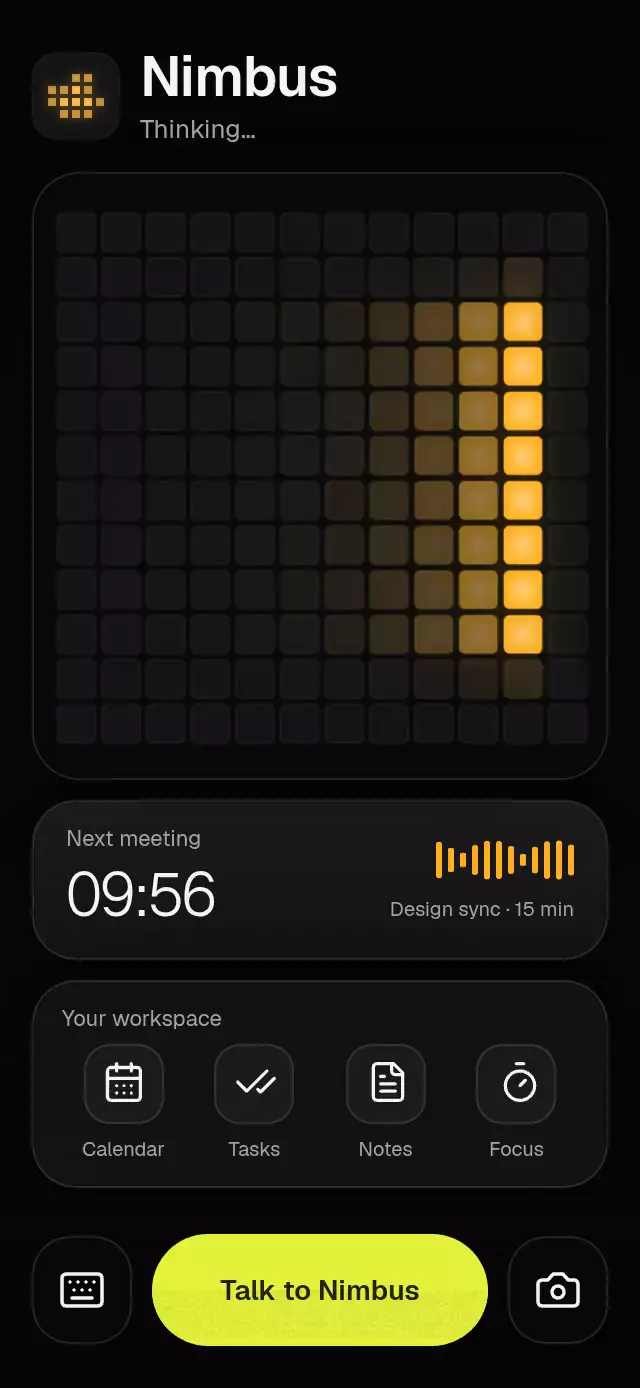
An LED face that morphs into listening bars and speaking waves, with configurable state labels, shortcuts, colors, and fonts.
Why this one
Voice gets a face instead of another orb. The same rounded LEDs remain on screen throughout each state change: a spring blends their occupancy with a column stagger, preserving continuity when the interaction is interrupted. Amber light is shaded inside each LED and spills into its surrounding grid; no rectangular shine overlays the content.
How it works
onLayoutmeasures the component and panel. Column count determines square LED pitch, and the available height determines rows.- One Skia runtime shader draws the entire grid, its bezels, warm spill, and brighter LED centers. No React elements are created per LED.
- One spring progress blends four state weights per column. An interruption snapshots the current weights before starting the next transition.
- A UI-thread clock drives idle gaze/blinks, simulated listening amplitude, the thinking trail, and the symmetric speaking shape. A supplied
levelreplaces the simulated amplitude. - Gesture Handler composes a short tap with a 280 ms hold. Press feedback uses its own spring. Response timers update React only when the state changes, and are canceled on interruption or unmount.
- Reduced motion freezes the clock and replaces the column stagger with a 200 ms crossfade between still shapes.
Install
npx expo install @shopify/react-native-skia expo-blur expo-linear-gradient react-native-gesture-handler react-native-reanimated react-native-workletsFor web, copy the matching CanvasKit binary into your public assets:
npx setup-skia-webCopy PixelGridVoice.tsx, shaders.ts, icons.ts, and index.ts together. Wrap your app in GestureHandlerRootView. Configure Reanimated/worklets according to your Expo SDK. For web, make CanvasKit available using Skia's web setup and load Skia before mounting the component; the catalog already supplies this loader.
Icons: Lucide (ISC). Only the used paths are bundled in icons.ts.
Usage
import { PixelGridVoice } from './pixel-grid-voice';

// The host supplies screen safe areas, or a bounded integration container.
<View style={{ flex: 1 }}>
  <PixelGridVoice />
</View>
const assistant = useRef<PixelGridVoiceRef>(null);
const audioLevel = useSharedValue(0);
<PixelGridVoice
ref={assistant}
level={audioLevel}
columns={16}
title="Your assistant"
meetingTime="10:30"
colors={{ lit: '#FFB020', pill: '#E5F23C' }}
onStateChange={(next) => handleVoiceState(next)}
onKeyboardPress={() => openComposer()}
onCameraPress={() => openCamera()}
onShortcutPress={(index) => openWorkspaceSection(index)}
/>
// Drive real audio via audioLevel.set(amplitude), and the lifecycle explicitly:
assistant.current?.listen();
assistant.current?.stop();
assistant.current?.speak();
assistant.current?.reset();state makes the state machine controlled: methods and gestures request a state through onStateChange, while the host decides when to apply it. Automatic thinking/speaking/idle timers run only when uncontrolled. No microphone permission, recording, transcription, keyboard, or camera integration is included. Connect those actions with the callbacks; the default auxiliary actions demonstrate listening or speaking.
Props
| Prop | Type | Default | Purpose |
|---|---|---|---|
state | 'idle' | 'listening' | 'thinking' | 'speaking' | uncontrolled idle | Host-controlled visual state |
onStateChange | (state) => void | — | Requested state changes |
level | number | SharedValue<number> | simulated | Audio amplitude, clamped to 0–1; invalid input becomes zero |
columns | number | 12 | Column count, clamped to 8–24 |
colors | Partial<PixelGridVoiceColors> | dark palette below | Complete surface, text, LED, and control palette |
title | string | Assistant | Heading |
brandIcon | ReactNode | amber pixel cloud | Host-supplied brand tile; pass null to hide it |
leadingIcon | ReactNode | — | Legacy tile override; used when brandIcon is undefined |
glassTint | 'light' | 'dark' | dark | Blur material tint |
stateLabels | Partial<Record<PixelGridVoiceState, string>> | Ready when you are / Listening… / Thinking… / Speaking | State announcements and subtitle |
talkLabel, listeningLabel | string | Talk to me / Tap to finish | Talk pill copy |
meetingLabel, meetingTime, meetingDetail | string | Next meeting / 09:56 / Daily check-in | Meeting card content |
shortcutsLabel | string | Your workspace | Shortcut card heading |
shortcuts | readonly PixelGridVoiceShortcut[] | Calendar / Tasks / Notes / Focus | Up to four entries, with kit icons |
onShortcutPress | (index: number) => void | simulated state action | Workspace action |
onKeyboardPress, onCameraPress | () => void | listen / speak | Host integrations |
keyboardLabel, cameraLabel | string | Use keyboard / Use camera | Auxiliary action announcements |
accessibilityLabel | string | Talk: tap to toggle or hold to listen | Talk action announcement |
fontFamily, headingFontFamily, lightFontFamily | string | system | Body, heading, and time fonts |
thinkingDuration, speakingDuration | number | 1500 / 2500 | Simulated response delays in ms |
style | StyleProp<ViewStyle> | — | Root container style |
testID | string | pixel-grid-voice | Root ID; controls append -talk, -keyboard, -camera, -shortcut-N |
The default palette is background #050506, panel #080809, cell #141416, lit #FFB020, pill #E5F23C, text #F4F4F6, muted #A3A3AD, border rgba(255,255,255,0.12), glass rgba(255,255,255,0.045), and pillText #202406. A light theme should override the entire palette and set glassTint="light".
The demo uses the default 44×44 dark tile with a 5×4 amber pixel cloud and Geist body/light typefaces. The tile matches the unlit grid cells and their dim bezel; perimeter pixels are softer than the center. Thinking and speaking gently pulse its LED cores and halo using the grid’s shared clock and state blend, without per-frame React updates. Reduced motion leaves the cloud still. Geist 600 is loaded locally for the demo heading, without changing the host font registry.
Timing and layout
Autoplay lives entirely in demo/: idle 1.2 s → listening 2.5 s → thinking 1.5 s → speaking 2.5 s → repeat. The first recomposition starts at 1.2 s, inside the first three seconds. The spring uses explicit mass 1, damping 30, and stiffness 260; normal state changes settle in roughly half a second.
The component fills its host, caps the content width at 592 pt (420 pt in short landscape containers), and reserves the upper right for host controls. Primary actions stay visible below the scrollable content. The panel keeps at least six rows so wide containers cannot crop the LEDs. At 300×400, in landscape, or with large text, the cards scroll instead of overlapping controls. Listening and speaking return the scroll to the visualizer; reduced motion makes this immediate. The host applies safe-area insets. Interactive targets are at least 48 pt; text scaling remains enabled.
Compatibility
Built for Expo SDK 58, React Native 0.88.0, Reanimated 4.7.1, worklets 0.13.0, Gesture Handler 3.3, and Skia 2.14.0. Dependencies are SDK-compatible and available in the project's Expo Go setup. Android glass uses a shared BlurTargetView with dimezisBlurViewSdk31Plus; older Android versions receive the material fallback.
Accessibility
The state subtitle is a polite live region. Talk has an accessible activation action as an alternative to holding. Auxiliary controls and shortcuts have localizable button labels. Decorative LEDs are hidden from the accessibility tree. Reduced motion disables blinking, gaze, sweeping, spectrum motion, and moving grain, and uses a 200 ms crossfade between static state shapes. Listening and speaking still accept state requests immediately.