About this animation
A note-to-contact context reveal led by an animated assistant ring, with configurable note data, contact details, colors, and fonts.
Why this one
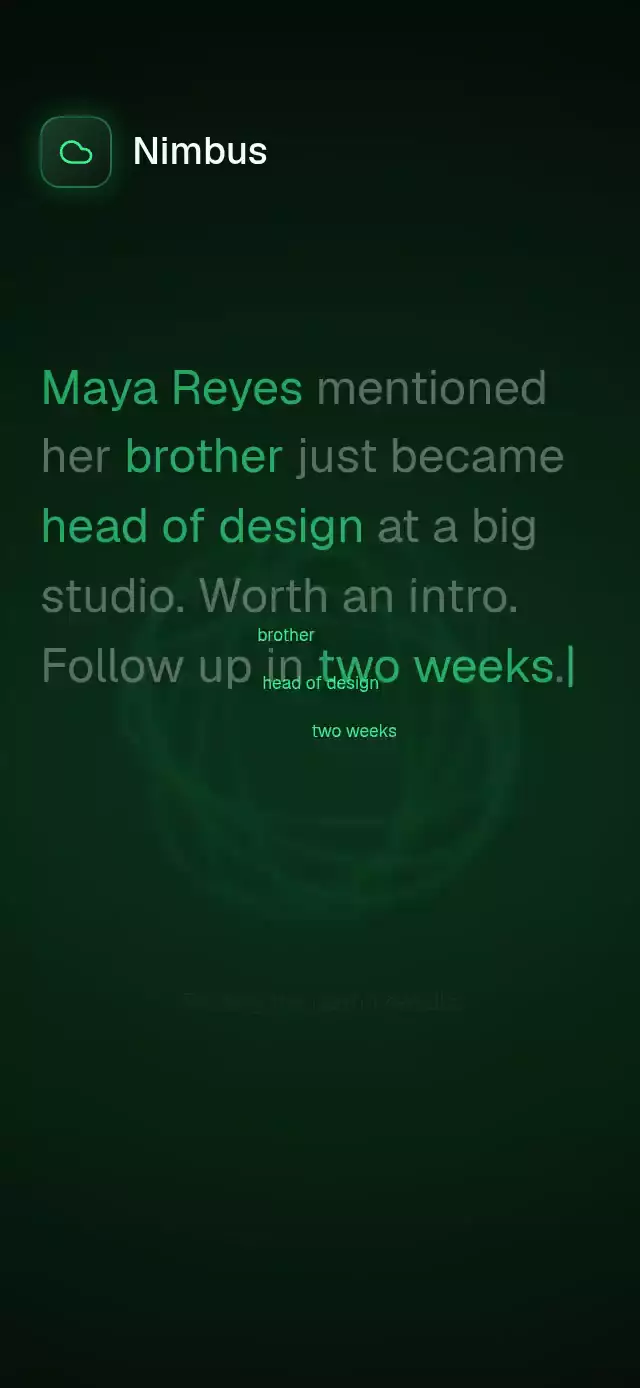
Show what the assistant understood before asking the user to trust a save. Entity phrases leave the original note and converge on the assistant; the resulting profile separates reminders from facts. Undo reverses the same timeline. This is a visual interaction component, not an AI parser or a persistence layer.
How it works
- The note is split using UTF-16 entity ranges. Individual characters reveal on the UI thread inside one flowing paragraph.
process()drives one continuous progress value from 0 to 3. Keyword colors, flight, ring contraction, profile reveal, and reminder border light derive from that value.- Six Reanimated ellipse borders with soft box shadows rotate at different speeds. Pan adjusts their orientation, then an explicit-mass spring settles them. A tap is the accessible alternative.
- The save callback runs only after completion. Operation identifiers discard canceled saves. Undo reverses progress and returns to the note.
- The demo types for 3 seconds, processes at 3.1 seconds, shows entity highlights, keyword flight, and the assistant ring during a 4.2-second transition after 250 ms of button pressure, holds the saved profile for 3 seconds after the save callback, then repeats every 10.55 seconds. One cancelable sequence owns a single pending timer; user touch and unmount cancel it. Reset cancels both typing and processing before starting a fresh note.
Install
npx expo install @shopify/react-native-skia expo-blur expo-linear-gradient react-native-gesture-handler react-native-reanimated react-native-workletsUse a GestureHandlerRootView at the application root. Configure Reanimated/worklets through your Expo SDK. For Skia on web, configure CanvasKit loading in the host application before mounting this component. Supply font families loaded by your application; no font files are bundled.
Usage
import { useRef } from 'react';
import { NoteToContextAssistant, type NoteToContextAssistantRef } from './note-to-context-assistant';

const assistant = useRef<NoteToContextAssistantRef>(null);

<NoteToContextAssistant
  ref={assistant}
  note={{ text: 'Alex mentioned a new role. Follow up soon.', entities: [
    { start: 0, end: 4, kind: 'contact' },
    { start: 21, end: 25, kind: 'keyword' },
  ] }}
  contact={{ name: 'Alex', initials: 'AL', lastTalked: 'Last talked today' }}
  extracted={{ facts: ['Started a new role.'], reminders: [{ title: 'Follow up', date: 'Nov 02' }] }}
  onSave={context => saveContext(context)}
  onUndo={() => removeContext()}
/>

assistant.current?.process();
assistant.current?.reset();
For a different treatment, pass colors={{ background: '#F5FFF8', surface: '#E6F4EA', ink: '#102C1C', muted: '#526C5B', accent: '#168A4B', glow: '#22C55E', border: '#B8D5C2', buttonInk: '#FFFFFF' }}, custom labels, and processDuration={2500}. The full palette is configurable. The Nimbus demo uses its kit-specified purple/blue brand tile and green interaction accent.
Props
| Prop | Type | Default | Purpose |
|---|---|---|---|
| note | { text, entities: NoteEntity[] } | Required | Source text and sorted, nonoverlapping entity ranges |
| contact | Contact | Required | Name, initials, last-talked copy |
| extracted | ExtractedContext | Required | Facts and reminders already parsed by the host |
| onSave | (context) => void | — | Completed save callback |
| onUndo | () => void | — | Reversal callback |
| onInteraction | () => void | — | User input notification |
| labels | Partial<Labels> | Generic English copy | Brand, prompt, suggestion, status, tabs, actions, steps, accessibility copy |
| colors | Partial<Palette> | Dark green palette | Background, surface, ink, muted, accent, glow, border, button ink |
| fontFamily | string | System | Body and control font |
| headingFontFamily | string | Body font | Heading font |
| monoFontFamily | string | Body font | Suggestion and progress font |
| typingDuration | number | 1300 | Typing time in milliseconds |
| processDuration | number | 2500 | Processing time in milliseconds |
| glowIntensity | number | 0.6 | Ambient glow from 0 to 1 |
| style | StyleProp<ViewStyle> | — | Root overrides |
| testID | string | note-to-context-assistant | Root and Next/Undo identifiers |
Ref methods: process() starts or restarts an interruptible save; reset() cancels and types the note again. Profile action buttons switch to the corresponding context view; they do not launch messaging or editing services. Timeline and Details display the supplied facts.
Compatibility
Targets Expo SDK 58, React Native 0.88.0, Reanimated 4.7.1, worklets 0.13.0, Gesture Handler 3.3, and Skia 2.14.0. Uses SDK-bundled modules supported by Expo Go. Supports iOS, Android, and web. Blur has a tinted-surface fallback on platforms without native backdrop blur.
The root fills its parent's available space, limits content to 480 pt, and scrolls in compact/landscape containers. The host supplies safe-area insets. No photographs or external network assets are used. Icons: Lucide (ISC); paths copied from the project kit.
Accessibility
Controls provide labels and roles, tabs expose selection, and save/undo announce outcomes. Interactive targets are at least 48 pt. Ring activation is available through tap and accessibility activation. Reduced motion disables orbit motion, keyword flight, parallax, and scale changes; save/reset use 200 ms fades. Dynamic type remains enabled. Large text, RTL, frame rate, and native touch need device validation.
Review notes
Code review: copy stays in flow and the profile can scroll; header reserves 48 pt on the right and all actions stay below the viewer's close control. At 390×844 and 320×694, width is constrained and the note/profile use separate layers; shorter containers scroll. The demo types for three seconds, calls the same process() action as Next (including a 250 ms pressure animation), highlights entities, moves keyword labels into a glowing ring, and reveals the contact. The ring uses Reanimated views with ellipse borders and box shadows so it renders without a Skia animated drawing. The demo uses processDuration={4200} to leave time for highlight, flight, and the ring transition; the public default remains 2500 ms. The next cycle starts three seconds after onSave, rather than resetting on an independent timer. The full loop lasts approximately 10.55 seconds. The note is one text paragraph, including inline entity spans that wrap normally. The demo uses the loaded Geist Medium heading because the shared font kit currently has no Geist 600 asset.