About this animation
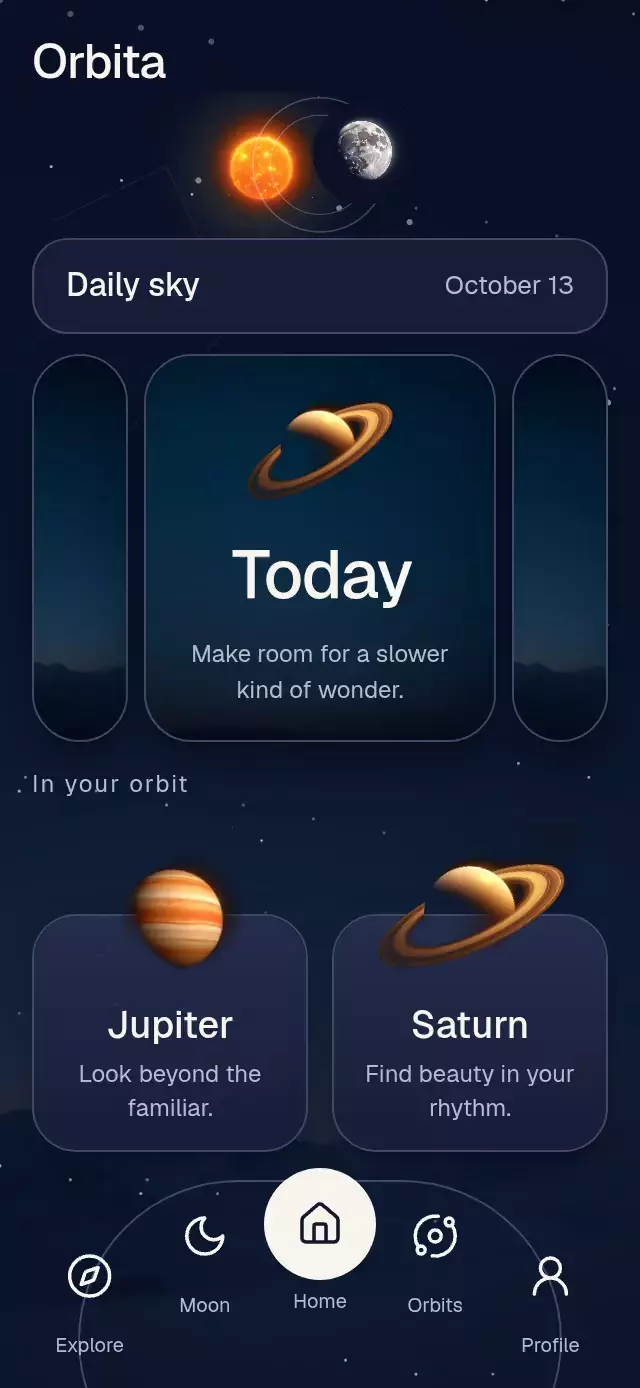
A daily sky carousel with expanding illustrated pages and an eclipse effect, with configurable day data, artwork, palette, and fonts.
Why this one
Most carousels move identical cards across a track. Here, the selected card borrows width from its neighbors while its title turns from vertical to horizontal. The same continuous position controls the celestial header, making the whole screen respond to the selected day. Warm orbital light and an arched navigation dock give the pattern its own composition.
How it works
- A single shared position determines each card's width, horizontal origin, title rotation, and content opacity.
- An exclusive pan/tap gesture supports interrupted dragging, velocity projection, and direct selection. Pressure has a separate shared value.
- The same position moves the sun and moon. The third day brings them into a partial eclipse.
- One UI frame clock drives three star layers and slow planet rotation; dragging offsets the sky layers at different depths.
- Planet cards hand off their artwork to a centered detail view. Its flight starts from the measured card center, compensates for scroll position, and reverses when closed.
- The demo starts its first transition at 650 ms, then shows Tomorrow → Yesterday → Today → Jupiter → close. Any touch stops autoplay.
Install
npx expo install react-native-reanimated react-native-worklets react-native-gesture-handler expo-image expo-linear-gradient @shopify/react-native-skiaWrap the host in GestureHandlerRootView and configure Reanimated/worklets for your Expo project. On web, initialize Skia's CanvasKit before mounting this component (the Expo integration supports WithSkiaWeb / a deferred Skia entry). Icons: Lucide (ISC); paths are copied from the supplied kit.
Usage
import { CosmicDayCarousel, type CosmicDayCarouselRef } from './cosmic-day-carousel';

const ref = useRef<CosmicDayCarouselRef>(null);

<CosmicDayCarousel
  ref={ref}
  date="October 13"
  days={[
    { title: 'Yesterday', text: 'Pause and reflect.', image: sky },
    { title: 'Today', text: 'Follow your curiosity.', image: sky, planetImage: saturn },
    { title: 'Tomorrow', text: 'Make space for possibility.', image: sky },
  ]}
  planets={[
    { title: 'Jupiter', text: 'Look farther.', detail: 'A new perspective awaits.', image: jupiter },
    { title: 'Saturn', text: 'Find your rhythm.', detail: 'Take time for what matters.', image: saturn },
  ]}
  sunImage={sun}
  moonImage={moon}
/>

ref.current?.goTo(2);
For a quieter, lighter treatment:
<CosmicDayCarousel
  days={days}
  planets={planets}
  date={formattedDate}
  initialIndex={1}
  ambientIntensity={0.4}
  palette={{
    background: '#E9EDF5', surface: '#DCE2EF', raised: '#F3F6FC',
    text: '#18223D', muted: '#495672', border: '#A2AEC5',
    accent: '#AD702E', onAccent: '#F3F6FC', scrim: 'rgba(233,237,245,0.96)',
  }}
  onSelectDay={setSelectedDay}
/>
Props
| Prop | Type | Default | Purpose |
|---|---|---|---|
days | CosmicDay[] | Required | Three illustrated day cards with title, text, image, optional planet image and accessible label. |
planets | CosmicPlanet[] | Required | Planet name, short text, expanded description, image, optional accessible label. |
date | string | Required | Host-formatted date. |
brand | string | None | Optional text-only wordmark. |
heading, planetHeading | string | Daily sky / In your orbit | Section labels. |
sunImage, moonImage, skyImage | ImageSourcePropType | None | Host-provided celestial art. |
palette | Partial<CosmicPalette> | Night blue / warm amber | Background, surfaces, text, muted text, border, accent, control ink, and scrim. |
fontFamily, titleFontFamily | string | System | Body and heading fonts, loaded by the host. |
initialIndex | number | 1 | Initial active day. |
ambientIntensity | number | 1 | Ambient speed; set 0 to freeze it. |
navigationLabels | Five-string tuple | Explore / Moon / Home / Orbits / Profile | Dock labels and screen-reader names. |
closeLabel | string | Back to sky | Detail close action. |
onSelectDay, onOpenPlanet, onNavigate | (index: number) => void | None | Selection, detail, and host navigation callbacks. Home also resets the sky. |
onInteraction | () => void | None | Stops host autoplay on manual interaction. |
style, testID | StyleProp<ViewStyle>, string | None / cosmic-day-carousel | Host layout and stable control identifiers. |
The ref exposes goTo(index), openPlanet(index), and closePlanet().
Layout and assets
The root fills its host and measures with onLayout. Content is capped at 460 pt wide and scrolls in short or landscape containers, including 300×400. The host owns safe-area insets. The upper-right corner contains no controls or essential copy. Cards are designed for three days; planet cards wrap into two columns. Long or enlarged text may require scrolling. Use concise day summaries for the fixed card composition.
Planet JPEGs blend their black backgrounds with Skia Screen; day illustrations use a circular mask. Keep assets local and provide at least 3× the displayed resolution. Demo art is 768×768; expanded planets are capped at 240 pt. The demo uses the available Geist medium face; Geist 600 is not loaded by the host theme.
Compatibility
Expo SDK 58, React Native 0.88.0, Reanimated 4.7.1, worklets 0.13.0, Gesture Handler 3.3, and Skia 2.14.0. Uses modules included in this project's Expo Go stack.
Accessibility
Every day, planet, and dock button has a role, label, and stable test identifier. Day and planet gestures include screen-reader activate actions. Dock and close targets are at least 48 pt; day spines are 48 pt wide. Important selection and detail changes announce their text. Background accessibility content is hidden while details are open.
Reduced motion disables star twinkling, planet float/rotation, parallax, and detail flights. Day geometry switches at the midpoint of a 200 ms fade; detail views fade over 200 ms. Tap selection remains available alongside dragging. The host should handle route navigation and focus restoration for its own screens.