About this animation
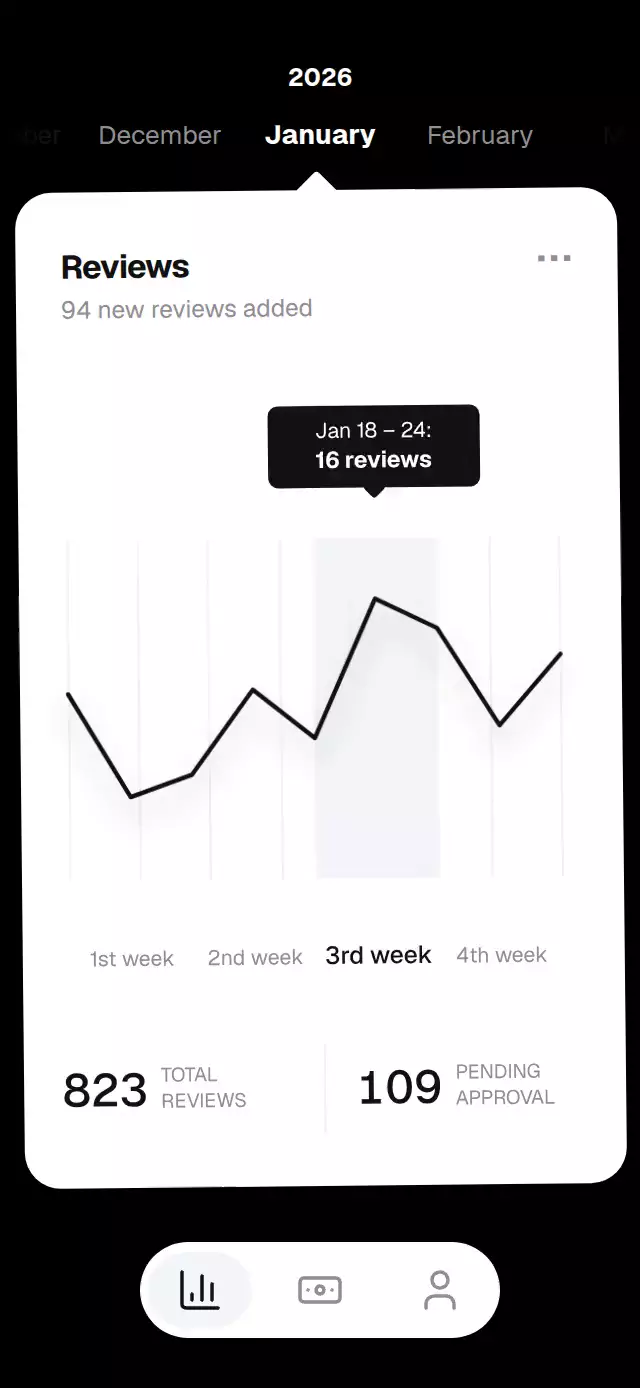
A review dashboard with a month carousel and morphing line chart, with configurable monthly data, labels, colors, and fonts.
Why this one
The card's centered pointer connects the selected month to its data. Scrubbing transforms the same nine vertices continuously, so the graph stays readable between months. A soft shadow follows the line 40 ms later, while each metric settles on exact digits.
How it works
- A continuous
monthshared value drives the carousel and vertex-by-vertex interpolation of nine normalized chart points in a Skia path. - Horizontal month gestures project their velocity into a nearby month and settle with an interruptible spring (
damping: 20,stiffness: 200,mass: 1). Tapping a neighboring label uses the same value. - A separate continuous
weekvalue moves the highlighted column and tooltip. Drag the chart or tap a week label to select it. Date and count layers crossfade over a 6-point vertical offset. - A short UI-thread history samples the line's position 40 ms earlier for its blurred shadow. The graph and its shadow share the entry trim animation.
- Metrics animate for 300 ms on each discrete month change. Individual digit columns move only on their own carry and hide leading zeros.
- The demo calls the public ref every 1.4 seconds and stops autoplay as soon as the dashboard is touched. No React state is updated per animation frame.
Install
npx expo install @shopify/react-native-skia@2.14.0 expo-linear-gradient@~58.0.3 react-native-gesture-handler@~3.3.0 react-native-reanimated@4.7.1 react-native-worklets@0.13.0Copy ReviewInsightsChart.tsx, icons.ts, and index.ts together. Place the component inside a GestureHandlerRootView. Load your fonts before mounting; without font props it uses the system font. On web, initialize CanvasKit before importing this component, following your Skia setup. No images, external requests, or bundled font files are required.
Usage
import { ReviewInsightsChart, type ReviewMonth } from './review-insights-chart';

const months: ReviewMonth[] = [{
  label: 'January', year: 2026, newReviews: 94, total: 823, pending: 109,
  points: [0.56, 0.18, 0.26, 0.57, 0.39, 0.9, 0.79, 0.43, 0.69],
  weeks: [
    { label: '1st week', range: 'Jan 4 – 10', count: 27 },
    { label: '2nd week', range: 'Jan 11 – 17', count: 25 },
    { label: '3rd week', range: 'Jan 18 – 24', count: 16 },
    { label: '4th week', range: 'Jan 25 – 31', count: 26 },
  ],
}];

export function ReviewScreen() {
  return <ReviewInsightsChart months={months} />;
}
Customize content, palette, fonts, and imperative selection:
const chart = useRef<ReviewInsightsChartRef>(null);

<ReviewInsightsChart
  ref={chart}
  months={months}
  initialMonth={0}
  title="Customer feedback"
  subtitleFormat="{count} reviews received"
  labels={{ total: 'ALL\nREVIEWS', pending: 'AWAITING\nREVIEW', reviewsUnit: 'reviews' }}
  colors={{ background: '#121212', card: '#FAF9F6', ink: '#20201E', muted: '#77756F', highlight: '#ECEAE4', inverse: '#FFFFFF', guide: '#EFEEE9' }}
  fontFamily="Geist_400Regular"
  mediumFontFamily="Geist_500Medium"
  boldFontFamily="Geist_700Bold"
  onMonthChange={index => updateSelectedMonth(index)}
  onTabChange={id => navigateToTab(id)}
/>

chart.current?.goToMonth(1);
chart.current?.selectWeek(0);
Import useRef from React and ReviewInsightsChartRef from this folder for the second example. Navigation belongs to the host application; selecting a tab changes the indicator and calls onTabChange.
Props
| Prop | Type | Default | Purpose |
|---|---|---|---|
months | ReviewMonth[] | Required | Chronological data, at least one month |
initialMonth | number | 0 | Initial zero-based month, clamped |
title | string | Reviews | Card heading |
subtitleFormat | string | {count} new reviews added | Text surrounding the animated count; include {count} once |
labels | { total?, pending?, reviewsUnit? } | English captions | Metric captions and tooltip unit; captions accept newlines |
colors | Partial<ReviewInsightsColors> | Monochrome palette | Background, card, ink, muted, highlight, inverse text, and guides |
tabs | ReviewInsightsTab[] | Insights, payments, profile | Labels, IDs, and included Lucide icon names; [] hides tabs |
onMonthChange | (index: number) => void | — | Nearest month changes, including while dragging |
onWeekChange | (index: number) => void | — | Nearest week changes, including while dragging |
onTabChange | (id: string) => void | — | Selected tab ID |
onInteractionStart | () => void | — | Stops a host's autoplay on direct interaction |
fontFamily | string | System | Body typeface |
mediumFontFamily | string | Body typeface | Active weeks and figures |
boldFontFamily | string | Medium typeface | Headings and active month |
style | StyleProp<ViewStyle> | — | Container style; root uses flex: 1 |
testID | string | review-insights-chart | Stable root and control identifiers |
ReviewMonth contains label, year, newReviews, total, pending, exactly four weeks: { label, range, count }[], and exactly nine points. Points are normalized to 0–1; larger values appear higher. Counts must be nonnegative safe integers. Invalid records throw a descriptive error. Keep month order stable when replacing data. initialMonth is read on mount; use the ref for later selection.
Compatibility
Built for Expo SDK 58, React Native 0.88.0, Reanimated 4.7.1, Worklets 0.13.0, Gesture Handler 3.3, and Skia 2.14.0. Uses modules available in this project's Expo Go configuration.
Icons: Lucide (ISC). Only chart-column, banknote, and user are included.
Accessibility
The host owns safe-area insets. This component measures its container, caps the dashboard width at 480 points, and uses a shorter card under 500 points of height. It has no internal scrolling. Week labels and tabs have 48-point touch height; the month strip is at least 48 points tall. Use the chart region or its labels to select a week.
The month strip and chart expose adjustable screen-reader controls with increment/decrement actions. Metric groups expose complete values rather than individual rolling digits. Tabs announce their label and selected state. Dates, month labels, week labels, captions, and tab labels come from props. The host should provide concise labels; longer translations and very large font sizes may require a larger container.
With reduced motion, imperative selections update through a 200 ms surface fade, the line appears without a drawing sweep, figures update immediately, and the shadow, vertical text offsets, perspective tilt, and spring overshoot are removed. Dragging still tracks the finger.