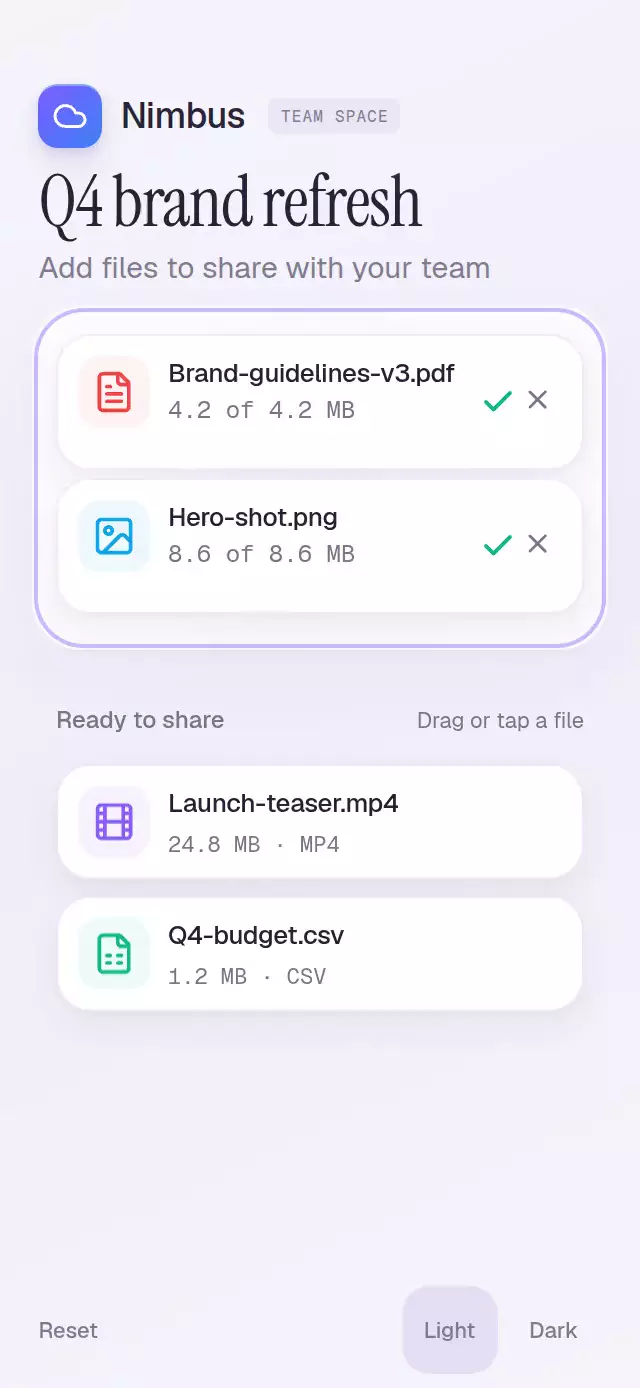
About this animation
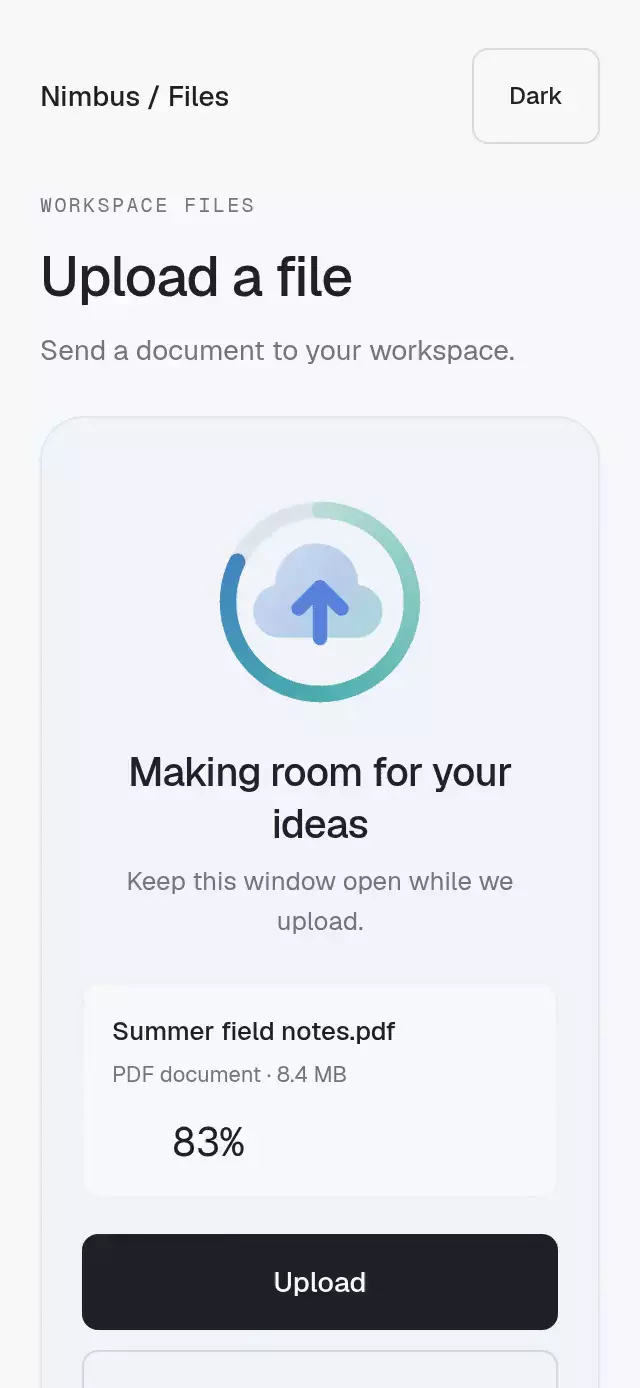
A file upload surface that morphs file chips into progress rows, with configurable files, copy, accent color, and fonts.
Why this one
Typical upload zones only change their border. This one lifts each file with velocity-driven tilt, blooms with radial light when approached, and springs the same file surface into a row. Variable-speed progress and rolling megabyte figures share a UI-thread value. Completion draws a green check and sweeps a narrow highlight through the row's top edge, never over its text.
How it works
onLayoutmeasures the component. The idle zone uses 37.8% of its height; the source tray sits beneath it and compacts as files leave.- Each file keeps continuous UI-thread position, lift, pressure, morph, and upload values. A pan and an exclusive tap offer the same upload action.
- Hit testing uses the chip center in local coordinates and the current animated zone height. Hover drives a spring, solid outline, lifted cloud, and a transparent radial gradient.
- Acceptance updates the row order once. The original chip springs to its row position, changes height and material, and reveals metadata as the zone intro fades. The zone resizes to fit its rows.
- Four upload stages use different rates over 1.5–3 seconds. Rolling columns move only on their own carry and rest during the first 75% of a fractional step. Completion reveals a check as the bar disappears.
- Cancellation folds and fades a row, stops its progress animation, and returns it to the tray. The demo uses
drag()twice at 280 ms and 1,050 ms in a 5.2-second loop.
Install
npx expo install @shopify/react-native-skia expo-linear-gradient react-native-gesture-handler react-native-reanimated react-native-workletsWrap your application in GestureHandlerRootView. On web, initialize CanvasKit before importing this component, using Skia's WithSkiaWeb loader or your application's existing lazy Skia loader. This folder does not include fonts; pass font families already loaded in your application.
Usage
import FileDropZone from './file-drop-zone';

<FileDropZone
  files={[
    { id: 'brief', name: 'Project-brief.pdf', type: 'pdf', sizeMB: 4.2 },
    { id: 'image', name: 'Cover.png', type: 'png', sizeMB: 8.6 },
  ]}
/>
The parent must provide a bounded height. The root defaults to flex: 1.
import { useRef } from 'react';
import { FileDropZone, type FileDropZoneRef } from './file-drop-zone';

function ProjectFiles() {
  const uploadRef = useRef<FileDropZoneRef>(null);
  return (
    <FileDropZone
      ref={uploadRef}
      files={projectFiles}
      accentColor="#7C5CFF"
      gradientColor="#3B82F6"
      fontFamily="YourSans"
      mediumFontFamily="YourMedium"
      monoFontFamily="YourMono"
      uploadDuration={2400}
      springStiffness={320}
      onUploadStart={(file) => startUpload(file)}
      onCancel={(file) => cancelUpload(file.id)}
    />
  );
}projectFiles, startUpload, and cancelUpload belong to your application. Progress is a visual simulation, not measured network traffic. The component does not read local files or upload data. Supply onBrowse to launch your own picker and replace files; without it, browse accepts the next available source file. Keep source IDs stable and the supplied file list unchanged while uploads are active. The component renders up to four unique source files.
The ref exposes add(id?), drag(id?), cancel(id), and reset(). drag() demonstrates the full lift and drop; add() accepts immediately with the same row morph. Call a new drag after reset has rendered, as the demo does.
Props
| Prop | Type | Default | Description |
|---|---|---|---|
files | readonly DropFile[] | [] | Up to four unique files with id, name, type, sizeMB. |
title | string | Drop files here | Idle heading. |
hoverTitle | string | Release to upload | Hover heading. |
hint | string | PDF, PNG, MP4 up to 200 MB | Type and size hint, split into two lines on small screens. |
browseLabel | string | browse | Browse action text. |
trayLabel | string | Ready to share | Source tray heading. |
accentColor | string | #7C5CFF | Primary accent; use a six-digit hex color for alpha treatments. |
gradientColor | string | #3B82F6 | Secondary progress color. |
colorScheme | light / dark / auto | auto | Appearance. |
fontFamily | string | System | Body font. |
mediumFontFamily | string | Body font | Filenames and headings. |
monoFontFamily | string | System | Rolling progress figures. |
uploadDuration | number | 2200 | Nominal duration in milliseconds, varied and clamped to 1.5–3 seconds. |
springStiffness | number | 300 | Position and zone spring stiffness. |
onUploadStart | (file: DropFile) => void | — | Acceptance callback, on the JS thread. |
onUploadComplete | (file: DropFile) => void | — | Visual completion callback, on the JS thread. |
onCancel | (file: DropFile) => void | — | Row cancellation callback. |
onStateChange | (state: FileDropZoneState) => void | — | Idle, hover, uploading, or done. |
onBrowse | () => void | Add next file | Hook for an external picker. |
accessibilityLabel | string | File upload area | Area label. |
style | StyleProp<ViewStyle> | — | Root styles. |
testID | string | — | Root test ID. |
Compatibility
Expo SDK 58, React Native 0.88.0, Reanimated 4.7.1, Worklets 0.13.0, and Skia 2.14.0. Dependencies are included in the matching Expo Go SDK. Web requires CanvasKit initialization. Supports iOS, Android, and web. No dependencies were added to the repository.
Accessibility
Every source chip can be tapped or activated by a screen reader instead of dragged. Browse and cancel targets are at least 44 points. Cancellation uses Gesture Handler taps, including on native. A polite live region announces accepted and completed file counts. Reduced motion removes tilt, lift, animated dashes, drop bounce, rolling movement, and the success sweep; row changes use 180 ms fades.
Icons: Lucide (ISC), copied from the supplied kit. The Nimbus identity is confined to the demo.
Review notes
Layout was reviewed from measured formulas at 390×844 and 320×694. Intro copy uses a separate line for the size limit, filenames can shrink modestly or truncate, and the tray compacts while the zone grows. The top-right viewer close area contains no controls. Autoplay accepts its first two files by 1,590 ms and completes the first at about 2,710 ms. Light effects use a radial shader and an edge highlight, with no block over content.