About this animation
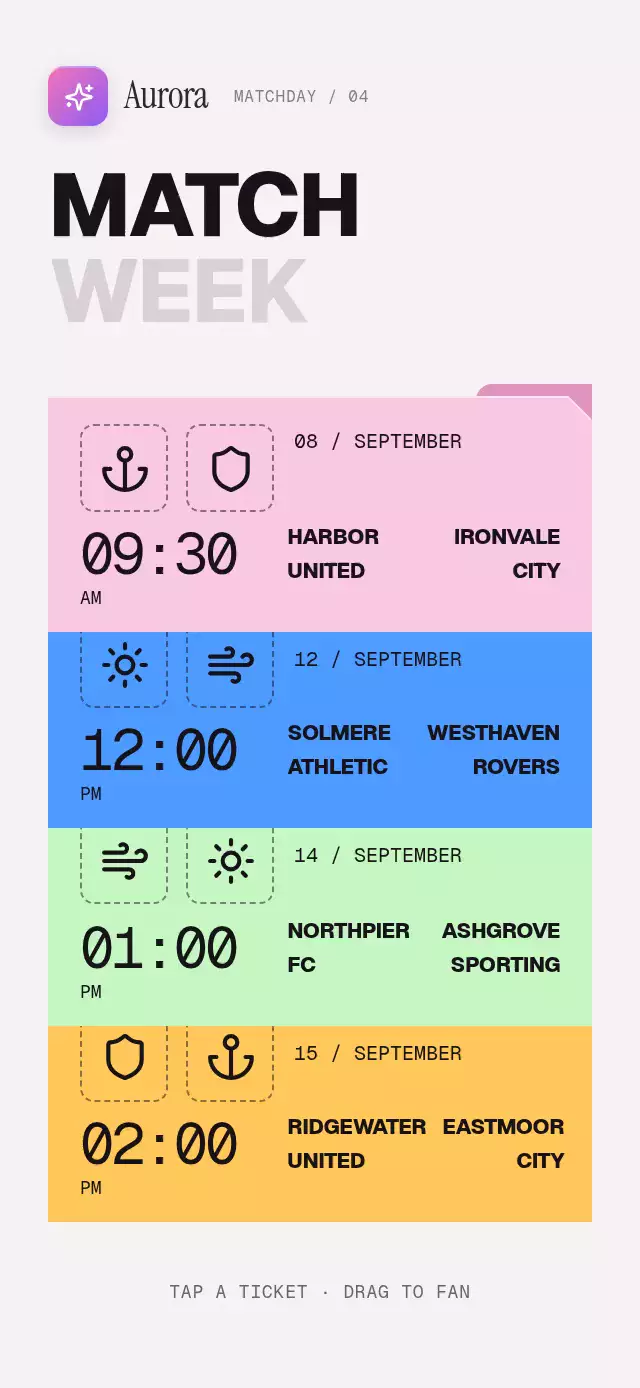
A match-ticket stack that unfolds into predictions, with configurable fixtures, labels, palette, and fonts.
Why this one
A fixture deserves more than a gray list row. Here the same ticket becomes the prediction: its color, emblems, date, time, and team names travel together, then probabilities build in three stages. Diagonal paper cuts and darker tabs give each matchup its own identity. The selection expands gently instead of replacing the screen with a separate page. All demo teams are fictional; this component handles predictions, not payments or wagering.
How it works
onLayoutmeasures the host. A centered stage caps its width at 460 points and uses scrolling in short containers, including landscape and 300×400 embeds.- Each ticket enters on a 70 ms cascade with a damped spring and a small straightening rotation. A UI-thread pan continuously changes spacing; release carries its velocity into the settling spring.
- Each stable fixture ID selects one data object for both views. One shared opening progress controls the paper morph, background sweep, sibling fade, and the positions of the existing emblems, clock, and team names. No duplicate shared-element content is mounted. Stack titles, footer, and sibling tickets fade out over progress 0–0.2; detail titles, sections, and action fade in over 0.94–1, once the selected ticket is nearly settled. The same nonoverlapping windows run in reverse when closing or interrupting a transition, so only the selected ticket stays visible between views.
- A delayed reveal progress fills the three probability segments and lights up recent results. Independent digit columns rest at exact integer positions and fade at rollover. The percent sign has its own width.
- Taps choose home, draw, or away, expand the segment by 8%, dim the other fills while keeping text at full contrast, and update the action label. Callbacks run on the React Native thread. Pressure has its own shared value.
useReducedMotion()removes flights, fan rotation, digit rolling, and the sweep. State transitions use 200 ms fades.
Icons: Lucide (ISC), copied from the local kit. SVGs are rendered with expo-image; no Skia initialization or external asset URLs are required.
Install
npx expo install expo-image react-native-gesture-handler react-native-reanimated react-native-workletsWrap the application in GestureHandlerRootView, following your Expo SDK setup. Copy this folder without demo/. Supply your fonts through props; the component does not depend on the catalog theme.
Usage
import { useRef } from 'react';
import { FixtureTicketStack, type Fixture, type FixtureTicketStackRef } from './fixture-ticket-stack';

const fixtures: Fixture[] = [{
  id: 'harbor-ironvale',
  home: { name: 'HARBOR\nUNITED', shortName: 'HARBOR', icon: 'anchor', form: [true, false, true, true, false] },
  away: { name: 'IRONVALE\nCITY', shortName: 'IRONVALE', icon: 'shield', form: [true, true, false, true, true] },
  date: '08 / SEPTEMBER', time: '09:30', period: 'AM',
  color: '#F9C9E4', tabColor: '#DF95BF', probabilities: [31, 22, 47],
}];

export function Matches() {
  const tickets = useRef<FixtureTicketStackRef>(null);
  return <FixtureTicketStack ref={tickets} fixtures={fixtures}
    onPick={(id, pick) => savePrediction(id, pick)} />;
}
savePrediction is your own application callback. Predictions fire when an outcome is chosen; the large action button repeats that choice, or picks the highest probability if no outcome is selected.
<FixtureTicketStack
  fixtures={fixtures}
  fontFamily="YourInterfaceFont"
  displayFontFamily="YourPosterFont"
  monoFontFamily="YourMonoFont"
  overlap={20}
  fanDistance={12}
  stagger={70}
  palette={{ background: '#1D1720', ink: '#F8EEF5',
    muted: '#D1BCCD', titleMuted: '#A391A0' }}
  labels={{ stackTitle: ['YOUR', 'MATCHES'], detailTitle: ['MAKE YOUR', 'PICK'] }}
  formatPick={(fixture, pick) => pick === 'draw' ? 'A DRAW' : `${fixture[pick].shortName} TO WIN`}
/>
Date, time, AM/PM, team names, icons, results, colors, and probabilities come from the same fixture object in both views. The date string (for example 08 / SEPTEMBER) is never reformatted. Dates, times, and percentages share monoFontFamily.
Each fixture's color stays unchanged on its paper throughout opening and closing and also colors the detail background. Probability fills, form squares, borders, the action, and its glow derive from that color. Text ink is selected for at least 4.5:1 contrast against its surface; selecting an outcome dims only fills. The stack uses palette; the legacy match fields (detail, paper, outline, loss, accent, accentInk, probability) remain accepted for compatibility but are derived per fixture rather than used as global match overrides.
Weights are normalized to integer percentages summing to 100. Zero weights use a neutral split. Keep poster names short, with an explicit newline between the two words.
Props
| Prop | Type | Default | Purpose |
|---|---|---|---|
fixtures | readonly Fixture[] | [] | Match data with stable IDs, teams, date, time, paper colors, form, and three weights |
onPick | (id, pick) => void | — | Selection callback; pick is home, draw, or away |
palette | Partial<FixturePalette> | Warm white stack | Override the stack palette; match treatments derive from fixture colors |
labels | Partial<FixtureLabels> | English labels | Poster titles, back/fan labels, section labels, empty text, result words |
fontFamily | string | System | Interface text |
displayFontFamily | string | fontFamily | Poster titles and team names |
monoFontFamily | string | System | Clock and rolling percentages |
brand | ReactNode | — | Host-owned brand slot at the upper left |
formatPick | (fixture, pick) => string | Team + TO WIN | Action text and selection announcement |
formatFixtureLabel | (fixture) => string | Teams/date/time | Accessible ticket label |
formatOpenAnnouncement | (fixture) => string | Match + prediction prompt | Opening announcement |
percentSuffix | string | % | Percentage separator |
stagger | number | 70 | Entrance delay between tickets, in ms |
overlap | number | 20 | Overlapping paper edge, in points |
fanDistance | number | 14 | Additional spacing while fanning |
style | StyleProp<ViewStyle> | — | Host container styling |
testID | string | fixture-ticket-stack | Root and control ID prefix |
Ref methods: open(id), close(), pick(outcome), and fan(). Unknown IDs are ignored. A different fixture opens after the current paper returns; reopening the same fixture can reverse its return spring. Autoplay is exclusively in the demo: fan at 650 ms, then pink, blue, green, and yellow open at 1.25, 4.85, 8.45, and 12.05 seconds. Each picks an outcome 1.2 seconds after opening and closes 2.5 seconds after opening. The sequence repeats every 16 seconds. The first morph completes before 3 s.
Compatibility
Targets Expo SDK 58, React Native 0.88.0, Reanimated 4.7.1, Worklets 0.13.0, and Gesture Handler 3.3.
The component owns no safe-area padding. The screen embedding it must supply safe-area insets. Its upper-right area is reserved for the catalog viewer close button. Normal-size layouts are designed for 320×568, 320×694, 390×844, 430×932, tablet, landscape, and 300×400 embeds. Short layouts scroll instead of shrinking controls.
Accessibility
Tickets, the back button, fan alternative, probability choices, and action button expose roles, labels, and activation actions. Every control has at least a 48-point target. Hidden screens and sibling tickets are removed from accessibility traversal. Opening, closing, and choosing a prediction announce their changes. Five-game form labels use customizable win/loss words. Motion preferences disable flights and rolling and replace transitions with fades. All visible copy and important accessible copy can be provided by the host.
The overlap knob is clamped once and shared by ticket positions, content height, and the background reveal origin, so custom overlap values cannot truncate the scrollable stack.
Dates on the lower tickets sit at least 8 points below the overlapping paper edge, leaving clearance during the fan. The first ticket and every fully opened detail retain their original date position. Short containers retain scrolling rather than compressing the date strip.