About this animation
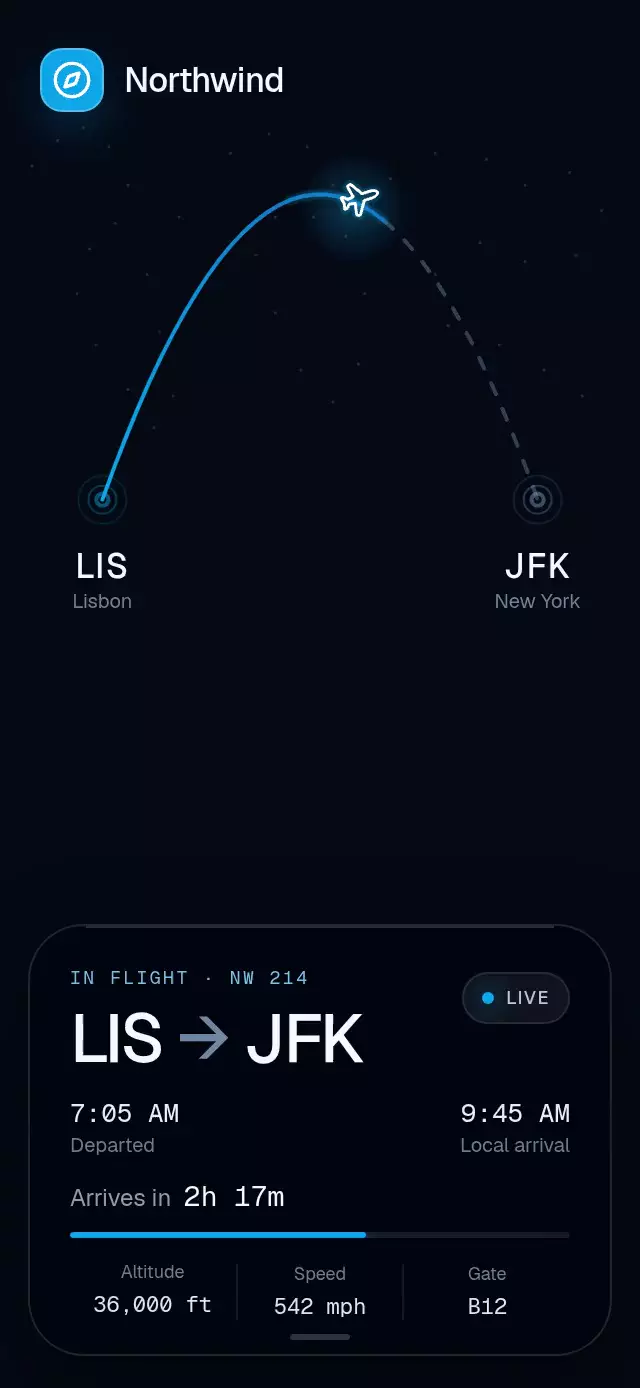
A flight tracker with a drawn route and expanding timeline, with configurable airport codes, flight details, accent color, and fonts.
Why this one
Most flight trackers stop at a static route. This pattern adds a cinematic takeoff, a fading aircraft trail, live rolling figures, and a compact timeline that expands without leaving the map. The dotted world, restrained airline gradient, and depth-aware glass keep the experience useful rather than decorative.
How it works
- A Skia quadratic path defines the route and provides both the aircraft position and its tangent rotation.
- One continuous flight progress drives the aircraft, traveled route, trail, and progress bar.
- A separate interruptible spring controls the expandable glass card, whose collapsed and expanded heights are measured from its content.
- The map uses a small deterministic set of Skia points instead of map tiles or network assets.
- Gesture Handler owns the card tap so the same interaction works on touch devices and web.
Install
npx expo install @shopify/react-native-skia expo-blur react-native-gesture-handler react-native-reanimated react-native-workletsFor Skia on web, follow the Expo Skia setup for CanvasKit. Wrap your app root in GestureHandlerRootView when it is not already provided by your navigation setup.
Usage
import { FlightArcTracker } from './FlightArcTracker';

export function FlightScreen() {
  return <FlightArcTracker style={{ flex: 1 }} />;
}<FlightArcTracker
brandName="Northwind"
flightNumber="NW 214"
originCode="LIS"
destinationCode="JFK"
accentColor="#0EA5E9"
deepAccentColor="#1E3A8A"
initialProgress={0.58}
/>Props
| Prop | Type | Default | Description |
|---|---|---|---|
brandName | string | "Airline" | Brand shown above the route. |
flightNumber | string | "FL 214" | Flight identifier. |
originCode | string | "LIS" | Origin airport code. |
destinationCode | string | "JFK" | Destination airport code. |
departureTime | string | "7:05 AM" | Departure time. |
arrivalTime | string | "9:45 AM" | Local arrival time. |
arrivalCountdown | string | "2h 18m" | Remaining duration. |
altitude | string | "36,000 ft" | Live altitude label. |
speed | string | "542 mph" | Live speed label. |
gate | string | "B12" | Arrival gate. |
accentColor | string | "#0EA5E9" | Route and live accent. |
deepAccentColor | string | "#1E3A8A" | Route gradient endpoint. |
initialProgress | number | 0.58 | Initial flight position from zero to one. |
fontFamily | string | system | Primary interface typeface. |
mediumFontFamily | string | system | Heading typeface. |
monoFontFamily | string | system | Typeface for changing figures. |
onExpandedChange | (expanded: boolean) => void | — | Expansion callback. |
accessibilityLabel | string | flight summary | Interactive card label. |
style | StyleProp<ViewStyle> | — | Outer container style. |
testID | string | — | Test identifier. |
The ref exposes replay(), expand(), and collapse().
Compatibility
- Expo SDK 58, React Native 0.88, Reanimated 4.7, Worklets 0.13, and Skia 2.14.
- iOS, Android, and web: supported
- Uses modules available in Expo Go for SDK 58.
- Icons: Lucide (ISC).
Accessibility
The flight card exposes a button role, expanded state, and explicit expand/collapse actions. Reduced Motion renders the route and aircraft at their current position, disables the live drift and pulse, and updates changing figures without rolling.