About this animation
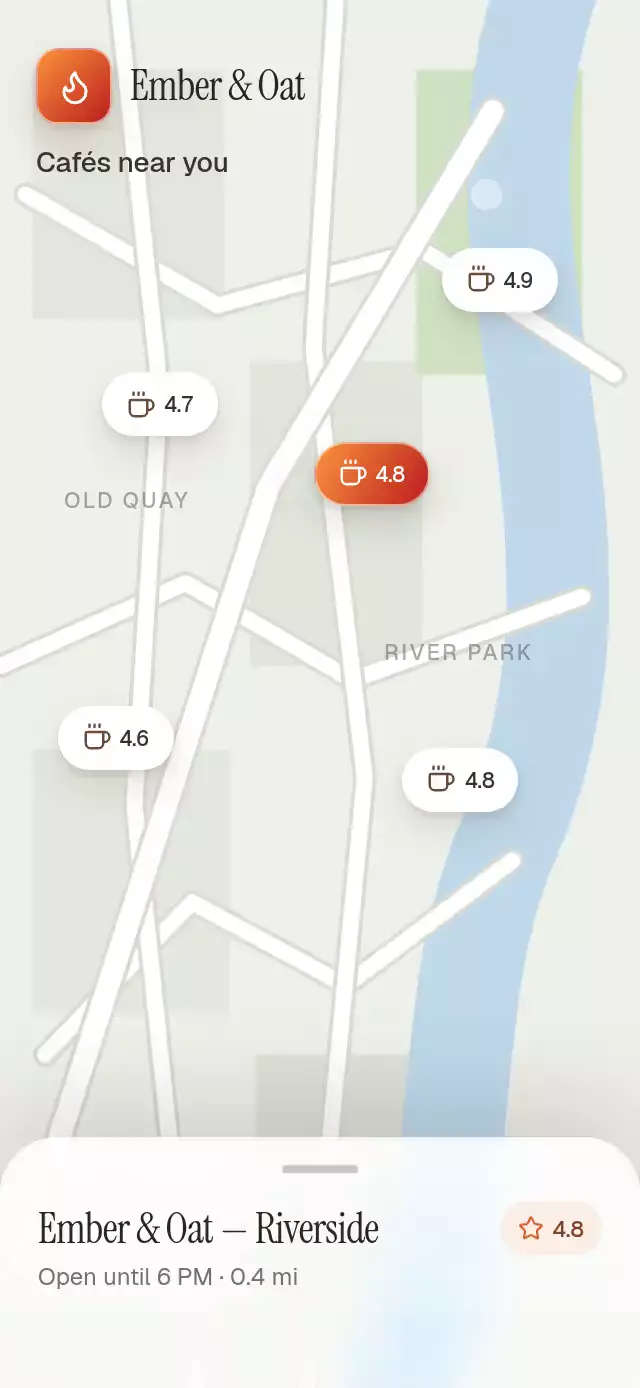
A React Native sliding up panel is a persistent bottom sheet when place details slide over a map. Three anchors reveal eighteen, fifty, and ninety percent of the measured container. A vertical drag follows one shared progress, applies resistance beyond the endpoints, and uses release velocity to choose an anchor. At the middle anchor the map recenters; at full height it scales and darkens as details take focus. Selecting another marker moves through peek before presenting the next place. Supply your own local photos and place content, then connect location, snap, directions, call, or save callbacks. This is coordinated map-and-sheet choreography rather than a generic modal or keyboard manager.
When to use it
- Reveal details for a selected place.
- Keep a map and detail panel in one composition.
- Show a gallery and actions at different snap points.
Related guides
A map-linked bottom sheet with three snap points and a receding backdrop, with configurable locations, photos, accent colors, and fonts.
Why this one
Most snap-sheet examples treat the backdrop as static decoration. This version turns the map and sheet into one continuous composition: the map recenters at the middle anchor, shrinks and darkens at full height, and remains fully selectable. The place change also has narrative continuity—the sheet returns to peek before presenting the newly selected café.
How it works
- The component measures its own container and derives all three sheet positions from its height: 18%, 50%, and 90% visible.
- One continuous
progressshared value drives the sheet translation, map offset, map scale, corner radius, dimming, and staged content entrances. - A vertical pan follows the finger, applies progressive rubber-band resistance beyond the endpoints, projects release velocity, and springs to the nearest anchor.
- The map is rendered with Skia while accessible React Native marker buttons sit above it. Selecting a marker moves through peek before revealing the new place.
BlurTargetViewandBlurViewcreate a real cross-platform glass surface, with a translucent white fallback where platform blur is unavailable.
Icons: Lucide (ISC).
Install
npx expo install @shopify/react-native-skia expo-blur expo-image expo-linear-gradient react-native-gesture-handler react-native-reanimated react-native-workletsUsage
import SnapSheetBackdrop from './SnapSheetBackdrop';

export function PlacesScreen() {
  return (
    <SnapSheetBackdrop
      photos={[
        require('./assets/cafe-1.jpg'),
        require('./assets/cafe-2.jpg'),
        require('./assets/cafe-3.jpg'),
      ]}
    />
  );
}
Customize the content and control the sheet through its forwarded ref:
import { useRef } from 'react';
import SnapSheetBackdrop, {
  type SnapSheetBackdropRef,
} from './SnapSheetBackdrop';

export function PlacesScreen() {
  const sheetRef = useRef<SnapSheetBackdropRef>(null);

  return (
    <SnapSheetBackdrop
      ref={sheetRef}
      photos={cafePhotos}
      accentColors={['#FB923C', '#B91C1C']}
      heading="Coffee near you"
      onDirectionsPress={() => openDirections()}
      onLocationChange={(location) => trackSelection(location.id)}
    />
  );
}
The ref exposes snapTo(snap), next(), and selectLocation(index).
Props
| Prop | Type | Default | Description |
|---|---|---|---|
locations | SnapSheetBackdropLocation[] | DEFAULT_LOCATIONS | Locations rendered as selectable map markers. |
photos | ImageSourcePropType[] | Required | Three local photos for the horizontal gallery. |
menuItems | SnapSheetBackdropMenuItem[] | DEFAULT_MENU | Featured dishes shown at the full anchor. |
reviews | string[] | DEFAULT_REVIEWS | Short review quotes shown at the full anchor. |
heading | string | 'Cafés near you' | Heading above the map. |
brandName | string | 'Gather Coffee' | Brand shown above the map and beside the selected place. |
hours | string | 'Mon–Sun · 7 AM–6 PM' | Business hours copy. |
initialSnap | SnapSheetBackdropSnap | 'peek' | Initial sheet anchor. |
accentColors | readonly [string, string] | ['#FB923C', '#B91C1C'] | Brand gradient used by the selected marker and app tile. |
fontFamily | string | undefined | Font family for body copy. |
mediumFontFamily | string | undefined | Font family for emphasized interface copy. |
displayFontFamily | string | undefined | Display font family for the place name. |
onLocationChange | ( location: SnapSheetBackdropLocation, index: number, ) => void | undefined | Called after a location is selected. |
onSnapChange | (snap: SnapSheetBackdropSnap) => void | undefined | Called when the nearest anchor changes. |
onDirectionsPress | () => void | undefined | Called when Directions is pressed. |
onCallPress | () => void | undefined | Called when Call is pressed. |
onSavePress | () => void | undefined | Called when Save is pressed. |
accessibilityLabel | string | 'Place details sheet' | Accessible label for the adjustable sheet. |
style | StyleProp<ViewStyle> | undefined | Optional outer-container style. |
testID | string | undefined | Test identifier applied to the outer container. |
Compatibility
- Expo SDK 58
- React Native 0.88
- Reanimated 4.7 and Worklets 0.13
- Skia 2.14
- iOS: supported
- Android: supported
- Web: supported
- Works in Expo Go because all native dependencies are included in the SDK
Accessibility
Markers and actions are labeled buttons with at least 44-point hit areas. The sheet exposes adjustable increment and decrement actions, while tapping the handle provides a non-gesture alternative. With Reduce Motion enabled, anchors crossfade into place without springs, rubber-band motion, map scaling, or marker pulsing.
Customization notes
Movement follows gestures, scroll position, or interruptible spring physics. A global duration is not exposed; reduced-motion fades retain their short fixed timing.
FAQ
- Is a slide up panel the same as a bottom sheet?
- Here it is: a persistent place-detail panel with peek, middle, and full anchors showing 18%, 50%, and 90% of the component height. It is a coordinated map-and-sheet scene, with no generic modal or keyboard manager included.
- Can I control this sliding up panel from my app?
- Yes. The ref exposes snapTo, next, and selectLocation. Supply local photos and optionally replace locations, menu items, reviews, headings, fonts, and accents. Location, snap, directions, call, and save callbacks connect the scene to your app.
- Can someone change snap points without dragging?
- Yes. The handle offers a tap alternative and the sheet exposes adjustable increment/decrement actions. Reduced Motion removes spring travel, map scaling, and marker pulsing.