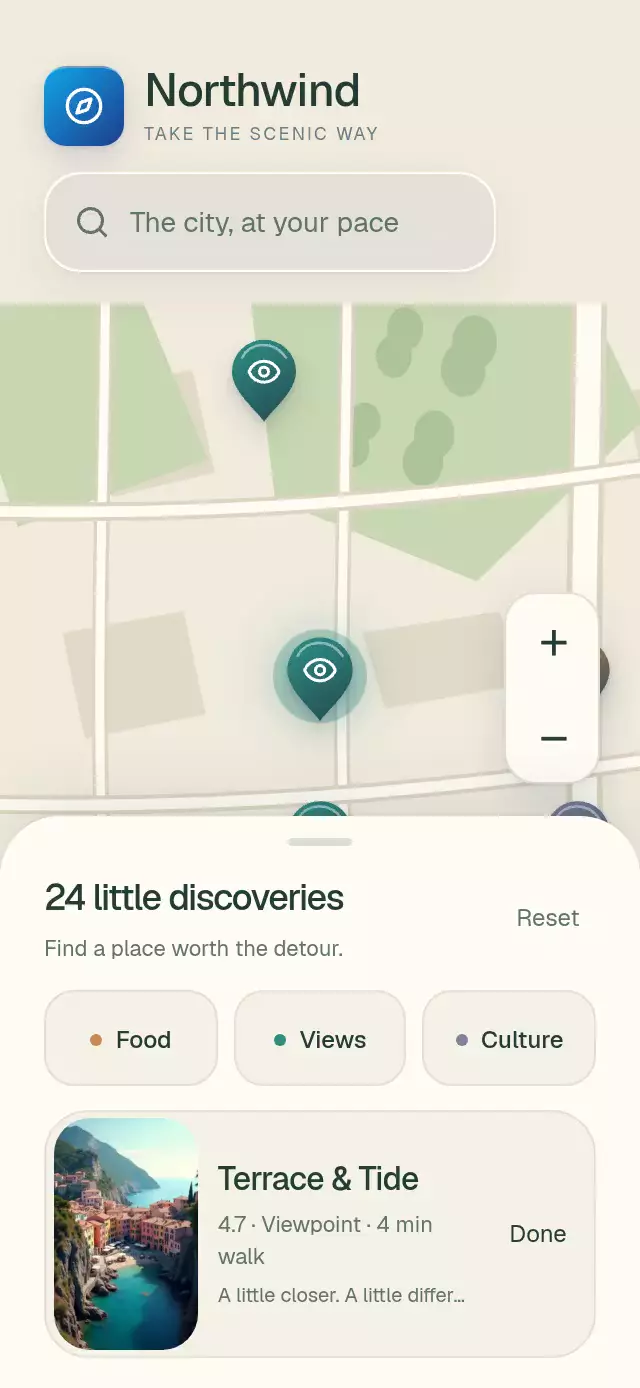
About this animation
A map whose pins separate from clusters and gather back, with configurable places, labels, land color, and fonts.
Why this one
Clusters normally replace pins abruptly. Here every place keeps a persistent animated identity: its position springs from the old cluster center to its new location, and returns along the same path when zooming out. Pearl cluster discs show category proportions with continuous muted ring segments. An expanding teal contour marks the split, while beveled pins settle without overshoot. Warm city blocks, planted parks, and a flowing teal waterfront form an original editorial map. The map is original vector geometry, with no tiles, downloads, API keys, or map provider attribution.
How it works
- Measure the container with
onLayoutand project coordinates from a 0–1000 space. - Precompute four screen-space grid partitions, using 120-point cells at reference scales 1, 1.7, 2.7, and 4. The final level always shows individual places. Category filters rebuild those partitions outside the animation loop.
- Keep
scale,tx, andtyon the UI thread. A single Skia Canvas draws the terrain, streets, neighborhoods, clusters, and pins. Native count labels follow the same marker motion and remain visible independently of Skia rendering and font loading. Counts update only at grouping boundaries, never once per frame. - Each persistent place has a spring-driven split and position. At thresholds 1.45, 2.3, and 3.25, representatives fade between discs and teardrops while their members spread out with a 30 ms stagger.
- Compose simultaneous pinch/pan with exclusive double/single taps. Panning projects release velocity and springs back from elastic edges. All map taps use Gesture Handler.
- Select a pin to emphasize it and lift the photo detail sheet. Filtering fades and shrinks excluded places. Separate press progress prevents native press-release events from canceling camera motion.
Install
npx expo install @shopify/react-native-skia expo-blur expo-image react-native-gesture-handler react-native-reanimated react-native-workletsWrap your application in GestureHandlerRootView. Configure Reanimated/worklets as required by your Expo project. On web, load CanvasKit before importing this piece, using Skia's LoadSkiaWeb and a lazy import (or your existing Skia loader). Supply a label font asset for Skia neighborhood text on web; the guarded system-font fallback is native only. Cluster counts use native text and the interface font, so markers never wait for Skia fonts or a Canvas redraw. No font package is required by the reusable component.
Usage
import { MapPinCluster } from './map-pin-cluster';

<MapPinCluster
  places={[
    { id: 'lookout', name: 'River lookout', category: 'Views',
      x: 700, y: 450, detail: '4.7 · Viewpoint · 6 min walk',
      image: require('./assets/lookout.jpg'), imageLabel: 'Waterfront lookout at sunset' },
  ]}
/>
const map = useRef<MapPinClusterRef>(null);
<MapPinCluster
ref={map}
places={places}
searchLabel="Search your city"
onSearch={() => openSearch()}
fontFamily="YourInterfaceFont"
mediumFontFamily="YourHeadingFont"
labelFont={require('./assets/semibold.ttf')}
springDamping={36}
staggerMs={40}
onPlaceSelect={(place) => saveSelection(place.id)}
/>
// From an event handler:
map.current?.focus(750, 430, 4);The map is an illustrative discovery surface, not a geographic navigation engine. Replace the local terrain constants in map.ts to draw another city. Use unique place IDs and coordinates in the documented map space.
Props
| Prop | Type | Default | Description |
|---|---|---|---|
| places | MapPlace[] | Required | IDs, names, categories, coordinates, detail lines |
| header | ReactNode | — | Upper-left brand or title |
| searchLabel | string | Search places | Search placeholder/action label |
| onSearch | () => void | — | Opens caller-owned search; without it the bar is a static location label |
| fontFamily | string | System | Interface text |
| mediumFontFamily | string | System | Headings and chips |
| labelFont | DataSourceParam | Guarded system fallback | Neighborhood font asset |
| countFont | DataSourceParam | — | Deprecated compatibility prop; native counts use fontFamily |
| landColor | string | Theme ground | Optional map ground override |
| colorScheme | light | dark | auto | light | Complete terrain and interface theme |
| labels | Partial<MapPinClusterLabels> | Generic English | Interface strings, category names, and label formatters |
| neighborhoods | { name, x, y }[] | Four generic districts | Caller-owned map labels |
| springDamping | number | 32 | Camera/marker damping, clamped to at least 32 |
| staggerMs | number | 30 | Emerging pin delay |
| onPlaceSelect | (place: MapPlace) => void | — | Selection callback |
| onFilterChange | (category: MapCategory | null) => void | — | Filter callback |
| accessibilityLabel | string | Explore nearby places | Map description |
| style | StyleProp<ViewStyle> | — | Root layout override |
| testID | string | — | Root test ID |
MapPlace contains id, name, category (Food, Views, or Culture), x, y, and detail, plus optional image (ImageSource | number) and imageLabel. Without a photo, the card shows the category glyph. Category colors are Food #C98651, Views #2E8C83, and Culture #7F829E.
Ref methods: focus(x, y, zoom = 3.7), reset(), select(id), and filter(category | null). Demo autoplay calls these methods; the component never reads URLs or runs an autoplay timer.
Compatibility
Expo SDK 58, React Native 0.88.0, Reanimated 4.7.1, react-native-worklets 0.13.0, Gesture Handler 3.3, Skia 2.14.0, expo-image 58.0.17, and expo-blur 58.0.5. Uses Expo Go bundled modules. For bare/custom projects, include those native modules in a development build.
Zoom signs use native text, so the controls remain readable before Skia initializes. Cluster count badges provide placed markers on the map-colored background during the first Skia draw. Android blur uses a shared BlurTargetView and dimezisBlurViewSdk31Plus, with a translucent fallback on older devices. The default is warm daylight; colorScheme also supports a complete dusk palette. Caller-owned header content should match the selected theme.
| Platform | Status |
|---|---|
| iOS | Supported. |
| Android | Supported. |
| Web | Supported.; requires CanvasKit initialization |
Accessibility
The map has an adjustable role and zoom actions. Zoom and Reset buttons provide alternatives to pinch/pan. Explore next place cycles through filtered results and opens the same card as a marker tap, making every place reachable through a labeled button. Category chips expose selected state; all controls have at least 48-point targets. Hidden cards stop receiving touches and are excluded from screen-reader navigation. Reduced motion replaces marker travel with fades, makes camera zoom immediate, and removes inertia and press/selection scaling.
Demo timeline
The Northwind demo uses 24 fictional venues, the kit's compass tile, and three bundled repository photos (waterfront, café, and architecture). At 0.64 s it zooms into East Hill; at 1.67 s it expands the East Hill groups to individual pins at 3.5×; at 2.42 s it opens a viewpoint photo card and keeps it visible until 6.02 s. It then filters Views, regroups, and repeats every 8.5 s. Timers are cleaned up on unmount.
Icons: Lucide (ISC). All venue names and map geometry are original. No external map imagery or real venue identities are included.
Layout and motion
The parent owns safe-area insets. The map reserves the measured header and search height, then clips terrain and markers below that region. The bottom panel reserves 154 points and lifts by 112–132 points for details. The panel is capped at 560 points wide on tablets. Below 500 points tall, the demo header keeps its brand and omits the search caption; zoom controls hide while details are open to preserve the viewer close area. Close the card to restore them. The selected camera target stays in the upper map area in this compact mode. Photo thumbnails cap at 140 points wide; bundled photos exceed 3× that width.
Camera, grouping, sheet, and press springs use explicit mass 1 and overshoot clamping. Marker travel remains interruptible. A 580 ms contour pulse accompanies cluster separation; reduced motion omits the pulse and uses a brief fade with immediate camera placement. Root testID prefixes zoom, filter, explore, reset, and close controls.
The intended layout covers 320×568, 390×844, 430×932, 1024×1366, 844×390, and 300×400.