About this animation
A media gallery whose folders release photos into a grid and gather them back, with configurable items, copy, colors, and fonts.
Why this one
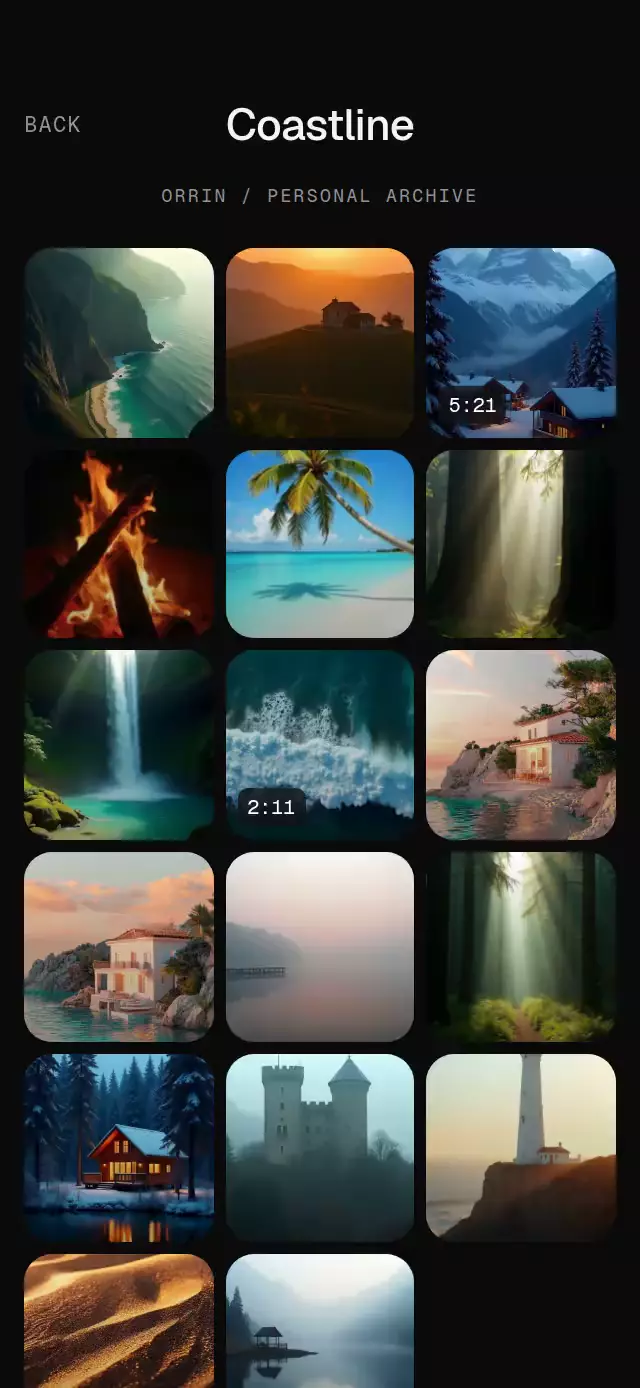
Folder previews are the actual photos in the destination grid. They do not disappear behind a screen change: their position, scale, and rotation interpolate continuously from the fan to the cell. BACK reverses those same trajectories and their stagger. The mint-lit folder rims and quiet archive heading give the library its own visual identity.
How it works
- An occupancy map packs photos, places, and 2×2 folders into three columns using the component's
onLayoutwidth. Content scrolls, and the grid width is capped at 540 points on tablets. - The active folder derives its local opening progress from one interruptible UI-thread spring. Every photo uses that progress for its curved path, size, rotation, and visibility. Photos after the first three emerge from inside the folder.
- A separate pressure spring scales the hit surface to 0.97. A long press opens the fan and tilts the folder; releasing it restores the resting pose. A four-second UI-thread clock breathes only the three preview photos per closed folder without React updates. The clock stops while a folder is fully open or the viewer is visible. Closed folders mount only their previews; the destination grid stays mounted until its return flight finishes. Static library thumbnails resize early to their display bounds on iOS; flying photos keep normal downscaling so resizing preserves their crop, and the viewer image is released after dismissal.
- The same progress sinks the folder faces, fades and lowers the other tiles, and slides the heading. Reversing it gathers the photos in the opposite order. Changing folders starts a new transition.
- Selecting a photo records its cell rectangle and scroll offset. An image layer expands from that rectangle into the viewer; the source photo is hidden while it is moving. Drag down to return, or tap the close control.
- Reduced motion replaces the folder flight and viewer expansion with 200 ms crossfades. React state changes only for user actions and layout, never on animation frames.
Install
npx expo install expo-image expo-linear-gradient react-native-gesture-handler react-native-reanimated react-native-workletsCopy FolderBurstGallery.tsx, icons.ts, and index.ts together. Wrap your app in GestureHandlerRootView. No Skia, blur setup, native folder assets, or demo imports are required. The folder uses layered gradients as its dark glass material.
Usage
import { FolderBurstGallery } from './folder-burst-gallery';

<FolderBurstGallery
  items={[
    {
      id: 'weekend',
      type: 'folder',
      name: 'Weekend',
      photos: [
        { id: 'lake', type: 'photo', label: 'A quiet lake', source: require('./lake.jpg') },
      ],
    },
  ]}
/>
Personalize the typography, full palette, and motion:
const gallery = useRef<FolderBurstGalleryRef>(null);

<FolderBurstGallery
  ref={gallery}
  items={items}
  title="Archive"
  count="218"
  archiveLabel="PERSONAL COLLECTION"
  colors={{ background: '#F3F2EF', surface: '#E2E5E0', front: '#D1D7CF', text: '#171C19', muted: '#656D67', border: '#B1BEB5', accent: '#4C7865', badge: '#FFFFFFD9', badgeText: '#18291F' }}
  fontFamily="YourBodyFont"
  mediumFontFamily="YourHeadingFont"
  monoFontFamily="YourMonoFont"
  flightArc={0.7}
  springStiffness={260}
  onOpenFolder={(folder) => trackFolder(folder.id)}
  onOpenItem={(item) => trackMedia(item.id)}
  testID="archive"
/>

// Call from an event handler or timer.
gallery.current?.openFolder('weekend');
gallery.current?.openItem('lake');
gallery.current?.back();
Import FolderBurstGalleryRef from the same folder for the second example. Use unique IDs across all items and folder contents. Empty folders are allowed; they open an empty grid. Supply enough photos for a three-photo fan. Video items are thumbnails with duration badges, not video players. Use onOpenItem to connect playback or place navigation in the host app.
Props
| Prop | Type | Default | Purpose |
|---|---|---|---|
items | GalleryItem[] | Required | Photo/video sources, folders, and places |
title | string | Library | Library heading |
count | string | — | Superscript library count |
archiveLabel | string | — | Supporting archive copy |
backLabel | string | BACK | Back control text and label |
closeLabel | string | Close photo | Viewer button text and label |
formatFiles | (count: number) => string | N FILES | Folder metadata |
formatFolderLabel | (folder: GalleryFolder) => string | Name, folder, N files | Screen-reader copy |
colors | Partial<GalleryColors> | Dark palette | Background, surfaces, ink, borders, accent, badges |
fontFamily | string | System | Interface font |
mediumFontFamily | string | System | Headings and folder names |
monoFontFamily | string | System | Counts and durations |
springStiffness | number | 240 | Flight response, with explicit mass 1 |
flightArc | number | 0.85 | Curvature in cell heights |
onOpenFolder | (folder) => void | — | Folder activation callback |
onOpenItem | (item) => void | — | Photo, video thumbnail, or place callback |
onBack | () => void | — | BACK from the library |
style | StyleProp<ViewStyle> | — | Host container override |
testID | string | — | Root and stable control identifiers |
Photo/video items contain id, type, source, label, and optional duration. Folder items contain id, type: 'folder', name, photos, optional count, and optional accessibilityLabel. Place items contain id, type: 'place', label, and optional accessibilityLabel. All content and sources come from props.
The ref exposes openFolder(id), openItem(id), and back(). Back first dismisses the viewer, then closes the folder, then calls the host's onBack. Without onBack, BACK is visibly dimmed and disabled in the library. The header stays above both the grid and viewer; its unused space passes touches through.
Compatibility
Expo SDK 58, React Native 0.88.0, Reanimated 4.7.1, Worklets 0.13.0, Gesture Handler 3.3. Expo Go compatible with the installed SDK packages.
The component fills its host and does not apply safe area insets: a full-screen host should inset it. Small containers and landscape use scroll; tablets retain the capped grid. Provide images at least three times the displayed thumbnail width. Full-screen images need separate resolution review: the supplied demo photos are at most 1080 pixels wide, so the largest viewer sizes do not guarantee native @3x density. No zoom is exposed.
Accessibility
Folders and media expose button roles, labels, and activation actions. Every gesture has a tap alternative: tap a folder instead of holding, and use the 48-point close control instead of dragging. BACK is also 48×48. Hidden folder contents are excluded from accessibility until that folder is open. Reduced motion disables breathing, tilt, rotation, and curved flights, and uses 200 ms crossfades.
Demo
The supplied demo uses local landscape photos, the kit's Orrin wordmark, two populated folders, video duration badges, and a Lisbon place tile. The LIGHT/DARK toggle is at the bottom left, clear of the catalog close control. Autoplay: rest 1 s → Summer → hold 2 s → BACK → Coastline → photo viewer → close → BACK; repeat every 10 s. The first flight begins at 1 s.
Icons: Lucide (ISC). The exact map-pin path is copied from the project kit and rendered with expo-image's SVG support. No custom icon or third-party brand assets are used.